Aurora VWAP Suite V2
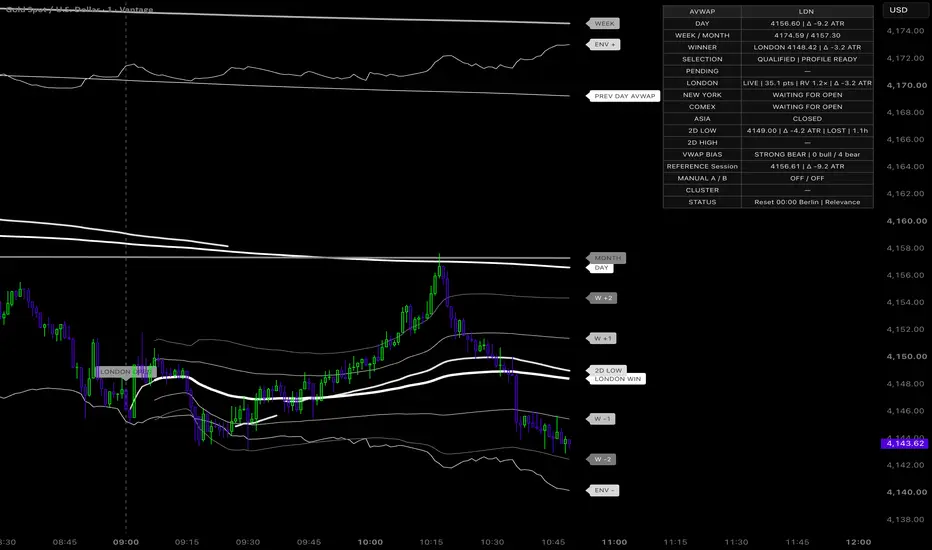
█ Overview
AVWAP Suite is a multi-session, anchored VWAP framework that brings daily context, market-session references, confirmed extreme anchors, and an adaptive reference engine into one chart workspace.
The indicator tracks Asia, London, New York, and COMEX independently, compares their current relevance, and highlights a confirmed session winner. Around this structure, optional deviation bands, a volume/ADX envelope, VWAP clusters, opening-name badges, and a live dashboard provide additional context.
The result is a connected reference map for reading where price is trading, which session reference is closest to current conditions, and how shorter-term activity relates to broader volume-weighted levels.
█ What Makes This Suite Different
The main focus is the relationship between session timing, relative activity, and anchor horizons.
A session that opened earlier naturally has more time to accumulate volume. Selecting a winner from that total alone can repeatedly favor the longer window. AVWAP Suite therefore offers a relevance model that combines normalized activity with VWAP proximity, together with closed-bar confirmation and a switching margin.
The same framework also keeps the chart organized across daily resets. Old session curves, winner state, opening markers, and inactive labels are cleared, while weekly/monthly VWAPs and longer-horizon anchors retain their intended calculations.
█ How It Works
⚪ Daily, Weekly & Monthly VWAP
The daily VWAP starts at the selected reset time in the selected timezone. Defaults are 00:00 — Berlin, with alternative timezones, common reset times, and a custom HH:MM option available.
Weekly and monthly references provide broader context. Their boundaries follow the selected VWAP-day start date: local Monday for the week and the local calendar month for the month.
The basic volume-weighted relationship is:
Pine Script®
Here, weightedPriceSum is the accumulated price × volume and volumeSum is the accumulated volume over the relevant window.
⚪ Previous-Day AVWAP
The previous-day reference continues from the start of the previous observed VWAP day and adds incoming volume during the current period.
It is a live anchored calculation, rather than a frozen horizontal line at yesterday’s final VWAP. At the next daily reset, it rolls forward to the new previous period. Its early-period movement can be gradual because the earlier volume still carries substantial weight.
⚪ Independent Market Sessions
Each enabled market has its own VWAP calculation, active window, and winner eligibility:
• Asia: 09:00–15:00, Tokyo time.
• London: 08:00–16:30, London time.
• New York: 09:30–16:00, New York time.
• COMEX: 08:20–13:30, New York time.
New York and COMEX are separate references. Market defaults follow each market’s local clock and daylight-saving changes.
Custom session hours can use either market-local time or the timezone selected for the daily reset. Trading-day controls use Weekdays or Every day.
Before a window opens, its session value and right-edge label are unavailable. At the close, the curve stops and its label disappears. The current-period curve remains until the next daily reset; previous-period session curves are removed.
⚪ Session Winner Engine
Four selection methods are available:
• Relevance: combines relative activity and price proximity.
• Relative activity: compares recent volume with historical expectations.
• Volume rate: compares current-period volume per observed session bar.
• Accumulated volume: compares current-period session volume totals.
Only enabled, active sessions with positive volume and sufficient observations can compete.
The default relevance model uses 60% activity and 40% proximity:
Pine Script®
relativeVolume compares recent actual volume with expected volume for the same elapsed-session slots. sessionVWAP is the candidate reference, and atrValue normalizes its distance from price.
Normal relative volume produces 50 activity points; twice normal produces approximately 66.7. Proximity rewards a reference that is closer to current price. It does not measure historical support/resistance effectiveness.
⚪ Historical Activity & Warmup
The default activity window uses the latest 20 active-session bars. Expected volume is learned from completed windows using a 20-session EMA, with at least five prior observations required per slot.
The current session never trains the expectation used to score itself. Initial partial sessions are excluded.
During warmup, all eligible candidates use a common volume-rate fallback. The detailed dashboard identifies the scoring state. Fallback and trained relative-volume scores use different normalization scales, so compare candidates within the current state.
Important: overlapping windows receive volume from the same chart symbol. The suite selects a VWAP reference; it does not identify which exchange or participant group generated that volume. Fully overlapping activity windows can correctly produce tied readings.
⚪ Confirmed Winner Switching
Each candidate needs at least five observed bars and a score of 15. Switching response controls how persistent a challenger must be:
• Stable: lead greater than 12 points for five closed bars.
• Balanced: lead greater than eight points for three closed bars.
• Fast: lead greater than four points for two closed bars.
Broken streaks reset. Exact ties retain an eligible incumbent; an initial tie leaves selection empty.
The daily boundary clears winner and pending state immediately. Other selection changes confirm at bar close. Live scores continue updating during the open candle.
⚪ Two-Day Extreme AVWAPs
Low- and high-anchored VWAPs are created from confirmed pivots near the extremes of the current and previous observed VWAP periods.
Defaults use eight confirmation bars and a maximum distance of 0.5 ATR from the relevant extreme. Replacement options are:
• More extreme only.
• Every qualifying swing.
• Keep until expiry.
The calculation includes the pivot through its confirmation bar, then adds incoming volume. It is not plotted backward as if the anchor had been known earlier. Tooltips distinguish anchor time from confirmation time.
The dashboard describes current position around each reference using HOLDS / LOST / TEST for the low anchor and REJECTS / RECLAIM / TEST for the high anchor.
⚪ Manual Anchors
Two independent timestamp anchors are available. Choose an event or candle within loaded chart history.
The containing candle is included. A time in a data gap begins on the next observed bar; an anchor before loaded history remains unavailable. Manual anchors keep their selected horizon through daily resets.
⚪ Reference Engine
The reference VWAP supports four modes:
• Rolling: volume-weighted moving average, default 200 bars.
• Session: cumulative reference for the selected VWAP day.
• Adaptive Swing: exponentially decayed statistics with ATR-adapted tracking speed.
• Swing AVWAP: cumulative VWAP from the opposing rolling extreme after a confirmed direction change.
Swing ordering uses a 50-bar rolling high/low lookback. It can also change when an older extreme leaves that window.
The reference engine uses HL2. Daily, market-session, weekly/monthly, and anchor calculations default to HLC3; their source can be adjusted under Advanced tuning.
⚪ Bands & Volume/ADX Envelope
Winner and selected-reference bands support Sigma, ATR, or Percent distances. In percentage mode, multiplier 1 represents 1% of the reference price.
The engine envelope expands with volume activity and ADX. It smooths its width and applies that distance symmetrically around the reference:
Pine Script®
Fixed engine bands and selected-reference bands share one additional-band family. Winner bands and the dynamic envelope remain independent.
Sigma bands describe weighted price dispersion; they are not guaranteed probability ranges.
⚪ Confluence & VWAP Bias
Optional confluence highlights a cluster of at least three displayed daily/weekly/monthly, market-session, extreme-anchor, or manual references within a total width of 0.2 ATR.
It uses the full cluster range rather than chaining adjacent nearby levels into an oversized zone. The duplicate winner reference is excluded. Equal-size clusters favor the one nearer price.
VWAP Bias summarizes agreement across available daily, winner, extreme-anchor, and same-period daily-slope readings. These references can be correlated. Bias is a context reading, not a probability.
█ How to Use
⚪ Establish the Broader Context
Start with the daily VWAP. Add weekly/monthly or previous-day AVWAP when you want to compare the current session with a longer volume-weighted horizon.
⚪ Compare Session References
Enable the relevant markets and watch how their VWAPs develop. Use the winner score and pending counter to follow confirmed changes in reference selection.
⚪ Inspect Anchor Tests
Compare price with the low/high or manual AVWAPs. A test, hold, rejection, or reclaim describes interaction with that reference and should be read alongside price structure.
⚪ Observe Expansion & Clustering
The envelope shows changing reference width, while confluence identifies nearby VWAP references. Band extension alone does not establish that a reversal must occur.
⚪ Keep the Chart Focused
Use the layout presets and individual display controls. Compact dashboard shows the main context; Detailed exposes scores, profile status, pending selection, anchors, and engine information.
█ Visuals & Settings
The default Custom theme uses green #03F10D and purple #5100DE. Colors identify reference families rather than automatic buy/sell direction.
All line names and opening names use filled label badges. Automatic contrast selects readable text, with a custom text color and Tiny/Small/Normal sizes available. Opening badges sit above candles and stack when openings share a bar.
Settings are organized into:
• Daily reset.
• Market sessions.
• Chart display.
• Winner.
• Bands.
• Anchors.
• Labels.
• Dashboard.
• Open markers.
• Alerts.
• Advanced tuning.
• Custom line colors.
Dependent controls are disabled when their feature is off. The separate reopen hour/minute controls are replaced by marker presets: Off, Session opens, Exchange opens, Daily reset, and Session opens + reset.
█ Alerts
Individual conditions cover new extreme anchors, each market becoming winner, and winner clearing.
For configurable price events, choose Any alert() function call and enable the desired crosses, support/resistance tests, or band breaks.
• Support tests require the candle low inside the ATR tolerance zone and a close above it.
• Resistance tests require the candle high inside that zone and a close below it.
• Cross alerts identify close crossing the selected reference.
• Band breaks require positive band width on both compared bars.
Bar-close confirmation is the default. Reset jumps, winner changes, and unavailable prior values are excluded from price-cross events. Recreate saved alerts after changing the source or settings.
█ Important Notes
• Session rendering requires standard intraday time charts of at least one minute.
• Calculations use the chart’s supplied price and volume. Volume type and quality depend on the feed.
• Chart-bar volume cannot be split at a boundary inside a candle. Use aligned timeframes when exact session/reset timing matters.
• Market presets do not load exchange holiday or early-close calendars.
• First loaded periods can be partial. Session-open markers require the opening to be observed within the first timeframe interval.
• Each current-period session/winner trace retains up to six continuous pieces. Frequent switches can remove the earliest pieces without changing current values.
• Current-bar VWAPs, scores, bands, and labels update live. Confirmed pivots and ordinary winner selection wait for bar close; the indicator makes no blanket non-repainting claim.
• The suite is an analytical overlay. It does not place orders or backtest trading profitability.
█ Disclaimer
This indicator is provided for educational and informational purposes. It does not constitute financial advice or a recommendation to buy or sell any instrument. Trading involves risk, and all trading decisions and risk management remain the user’s responsibility.
AVWAP Suite is a multi-session, anchored VWAP framework that brings daily context, market-session references, confirmed extreme anchors, and an adaptive reference engine into one chart workspace.
The indicator tracks Asia, London, New York, and COMEX independently, compares their current relevance, and highlights a confirmed session winner. Around this structure, optional deviation bands, a volume/ADX envelope, VWAP clusters, opening-name badges, and a live dashboard provide additional context.
The result is a connected reference map for reading where price is trading, which session reference is closest to current conditions, and how shorter-term activity relates to broader volume-weighted levels.
█ What Makes This Suite Different
The main focus is the relationship between session timing, relative activity, and anchor horizons.
A session that opened earlier naturally has more time to accumulate volume. Selecting a winner from that total alone can repeatedly favor the longer window. AVWAP Suite therefore offers a relevance model that combines normalized activity with VWAP proximity, together with closed-bar confirmation and a switching margin.
The same framework also keeps the chart organized across daily resets. Old session curves, winner state, opening markers, and inactive labels are cleared, while weekly/monthly VWAPs and longer-horizon anchors retain their intended calculations.
█ How It Works
⚪ Daily, Weekly & Monthly VWAP
The daily VWAP starts at the selected reset time in the selected timezone. Defaults are 00:00 — Berlin, with alternative timezones, common reset times, and a custom HH:MM option available.
Weekly and monthly references provide broader context. Their boundaries follow the selected VWAP-day start date: local Monday for the week and the local calendar month for the month.
The basic volume-weighted relationship is:
Here, weightedPriceSum is the accumulated price × volume and volumeSum is the accumulated volume over the relevant window.
⚪ Previous-Day AVWAP
The previous-day reference continues from the start of the previous observed VWAP day and adds incoming volume during the current period.
It is a live anchored calculation, rather than a frozen horizontal line at yesterday’s final VWAP. At the next daily reset, it rolls forward to the new previous period. Its early-period movement can be gradual because the earlier volume still carries substantial weight.
⚪ Independent Market Sessions
Each enabled market has its own VWAP calculation, active window, and winner eligibility:
• Asia: 09:00–15:00, Tokyo time.
• London: 08:00–16:30, London time.
• New York: 09:30–16:00, New York time.
• COMEX: 08:20–13:30, New York time.
New York and COMEX are separate references. Market defaults follow each market’s local clock and daylight-saving changes.
Custom session hours can use either market-local time or the timezone selected for the daily reset. Trading-day controls use Weekdays or Every day.
Before a window opens, its session value and right-edge label are unavailable. At the close, the curve stops and its label disappears. The current-period curve remains until the next daily reset; previous-period session curves are removed.
⚪ Session Winner Engine
Four selection methods are available:
• Relevance: combines relative activity and price proximity.
• Relative activity: compares recent volume with historical expectations.
• Volume rate: compares current-period volume per observed session bar.
• Accumulated volume: compares current-period session volume totals.
Only enabled, active sessions with positive volume and sufficient observations can compete.
The default relevance model uses 60% activity and 40% proximity:
relativeVolume compares recent actual volume with expected volume for the same elapsed-session slots. sessionVWAP is the candidate reference, and atrValue normalizes its distance from price.
Normal relative volume produces 50 activity points; twice normal produces approximately 66.7. Proximity rewards a reference that is closer to current price. It does not measure historical support/resistance effectiveness.
⚪ Historical Activity & Warmup
The default activity window uses the latest 20 active-session bars. Expected volume is learned from completed windows using a 20-session EMA, with at least five prior observations required per slot.
The current session never trains the expectation used to score itself. Initial partial sessions are excluded.
During warmup, all eligible candidates use a common volume-rate fallback. The detailed dashboard identifies the scoring state. Fallback and trained relative-volume scores use different normalization scales, so compare candidates within the current state.
Important: overlapping windows receive volume from the same chart symbol. The suite selects a VWAP reference; it does not identify which exchange or participant group generated that volume. Fully overlapping activity windows can correctly produce tied readings.
⚪ Confirmed Winner Switching
Each candidate needs at least five observed bars and a score of 15. Switching response controls how persistent a challenger must be:
• Stable: lead greater than 12 points for five closed bars.
• Balanced: lead greater than eight points for three closed bars.
• Fast: lead greater than four points for two closed bars.
Broken streaks reset. Exact ties retain an eligible incumbent; an initial tie leaves selection empty.
The daily boundary clears winner and pending state immediately. Other selection changes confirm at bar close. Live scores continue updating during the open candle.
⚪ Two-Day Extreme AVWAPs
Low- and high-anchored VWAPs are created from confirmed pivots near the extremes of the current and previous observed VWAP periods.
Defaults use eight confirmation bars and a maximum distance of 0.5 ATR from the relevant extreme. Replacement options are:
• More extreme only.
• Every qualifying swing.
• Keep until expiry.
The calculation includes the pivot through its confirmation bar, then adds incoming volume. It is not plotted backward as if the anchor had been known earlier. Tooltips distinguish anchor time from confirmation time.
The dashboard describes current position around each reference using HOLDS / LOST / TEST for the low anchor and REJECTS / RECLAIM / TEST for the high anchor.
⚪ Manual Anchors
Two independent timestamp anchors are available. Choose an event or candle within loaded chart history.
The containing candle is included. A time in a data gap begins on the next observed bar; an anchor before loaded history remains unavailable. Manual anchors keep their selected horizon through daily resets.
⚪ Reference Engine
The reference VWAP supports four modes:
• Rolling: volume-weighted moving average, default 200 bars.
• Session: cumulative reference for the selected VWAP day.
• Adaptive Swing: exponentially decayed statistics with ATR-adapted tracking speed.
• Swing AVWAP: cumulative VWAP from the opposing rolling extreme after a confirmed direction change.
Swing ordering uses a 50-bar rolling high/low lookback. It can also change when an older extreme leaves that window.
The reference engine uses HL2. Daily, market-session, weekly/monthly, and anchor calculations default to HLC3; their source can be adjusted under Advanced tuning.
⚪ Bands & Volume/ADX Envelope
Winner and selected-reference bands support Sigma, ATR, or Percent distances. In percentage mode, multiplier 1 represents 1% of the reference price.
The engine envelope expands with volume activity and ADX. It smooths its width and applies that distance symmetrically around the reference:
Fixed engine bands and selected-reference bands share one additional-band family. Winner bands and the dynamic envelope remain independent.
Sigma bands describe weighted price dispersion; they are not guaranteed probability ranges.
⚪ Confluence & VWAP Bias
Optional confluence highlights a cluster of at least three displayed daily/weekly/monthly, market-session, extreme-anchor, or manual references within a total width of 0.2 ATR.
It uses the full cluster range rather than chaining adjacent nearby levels into an oversized zone. The duplicate winner reference is excluded. Equal-size clusters favor the one nearer price.
VWAP Bias summarizes agreement across available daily, winner, extreme-anchor, and same-period daily-slope readings. These references can be correlated. Bias is a context reading, not a probability.
█ How to Use
⚪ Establish the Broader Context
Start with the daily VWAP. Add weekly/monthly or previous-day AVWAP when you want to compare the current session with a longer volume-weighted horizon.
⚪ Compare Session References
Enable the relevant markets and watch how their VWAPs develop. Use the winner score and pending counter to follow confirmed changes in reference selection.
⚪ Inspect Anchor Tests
Compare price with the low/high or manual AVWAPs. A test, hold, rejection, or reclaim describes interaction with that reference and should be read alongside price structure.
⚪ Observe Expansion & Clustering
The envelope shows changing reference width, while confluence identifies nearby VWAP references. Band extension alone does not establish that a reversal must occur.
⚪ Keep the Chart Focused
Use the layout presets and individual display controls. Compact dashboard shows the main context; Detailed exposes scores, profile status, pending selection, anchors, and engine information.
█ Visuals & Settings
The default Custom theme uses green #03F10D and purple #5100DE. Colors identify reference families rather than automatic buy/sell direction.
All line names and opening names use filled label badges. Automatic contrast selects readable text, with a custom text color and Tiny/Small/Normal sizes available. Opening badges sit above candles and stack when openings share a bar.
Settings are organized into:
• Daily reset.
• Market sessions.
• Chart display.
• Winner.
• Bands.
• Anchors.
• Labels.
• Dashboard.
• Open markers.
• Alerts.
• Advanced tuning.
• Custom line colors.
Dependent controls are disabled when their feature is off. The separate reopen hour/minute controls are replaced by marker presets: Off, Session opens, Exchange opens, Daily reset, and Session opens + reset.
█ Alerts
Individual conditions cover new extreme anchors, each market becoming winner, and winner clearing.
For configurable price events, choose Any alert() function call and enable the desired crosses, support/resistance tests, or band breaks.
• Support tests require the candle low inside the ATR tolerance zone and a close above it.
• Resistance tests require the candle high inside that zone and a close below it.
• Cross alerts identify close crossing the selected reference.
• Band breaks require positive band width on both compared bars.
Bar-close confirmation is the default. Reset jumps, winner changes, and unavailable prior values are excluded from price-cross events. Recreate saved alerts after changing the source or settings.
█ Important Notes
• Session rendering requires standard intraday time charts of at least one minute.
• Calculations use the chart’s supplied price and volume. Volume type and quality depend on the feed.
• Chart-bar volume cannot be split at a boundary inside a candle. Use aligned timeframes when exact session/reset timing matters.
• Market presets do not load exchange holiday or early-close calendars.
• First loaded periods can be partial. Session-open markers require the opening to be observed within the first timeframe interval.
• Each current-period session/winner trace retains up to six continuous pieces. Frequent switches can remove the earliest pieces without changing current values.
• Current-bar VWAPs, scores, bands, and labels update live. Confirmed pivots and ordinary winner selection wait for bar close; the indicator makes no blanket non-repainting claim.
• The suite is an analytical overlay. It does not place orders or backtest trading profitability.
█ Disclaimer
This indicator is provided for educational and informational purposes. It does not constitute financial advice or a recommendation to buy or sell any instrument. Trading involves risk, and all trading decisions and risk management remain the user’s responsibility.

면책사항
해당 정보와 게시물은 금융, 투자, 트레이딩 또는 기타 유형의 조언이나 권장 사항으로 간주되지 않으며, 트레이딩뷰에서 제공하거나 보증하는 것이 아닙니다. 자세한 내용은 이용 약관을 참조하세요.
면책사항
해당 정보와 게시물은 금융, 투자, 트레이딩 또는 기타 유형의 조언이나 권장 사항으로 간주되지 않으며, 트레이딩뷰에서 제공하거나 보증하는 것이 아닙니다. 자세한 내용은 이용 약관을 참조하세요.