OPEN-SOURCE SCRIPT
N-Touch Trendline Breakout
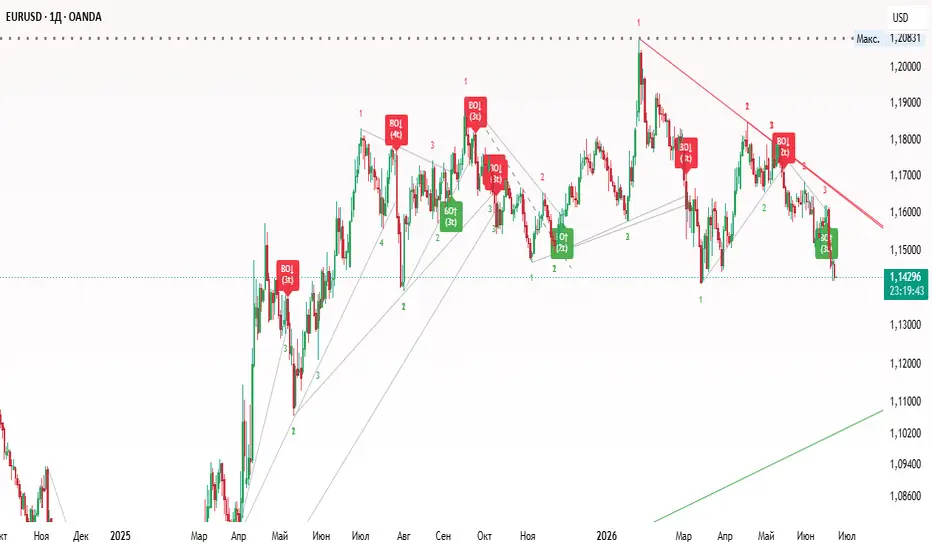
I've created an indicator that identifies support and resistance levels based on pivots and tracks how many times price interacts with them before breaking out.
Here is how it works:
1. Pivot Identification: It looks for pivot highs (resistance) and pivot lows (support) to establish levels.
2. Touch Tracking: When the price comes within the Touch Tolerance % of an active level (but doesn't break and close past it), it registers a "touch" and displays the count as tiny text on the chart.
3. Breakout Detection: If the price breaks through the level (closing above resistance or below support), it checks the touch count. If the required number of touches (default is 3) has been met or exceeded, it triggers a "BO" (Breakout) label with an arrow.
You can customize the following settings in the indicator inputs:
1. Pivot Length: Adjusts how many bars are used to define a pivot. A higher value will find more significant long-term levels.
2. Required Touches: The minimum number of interactions required before a breakout signal is valid.
3. Touch Tolerance %: Defines how close the price must get to the level to be considered a touch.
-Initial Touches: The two pivot points used to create the trendline automatically count as the first 2 touches.
-Future Touches: As the trendline extends into the future, any time the price comes within the Touch Tolerance % of the line without breaking it, a new touch is registered and displayed as a small number on the chart.
-Breakout Detection: If the price breaks through the extended trendline (closing above resistance or below support), the script checks the touch count. If it meets or exceeds your Required Touches setting (default is 3, which means the 2 pivots + 1 additional touch), it signals a breakout.
Clean Touch Numbers: The number 3 (and any subsequent numbers) will only print once per actual swing touch, keeping your chart nice and clean.
Here is how it works:
1. Pivot Identification: It looks for pivot highs (resistance) and pivot lows (support) to establish levels.
2. Touch Tracking: When the price comes within the Touch Tolerance % of an active level (but doesn't break and close past it), it registers a "touch" and displays the count as tiny text on the chart.
3. Breakout Detection: If the price breaks through the level (closing above resistance or below support), it checks the touch count. If the required number of touches (default is 3) has been met or exceeded, it triggers a "BO" (Breakout) label with an arrow.
You can customize the following settings in the indicator inputs:
1. Pivot Length: Adjusts how many bars are used to define a pivot. A higher value will find more significant long-term levels.
2. Required Touches: The minimum number of interactions required before a breakout signal is valid.
3. Touch Tolerance %: Defines how close the price must get to the level to be considered a touch.
-Initial Touches: The two pivot points used to create the trendline automatically count as the first 2 touches.
-Future Touches: As the trendline extends into the future, any time the price comes within the Touch Tolerance % of the line without breaking it, a new touch is registered and displayed as a small number on the chart.
-Breakout Detection: If the price breaks through the extended trendline (closing above resistance or below support), the script checks the touch count. If it meets or exceeds your Required Touches setting (default is 3, which means the 2 pivots + 1 additional touch), it signals a breakout.
Clean Touch Numbers: The number 3 (and any subsequent numbers) will only print once per actual swing touch, keeping your chart nice and clean.
오픈 소스 스크립트
트레이딩뷰의 진정한 정신에 따라, 이 스크립트의 작성자는 이를 오픈소스로 공개하여 트레이더들이 기능을 검토하고 검증할 수 있도록 했습니다. 작성자에게 찬사를 보냅니다! 이 코드는 무료로 사용할 수 있지만, 코드를 재게시하는 경우 하우스 룰이 적용된다는 점을 기억하세요.

면책사항
해당 정보와 게시물은 금융, 투자, 트레이딩 또는 기타 유형의 조언이나 권장 사항으로 간주되지 않으며, 트레이딩뷰에서 제공하거나 보증하는 것이 아닙니다. 자세한 내용은 이용 약관을 참조하세요.
오픈 소스 스크립트
트레이딩뷰의 진정한 정신에 따라, 이 스크립트의 작성자는 이를 오픈소스로 공개하여 트레이더들이 기능을 검토하고 검증할 수 있도록 했습니다. 작성자에게 찬사를 보냅니다! 이 코드는 무료로 사용할 수 있지만, 코드를 재게시하는 경우 하우스 룰이 적용된다는 점을 기억하세요.
면책사항
해당 정보와 게시물은 금융, 투자, 트레이딩 또는 기타 유형의 조언이나 권장 사항으로 간주되지 않으며, 트레이딩뷰에서 제공하거나 보증하는 것이 아닙니다. 자세한 내용은 이용 약관을 참조하세요.