MA Ribbon Aurora_Channel_V1 (DRIZZLE_ALGO56)
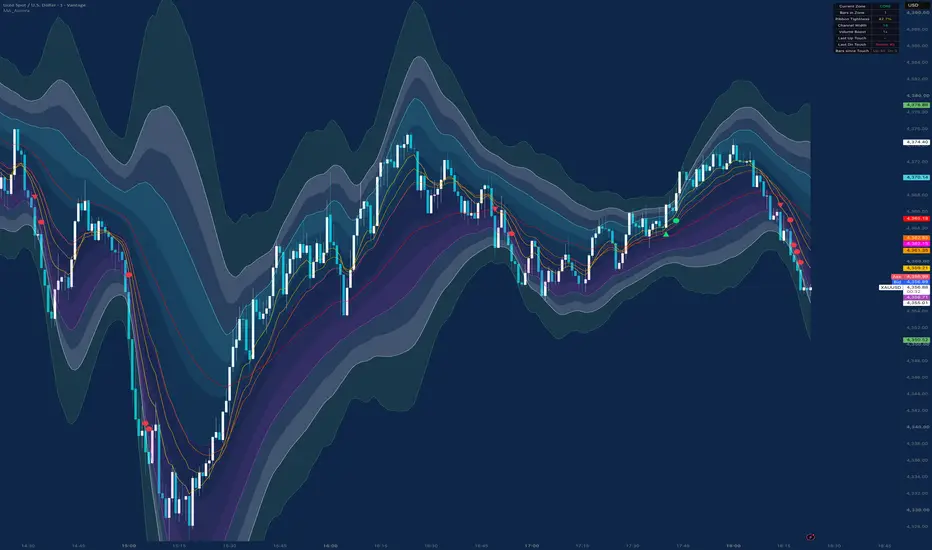
MA Ribbon with Aurora Channels UI [Experimental]
█ Overview
MA Ribbon with Aurora Channels UI is an experimental indicator designed to modernize the classic Moving Average Ribbon. Instead of relying on static trailing averages—which frequently lag during sharp structural shifts—the system fuses custom MA ribbons with Flipped (Inverse) Ribbon Dynamics, Volume Expansion Multipliers, and Asymmetrical Wick Ratios, wrapped inside a real-time HUD interface.
The indicator converts standard ribbon dispersion into a multi-layered, volatility-adaptive envelope (Core Channel, Expansion Envelope, and Trigger Buffer). The channel automatically expands during high-volume momentum breakouts and contracts during low-volatility consolidation phases.
⚠️ Author Note: This project is an experimental research prototype. Optimal performance requires manual tuning of parameter settings (smoothing lengths, volume sensitivity, and width multipliers) based on your target asset, timeframe, and prevailing market regime.
█ How It Works
⚪ Dynamic Midline Engine
The system averages all active moving averages (supporting SMA, EMA, SMMA, WMA, VWMA) to create a central equilibrium reference line.
⚪ Flipped Ribbon & Width Engine
Rather than relying purely on standard moving average distance, the indicator calculates inverse mirror projections for every active ribbon line to measure true structural price dispersion:
Pine Script®
The maximum deviation across normal and flipped lines defines the raw channel width, which is then smoothed using an exponential moving average:
Pine Script®
⚪ Volume-Driven Expansion
Channel width dynamically scales upward when volume participation exceeds its baseline moving average, ensuring bands react instantly to institutional volume spikes:
Pine Script®
⚪ Asymmetrical Wick Balancing
Upper and lower envelope boundaries expand independently based on the ratio of directional wicks relative to ATR. This prevents false boundary breaches caused by one-sided wick rejections:
Pine Script®
⚪ Aurora Multi-Layer Bounds
The engine calculates three distinct volatility zones:
Core Channel: The primary equilibrium zone surrounding the midline.
Expansion Envelope: Outermost normal volatility bounds where directional acceleration occurs.
Trigger Buffer: An extreme extension boundary for mean-reversion cues.
⚪ Signal Engine & HUD Dashboard
The script tracks zone transitions, logging whether a boundary breach represents a 1st Touch or a Retest. The real-time HUD table tracks current zone regime, duration, ribbon compression percentage, active volume boost, and touch history directly on the chart.
█ How to Use
⚪ Volatility Contraction & Compression
When the Ribbon Tightness value on the HUD falls below 30%, the MA ribbon is in deep compression. Price residing strictly inside the Core Channel signals neutral range consolidation prior to a breakout.
⚪ Trend Expansion & Momentum Setup
A candle close outside the Expansion Envelope indicates institutional volume acceleration. Look for 1st Touch (triangle) or Retest (circle) shapes for momentum entries aligned with expanding channel width.
⚪ Mean-Reversion / Profit-Taking Setup
When price reaches or breaches the outer Trigger Buffer, market expansion is overextended. Look for mean-reversion rejections back toward the Core Channel or Midline.
█ Settings
MA Ribbon Inputs
MA #1 – #4: Enable or disable up to four independent moving averages. Select the MA type (SMA, EMA, SMMA, WMA, VWMA), source, length, and plot color.
Display
Show Normal / Flipped Ribbon: Toggle visibility of standard ribbon lines or mirror projections.
Show Core / Envelope / Trigger: Toggle individual channel layer visibility.
Show Dashboard & Position: Enable the real-time HUD and select its chart overlay anchor.
Show Signal Shapes: Enable breakout and retest signal markers.
Channel Engine
Core Multiplier: Sets the width multiplier for the inner fair-value channel.
Envelope Multiplier: Controls the distance of the momentum envelope bounds.
Trigger Buffer Multiplier: Controls the outer overextension boundary.
Width & Edge Smoothing: Sets the EMA smoothing applied to raw dispersion and final channel edges.
Volume MA Length & Sensitivity: Adjusts how strongly volume spikes expand channel boundaries.
Asymmetry Strength: Controls how aggressively upper/lower bounds deform in response to long wicks.
Colors
Core Upper / Lower: Custom colors for the inner channel clouds.
Envelope / Trigger / Midline: Color selection for boundary lines and fill layers.
Cloud Transparency: Adjusts the opacity gradient of background fills.
Disclaimer
The content provided in my scripts, indicators, ideas, algorithms, and systems is for educational and informational purposes only. It does not constitute financial advice, investment recommendations, or a solicitation to buy or sell any financial instruments. I will not accept liability for any loss or damage, including without limitation any loss of profit, which may arise directly or indirectly from the use of or reliance on such information.
All investments involve risk, and the past performance of a security, industry, sector, market, financial product, trading strategy, backtest, or individual's trading does not guarantee future results or returns. Investors are fully responsible for any investment decisions they make. Such decisions should be based solely on an evaluation of their financial circumstances, investment objectives, risk tolerance, and liquidity needs.
█ Overview
MA Ribbon with Aurora Channels UI is an experimental indicator designed to modernize the classic Moving Average Ribbon. Instead of relying on static trailing averages—which frequently lag during sharp structural shifts—the system fuses custom MA ribbons with Flipped (Inverse) Ribbon Dynamics, Volume Expansion Multipliers, and Asymmetrical Wick Ratios, wrapped inside a real-time HUD interface.
The indicator converts standard ribbon dispersion into a multi-layered, volatility-adaptive envelope (Core Channel, Expansion Envelope, and Trigger Buffer). The channel automatically expands during high-volume momentum breakouts and contracts during low-volatility consolidation phases.
⚠️ Author Note: This project is an experimental research prototype. Optimal performance requires manual tuning of parameter settings (smoothing lengths, volume sensitivity, and width multipliers) based on your target asset, timeframe, and prevailing market regime.
█ How It Works
⚪ Dynamic Midline Engine
The system averages all active moving averages (supporting SMA, EMA, SMMA, WMA, VWMA) to create a central equilibrium reference line.
⚪ Flipped Ribbon & Width Engine
Rather than relying purely on standard moving average distance, the indicator calculates inverse mirror projections for every active ribbon line to measure true structural price dispersion:
The maximum deviation across normal and flipped lines defines the raw channel width, which is then smoothed using an exponential moving average:
⚪ Volume-Driven Expansion
Channel width dynamically scales upward when volume participation exceeds its baseline moving average, ensuring bands react instantly to institutional volume spikes:
⚪ Asymmetrical Wick Balancing
Upper and lower envelope boundaries expand independently based on the ratio of directional wicks relative to ATR. This prevents false boundary breaches caused by one-sided wick rejections:
⚪ Aurora Multi-Layer Bounds
The engine calculates three distinct volatility zones:
Core Channel: The primary equilibrium zone surrounding the midline.
Expansion Envelope: Outermost normal volatility bounds where directional acceleration occurs.
Trigger Buffer: An extreme extension boundary for mean-reversion cues.
⚪ Signal Engine & HUD Dashboard
The script tracks zone transitions, logging whether a boundary breach represents a 1st Touch or a Retest. The real-time HUD table tracks current zone regime, duration, ribbon compression percentage, active volume boost, and touch history directly on the chart.
█ How to Use
⚪ Volatility Contraction & Compression
When the Ribbon Tightness value on the HUD falls below 30%, the MA ribbon is in deep compression. Price residing strictly inside the Core Channel signals neutral range consolidation prior to a breakout.
⚪ Trend Expansion & Momentum Setup
A candle close outside the Expansion Envelope indicates institutional volume acceleration. Look for 1st Touch (triangle) or Retest (circle) shapes for momentum entries aligned with expanding channel width.
⚪ Mean-Reversion / Profit-Taking Setup
When price reaches or breaches the outer Trigger Buffer, market expansion is overextended. Look for mean-reversion rejections back toward the Core Channel or Midline.
█ Settings
MA Ribbon Inputs
MA #1 – #4: Enable or disable up to four independent moving averages. Select the MA type (SMA, EMA, SMMA, WMA, VWMA), source, length, and plot color.
Display
Show Normal / Flipped Ribbon: Toggle visibility of standard ribbon lines or mirror projections.
Show Core / Envelope / Trigger: Toggle individual channel layer visibility.
Show Dashboard & Position: Enable the real-time HUD and select its chart overlay anchor.
Show Signal Shapes: Enable breakout and retest signal markers.
Channel Engine
Core Multiplier: Sets the width multiplier for the inner fair-value channel.
Envelope Multiplier: Controls the distance of the momentum envelope bounds.
Trigger Buffer Multiplier: Controls the outer overextension boundary.
Width & Edge Smoothing: Sets the EMA smoothing applied to raw dispersion and final channel edges.
Volume MA Length & Sensitivity: Adjusts how strongly volume spikes expand channel boundaries.
Asymmetry Strength: Controls how aggressively upper/lower bounds deform in response to long wicks.
Colors
Core Upper / Lower: Custom colors for the inner channel clouds.
Envelope / Trigger / Midline: Color selection for boundary lines and fill layers.
Cloud Transparency: Adjusts the opacity gradient of background fills.
Disclaimer
The content provided in my scripts, indicators, ideas, algorithms, and systems is for educational and informational purposes only. It does not constitute financial advice, investment recommendations, or a solicitation to buy or sell any financial instruments. I will not accept liability for any loss or damage, including without limitation any loss of profit, which may arise directly or indirectly from the use of or reliance on such information.
All investments involve risk, and the past performance of a security, industry, sector, market, financial product, trading strategy, backtest, or individual's trading does not guarantee future results or returns. Investors are fully responsible for any investment decisions they make. Such decisions should be based solely on an evaluation of their financial circumstances, investment objectives, risk tolerance, and liquidity needs.

면책사항
해당 정보와 게시물은 금융, 투자, 트레이딩 또는 기타 유형의 조언이나 권장 사항으로 간주되지 않으며, 트레이딩뷰에서 제공하거나 보증하는 것이 아닙니다. 자세한 내용은 이용 약관을 참조하세요.
면책사항
해당 정보와 게시물은 금융, 투자, 트레이딩 또는 기타 유형의 조언이나 권장 사항으로 간주되지 않으며, 트레이딩뷰에서 제공하거나 보증하는 것이 아닙니다. 자세한 내용은 이용 약관을 참조하세요.