업데이트됨
Dynamic Multi-DTE Call Wall Levels (RRR)
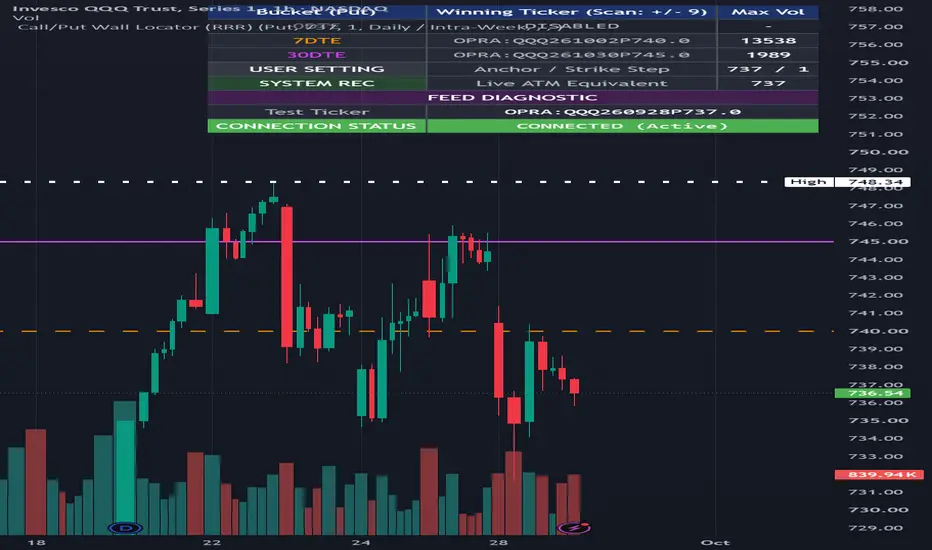
Dynamic Multi-DTE Call Wall Levels (RRR)
This Pine Script v6 overlay indicator dynamically maps critical options market structure directly onto your price chart, identifying areas of high options concentration that act as institutional support, resistance, or volatility triggers.
Premium Data Feed: The script relies on TradingView’s native OPRA (Options Price Reporting Authority) real-time data subscription. By using dynamic string generation with the OPRA: prefix, it bypasses the need for costly third-party APIs, querying precise, strike-by-strike data directly from the exchange.
Dynamic Expiration Engine: Automatically calculates and rolls the precise YYMMDD string for three distinct time horizons: Nearest Expiry (0DTE or daily equivalent), Nearest Friday (7DTE), and +28Days (macro exposure). It mathematically adjusts for single stocks (Friday-only) versus daily ETFs (SPY/QQQ).
Exposure Visualization Logic:
Anchor & Scan: The script identifies the current At-The-Money (ATM) strike and queries the volume for a user-defined basket of strikes above and below the current price.
Peak Identification: It pushes the real-time volume data into a v6 array, instantly identifying the single strike with the maximum volume—the "Call Wall." This level represents the highest concentration of dealer gamma exposure.
Persistent Plotting: The macro and micro Call Walls are plotted as distinct horizontal lines (using trackprice=true) across the chart.
EOD Freeze Mechanism: Using session.ismarket, the script stops pinging the chain at the 4:00 PM EST close, locking the final levels in memory and projecting them across the overnight and pre-market sessions for continuous visualization.
This Pine Script v6 overlay indicator dynamically maps critical options market structure directly onto your price chart, identifying areas of high options concentration that act as institutional support, resistance, or volatility triggers.
Premium Data Feed: The script relies on TradingView’s native OPRA (Options Price Reporting Authority) real-time data subscription. By using dynamic string generation with the OPRA: prefix, it bypasses the need for costly third-party APIs, querying precise, strike-by-strike data directly from the exchange.
Dynamic Expiration Engine: Automatically calculates and rolls the precise YYMMDD string for three distinct time horizons: Nearest Expiry (0DTE or daily equivalent), Nearest Friday (7DTE), and +28Days (macro exposure). It mathematically adjusts for single stocks (Friday-only) versus daily ETFs (SPY/QQQ).
Exposure Visualization Logic:
Anchor & Scan: The script identifies the current At-The-Money (ATM) strike and queries the volume for a user-defined basket of strikes above and below the current price.
Peak Identification: It pushes the real-time volume data into a v6 array, instantly identifying the single strike with the maximum volume—the "Call Wall." This level represents the highest concentration of dealer gamma exposure.
Persistent Plotting: The macro and micro Call Walls are plotted as distinct horizontal lines (using trackprice=true) across the chart.
EOD Freeze Mechanism: Using session.ismarket, the script stops pinging the chain at the 4:00 PM EST close, locking the final levels in memory and projecting them across the overnight and pre-market sessions for continuous visualization.
릴리즈 노트
Stabilized OPRA feed and added dashboard for validation릴리즈 노트
Toggle between Call and Put Walls릴리즈 노트
Toggle between Call and Put Walls릴리즈 노트
Modified the strike engine to scan more strikes when you reduce the load on the Number of Expirations. If all 3 toggles for 0/7/30DTE are selected, 6 strikes (above and below) will be scanned. If the 7/30DTE toggles are selected, 9 strikes (above and below) will be scanned. If the 30DTE strike alone is selected, 19 strikes will be scanned (above and below)릴리즈 노트
Updated logic to manually enter expirations if desired by user릴리즈 노트
Cleaner user interface and added notes on functionality릴리즈 노트
fixed 0DTE option strike scanner
면책사항
해당 정보와 게시물은 금융, 투자, 트레이딩 또는 기타 유형의 조언이나 권장 사항으로 간주되지 않으며, 트레이딩뷰에서 제공하거나 보증하는 것이 아닙니다. 자세한 내용은 이용 약관을 참조하세요.
면책사항
해당 정보와 게시물은 금융, 투자, 트레이딩 또는 기타 유형의 조언이나 권장 사항으로 간주되지 않으며, 트레이딩뷰에서 제공하거나 보증하는 것이 아닙니다. 자세한 내용은 이용 약관을 참조하세요.