OPEN-SOURCE SCRIPT
업데이트됨 CBC Table [MMT]
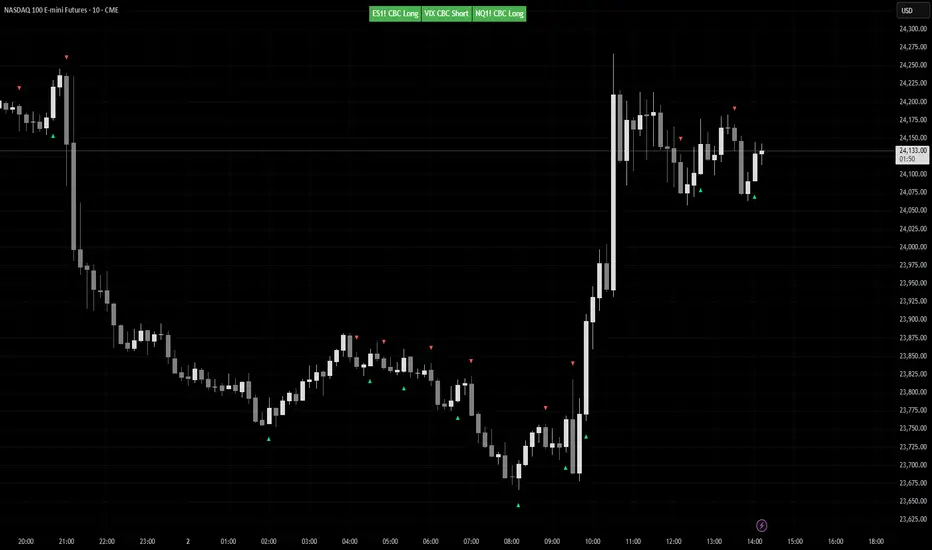
CBC Table [MMT] is a multi-asset Candle-by-Candle status table that lets you monitor confirmed CBC direction across up to three configurable symbols from one chart. It is designed to show the latest confirmed CBC state from a selected timeframe, while only displaying the table when the current chart matches one of the configured symbols.
This makes it useful for traders who want to track correlated or inverse markets such as ES/NQ/VIX, GC/DXY, or any custom asset set without hardcoding the script to one specific pair.
How it works
For each enabled symbol, the script requests data from the selected CBC timeframe and tracks whether that market is currently in a CBC bullish or bearish state based on confirmed candle closes. The status shown in the table is the latest confirmed state, so it does not flip back and forth intrabar while the higher-timeframe candle is still forming.
The script also checks whether the current chart symbol matches one of the enabled symbols. If it does, the table is shown with the CBC status for all enabled assets; if it does not, the script displays a non-matching message instead of showing unrelated pair data.
Features
How to use
Example use cases
Notes
This makes it useful for traders who want to track correlated or inverse markets such as ES/NQ/VIX, GC/DXY, or any custom asset set without hardcoding the script to one specific pair.
How it works
For each enabled symbol, the script requests data from the selected CBC timeframe and tracks whether that market is currently in a CBC bullish or bearish state based on confirmed candle closes. The status shown in the table is the latest confirmed state, so it does not flip back and forth intrabar while the higher-timeframe candle is still forming.
The script also checks whether the current chart symbol matches one of the enabled symbols. If it does, the table is shown with the CBC status for all enabled assets; if it does not, the script displays a non-matching message instead of showing unrelated pair data.
Features
- Monitor up to 3 custom symbols
- User-selectable CBC timeframe
- Symbol-based chart matching
- Confirmed-state CBC logic
- Optional inverse color handling for assets like VIX or DXY
- Dynamic table sizing based on enabled assets
- Automatic symbol label extraction from the selected ticker
- Optional candle markers for CBC flips
How to use
- Choose the timeframe you want CBC to be calculated from.
- Select up to three symbols in the settings.
- Enable or disable any asset slot as needed.
- Use invert colors for symbols that are interpreted inversely relative to your main market.
- Apply the script to one of the selected chart symbols to see the table and any flip markers.
Example use cases
- ES / NQ / VIX
- GC / DXY
- CL / XLE
- Any custom intermarket or confirmation set you want to monitor from one chart
Notes
- CBC state updates only on confirmed candles from the selected timeframe.
- Flip markers are plotted only for the currently matched chart symbol so markers stay aligned with the candles on the chart.
릴리즈 노트
Bug Fix:Remove the constraint of requiring current chart needs to be one of the tickers in the settings to show
오픈 소스 스크립트
트레이딩뷰의 진정한 정신에 따라, 이 스크립트의 작성자는 이를 오픈소스로 공개하여 트레이더들이 기능을 검토하고 검증할 수 있도록 했습니다. 작성자에게 찬사를 보냅니다! 이 코드는 무료로 사용할 수 있지만, 코드를 재게시하는 경우 하우스 룰이 적용된다는 점을 기억하세요.

면책사항
해당 정보와 게시물은 금융, 투자, 트레이딩 또는 기타 유형의 조언이나 권장 사항으로 간주되지 않으며, 트레이딩뷰에서 제공하거나 보증하는 것이 아닙니다. 자세한 내용은 이용 약관을 참조하세요.
오픈 소스 스크립트
트레이딩뷰의 진정한 정신에 따라, 이 스크립트의 작성자는 이를 오픈소스로 공개하여 트레이더들이 기능을 검토하고 검증할 수 있도록 했습니다. 작성자에게 찬사를 보냅니다! 이 코드는 무료로 사용할 수 있지만, 코드를 재게시하는 경우 하우스 룰이 적용된다는 점을 기억하세요.
면책사항
해당 정보와 게시물은 금융, 투자, 트레이딩 또는 기타 유형의 조언이나 권장 사항으로 간주되지 않으며, 트레이딩뷰에서 제공하거나 보증하는 것이 아닙니다. 자세한 내용은 이용 약관을 참조하세요.