OPEN-SOURCE SCRIPT
CQ_(1)_Fibonacci IntraDay Range v2
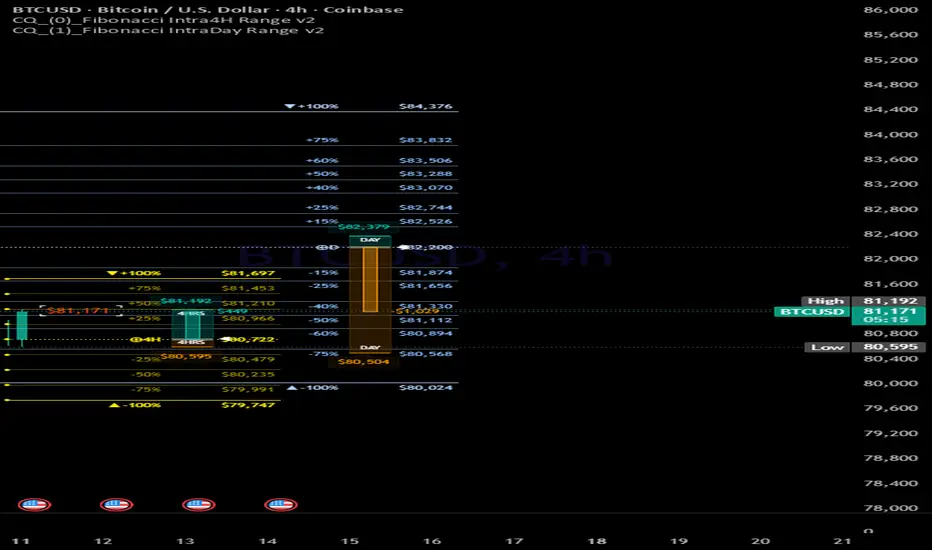
================================================================================
CQ FIBONACCI INTRADAY RANGE 2 — USER MANUAL
Based on UkutaLabs intraday Range Indicator | Pine Script v6 |
================================================================================
────────────────────────────────────────────────────────────────────────────────
OVERVIEW
────────────────────────────────────────────────────────────────────────────────
This indicator projects Fibonacci-based intraday price targets above and below
each session's opening price, calculated from a rolling average of past daily
ranges. It also includes a real-time price tendency gauge and a live price label
to help you track intraday momentum at a glance.
Timeframe restriction:
The indicator is hidden on Weekly and Monthly charts. It is active on all
intraday timeframes (1m through 4H) and on the Daily chart.
────────────────────────────────────────────────────────────────────────────────
HOW IT WORKS
────────────────────────────────────────────────────────────────────────────────
Step 1 — Average Range Calculation
At the start of each new session (session.isfirstbar), the previous day's
high-low range is added to a rolling array. Once the array exceeds the
user-defined "Days to Average Range" setting, the oldest entry is dropped.
The average of all entries in the array becomes the "averageRange" value used
for the current session.
Step 2 — Level Projection
Using the current session's opening price as the baseline, the indicator
calculates Fibonacci percentage levels above and below:
levelAbove = dailyOpen + averageRange × (Fib% ÷ 100)
levelBelow = dailyOpen − averageRange × (Fib% ÷ 100)
Available levels: 15%, 25%, 40%, 50%, 60%, 75%, 100%, 125%, 150%, 175%, 200%
The 100% level represents a full average-range move from the open — the most
statistically significant level. It is always rendered in the accent/highlight
color regardless of individual color settings.
Step 3 — Drawing Objects
All lines, label boxes, and circle markers are created once at session open
and stored in an IntraDayRange object. On every subsequent bar, each line's
right-hand x-coordinate is updated to (bar_index + offset), extending the
lines forward in real time.
Step 4 — Session Cleanup
When Display Mode limits the number of visible sessions, the oldest
IntraDayRange object is automatically deleted (all its drawing objects
removed) and shifted out of the internal collection array.
────────────────────────────────────────────────────────────────────────────────
SETTINGS REFERENCE
────────────────────────────────────────────────────────────────────────────────
── CONFIGURATION ───────────────────────────────────────────────────────────────
Display Mode
Controls how many session ranges are displayed simultaneously.
Hidden — turns the indicator completely off
Today — shows only the current session (default)
Two Days — shows today and yesterday
Week — shows the last 5 sessions
All — shows every session available on the chart
Days to Average Range
How many past daily candles are used to compute the average high-low range.
Default: 1 (uses only yesterday's range).
Higher values smooth out outlier days; lower values react faster to recent
volatility.
── LABEL SETTINGS ──────────────────────────────────────────────────────────────
Show Labels
Toggles the price text boxes at each Fibonacci level. Each box shows the
percentage label (e.g., "+50%") and the corresponding dollar price.
Font Size
Options: Tiny / Small / Medium / Large
Applies to all level label text.
Text Alignment
Options: Left / Center / Right
Controls the horizontal alignment of text inside each label box.
Position (Horizontal Offset)
Range: 0 – 100 bars. Default: 32.
How far to the right the lines and labels extend past the last bar.
The gauge position is automatically derived from this value (offset − 6).
── LINE SETTINGS ───────────────────────────────────────────────────────────────
Line Width
Pixel thickness of all Fibonacci level lines.
Line Style
Options: Solid / Dashed / Dotted
Applies to all horizontal Fibonacci level lines.
── CIRCLE SETTINGS ─────────────────────────────────────────────────────────────
Show Circles at Line Start
Draws a dot marker at the left origin of each level line, providing a clear
visual anchor at the session open bar.
Circle Size
Options: Tiny / Small / Normal / Large
Scales the dot markers independently from the label text.
── FIBONACCI LEVELS ────────────────────────────────────────────────────────────
Each level has three controls:
- Line Color individual color picker for that level's line
- Enable toggle on/off switch for that level
- (The color and toggle appear inline on the same row in settings)
Level % Default Notes
------- ------ -------- ---------------------------------------------------
0 15% On Minor support / resistance zone
1 25% On Quarter-range pivot
2 40% On Below-midpoint inflection
3 50% On Midpoint — half the average range
4 60% On Above-midpoint inflection
5 75% On Three-quarter range target
6 100% On Full average range — rendered in highlight color
7 125% Off Extended move target
8 150% Off Extended move target
9 175% Off Extreme extension
10 200% Off Double-range extreme
Line Color (shared)
Default color for all enabled levels: rgb(153, 198, 253) — soft blue.
Highlighted Items Color
The color used specifically for the daily open baseline and the 100% level
lines and labels. Default: rgb(181, 212, 249).
Normal Color
The color used for all other enabled level labels.
Default: rgb(136, 190, 255).
── GAUGE SETTINGS ──────────────────────────────────────────────────────────────
Draw Intraday Price Tendency Gauge
Enables or disables the vertical gauge drawn at the right edge of the chart.
How the gauge works:
The gauge is split into two halves, anchored at the daily open price:
- Bullish half (upper): spans from daily open up to daily high
- Bearish half (lower): spans from daily open down to daily low
An inner shaded bar fills proportionally to show where current price sits
within the session's range. The daily high and low are labeled with prices.
A floating label to the right of the gauge shows the dollar gain/loss from
the daily open, with a tooltip displaying the percentage move.
Gauge Background (Bullish)
Background color of the upper (bullish) half of the gauge.
Default: dark green rgb(0, 83, 75).
Foreground (Bullish)
Color of the active fill bar and high price label when price is above open.
Default: bright teal rgb(0, 194, 174).
Gauge Background (Bearish)
Background color of the lower (bearish) half of the gauge.
Default: dark amber rgb(85, 48, 0).
Foreground (Bearish)
Color of the active fill bar and low price label when price is below open.
Default: orange rgb(255, 153, 0).
Note: The gauge's horizontal position is automatically calculated as
(Position (Horizontal Offset) − 6) bars to the right of the last bar.
── CURRENT PRICE LABEL ─────────────────────────────────────────────────────────
Show Current Price Label
Displays a live-updating price label to the right of the chart.
Only active on intraday timeframes at or below 4H, and only during
confirmed real-time bars (not on historical bars).
Position (Horizontal Offset)
Controls how far to the right the price label sits from the last bar.
This is a separate offset from the Fibonacci lines offset.
Behavior:
- Cyan color when price is above the daily open
- Orange-red color when price is below the daily open
- A bracket/frame label (⌜ ⌝ / ⌞ ⌟) surrounds the price for emphasis
- Updates continuously during real-time bar progression
────────────────────────────────────────────────────────────────────────────────
PRACTICAL TIPS
────────────────────────────────────────────────────────────────────────────────
Using levels as intraday targets
The 50% and 100% levels are the most widely watched. A move to the 50% level
often acts as the first intraday target. A push through the 100% level signals
an unusually strong trending session. Levels above 100% (125%–200%) are most
useful for identifying breakout extensions on high-volatility days.
Choosing the averaging window
Set "Days to Average Range" to 1 to use only yesterday's range — ideal around
major news events when recent conditions are most relevant. Set it to 5 or 10
to smooth out weekly seasonality. Avoid very large values as they dilute the
relevance of current market conditions.
Reducing visual clutter
Disable the extended-range levels (125%–200%) unless you are specifically
trading breakout scenarios. Setting Display Mode to "Today" and reducing the
Horizontal Offset to 8–12 bars keeps the chart clean on lower timeframes.
Daily chart usage
On the Daily timeframe the Fibonacci levels still draw, but the gauge and the
current price label are disabled (they are intraday-only features). The
session logic fires once per day, so each new candle extends the lines
forward by one bar.
Working with multiple sessions (Two Days / Week / All)
Each session gets its own set of lines drawn from that session's open. Older
sessions are progressively deleted when the count exceeds the Display Mode
limit. Switching from "Today" to "Week" mid-session will not retroactively
draw past sessions that have already been cleaned up — it takes effect on the
next session boundary.
────────────────────────────────────────────────────────────────────────────────
QUICK REFERENCE — DEFAULT SETTINGS
────────────────────────────────────────────────────────────────────────────────
Display Mode Today
Days to Average Range 1
Show Labels On
Font Size Small
Text Alignment Right
Horizontal Offset 32
Line Width 1
Line Style Solid
Show Circles On
Circle Size Small
Active Fib Levels 15%, 25%, 40%, 50%, 60%, 75%, 100%
Gauge On
Current Price Label On (intraday ≤ 4H only)
================================================================================
END OF MANUAL
================================================================================
CQ FIBONACCI INTRADAY RANGE 2 — USER MANUAL
Based on UkutaLabs intraday Range Indicator | Pine Script v6 |
================================================================================
────────────────────────────────────────────────────────────────────────────────
OVERVIEW
────────────────────────────────────────────────────────────────────────────────
This indicator projects Fibonacci-based intraday price targets above and below
each session's opening price, calculated from a rolling average of past daily
ranges. It also includes a real-time price tendency gauge and a live price label
to help you track intraday momentum at a glance.
Timeframe restriction:
The indicator is hidden on Weekly and Monthly charts. It is active on all
intraday timeframes (1m through 4H) and on the Daily chart.
────────────────────────────────────────────────────────────────────────────────
HOW IT WORKS
────────────────────────────────────────────────────────────────────────────────
Step 1 — Average Range Calculation
At the start of each new session (session.isfirstbar), the previous day's
high-low range is added to a rolling array. Once the array exceeds the
user-defined "Days to Average Range" setting, the oldest entry is dropped.
The average of all entries in the array becomes the "averageRange" value used
for the current session.
Step 2 — Level Projection
Using the current session's opening price as the baseline, the indicator
calculates Fibonacci percentage levels above and below:
levelAbove = dailyOpen + averageRange × (Fib% ÷ 100)
levelBelow = dailyOpen − averageRange × (Fib% ÷ 100)
Available levels: 15%, 25%, 40%, 50%, 60%, 75%, 100%, 125%, 150%, 175%, 200%
The 100% level represents a full average-range move from the open — the most
statistically significant level. It is always rendered in the accent/highlight
color regardless of individual color settings.
Step 3 — Drawing Objects
All lines, label boxes, and circle markers are created once at session open
and stored in an IntraDayRange object. On every subsequent bar, each line's
right-hand x-coordinate is updated to (bar_index + offset), extending the
lines forward in real time.
Step 4 — Session Cleanup
When Display Mode limits the number of visible sessions, the oldest
IntraDayRange object is automatically deleted (all its drawing objects
removed) and shifted out of the internal collection array.
────────────────────────────────────────────────────────────────────────────────
SETTINGS REFERENCE
────────────────────────────────────────────────────────────────────────────────
── CONFIGURATION ───────────────────────────────────────────────────────────────
Display Mode
Controls how many session ranges are displayed simultaneously.
Hidden — turns the indicator completely off
Today — shows only the current session (default)
Two Days — shows today and yesterday
Week — shows the last 5 sessions
All — shows every session available on the chart
Days to Average Range
How many past daily candles are used to compute the average high-low range.
Default: 1 (uses only yesterday's range).
Higher values smooth out outlier days; lower values react faster to recent
volatility.
── LABEL SETTINGS ──────────────────────────────────────────────────────────────
Show Labels
Toggles the price text boxes at each Fibonacci level. Each box shows the
percentage label (e.g., "+50%") and the corresponding dollar price.
Font Size
Options: Tiny / Small / Medium / Large
Applies to all level label text.
Text Alignment
Options: Left / Center / Right
Controls the horizontal alignment of text inside each label box.
Position (Horizontal Offset)
Range: 0 – 100 bars. Default: 32.
How far to the right the lines and labels extend past the last bar.
The gauge position is automatically derived from this value (offset − 6).
── LINE SETTINGS ───────────────────────────────────────────────────────────────
Line Width
Pixel thickness of all Fibonacci level lines.
Line Style
Options: Solid / Dashed / Dotted
Applies to all horizontal Fibonacci level lines.
── CIRCLE SETTINGS ─────────────────────────────────────────────────────────────
Show Circles at Line Start
Draws a dot marker at the left origin of each level line, providing a clear
visual anchor at the session open bar.
Circle Size
Options: Tiny / Small / Normal / Large
Scales the dot markers independently from the label text.
── FIBONACCI LEVELS ────────────────────────────────────────────────────────────
Each level has three controls:
- Line Color individual color picker for that level's line
- Enable toggle on/off switch for that level
- (The color and toggle appear inline on the same row in settings)
Level % Default Notes
------- ------ -------- ---------------------------------------------------
0 15% On Minor support / resistance zone
1 25% On Quarter-range pivot
2 40% On Below-midpoint inflection
3 50% On Midpoint — half the average range
4 60% On Above-midpoint inflection
5 75% On Three-quarter range target
6 100% On Full average range — rendered in highlight color
7 125% Off Extended move target
8 150% Off Extended move target
9 175% Off Extreme extension
10 200% Off Double-range extreme
Line Color (shared)
Default color for all enabled levels: rgb(153, 198, 253) — soft blue.
Highlighted Items Color
The color used specifically for the daily open baseline and the 100% level
lines and labels. Default: rgb(181, 212, 249).
Normal Color
The color used for all other enabled level labels.
Default: rgb(136, 190, 255).
── GAUGE SETTINGS ──────────────────────────────────────────────────────────────
Draw Intraday Price Tendency Gauge
Enables or disables the vertical gauge drawn at the right edge of the chart.
How the gauge works:
The gauge is split into two halves, anchored at the daily open price:
- Bullish half (upper): spans from daily open up to daily high
- Bearish half (lower): spans from daily open down to daily low
An inner shaded bar fills proportionally to show where current price sits
within the session's range. The daily high and low are labeled with prices.
A floating label to the right of the gauge shows the dollar gain/loss from
the daily open, with a tooltip displaying the percentage move.
Gauge Background (Bullish)
Background color of the upper (bullish) half of the gauge.
Default: dark green rgb(0, 83, 75).
Foreground (Bullish)
Color of the active fill bar and high price label when price is above open.
Default: bright teal rgb(0, 194, 174).
Gauge Background (Bearish)
Background color of the lower (bearish) half of the gauge.
Default: dark amber rgb(85, 48, 0).
Foreground (Bearish)
Color of the active fill bar and low price label when price is below open.
Default: orange rgb(255, 153, 0).
Note: The gauge's horizontal position is automatically calculated as
(Position (Horizontal Offset) − 6) bars to the right of the last bar.
── CURRENT PRICE LABEL ─────────────────────────────────────────────────────────
Show Current Price Label
Displays a live-updating price label to the right of the chart.
Only active on intraday timeframes at or below 4H, and only during
confirmed real-time bars (not on historical bars).
Position (Horizontal Offset)
Controls how far to the right the price label sits from the last bar.
This is a separate offset from the Fibonacci lines offset.
Behavior:
- Cyan color when price is above the daily open
- Orange-red color when price is below the daily open
- A bracket/frame label (⌜ ⌝ / ⌞ ⌟) surrounds the price for emphasis
- Updates continuously during real-time bar progression
────────────────────────────────────────────────────────────────────────────────
PRACTICAL TIPS
────────────────────────────────────────────────────────────────────────────────
Using levels as intraday targets
The 50% and 100% levels are the most widely watched. A move to the 50% level
often acts as the first intraday target. A push through the 100% level signals
an unusually strong trending session. Levels above 100% (125%–200%) are most
useful for identifying breakout extensions on high-volatility days.
Choosing the averaging window
Set "Days to Average Range" to 1 to use only yesterday's range — ideal around
major news events when recent conditions are most relevant. Set it to 5 or 10
to smooth out weekly seasonality. Avoid very large values as they dilute the
relevance of current market conditions.
Reducing visual clutter
Disable the extended-range levels (125%–200%) unless you are specifically
trading breakout scenarios. Setting Display Mode to "Today" and reducing the
Horizontal Offset to 8–12 bars keeps the chart clean on lower timeframes.
Daily chart usage
On the Daily timeframe the Fibonacci levels still draw, but the gauge and the
current price label are disabled (they are intraday-only features). The
session logic fires once per day, so each new candle extends the lines
forward by one bar.
Working with multiple sessions (Two Days / Week / All)
Each session gets its own set of lines drawn from that session's open. Older
sessions are progressively deleted when the count exceeds the Display Mode
limit. Switching from "Today" to "Week" mid-session will not retroactively
draw past sessions that have already been cleaned up — it takes effect on the
next session boundary.
────────────────────────────────────────────────────────────────────────────────
QUICK REFERENCE — DEFAULT SETTINGS
────────────────────────────────────────────────────────────────────────────────
Display Mode Today
Days to Average Range 1
Show Labels On
Font Size Small
Text Alignment Right
Horizontal Offset 32
Line Width 1
Line Style Solid
Show Circles On
Circle Size Small
Active Fib Levels 15%, 25%, 40%, 50%, 60%, 75%, 100%
Gauge On
Current Price Label On (intraday ≤ 4H only)
================================================================================
END OF MANUAL
================================================================================
오픈 소스 스크립트
트레이딩뷰의 진정한 정신에 따라, 이 스크립트의 작성자는 이를 오픈소스로 공개하여 트레이더들이 기능을 검토하고 검증할 수 있도록 했습니다. 작성자에게 찬사를 보냅니다! 이 코드는 무료로 사용할 수 있지만, 코드를 재게시하는 경우 하우스 룰이 적용된다는 점을 기억하세요.

면책사항
해당 정보와 게시물은 금융, 투자, 트레이딩 또는 기타 유형의 조언이나 권장 사항으로 간주되지 않으며, 트레이딩뷰에서 제공하거나 보증하는 것이 아닙니다. 자세한 내용은 이용 약관을 참조하세요.
오픈 소스 스크립트
트레이딩뷰의 진정한 정신에 따라, 이 스크립트의 작성자는 이를 오픈소스로 공개하여 트레이더들이 기능을 검토하고 검증할 수 있도록 했습니다. 작성자에게 찬사를 보냅니다! 이 코드는 무료로 사용할 수 있지만, 코드를 재게시하는 경우 하우스 룰이 적용된다는 점을 기억하세요.
면책사항
해당 정보와 게시물은 금융, 투자, 트레이딩 또는 기타 유형의 조언이나 권장 사항으로 간주되지 않으며, 트레이딩뷰에서 제공하거나 보증하는 것이 아닙니다. 자세한 내용은 이용 약관을 참조하세요.