HTF Candles [odnac]
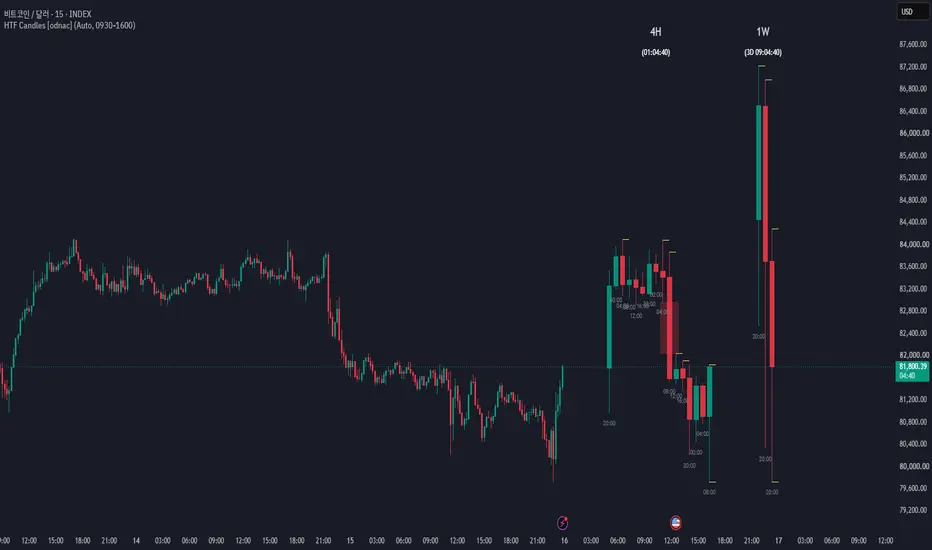
This indicator is adapted from "ICT HTF Candles" by fadi, reworked with additional features such as Auto timeframe pairing, Session Stack, and extra customization options. Credit to the original author for the core concept.
HTF Candles [odnac]
Displays higher-timeframe (HTF) candles on the right side of your chart, so you can read the bigger picture without switching timeframes. It also includes an optional Session Stack mode that builds the HTF candles from a session start.
━━━ Features ━━━
- Two HTF rows
Show up to two higher timeframes side by side, each with its own on/off toggle and "max candles" limit. The forming candle updates in real time.
- Auto timeframe pairing
In Auto mode the HTFs are picked from your chart timeframe:
1m → 15m / 4H
5m → 1H / 1D
15m → 4H / 1W
1H → 1D / 1M
4H → 1W
1D → 1M
Other chart timeframes use the manual pickers. You can also switch to Manual mode at any time.
- Fair Value Gaps
Detects FVGs between HTF candles and highlights them with bullish/bearish colors.
- Liquidity lines
Draws each HTF candle's high and low as lines. When price sweeps a level, its line is removed, so only untouched liquidity remains.
- Candle start time
Optional label under each candle showing when it opened, in the timezone of your choice.
- Remaining time
Shows a countdown to the close of the current HTF candle (realtime bars only).
━━━ Session Stack ━━━
When enabled, the HTF candles are stacked from the start of a custom session instead of showing a rolling last-N window.
- Session and timezone: set any session (e.g. NY 0930-1600, London 0800-1700) and the timezone it is read in.
- Resets at every session start.
- Apply to HTF 1, HTF 2, or both.
- Keep Stacking After Session End:
OFF – the stack disappears when the session ends.
ON – the stack keeps growing after the session ends and resets at the next session start (only the start time is used).
- Include Weekends: optional.
━━━ Notes ━━━
- An HTF is only drawn if it is higher than the chart timeframe (and divides evenly for intraday timeframes).
- With Keep Stacking ON, raise the "max candles" value so the whole stack fits (e.g. a 15m HTF can produce 96 candles in 24 hours).
- The remaining-time countdown only updates on realtime bars.
- Drawings are placed to the right of the latest bar; use "padding" and "space" settings to adjust the layout.
━━━ Settings overview ━━━
- Timeframe Pairing: Auto / Manual, HTF 1 and HTF 2 pickers
- Session Stack: session, timezone, keep stacking, weekends
- Styling: bull/bear body, border and wick colors, padding, spacing, candle width
- Label Settings: HTF label and remaining time (color, size)
- Imbalance: FVG colors
- Candle Time: show/hide, color, size, timezone
- Liquidity: color, width, line style

면책사항
해당 정보와 게시물은 금융, 투자, 트레이딩 또는 기타 유형의 조언이나 권장 사항으로 간주되지 않으며, 트레이딩뷰에서 제공하거나 보증하는 것이 아닙니다. 자세한 내용은 이용 약관을 참조하세요.
면책사항
해당 정보와 게시물은 금융, 투자, 트레이딩 또는 기타 유형의 조언이나 권장 사항으로 간주되지 않으며, 트레이딩뷰에서 제공하거나 보증하는 것이 아닙니다. 자세한 내용은 이용 약관을 참조하세요.