OPEN-SOURCE SCRIPT
FVG/IFVG [CRODL]
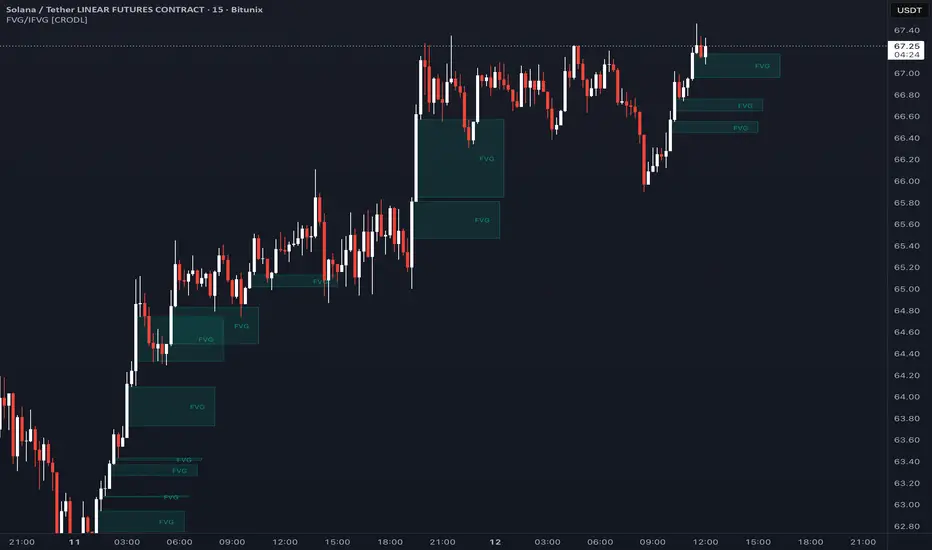
█ OVERVIEW
This indicator detects Fair Value Gaps (FVGs) on up to five timeframes at once, tracks every gap it draws, and invalidates each one automatically the moment price fills it. A filled gap can be deleted, kept on the chart cut off at the candle that filled it, or flipped into an Inversion Fair Value Gap (iFVG) - the same zone watched with the opposite bias. What makes the script useful is that it manages the full life cycle of every zone in one tool: detect, track, fill-check on every bar, invert, and expire - across multiple timeframes, with a choice of close-based or wick-based fill logic, and without repainting committed zones.
█ CONCEPTS
Fair Value Gap (FVG)
An FVG is a three-candle imbalance, a concept popularized in ICT / "smart money" style trading. A bullish FVG forms when the low of the third candle stays above the high of the first candle: price moved up so fast that the middle candle left a slice of untraded space behind it. A bearish FVG is the mirror image - the high of the third candle stays below the low of the first. The space between those two levels is the zone this script draws. Traders typically watch unfilled gaps as areas price may revisit ("rebalance") before continuing.
Inversion Fair Value Gap (iFVG)
An iFVG is a gap that failed. When price closes through a bullish FVG instead of respecting it, many traders treat that same zone as resistance afterwards - a support/resistance flip applied to imbalances. This script performs the flip automatically: the box changes to the iFVG colors and label, and the inversion zone remains active until price trades back through its far side, at which point it is removed as well.
█ HOW IT WORKS
Detection
On every enabled timeframe the script tests the last three confirmed candles. A bullish gap is registered when the low of the newest candle is above the high of the oldest one; a bearish gap when the high of the newest candle is below the low of the oldest one. The gap is committed the moment its third candle closes, and the box is anchored at the middle candle where the imbalance was created.
Higher-timeframe data
Higher-timeframe candles are requested on confirmed bars only, using bar offsets (the publication-safe request technique recommended by PineCoders). No future data is accessed, and committed zones print in the same place historically and in real time — they do not repaint.
Live preview
With "Wait for candle close to identify FVGs" turned OFF, a provisional box is drawn while the third candle is still forming. It expands and contracts with the developing high/low, becomes permanent only if the gap survives the candle close, and is removed if the wick closes the gap first. Turn the setting ON if you prefer to see confirmed gaps only.
Invalidation engine
Every active zone is stored internally and re-checked on every chart bar:
• A bullish FVG is filled when price breaks below the BOTTOM of its zone.
• A bearish FVG is filled when price breaks above the TOP of its zone.
• "Close" mode requires a confirmed candle close beyond the level; "Wick" mode triggers on a single touch.
When a gap fills it is either deleted (default), kept on the chart truncated at the fill candle, or inverted into an iFVG - depending on your settings. An iFVG is then invalidated by the same Close/Wick rule, mirrored to its new direction.
█ SETTINGS AND HOW TO USE IT
• Timeframes - the chart timeframe plus up to four higher ones (15m / 1h / 4h / 1D by default). "Hide FVGs from timeframes lower than the chart" keeps the chart clean when you move up a timeframe.
• Filled FVG Type - Close (stricter) or Wick (more sensitive).
• Show FVG / Show iFVG - display fresh gaps, inversion zones, or both.
• Delete Boxes after fill - ON shows only zones that are still valid; OFF keeps a visual history of filled gaps, each cut off where it was filled.
• Extend Boxes + Label Distance - stretch active zones to the right edge of the chart with floating labels.
• Per-timeframe label text, plus full color and border control for FVG and iFVG boxes.
• Max bars back - how much history to scan (performance guard).
Typical use: treat unfilled gaps as potential reaction zones in the direction of the prevailing move, look for multi-timeframe confluence (for example a 15m gap sitting inside a 4h gap), and watch iFVGs as flip zones after a gap fails. The script marks and manages zones - it does not generate buy or sell signals. Combine it with your own market-structure analysis and risk management.
█ ALERTS
Alert conditions are included: Bullish FVG created, Bearish FVG created, FVG inverted bearish (a bullish gap was invalidated), and FVG inverted bullish (a bearish gap was invalidated).
█ NOTES AND LIMITATIONS
• Invalidation is evaluated against chart-timeframe candles. On a low timeframe a higher-timeframe gap can therefore be invalidated by a lower-timeframe close - this makes mitigation responsive, but it means the exact moment a higher-timeframe zone disappears can differ slightly depending on the chart timeframe you are viewing.
• With "Wait for candle close" OFF, the preview box on the still-forming candle keeps updating until that candle closes. This is by design and only affects the live, unconfirmed candle - committed zones never change.
• Up to 500 boxes and labels are kept on the chart; beyond that, the oldest zones are recycled first.
This is an educational tool, not financial advice. Past behavior of price around these zones does not guarantee future results.
This indicator detects Fair Value Gaps (FVGs) on up to five timeframes at once, tracks every gap it draws, and invalidates each one automatically the moment price fills it. A filled gap can be deleted, kept on the chart cut off at the candle that filled it, or flipped into an Inversion Fair Value Gap (iFVG) - the same zone watched with the opposite bias. What makes the script useful is that it manages the full life cycle of every zone in one tool: detect, track, fill-check on every bar, invert, and expire - across multiple timeframes, with a choice of close-based or wick-based fill logic, and without repainting committed zones.
█ CONCEPTS
Fair Value Gap (FVG)
An FVG is a three-candle imbalance, a concept popularized in ICT / "smart money" style trading. A bullish FVG forms when the low of the third candle stays above the high of the first candle: price moved up so fast that the middle candle left a slice of untraded space behind it. A bearish FVG is the mirror image - the high of the third candle stays below the low of the first. The space between those two levels is the zone this script draws. Traders typically watch unfilled gaps as areas price may revisit ("rebalance") before continuing.
Inversion Fair Value Gap (iFVG)
An iFVG is a gap that failed. When price closes through a bullish FVG instead of respecting it, many traders treat that same zone as resistance afterwards - a support/resistance flip applied to imbalances. This script performs the flip automatically: the box changes to the iFVG colors and label, and the inversion zone remains active until price trades back through its far side, at which point it is removed as well.
█ HOW IT WORKS
Detection
On every enabled timeframe the script tests the last three confirmed candles. A bullish gap is registered when the low of the newest candle is above the high of the oldest one; a bearish gap when the high of the newest candle is below the low of the oldest one. The gap is committed the moment its third candle closes, and the box is anchored at the middle candle where the imbalance was created.
Higher-timeframe data
Higher-timeframe candles are requested on confirmed bars only, using bar offsets (the publication-safe request technique recommended by PineCoders). No future data is accessed, and committed zones print in the same place historically and in real time — they do not repaint.
Live preview
With "Wait for candle close to identify FVGs" turned OFF, a provisional box is drawn while the third candle is still forming. It expands and contracts with the developing high/low, becomes permanent only if the gap survives the candle close, and is removed if the wick closes the gap first. Turn the setting ON if you prefer to see confirmed gaps only.
Invalidation engine
Every active zone is stored internally and re-checked on every chart bar:
• A bullish FVG is filled when price breaks below the BOTTOM of its zone.
• A bearish FVG is filled when price breaks above the TOP of its zone.
• "Close" mode requires a confirmed candle close beyond the level; "Wick" mode triggers on a single touch.
When a gap fills it is either deleted (default), kept on the chart truncated at the fill candle, or inverted into an iFVG - depending on your settings. An iFVG is then invalidated by the same Close/Wick rule, mirrored to its new direction.
█ SETTINGS AND HOW TO USE IT
• Timeframes - the chart timeframe plus up to four higher ones (15m / 1h / 4h / 1D by default). "Hide FVGs from timeframes lower than the chart" keeps the chart clean when you move up a timeframe.
• Filled FVG Type - Close (stricter) or Wick (more sensitive).
• Show FVG / Show iFVG - display fresh gaps, inversion zones, or both.
• Delete Boxes after fill - ON shows only zones that are still valid; OFF keeps a visual history of filled gaps, each cut off where it was filled.
• Extend Boxes + Label Distance - stretch active zones to the right edge of the chart with floating labels.
• Per-timeframe label text, plus full color and border control for FVG and iFVG boxes.
• Max bars back - how much history to scan (performance guard).
Typical use: treat unfilled gaps as potential reaction zones in the direction of the prevailing move, look for multi-timeframe confluence (for example a 15m gap sitting inside a 4h gap), and watch iFVGs as flip zones after a gap fails. The script marks and manages zones - it does not generate buy or sell signals. Combine it with your own market-structure analysis and risk management.
█ ALERTS
Alert conditions are included: Bullish FVG created, Bearish FVG created, FVG inverted bearish (a bullish gap was invalidated), and FVG inverted bullish (a bearish gap was invalidated).
█ NOTES AND LIMITATIONS
• Invalidation is evaluated against chart-timeframe candles. On a low timeframe a higher-timeframe gap can therefore be invalidated by a lower-timeframe close - this makes mitigation responsive, but it means the exact moment a higher-timeframe zone disappears can differ slightly depending on the chart timeframe you are viewing.
• With "Wait for candle close" OFF, the preview box on the still-forming candle keeps updating until that candle closes. This is by design and only affects the live, unconfirmed candle - committed zones never change.
• Up to 500 boxes and labels are kept on the chart; beyond that, the oldest zones are recycled first.
This is an educational tool, not financial advice. Past behavior of price around these zones does not guarantee future results.
오픈 소스 스크립트
트레이딩뷰의 진정한 정신에 따라, 이 스크립트의 작성자는 이를 오픈소스로 공개하여 트레이더들이 기능을 검토하고 검증할 수 있도록 했습니다. 작성자에게 찬사를 보냅니다! 이 코드는 무료로 사용할 수 있지만, 코드를 재게시하는 경우 하우스 룰이 적용된다는 점을 기억하세요.

면책사항
해당 정보와 게시물은 금융, 투자, 트레이딩 또는 기타 유형의 조언이나 권장 사항으로 간주되지 않으며, 트레이딩뷰에서 제공하거나 보증하는 것이 아닙니다. 자세한 내용은 이용 약관을 참조하세요.
오픈 소스 스크립트
트레이딩뷰의 진정한 정신에 따라, 이 스크립트의 작성자는 이를 오픈소스로 공개하여 트레이더들이 기능을 검토하고 검증할 수 있도록 했습니다. 작성자에게 찬사를 보냅니다! 이 코드는 무료로 사용할 수 있지만, 코드를 재게시하는 경우 하우스 룰이 적용된다는 점을 기억하세요.
면책사항
해당 정보와 게시물은 금융, 투자, 트레이딩 또는 기타 유형의 조언이나 권장 사항으로 간주되지 않으며, 트레이딩뷰에서 제공하거나 보증하는 것이 아닙니다. 자세한 내용은 이용 약관을 참조하세요.