OPEN-SOURCE SCRIPT
CDT Clock + Trade Timer
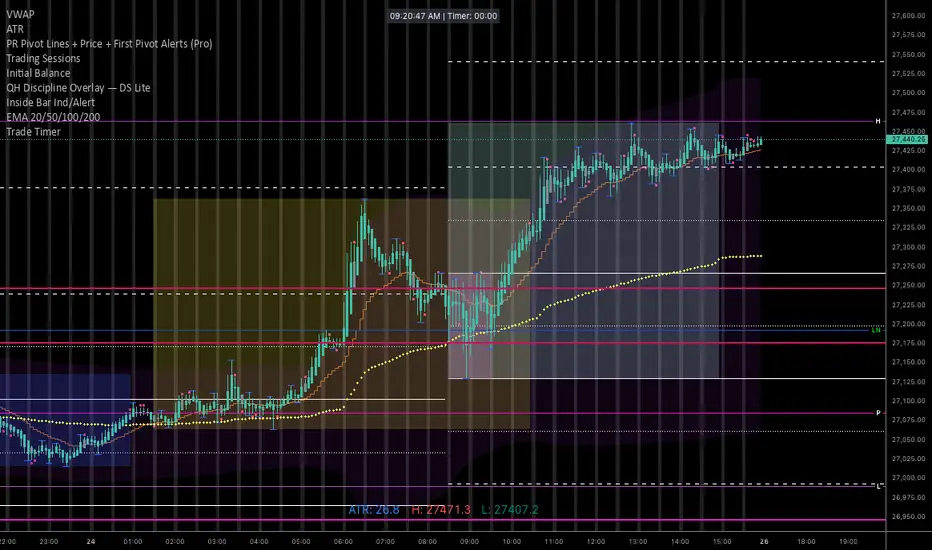
To keep it organized in your TradingView library, you’ll want a description that reminds you exactly how the logic works (especially the CDT offset and the manual timer).
Here is a concise description you can paste into the "Description" field when you save the script:
NQ Execution Clock & Patience Timer (CDT)
Overview:
A specialized execution tool designed for NQ/ES futures trading. This indicator provides a high-visibility digital clock synced to Central Daylight Time (CDT) and a manual "Trade Timer" to help manage trade duration and psychology during liquidity sweeps.
Key Features:
Live CDT Clock: Hardcoded to UTC-5 to stay synced with Chicago/San Antonio market hours.
Manual Trade Stopwatch: A "Start Trade Timer" toggle in the settings allows you to track exactly how many minutes/seconds you have been in a position.
Psychology Support: Specifically built to prevent early exits by providing a visual counter for the "10-minute rule" during NQ runs.
Customizable UI: Options to reposition the clock (Top Right, Bottom Left, etc.) and adjust font size/color to fit any chart layout.
Instructions:
Check "START TRADE TIMER" in the inputs as soon as your limit order is filled.
Uncheck to reset once the trade is closed.
Here is a concise description you can paste into the "Description" field when you save the script:
NQ Execution Clock & Patience Timer (CDT)
Overview:
A specialized execution tool designed for NQ/ES futures trading. This indicator provides a high-visibility digital clock synced to Central Daylight Time (CDT) and a manual "Trade Timer" to help manage trade duration and psychology during liquidity sweeps.
Key Features:
Live CDT Clock: Hardcoded to UTC-5 to stay synced with Chicago/San Antonio market hours.
Manual Trade Stopwatch: A "Start Trade Timer" toggle in the settings allows you to track exactly how many minutes/seconds you have been in a position.
Psychology Support: Specifically built to prevent early exits by providing a visual counter for the "10-minute rule" during NQ runs.
Customizable UI: Options to reposition the clock (Top Right, Bottom Left, etc.) and adjust font size/color to fit any chart layout.
Instructions:
Check "START TRADE TIMER" in the inputs as soon as your limit order is filled.
Uncheck to reset once the trade is closed.
오픈 소스 스크립트
트레이딩뷰의 진정한 정신에 따라, 이 스크립트의 작성자는 이를 오픈소스로 공개하여 트레이더들이 기능을 검토하고 검증할 수 있도록 했습니다. 작성자에게 찬사를 보냅니다! 이 코드는 무료로 사용할 수 있지만, 코드를 재게시하는 경우 하우스 룰이 적용된다는 점을 기억하세요.

면책사항
해당 정보와 게시물은 금융, 투자, 트레이딩 또는 기타 유형의 조언이나 권장 사항으로 간주되지 않으며, 트레이딩뷰에서 제공하거나 보증하는 것이 아닙니다. 자세한 내용은 이용 약관을 참조하세요.
오픈 소스 스크립트
트레이딩뷰의 진정한 정신에 따라, 이 스크립트의 작성자는 이를 오픈소스로 공개하여 트레이더들이 기능을 검토하고 검증할 수 있도록 했습니다. 작성자에게 찬사를 보냅니다! 이 코드는 무료로 사용할 수 있지만, 코드를 재게시하는 경우 하우스 룰이 적용된다는 점을 기억하세요.
면책사항
해당 정보와 게시물은 금융, 투자, 트레이딩 또는 기타 유형의 조언이나 권장 사항으로 간주되지 않으며, 트레이딩뷰에서 제공하거나 보증하는 것이 아닙니다. 자세한 내용은 이용 약관을 참조하세요.