OPEN-SOURCE SCRIPT
Triple EMA + Stochastic/ADX
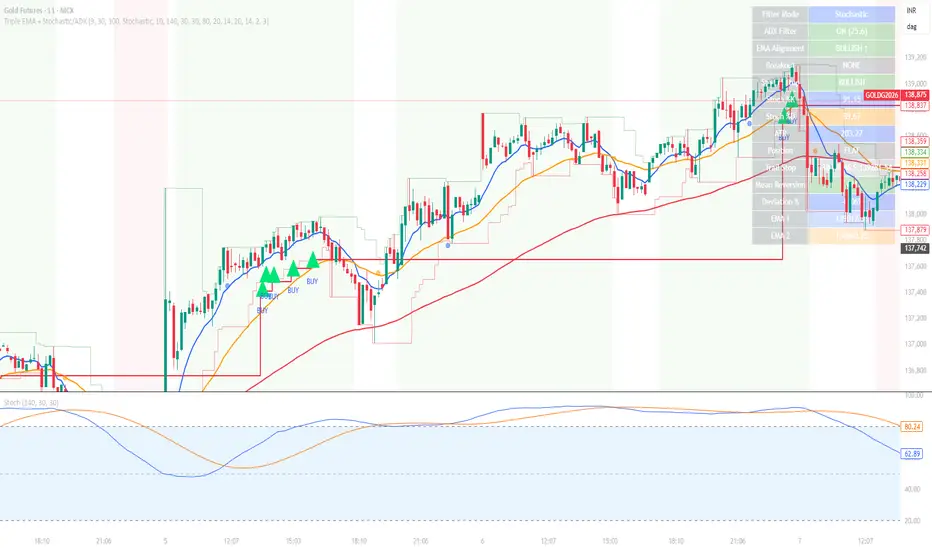
# Triple EMA + Stochastic/ADX Breakout Indicator
A professional TradingView indicator designed for trend-following and momentum breakout trading. This system uses a hierarchical confirmation process to ensure high-probability entries and robust trend maintenance.
## 🚀 Core Trading Logic: "The Setup Cycle"
This indicator operates on a **Cycle-Based Logic** rather than simple crossovers. A trade cycle is defined as:
1. **The Setup (Priming)**: A Stochastic crossover (K > D for Long, D > K for Short) initiates a "Setup Mode." This is marked by a small dot (Blue for Long, Orange for Short).
2. **The Confirmation (Trend)**: The systems checks for hierarchical EMA alignment (Fast > Medium > Slow for Longs).
3. **The Trigger (Breakout)**: Once the Setup is active and EMAs are aligned, every **Price Breakout** above the previous high (X-period) triggers a continuous **BUY/SELL mark**.
4. **The Exit (Take Profit/Stop)**: The cycle and trade only end when the Fast EMA crosses back over the Medium EMA (EMA 9/21 crossover).
---
## 🛠 Features
### 1. Triple EMA System
* **Hierarchical Alignment**: Requires Fast > Medium > Slow (9, 21, 50 by default) for a confirmed trend direction.
* **Dynamic Trend Background**: Chart background changes color when a full EMA trend is established.
### 2. Dual Filter System (Stochastic & ADX)
* **Stochastic Setup**: Uses smoothed %K and %D to identify the start of momentum cycles.
* **ADX Filter**: Provides a trend-strength baseline. Default threshold is set to 20 to filter out choppy markets.
### 3. Price Breakout Confirmation
* Requires price to break above/below the previous High/Low of the last X bars (default 10).
* Allows for **continuous entries** within a single trend cycle.
### 4. Robust Exit Strategy
* **EMA Crossover Exit**: The primary exit method. Triggers an "EXIT" flag when the trend momentum shifts.
* **ATR Trailing Stop**: A secondary volatility-based stop that moves with the price. Can be set as the absolute exit or used for visual reference.
### 5. Mean Reversion Mode (Optional)
* Identifies overextended price action (percent deviation from EMA2).
* Signals potential "bounce" or "rejection" trades against the trend.
---
## 📊 Dashboard & Visuals
* **🟢 BUY / 🔴 SELL**: Trend continuation breakout signals.
* **🟠 EXIT / 🟣 EXIT**: Trend reversal/exit signals.
* **🔵/🟠 Small Dots**: Setup priming moments.
* **Real-time Dashboard**: Displays current Setup Status, EMA Alignment, Breakout status, ADX strength, and calculated Stop levels.
---
## ⚙️ How to Customize
| Parameter | Recommended Use |
| :--- | :--- |
| **Breakout Lookback** | Lower (3-5) for aggressive scalping, Higher (10-20) for conservative trends. |
| **Filter Mode** | Choose "Stochastic" for momentum or "ADX" for trend strength preference. |
| **ATR Multiplier** | Reduce (1.5) for tighter stops, Increase (3.0) for wider trend following. |
| **Exit ONLY on EMA** | Enable to stay in trades longer; Disable to exit immediately on ATR stop hits. |
---
## 📥 Installation
1. Open your **Pine Editor** in TradingView.
2. Create a new "Indicator."
3. Copy the code from `Triple_EMA_Stochastic_ADX.pine`.
4. Click **Save** and **Add to Chart**.
---
*Developed for Dhan/MCX/Futures and general Asset Trading.*
A professional TradingView indicator designed for trend-following and momentum breakout trading. This system uses a hierarchical confirmation process to ensure high-probability entries and robust trend maintenance.
## 🚀 Core Trading Logic: "The Setup Cycle"
This indicator operates on a **Cycle-Based Logic** rather than simple crossovers. A trade cycle is defined as:
1. **The Setup (Priming)**: A Stochastic crossover (K > D for Long, D > K for Short) initiates a "Setup Mode." This is marked by a small dot (Blue for Long, Orange for Short).
2. **The Confirmation (Trend)**: The systems checks for hierarchical EMA alignment (Fast > Medium > Slow for Longs).
3. **The Trigger (Breakout)**: Once the Setup is active and EMAs are aligned, every **Price Breakout** above the previous high (X-period) triggers a continuous **BUY/SELL mark**.
4. **The Exit (Take Profit/Stop)**: The cycle and trade only end when the Fast EMA crosses back over the Medium EMA (EMA 9/21 crossover).
---
## 🛠 Features
### 1. Triple EMA System
* **Hierarchical Alignment**: Requires Fast > Medium > Slow (9, 21, 50 by default) for a confirmed trend direction.
* **Dynamic Trend Background**: Chart background changes color when a full EMA trend is established.
### 2. Dual Filter System (Stochastic & ADX)
* **Stochastic Setup**: Uses smoothed %K and %D to identify the start of momentum cycles.
* **ADX Filter**: Provides a trend-strength baseline. Default threshold is set to 20 to filter out choppy markets.
### 3. Price Breakout Confirmation
* Requires price to break above/below the previous High/Low of the last X bars (default 10).
* Allows for **continuous entries** within a single trend cycle.
### 4. Robust Exit Strategy
* **EMA Crossover Exit**: The primary exit method. Triggers an "EXIT" flag when the trend momentum shifts.
* **ATR Trailing Stop**: A secondary volatility-based stop that moves with the price. Can be set as the absolute exit or used for visual reference.
### 5. Mean Reversion Mode (Optional)
* Identifies overextended price action (percent deviation from EMA2).
* Signals potential "bounce" or "rejection" trades against the trend.
---
## 📊 Dashboard & Visuals
* **🟢 BUY / 🔴 SELL**: Trend continuation breakout signals.
* **🟠 EXIT / 🟣 EXIT**: Trend reversal/exit signals.
* **🔵/🟠 Small Dots**: Setup priming moments.
* **Real-time Dashboard**: Displays current Setup Status, EMA Alignment, Breakout status, ADX strength, and calculated Stop levels.
---
## ⚙️ How to Customize
| Parameter | Recommended Use |
| :--- | :--- |
| **Breakout Lookback** | Lower (3-5) for aggressive scalping, Higher (10-20) for conservative trends. |
| **Filter Mode** | Choose "Stochastic" for momentum or "ADX" for trend strength preference. |
| **ATR Multiplier** | Reduce (1.5) for tighter stops, Increase (3.0) for wider trend following. |
| **Exit ONLY on EMA** | Enable to stay in trades longer; Disable to exit immediately on ATR stop hits. |
---
## 📥 Installation
1. Open your **Pine Editor** in TradingView.
2. Create a new "Indicator."
3. Copy the code from `Triple_EMA_Stochastic_ADX.pine`.
4. Click **Save** and **Add to Chart**.
---
*Developed for Dhan/MCX/Futures and general Asset Trading.*
오픈 소스 스크립트
트레이딩뷰의 진정한 정신에 따라, 이 스크립트의 작성자는 이를 오픈소스로 공개하여 트레이더들이 기능을 검토하고 검증할 수 있도록 했습니다. 작성자에게 찬사를 보냅니다! 이 코드는 무료로 사용할 수 있지만, 코드를 재게시하는 경우 하우스 룰이 적용된다는 점을 기억하세요.

면책사항
해당 정보와 게시물은 금융, 투자, 트레이딩 또는 기타 유형의 조언이나 권장 사항으로 간주되지 않으며, 트레이딩뷰에서 제공하거나 보증하는 것이 아닙니다. 자세한 내용은 이용 약관을 참조하세요.
오픈 소스 스크립트
트레이딩뷰의 진정한 정신에 따라, 이 스크립트의 작성자는 이를 오픈소스로 공개하여 트레이더들이 기능을 검토하고 검증할 수 있도록 했습니다. 작성자에게 찬사를 보냅니다! 이 코드는 무료로 사용할 수 있지만, 코드를 재게시하는 경우 하우스 룰이 적용된다는 점을 기억하세요.
면책사항
해당 정보와 게시물은 금융, 투자, 트레이딩 또는 기타 유형의 조언이나 권장 사항으로 간주되지 않으며, 트레이딩뷰에서 제공하거나 보증하는 것이 아닙니다. 자세한 내용은 이용 약관을 참조하세요.