SMT Divergence Strength Index [Metrify]
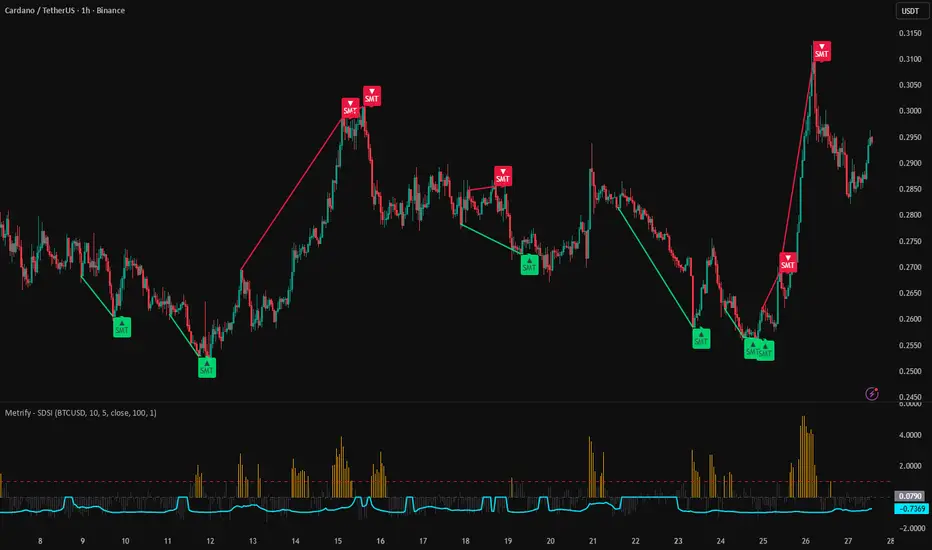
This indicator detects SMT-style divergence between the chart symbol and a user-defined reference symbol, then filters those divergence events using a statistical strength condition. The goal is to separate ordinary pivot mismatches from divergence events that occur during unusually large relative movement between the two instruments.
It combines three components in one script: pivot-based divergence detection, Z-score normalization of momentum spread, and a correlation plot for context. The output is an oscillator panel (Z-score columns + correlation line) plus optional SMT labels/lines drawn on the main chart.
SMT divergence logic (structural layer)
The structural part of the script is based on confirmed pivots on the main symbol.
For bearish SMT detection, the script checks whether the main symbol forms a higher high while the reference symbol (evaluated at the same pivot event point) forms a lower high relative to the previous corresponding pivot event. For bullish SMT detection, it checks whether the main symbol forms a lower low while the reference symbol forms a higher low
Reference symbol and inversion
The Reference Symbol (Pairing) input defines the market used for comparison. The usefulness of the divergence output depends heavily on this pairing. The script assumes the comparison is meaningful enough that non-confirmation between the two symbols can be interpreted as a potential imbalance or relative weakness/strength event.
The 'Invert Correlation' option transforms the reference data by using reciprocal values before the divergence and correlation calculations. This can be used when analyzing pairs that are expected to move inversely (like alt to btc in specific event), so the comparison orientation better matches the intended relationship.
Invert Correlation mode (what it does and why it exists)
The Invert Correlation option changes how the reference symbol is transformed before all downstream calculations (pivot comparison, momentum spread, Z-score, and correlation plot). When enabled, the script does not compare the main symbol to the raw reference prices. Instead, it compares against the reciprocal form of the reference series:
This inversion is used so that an inversely related market can be analyzed in the same directional framework as a positively correlated one. In practical terms, it converts an opposite direction relationship into a comparable orientation for SMT logic. After inversion, moves that would normally appear opposite can be interpreted as if they were aligned, allowing the same higher-high / lower-high and lower-low / higher-low SMT structure rules to be applied consistently.
Conceptually, invert mode is useful when your reference asset is expected to move opposite to the main asset and you want the script to evaluate non-confirmation in a unified SMT framework. It does not automatically improve signal quality, but simply changes the orientation of the comparison so the divergence logic matches the relationship you are trying to study.
Good inversion-pair examples (practical)
1) Risk asset vs Dollar Index (DXY)
This is one of the cleanest concepts for inversion.
BTCUSD vs DXY
ETHUSD vs DXY
OIL VS DXY
NASDAQ (NDX / US100) vs DXY
Gold vs DXY (often inverse, but can break regime)
When DXY rises, risk assets often weaken. Inverting DXY makes the reference move in the same orientation as the risk asset.

2) Equity index vs VIX
Very common inverse relationship idea.
SPX / ES / NQ vs VIX
BTC (sometimes) vs VIX as a broader risk proxy (less direct, more regime dependent)
Why inversion helps: VIX is typically "fear up when equities down". Inverted VIX can be used as a proxy for risk-on alignment.

3) USD-quoted asset vs USD strength proxy
If your main symbol is sensitive to USD strength:
XAUUSD vs DXY
EURUSD vs DXY
GBPUSD vs DXY
AUDUSD vs DXY
These are classic macro pairings where inversion often makes analytical sense.

4) Some commodity currencies vs commodity / dollar drivers (case-by-case)
Examples can work, but are more conditional:
USDCAD vs Oil (WTI) (often inverse-ish relationship via CAD/oil linkage)
AUDUSD vs Copper (sometimes)
NZDUSD vs risk proxy

These are not as stable as DXY/VIX examples, so you need to monitor correlation more carefully.
Trigger conditions in plain terms
A bearish SMT label appears only when all required conditions are satisfied:
A bullish SMT label follows the mirrored condition/vice versa.
Display behavior and non-repaint option
The indicator uses confirmed pivots, so signals are known only after pivot confirmation. The Non repaint mode setting controls how labels are displayed:
This setting affects visualization only. It does not change the underlying pivot confirmation process.
This indicator marks pivot-based intermarket non-confirmation events that occur during statistically elevated relative dislocation.
Pair selection remains a major source of variation in output quality. Weakly related pairs can produce divergence labels that satisfy the script’s rules but are not analytically useful.
It combines three components in one script: pivot-based divergence detection, Z-score normalization of momentum spread, and a correlation plot for context. The output is an oscillator panel (Z-score columns + correlation line) plus optional SMT labels/lines drawn on the main chart.
SMT divergence logic (structural layer)
The structural part of the script is based on confirmed pivots on the main symbol.
For bearish SMT detection, the script checks whether the main symbol forms a higher high while the reference symbol (evaluated at the same pivot event point) forms a lower high relative to the previous corresponding pivot event. For bullish SMT detection, it checks whether the main symbol forms a lower low while the reference symbol forms a higher low
Reference symbol and inversion
The Reference Symbol (Pairing) input defines the market used for comparison. The usefulness of the divergence output depends heavily on this pairing. The script assumes the comparison is meaningful enough that non-confirmation between the two symbols can be interpreted as a potential imbalance or relative weakness/strength event.
The 'Invert Correlation' option transforms the reference data by using reciprocal values before the divergence and correlation calculations. This can be used when analyzing pairs that are expected to move inversely (like alt to btc in specific event), so the comparison orientation better matches the intended relationship.
Invert Correlation mode (what it does and why it exists)
The Invert Correlation option changes how the reference symbol is transformed before all downstream calculations (pivot comparison, momentum spread, Z-score, and correlation plot). When enabled, the script does not compare the main symbol to the raw reference prices. Instead, it compares against the reciprocal form of the reference series:
- reference high is transformed using 1 / low
- reference low is transformed using 1 / high
- reference close is transformed using 1 / close
This inversion is used so that an inversely related market can be analyzed in the same directional framework as a positively correlated one. In practical terms, it converts an opposite direction relationship into a comparable orientation for SMT logic. After inversion, moves that would normally appear opposite can be interpreted as if they were aligned, allowing the same higher-high / lower-high and lower-low / higher-low SMT structure rules to be applied consistently.
Conceptually, invert mode is useful when your reference asset is expected to move opposite to the main asset and you want the script to evaluate non-confirmation in a unified SMT framework. It does not automatically improve signal quality, but simply changes the orientation of the comparison so the divergence logic matches the relationship you are trying to study.
- Use normal mode when the pair is usually expected to move in the same direction.
- Use invert mode when the pair is usually expected to move in opposite directions (or when your analysis framework treats one as a risk-off mirror of the other).
Good inversion-pair examples (practical)
1) Risk asset vs Dollar Index (DXY)
This is one of the cleanest concepts for inversion.
BTCUSD vs DXY
ETHUSD vs DXY
OIL VS DXY
NASDAQ (NDX / US100) vs DXY
Gold vs DXY (often inverse, but can break regime)
When DXY rises, risk assets often weaken. Inverting DXY makes the reference move in the same orientation as the risk asset.
2) Equity index vs VIX
Very common inverse relationship idea.
SPX / ES / NQ vs VIX
BTC (sometimes) vs VIX as a broader risk proxy (less direct, more regime dependent)
Why inversion helps: VIX is typically "fear up when equities down". Inverted VIX can be used as a proxy for risk-on alignment.
3) USD-quoted asset vs USD strength proxy
If your main symbol is sensitive to USD strength:
XAUUSD vs DXY
EURUSD vs DXY
GBPUSD vs DXY
AUDUSD vs DXY
These are classic macro pairings where inversion often makes analytical sense.
4) Some commodity currencies vs commodity / dollar drivers (case-by-case)
Examples can work, but are more conditional:
USDCAD vs Oil (WTI) (often inverse-ish relationship via CAD/oil linkage)
AUDUSD vs Copper (sometimes)
NZDUSD vs risk proxy
These are not as stable as DXY/VIX examples, so you need to monitor correlation more carefully.
Trigger conditions in plain terms
A bearish SMT label appears only when all required conditions are satisfied:
- a confirmed pivot high exists on the main symbol,
- the current main pivot high is higher than the previous main pivot high,
- the aligned reference high at the same pivot event is lower than its previous aligned reference high,
- and the Z-score condition exceeds the configured threshold.
A bullish SMT label follows the mirrored condition/vice versa.
Display behavior and non-repaint option
The indicator uses confirmed pivots, so signals are known only after pivot confirmation. The Non repaint mode setting controls how labels are displayed:
- Enabled: labels are shown on the trigger/confirmation bar (the bar where the pivot is confirmed and the signal becomes true).
- Disabled: labels are shifted back to the pivot bar for visual alignment.
This setting affects visualization only. It does not change the underlying pivot confirmation process.
This indicator marks pivot-based intermarket non-confirmation events that occur during statistically elevated relative dislocation.
Pair selection remains a major source of variation in output quality. Weakly related pairs can produce divergence labels that satisfy the script’s rules but are not analytically useful.

면책사항
해당 정보와 게시물은 금융, 투자, 트레이딩 또는 기타 유형의 조언이나 권장 사항으로 간주되지 않으며, 트레이딩뷰에서 제공하거나 보증하는 것이 아닙니다. 자세한 내용은 이용 약관을 참조하세요.
면책사항
해당 정보와 게시물은 금융, 투자, 트레이딩 또는 기타 유형의 조언이나 권장 사항으로 간주되지 않으며, 트레이딩뷰에서 제공하거나 보증하는 것이 아닙니다. 자세한 내용은 이용 약관을 참조하세요.