업데이트됨
Wave-Ocean Trend
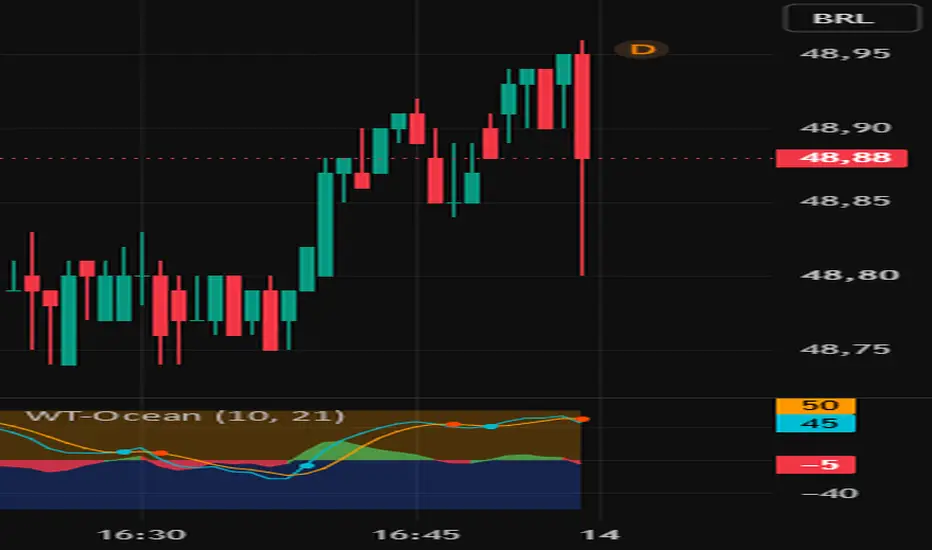
Wave-Ocean Trend
Description
Wave-Ocean Trend is a momentum indicator based on a combination of Exponential Moving Averages (EMA), mean deviation, and Simple Moving Average (SMA).
The indicator is designed to help visualize market direction and momentum changes through the relationship between two waves:
* X1 — Aqua: the fast wave, designed to respond to changes in momentum.
* X2 — Orange: the smoothed wave, used as a reference for identifying changes in market momentum.
## How to Use
🌊 Bullish Crossover
When X1 (Aqua) crosses above X2 (Orange), an Aqua ball appears.
This event represents a potential shift in momentum to the upside and can be used as a reference when analyzing possible bullish movements.
🔻 Bearish Crossover
When **X1 (Aqua)** crosses below **X2 (Orange)**, a **red-orange ball** appears.
This event represents a potential shift in momentum to the downside and can be used as a reference when analyzing possible bearish movements.
Reference Zones
The indicator includes two main reference zones:
* Above +60: elevated momentum zone.
* Below -60: negative momentum zone.
* Between +60 and -60: intermediate momentum zone.
These zones should not be interpreted independently as automatic buy or sell signals. They are intended to provide additional context when evaluating momentum.
## X1-X2 Area
The area between X1 and X2 helps visualize the difference between the two waves:
* Green: X1 is above X2.
* Red: X1 is below X2.
A wider separation between the waves indicates a larger momentary difference between fast momentum and its smoothed reference.
Settings
The indicator has two main parameters:
Fast Wave ⚡ — Default: 10
Controls the responsiveness of the fast wave.
Slow Wave 🐌 — Default: 21
Controls the smoothing of the reference wave.
Lower values may make the indicator more responsive to market changes, while higher values generally produce a smoother reading.
Suggested Use
Wave-Ocean Trend can be used together with:
* Market structure
* Support and resistance
* Higher-timeframe trend
* Volume
* Price action
* Risk management
One possible approach is to identify the broader trend on a higher timeframe and then use Wave-Ocean Trend crossovers on a lower timeframe to evaluate momentum within that context.
Important
Wave-Ocean Trend is a **technical analysis tool and does not guarantee financial results.
No crossover should be considered, by itself, a recommendation to buy or sell. Signals may occur during consolidation, choppy markets, or periods of high volatility and should be evaluated within the broader market context.
Use proper risk management and perform your own testing before using the indicator in live trading.
Description
Wave-Ocean Trend is a momentum indicator based on a combination of Exponential Moving Averages (EMA), mean deviation, and Simple Moving Average (SMA).
The indicator is designed to help visualize market direction and momentum changes through the relationship between two waves:
* X1 — Aqua: the fast wave, designed to respond to changes in momentum.
* X2 — Orange: the smoothed wave, used as a reference for identifying changes in market momentum.
## How to Use
🌊 Bullish Crossover
When X1 (Aqua) crosses above X2 (Orange), an Aqua ball appears.
This event represents a potential shift in momentum to the upside and can be used as a reference when analyzing possible bullish movements.
🔻 Bearish Crossover
When **X1 (Aqua)** crosses below **X2 (Orange)**, a **red-orange ball** appears.
This event represents a potential shift in momentum to the downside and can be used as a reference when analyzing possible bearish movements.
Reference Zones
The indicator includes two main reference zones:
* Above +60: elevated momentum zone.
* Below -60: negative momentum zone.
* Between +60 and -60: intermediate momentum zone.
These zones should not be interpreted independently as automatic buy or sell signals. They are intended to provide additional context when evaluating momentum.
## X1-X2 Area
The area between X1 and X2 helps visualize the difference between the two waves:
* Green: X1 is above X2.
* Red: X1 is below X2.
A wider separation between the waves indicates a larger momentary difference between fast momentum and its smoothed reference.
Settings
The indicator has two main parameters:
Fast Wave ⚡ — Default: 10
Controls the responsiveness of the fast wave.
Slow Wave 🐌 — Default: 21
Controls the smoothing of the reference wave.
Lower values may make the indicator more responsive to market changes, while higher values generally produce a smoother reading.
Suggested Use
Wave-Ocean Trend can be used together with:
* Market structure
* Support and resistance
* Higher-timeframe trend
* Volume
* Price action
* Risk management
One possible approach is to identify the broader trend on a higher timeframe and then use Wave-Ocean Trend crossovers on a lower timeframe to evaluate momentum within that context.
Important
Wave-Ocean Trend is a **technical analysis tool and does not guarantee financial results.
No crossover should be considered, by itself, a recommendation to buy or sell. Signals may occur during consolidation, choppy markets, or periods of high volatility and should be evaluated within the broader market context.
Use proper risk management and perform your own testing before using the indicator in live trading.
릴리즈 노트
ok릴리즈 노트
🔔 Sound Alerts릴리즈 노트
thank you 릴리즈 노트
Added sound alerts to the Wave.릴리즈 노트
Sound Alert Correction: The Wave sound alerts have been adjusted and corrected. The Ball and Wave alerts are now working properly.릴리즈 노트
ok릴리즈 노트
ok
면책사항
해당 정보와 게시물은 금융, 투자, 트레이딩 또는 기타 유형의 조언이나 권장 사항으로 간주되지 않으며, 트레이딩뷰에서 제공하거나 보증하는 것이 아닙니다. 자세한 내용은 이용 약관을 참조하세요.
면책사항
해당 정보와 게시물은 금융, 투자, 트레이딩 또는 기타 유형의 조언이나 권장 사항으로 간주되지 않으며, 트레이딩뷰에서 제공하거나 보증하는 것이 아닙니다. 자세한 내용은 이용 약관을 참조하세요.