Telah dikemas kini
Smart Trader, SNIF-OFF 5.1, Trade Finder, By Ata Sabanci
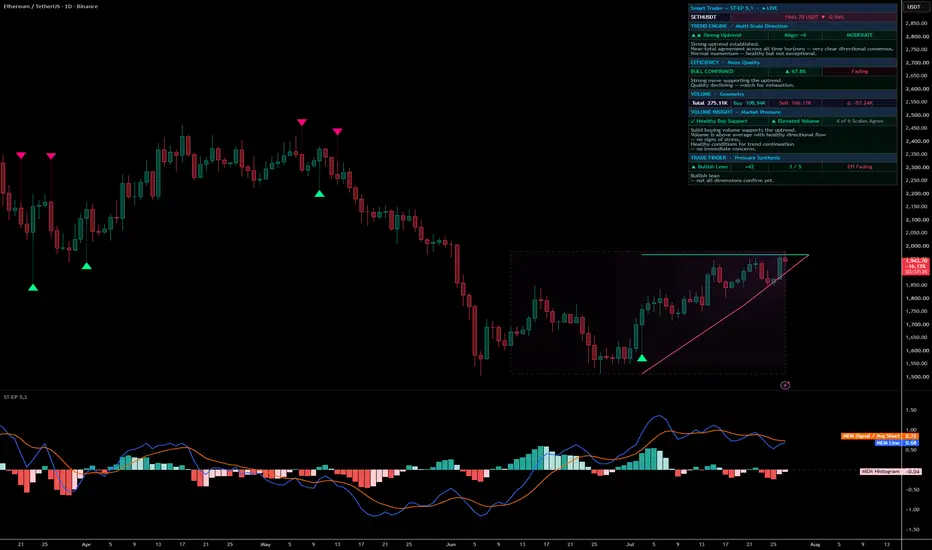
🔷 WHAT IS SMART TRADER?
Smart Trader (ST-EP 5,1) is a multi-module market intelligence dashboard designed to provide structured readings across three dimensions on every candle:
1. Direction — What is the prevailing trend across multiple time scales, from micro-reactions to macro structure?
2. Move Quality — Is the current price action decisive and efficient, or noisy and indecisive?
3. Market Pressure — Where is volume concentrated, who appears to be in control, and at which price levels did the heaviest activity occur?
These three dimensions are computed independently and then cross-referenced to produce layered, plain-language assessments. The output is not a single number or a buy/sell arrow — it is a structured narrative describing the current condition, the evidence behind it, and a contextual forward expectation.
One panel. Three engines. One decision framework.

The full Smart Trader desktop dashboard — three modules visible: Trend Engine, Move Quality, and Volume Intelligence.
🔷 HOW THE THREE MODULES WORK TOGETHER
The three engines — Trend, Efficiency, and Volume — are designed to operate as a cross-referencing system rather than three isolated readings.
Example: A "Strong Uptrend" reading from the Trend Engine tells you that most time horizons agree on a bullish direction. But direction alone may be incomplete. The Efficiency module checks whether the moves behind that trend appear clean and decisive or weak and choppy. The Volume module then checks whether buying volume seems to support the uptrend, or whether selling pressure may be building against it. The Volume Footprint adds a further layer: at which price levels did the heaviest estimated buying and selling occur — and do those levels appear to confirm or contradict the trend?
The result is a layered reading: direction (Trend) combined with quality (Efficiency) combined with participation (Volume).
This cross-referencing produces 11 trend signal states, 19 efficiency-trend coupling states, and 16 volume scenarios. Each state includes a plain-language narrative describing the observed condition, the structural evidence, and the contextual expectation.

Cross-module reading during a developing reversal — the Trend Engine detects a bullish reversal forming with low conviction, Efficiency confirms the directional move but flags fading momentum, and Volume Intelligence reports healthy buying support with partial scale consensus. Three independent readings, one layered assessment.
🔷 DATA ANCHORING
To minimize the possibility of retroactive changes to displayed values, the dashboard is designed so that all signals, labels, colors, and scenario classifications are computed from the last confirmed (closed) bar. The live bar (bar 0) is excluded from these computations by design.
Two clearly labeled exceptions are intended to operate under a live-bar protocol:
— Raw volume cells (Total, Buy, Sell, Delta) are designed to update while the current bar is open and lock when it closes.
— The live volume spike alert is designed to fire on the current candle. It is marked as a live event in both the dashboard and the alert message.
The intention behind this architecture is that if you observe a reading on a past bar, that reading should reflect the state that existed when the bar closed. Efforts have been made to ensure that past-bar values do not change after the fact. However, as with any technical system, users are encouraged to verify behavior on their own charts and timeframes.
🔷 MODULE 1: TREND ENGINE — Multi-Scale Direction
The Trend Engine is designed to analyze price movement across six time horizons simultaneously: 3, 7, 13, 19, 29, and 49 bars. Each horizon is intended to capture a different structural layer — from fast micro-reactions to slow macro structure.
How direction is assessed:
At each horizon, the engine measures the rate of directional change — whether price appears to be gaining ground relative to the available movement opportunity at that time scale. Each horizon produces an independent directional vote: +1 (bullish), −1 (bearish), or 0 (insufficient data). The sum of all six votes forms the Alignment Score, ranging from −6 to +6.
11 Signal States (priority-ordered):
⚡ Reversal Confirmed — Short-term and mid-term horizons have independently turned against the macro direction.
▲/▼ Reversal Forming — The fastest horizons have turned but mid-term has not yet confirmed.
▲▲/▼▼ Strong Uptrend / Strong Downtrend — Five or six of six horizons agree on one direction.
▲/▼ Hidden Bias — Alignment score is near zero, but the two broadest horizons unanimously agree on a direction.
▲/▼ Uptrend / Downtrend Active — Three or more horizons agree.
◆ No Clear Trend — Horizons disagree. No dominant direction observed.
Conviction Level:
Each vote is weighted by its magnitude — not just its sign. Weak, hesitant movements produce lower-weight votes. Decisive movements produce higher-weight votes. The weighted sum determines conviction: HIGH, MODERATE, or LOW.
Narrative:
A 3-line plain-language summary appears below the signal row: current state, structural reason, and conviction assessment.

🔷 MODULE 2: EFFICIENCY — Move Quality
A candle can have a large range but close near its open — noisy, indecisive movement. Another candle can have a smaller range but close at one extreme — clean, directional movement. The Efficiency module is designed to measure what fraction of a candle group's total movement opportunity was converted into net directional progress. It uses a multi-bar composite of the most recent closed bars to reduce single-bar noise.
Dimension 1 — Adaptive Percentile Rank:
The current efficiency value is compared against recent history using percentile ranking. This is intended to self-tune per instrument and timeframe — avoiding fixed thresholds. What may qualify as "extreme" on a volatile instrument differs from a slow-moving one.
Extreme — Top 5% of recent history.
Strong — Top 25%.
Normal — Middle 50%.
Weak — Bottom 25%.
Dimension 2 — Trend Coupling (19 States):
The efficiency rank is cross-referenced with the active trend direction. The same high-efficiency reading may carry different implications depending on whether it supports or opposes the trend:
When move quality appears aligned with the trend:
⚡ BULL/BEAR SURGE — Extreme quality driving the trend forward.
CONFIRMED — Strong quality supporting the trend.
Active — Normal directional support.
Stalling — Direction present but energy appears weak.
When move quality appears to oppose the trend:
⚠ STRONG COUNTER — Extreme quality move against the trend.
Pressure — Significant opposing push observed.
Mild Resistance / Mild Support — Moderate counter-move within the trend.
Noise — Weak opposing move.
When no trend is established:
Extreme Move, Strong Move, Normal, Indecisive.
Dimension 3 — Momentum:
Compares short-term average efficiency against long-term average efficiency:
Accelerating — Recent quality is well above the baseline.
Sharpening — Gradual improvement.
Steady — No significant change.
Fading — Recent quality has dropped below the baseline.
Narrative:
A 2-line summary describes the current situation and trajectory.

🔷 MODULE 3: VOLUME INTELLIGENCE — Market Pressure
Volume Decomposition:
Each candle's volume is decomposed into estimated buying pressure and selling pressure using one of two available methods:
Geometry method (available on all plans) — Uses the close position within the high-low range to estimate the buy/sell split.
Intrabar method (Essential plan and above) — Uses lower-timeframe data to classify sub-candles, then aggregates. Configurable timeframe (default: 1 minute).
The dashboard displays Total volume, Buy volume, Sell volume, and the net Delta (Buy minus Sell).
Multi-Scale Volume Ranking:
Volume is ranked using percentile comparison at each of the six grouping scales (3, 7, 13, 19, 29, 49 bars). The median of all six percentile ranks determines the overall volume intensity zone:
Explosive — Top 5% of multi-scale history.
Elevated — Top 25%.
Moderate — Middle 50%.
Very Low — Bottom 25%.
Volume Footprint — Price-Level Analysis:
For each grouping scale, the footprint maps estimated volume distribution across price levels. It extracts:
Maximum Buy / Sell — The price level where the heaviest estimated buying or selling occurred.
Minimum Buy / Sell — The price level with the least estimated activity.
Point of Control — The price level with the highest estimated total volume.
Two engines are available:
Geometry (all plans) — Estimates volume distribution using candle shape within each group period.
Native (Premium/Ultimate plan) — Uses tick-level data from TradingView for higher-resolution volume mapping. Configurable ticks per row and value area percentage.

Volume Intelligence identifying a Fair Value Magnet — the Volume Footprint shows Point of Control clustering near 11.40 across multiple grouping scales, with 4 of 6 scales in agreement. Price has moved away from this multi-scale volume center. The 3-line narrative describes the observed condition, the structural evidence from the footprint, and the contextual expectation.
Volume Center Consensus:
When multiple grouping scales place their Point of Control near the same price level, a consensus may form. The dashboard reports how many of the 6 scales appear to agree.
16 Volume Scenarios:
The engine synthesizes volume decomposition, footprint analysis, multi-scale ranking, and trend context into one of 16 classified scenarios:
Trend-Aligned:
S1 — ⚡ Full Buy/Sell Confirmation: Extreme volume appearing fully aligned with the trend.
S2 — ✓ Healthy Buy/Sell Support: Above-average volume appearing to support the trend.
S3 — ◆ Weak Buy/Sell Support: Direction present but volume is unremarkable.
Trend-Opposed:
S4 — ⚠ Major Buy/Sell Counter: Extreme volume appearing to oppose the trend.
S5 — ⚠ Buy/Sell Pressure Growing: Above-average opposing volume observed.
S6 — ◇ Normal Correction: Weak opposing volume within the trend.
Structural:
S7 — 💥 Breakout Candidate: Extreme one-sided volume without an established trend.
S8 — ● Dead Market: Minimal balanced volume observed.
S9 — ⚠ Volume Divergence: Trend present but volume participation appears to be declining.
Footprint-Derived:
S10 — 🧲 Fair Value Magnet: Multi-scale volume center consensus detected. Price has moved away from this level.
S11 — 🛡 Demand Absorption: Heaviest estimated buying concentrated near the range lows.
S12 — 📤 Supply Distribution: Heaviest estimated selling concentrated near the range highs.
S13 — 💢 Selling Capitulation: Extreme estimated sell volume concentrated at the lows.
S14 — 💢 Buying Exhaustion: Extreme estimated buy volume concentrated at the highs.
Stealth:
S15 — 🔍 Quiet Accumulation: Persistent low-volume buying near lows without trend support detected.
S16 — 🔍 Quiet Distribution: Persistent low-volume selling near highs without trend opposition detected.
Volume Narrative:
Each scenario generates a 3-line narrative: what is observed, the structural evidence, and the contextual expectation.

Volume Intelligence reporting Healthy Buy Support (S2) with elevated volume and 5 of 6 grouping scales in consensus. The Volume Footprint column shows Point of Control clustering near 25.60 across nearly all scales — a visible example of multi-scale volume center agreement. The 3-line narrative describes the observed pressure, the structural evidence, and the contextual expectation.
🔷 VISUAL TOOLS
Candle Grouping Boxes:
Six nested boxes drawn on the chart, one per grouping scale (3, 7, 13, 19, 29, 49 bars). Each box spans the highest high to lowest low of its group. The 49-bar box uses a dashed border to mark the macro structural boundary. Color and transparency are configurable.
Leader Candles:
Each grouping period is represented by one composite candle at the group center. The composite merges all candles in the group into one OHLC representation. When enabled, regular chart candles can be hidden for a cleaner structural view.
Leader Trend Lines:
Lines connecting the macro-scale anchor to the mid-term anchor, projected forward by a configurable number of bars. Lines are designed to lock after each refresh cycle and remain frozen until the next recalculation.

Visual tools and settings panel — six nested candle grouping boxes visible on the chart alongside composite leader candles and projected leader trend lines. The settings panel shows all configurable parameters including box color, transparency, leader trend line refresh cycle, forward extension, line style, and module visibility toggles.
🔷 MOBILE DASHBOARD
A compact 3-column, 5-row panel designed for mobile use:
Row 1 — Indicator name and live/historical status.
Row 2 — Ticker, price, and alignment score.
Row 3 — Trend signal and conviction level.
Row 4 — Efficiency coupling, quality percentage, and momentum.
Row 5 — Volume scenario and volume zone.
All data comes from the same computations — the mobile view changes only the display density.

Mobile dashboard — the compact 5-row layout displaying trend signal, efficiency coupling, and volume scenario alongside the chart with grouping boxes and leader trend lines. All readings are computed from the same engine as the desktop dashboard — the mobile view changes only the display density.
🔷 54 ALERT CONDITIONS
Every state the dashboard displays has a corresponding alert condition. Each is designed to fire once when entering a new state — not repeatedly while in the same state.
Trend Engine: 11 alerts — one per signal state.
Conviction: 3 alerts — HIGH, MODERATE, LOW transitions.
Efficiency Coupling: 19 alerts — one per coupling state.
Efficiency Momentum: 4 alerts — Accelerating, Sharpening, Steady, Fading.
Volume Scenarios: 16 alerts — one per scenario.
Live Volume Spike: 1 alert — fires on the current candle when volume meets spike criteria. Set alert frequency to "Once Per Bar" for this condition.
Alert messages include: ticker, timeframe, alignment score, efficiency percentage, volume rank, price, and timestamp.

Alert conditions panel — all 54 alert states listed in the TradingView alert dialog. Each dashboard state has a corresponding one-time transition alert: 11 trend signals, 3 conviction levels, 19 efficiency coupling states, 4 momentum states, 16 volume scenarios, and 1 live volume spike alert.
🔷 THREE-LANGUAGE SUPPORT
All dashboard text — labels, status messages, narratives — is available in three languages:
English — Default.
Türkçe — Turkish with professional trading terminology.
العربية — Arabic with right-to-left text alignment.
Computational logic and alert messages operate in English regardless of display language selection.
🔷 SUBSCRIPTION TIERS
Basic (Free TradingView Plan):
Trend Engine (11 signals), Conviction levels, Efficiency Intelligence (19 coupling states, 4 momentum states), Volume Decomposition (Geometry), Volume Footprint (Geometry), Volume Intelligence (16 scenarios), Leader Candles, Grouping Boxes, Leader Trend Lines, 54 Alerts, Mobile and Desktop Dashboard, 3-Language Support.
Essential and Plus:
All Basic features. Adds: Volume Decomposition via Intrabar method (lower-timeframe classification).
Premium and Ultimate:
All Essential features. Adds: Volume Footprint via Native tick-level engine.
🔷 HOW TO USE — Reading Workflow
Step 1: Read the Trend Engine.
Check the signal state and alignment score. "No Clear Trend" suggests the market has no dominant direction — any directional trade may carry higher uncertainty.
Step 2: Check Efficiency coupling.
Is move quality aligned with the trend (Confirmed, Active, Surge) or opposing it (Counter, Pressure)? Is momentum Accelerating or Fading?
Step 3: Check Volume Intelligence.
Does the volume scenario appear to confirm or contradict the trend reading? Check the footprint: where are the heaviest estimated buy and sell concentrations relative to current price?
Step 4: Read the narratives.
Each module produces a plain-language summary. Together, the three narratives provide a structured market assessment.
Step 5: Configure alerts.
Select the specific states relevant to your trading approach. Each alert is designed to fire on state transitions.
🔷 SETTINGS
Access Tier — Selects the TradingView subscription plan. Controls which volume methods are available. Higher tiers include all lower-tier features.
Dashboard — Font size, panel position, mobile dashboard toggle, mobile font size, display language.
Candle Grouping — Box color and transparency for the six structural grouping boxes.
Leader Trend Lines — Toggle, refresh cycle length (bars between recalculations), forward projection distance (bars), high line color, low line color, line style (solid/dashed/dotted), line width.
Trend Engine — Toggles dashboard row visibility. The engine runs regardless of this setting.
Candle Efficiency — Toggles dashboard row visibility. The engine runs regardless of this setting.
Volume Decomposition — Toggles dashboard rows. Method selection (Geometry or Intrabar). Intrabar timeframe configuration.
Volume Footprint — Method selection (Geometry or Native). Native-mode ticks per row and value area percentage.
🔷 DISCLAIMER
Smart Trader is an analytical tool designed to provide market structure readings. It does not generate buy or sell signals and does not constitute financial advice. Past observations do not guarantee future results. All readings are estimations based on available price and volume data. Users are responsible for their own trading decisions and risk management. No indicator can predict the market — this tool is intended to provide structured context to support your own decision-making process.
Smart Trader (ST-EP 5,1) is a multi-module market intelligence dashboard designed to provide structured readings across three dimensions on every candle:
1. Direction — What is the prevailing trend across multiple time scales, from micro-reactions to macro structure?
2. Move Quality — Is the current price action decisive and efficient, or noisy and indecisive?
3. Market Pressure — Where is volume concentrated, who appears to be in control, and at which price levels did the heaviest activity occur?
These three dimensions are computed independently and then cross-referenced to produce layered, plain-language assessments. The output is not a single number or a buy/sell arrow — it is a structured narrative describing the current condition, the evidence behind it, and a contextual forward expectation.
One panel. Three engines. One decision framework.
The full Smart Trader desktop dashboard — three modules visible: Trend Engine, Move Quality, and Volume Intelligence.
🔷 HOW THE THREE MODULES WORK TOGETHER
The three engines — Trend, Efficiency, and Volume — are designed to operate as a cross-referencing system rather than three isolated readings.
Example: A "Strong Uptrend" reading from the Trend Engine tells you that most time horizons agree on a bullish direction. But direction alone may be incomplete. The Efficiency module checks whether the moves behind that trend appear clean and decisive or weak and choppy. The Volume module then checks whether buying volume seems to support the uptrend, or whether selling pressure may be building against it. The Volume Footprint adds a further layer: at which price levels did the heaviest estimated buying and selling occur — and do those levels appear to confirm or contradict the trend?
The result is a layered reading: direction (Trend) combined with quality (Efficiency) combined with participation (Volume).
This cross-referencing produces 11 trend signal states, 19 efficiency-trend coupling states, and 16 volume scenarios. Each state includes a plain-language narrative describing the observed condition, the structural evidence, and the contextual expectation.
Cross-module reading during a developing reversal — the Trend Engine detects a bullish reversal forming with low conviction, Efficiency confirms the directional move but flags fading momentum, and Volume Intelligence reports healthy buying support with partial scale consensus. Three independent readings, one layered assessment.
🔷 DATA ANCHORING
To minimize the possibility of retroactive changes to displayed values, the dashboard is designed so that all signals, labels, colors, and scenario classifications are computed from the last confirmed (closed) bar. The live bar (bar 0) is excluded from these computations by design.
Two clearly labeled exceptions are intended to operate under a live-bar protocol:
— Raw volume cells (Total, Buy, Sell, Delta) are designed to update while the current bar is open and lock when it closes.
— The live volume spike alert is designed to fire on the current candle. It is marked as a live event in both the dashboard and the alert message.
The intention behind this architecture is that if you observe a reading on a past bar, that reading should reflect the state that existed when the bar closed. Efforts have been made to ensure that past-bar values do not change after the fact. However, as with any technical system, users are encouraged to verify behavior on their own charts and timeframes.
🔷 MODULE 1: TREND ENGINE — Multi-Scale Direction
The Trend Engine is designed to analyze price movement across six time horizons simultaneously: 3, 7, 13, 19, 29, and 49 bars. Each horizon is intended to capture a different structural layer — from fast micro-reactions to slow macro structure.
How direction is assessed:
At each horizon, the engine measures the rate of directional change — whether price appears to be gaining ground relative to the available movement opportunity at that time scale. Each horizon produces an independent directional vote: +1 (bullish), −1 (bearish), or 0 (insufficient data). The sum of all six votes forms the Alignment Score, ranging from −6 to +6.
11 Signal States (priority-ordered):
⚡ Reversal Confirmed — Short-term and mid-term horizons have independently turned against the macro direction.
▲/▼ Reversal Forming — The fastest horizons have turned but mid-term has not yet confirmed.
▲▲/▼▼ Strong Uptrend / Strong Downtrend — Five or six of six horizons agree on one direction.
▲/▼ Hidden Bias — Alignment score is near zero, but the two broadest horizons unanimously agree on a direction.
▲/▼ Uptrend / Downtrend Active — Three or more horizons agree.
◆ No Clear Trend — Horizons disagree. No dominant direction observed.
Conviction Level:
Each vote is weighted by its magnitude — not just its sign. Weak, hesitant movements produce lower-weight votes. Decisive movements produce higher-weight votes. The weighted sum determines conviction: HIGH, MODERATE, or LOW.
Narrative:
A 3-line plain-language summary appears below the signal row: current state, structural reason, and conviction assessment.
🔷 MODULE 2: EFFICIENCY — Move Quality
A candle can have a large range but close near its open — noisy, indecisive movement. Another candle can have a smaller range but close at one extreme — clean, directional movement. The Efficiency module is designed to measure what fraction of a candle group's total movement opportunity was converted into net directional progress. It uses a multi-bar composite of the most recent closed bars to reduce single-bar noise.
Dimension 1 — Adaptive Percentile Rank:
The current efficiency value is compared against recent history using percentile ranking. This is intended to self-tune per instrument and timeframe — avoiding fixed thresholds. What may qualify as "extreme" on a volatile instrument differs from a slow-moving one.
Extreme — Top 5% of recent history.
Strong — Top 25%.
Normal — Middle 50%.
Weak — Bottom 25%.
Dimension 2 — Trend Coupling (19 States):
The efficiency rank is cross-referenced with the active trend direction. The same high-efficiency reading may carry different implications depending on whether it supports or opposes the trend:
When move quality appears aligned with the trend:
⚡ BULL/BEAR SURGE — Extreme quality driving the trend forward.
CONFIRMED — Strong quality supporting the trend.
Active — Normal directional support.
Stalling — Direction present but energy appears weak.
When move quality appears to oppose the trend:
⚠ STRONG COUNTER — Extreme quality move against the trend.
Pressure — Significant opposing push observed.
Mild Resistance / Mild Support — Moderate counter-move within the trend.
Noise — Weak opposing move.
When no trend is established:
Extreme Move, Strong Move, Normal, Indecisive.
Dimension 3 — Momentum:
Compares short-term average efficiency against long-term average efficiency:
Accelerating — Recent quality is well above the baseline.
Sharpening — Gradual improvement.
Steady — No significant change.
Fading — Recent quality has dropped below the baseline.
Narrative:
A 2-line summary describes the current situation and trajectory.
🔷 MODULE 3: VOLUME INTELLIGENCE — Market Pressure
Volume Decomposition:
Each candle's volume is decomposed into estimated buying pressure and selling pressure using one of two available methods:
Geometry method (available on all plans) — Uses the close position within the high-low range to estimate the buy/sell split.
Intrabar method (Essential plan and above) — Uses lower-timeframe data to classify sub-candles, then aggregates. Configurable timeframe (default: 1 minute).
The dashboard displays Total volume, Buy volume, Sell volume, and the net Delta (Buy minus Sell).
Multi-Scale Volume Ranking:
Volume is ranked using percentile comparison at each of the six grouping scales (3, 7, 13, 19, 29, 49 bars). The median of all six percentile ranks determines the overall volume intensity zone:
Explosive — Top 5% of multi-scale history.
Elevated — Top 25%.
Moderate — Middle 50%.
Very Low — Bottom 25%.
Volume Footprint — Price-Level Analysis:
For each grouping scale, the footprint maps estimated volume distribution across price levels. It extracts:
Maximum Buy / Sell — The price level where the heaviest estimated buying or selling occurred.
Minimum Buy / Sell — The price level with the least estimated activity.
Point of Control — The price level with the highest estimated total volume.
Two engines are available:
Geometry (all plans) — Estimates volume distribution using candle shape within each group period.
Native (Premium/Ultimate plan) — Uses tick-level data from TradingView for higher-resolution volume mapping. Configurable ticks per row and value area percentage.
Volume Intelligence identifying a Fair Value Magnet — the Volume Footprint shows Point of Control clustering near 11.40 across multiple grouping scales, with 4 of 6 scales in agreement. Price has moved away from this multi-scale volume center. The 3-line narrative describes the observed condition, the structural evidence from the footprint, and the contextual expectation.
Volume Center Consensus:
When multiple grouping scales place their Point of Control near the same price level, a consensus may form. The dashboard reports how many of the 6 scales appear to agree.
16 Volume Scenarios:
The engine synthesizes volume decomposition, footprint analysis, multi-scale ranking, and trend context into one of 16 classified scenarios:
Trend-Aligned:
S1 — ⚡ Full Buy/Sell Confirmation: Extreme volume appearing fully aligned with the trend.
S2 — ✓ Healthy Buy/Sell Support: Above-average volume appearing to support the trend.
S3 — ◆ Weak Buy/Sell Support: Direction present but volume is unremarkable.
Trend-Opposed:
S4 — ⚠ Major Buy/Sell Counter: Extreme volume appearing to oppose the trend.
S5 — ⚠ Buy/Sell Pressure Growing: Above-average opposing volume observed.
S6 — ◇ Normal Correction: Weak opposing volume within the trend.
Structural:
S7 — 💥 Breakout Candidate: Extreme one-sided volume without an established trend.
S8 — ● Dead Market: Minimal balanced volume observed.
S9 — ⚠ Volume Divergence: Trend present but volume participation appears to be declining.
Footprint-Derived:
S10 — 🧲 Fair Value Magnet: Multi-scale volume center consensus detected. Price has moved away from this level.
S11 — 🛡 Demand Absorption: Heaviest estimated buying concentrated near the range lows.
S12 — 📤 Supply Distribution: Heaviest estimated selling concentrated near the range highs.
S13 — 💢 Selling Capitulation: Extreme estimated sell volume concentrated at the lows.
S14 — 💢 Buying Exhaustion: Extreme estimated buy volume concentrated at the highs.
Stealth:
S15 — 🔍 Quiet Accumulation: Persistent low-volume buying near lows without trend support detected.
S16 — 🔍 Quiet Distribution: Persistent low-volume selling near highs without trend opposition detected.
Volume Narrative:
Each scenario generates a 3-line narrative: what is observed, the structural evidence, and the contextual expectation.
Volume Intelligence reporting Healthy Buy Support (S2) with elevated volume and 5 of 6 grouping scales in consensus. The Volume Footprint column shows Point of Control clustering near 25.60 across nearly all scales — a visible example of multi-scale volume center agreement. The 3-line narrative describes the observed pressure, the structural evidence, and the contextual expectation.
🔷 VISUAL TOOLS
Candle Grouping Boxes:
Six nested boxes drawn on the chart, one per grouping scale (3, 7, 13, 19, 29, 49 bars). Each box spans the highest high to lowest low of its group. The 49-bar box uses a dashed border to mark the macro structural boundary. Color and transparency are configurable.
Leader Candles:
Each grouping period is represented by one composite candle at the group center. The composite merges all candles in the group into one OHLC representation. When enabled, regular chart candles can be hidden for a cleaner structural view.
Leader Trend Lines:
Lines connecting the macro-scale anchor to the mid-term anchor, projected forward by a configurable number of bars. Lines are designed to lock after each refresh cycle and remain frozen until the next recalculation.
Visual tools and settings panel — six nested candle grouping boxes visible on the chart alongside composite leader candles and projected leader trend lines. The settings panel shows all configurable parameters including box color, transparency, leader trend line refresh cycle, forward extension, line style, and module visibility toggles.
🔷 MOBILE DASHBOARD
A compact 3-column, 5-row panel designed for mobile use:
Row 1 — Indicator name and live/historical status.
Row 2 — Ticker, price, and alignment score.
Row 3 — Trend signal and conviction level.
Row 4 — Efficiency coupling, quality percentage, and momentum.
Row 5 — Volume scenario and volume zone.
All data comes from the same computations — the mobile view changes only the display density.
Mobile dashboard — the compact 5-row layout displaying trend signal, efficiency coupling, and volume scenario alongside the chart with grouping boxes and leader trend lines. All readings are computed from the same engine as the desktop dashboard — the mobile view changes only the display density.
🔷 54 ALERT CONDITIONS
Every state the dashboard displays has a corresponding alert condition. Each is designed to fire once when entering a new state — not repeatedly while in the same state.
Trend Engine: 11 alerts — one per signal state.
Conviction: 3 alerts — HIGH, MODERATE, LOW transitions.
Efficiency Coupling: 19 alerts — one per coupling state.
Efficiency Momentum: 4 alerts — Accelerating, Sharpening, Steady, Fading.
Volume Scenarios: 16 alerts — one per scenario.
Live Volume Spike: 1 alert — fires on the current candle when volume meets spike criteria. Set alert frequency to "Once Per Bar" for this condition.
Alert messages include: ticker, timeframe, alignment score, efficiency percentage, volume rank, price, and timestamp.
Alert conditions panel — all 54 alert states listed in the TradingView alert dialog. Each dashboard state has a corresponding one-time transition alert: 11 trend signals, 3 conviction levels, 19 efficiency coupling states, 4 momentum states, 16 volume scenarios, and 1 live volume spike alert.
🔷 THREE-LANGUAGE SUPPORT
All dashboard text — labels, status messages, narratives — is available in three languages:
English — Default.
Türkçe — Turkish with professional trading terminology.
العربية — Arabic with right-to-left text alignment.
Computational logic and alert messages operate in English regardless of display language selection.
🔷 SUBSCRIPTION TIERS
Basic (Free TradingView Plan):
Trend Engine (11 signals), Conviction levels, Efficiency Intelligence (19 coupling states, 4 momentum states), Volume Decomposition (Geometry), Volume Footprint (Geometry), Volume Intelligence (16 scenarios), Leader Candles, Grouping Boxes, Leader Trend Lines, 54 Alerts, Mobile and Desktop Dashboard, 3-Language Support.
Essential and Plus:
All Basic features. Adds: Volume Decomposition via Intrabar method (lower-timeframe classification).
Premium and Ultimate:
All Essential features. Adds: Volume Footprint via Native tick-level engine.
🔷 HOW TO USE — Reading Workflow
Step 1: Read the Trend Engine.
Check the signal state and alignment score. "No Clear Trend" suggests the market has no dominant direction — any directional trade may carry higher uncertainty.
Step 2: Check Efficiency coupling.
Is move quality aligned with the trend (Confirmed, Active, Surge) or opposing it (Counter, Pressure)? Is momentum Accelerating or Fading?
Step 3: Check Volume Intelligence.
Does the volume scenario appear to confirm or contradict the trend reading? Check the footprint: where are the heaviest estimated buy and sell concentrations relative to current price?
Step 4: Read the narratives.
Each module produces a plain-language summary. Together, the three narratives provide a structured market assessment.
Step 5: Configure alerts.
Select the specific states relevant to your trading approach. Each alert is designed to fire on state transitions.
🔷 SETTINGS
Access Tier — Selects the TradingView subscription plan. Controls which volume methods are available. Higher tiers include all lower-tier features.
Dashboard — Font size, panel position, mobile dashboard toggle, mobile font size, display language.
Candle Grouping — Box color and transparency for the six structural grouping boxes.
Leader Trend Lines — Toggle, refresh cycle length (bars between recalculations), forward projection distance (bars), high line color, low line color, line style (solid/dashed/dotted), line width.
Trend Engine — Toggles dashboard row visibility. The engine runs regardless of this setting.
Candle Efficiency — Toggles dashboard row visibility. The engine runs regardless of this setting.
Volume Decomposition — Toggles dashboard rows. Method selection (Geometry or Intrabar). Intrabar timeframe configuration.
Volume Footprint — Method selection (Geometry or Native). Native-mode ticks per row and value area percentage.
🔷 DISCLAIMER
Smart Trader is an analytical tool designed to provide market structure readings. It does not generate buy or sell signals and does not constitute financial advice. Past observations do not guarantee future results. All readings are estimations based on available price and volume data. Users are responsible for their own trading decisions and risk management. No indicator can predict the market — this tool is intended to provide structured context to support your own decision-making process.
Nota Keluaran
🔄 Update — Dashboard Font Precision UpgradeThis update modernizes the dashboard text sizing system to take advantage of Pine Script v6's native typographic point engine, released by TradingView in late 2024.
What changed:
The "Font Size" and "Mobile Font Size" settings in the Dashboard group now control text size with exact typographic point precision — the same system used in word processors and design tools. When you set the slider to 12, the dashboard text renders at exactly 12pt. When you set it to 18, it renders at exactly 18pt.
Why it matters:
Previously, the numeric slider (6–50) was internally mapped to only 5 discrete size levels (tiny, small, normal, large, huge). This meant that setting the font to 12, 13, 14, 15, or 16 all produced the same visual result. Users who carefully adjusted the slider expecting precise control were not getting it.
Now every single value in the 6–50 range produces a distinct, proportional text size — giving you full control over dashboard readability across different screen sizes, resolutions, and chart layouts.
What you need to do:
Nothing. Your existing font size settings carry over automatically. The only difference is that the number you see now matches the actual rendered size. If your dashboard looks slightly different after the update, simply adjust the Font Size slider to your preferred value — you now have 45 distinct sizes instead of 5.
Applies to:
— Desktop dashboard (all rows, all modules)
— Mobile dashboard (compact 5-row panel)
— All three languages (English, Türkçe, العربية)
No changes to any computation, signal logic, alert condition, or data anchoring behavior. This update is purely visual — zero impact on readings, scenarios, or narratives.
Nota Keluaran
🔷 UPDATE — Grouping Scale Correction (49 → 47)The six grouping scales used throughout Smart Trader — in the Trend Engine, Efficiency module, Volume Intelligence, Candle Grouping Boxes, Leader Candles, and Leader Trend Lines — are designed as a prime number sequence: each scale is a prime, chosen so that no scale is a harmonic multiple of another. This prevents structural overlap between time horizons and ensures each scale captures independent market information.
The previous largest scale was 49. However, 49 = 7 × 7 — it is not a prime number and is a direct harmonic of the 7-bar scale. This created a subtle redundancy between the two broadest horizons.
This update replaces 49 with 47, which is a verified prime. The six grouping scales are now 3, 7, 13, 19, 29, 47 — all prime numbers with no harmonic relationships between them.
What changed:
— All six-scale computations (slopes, signs, alignment, tier consensus, conviction weights, volume percentile ranks, footprint profiles, and volume center consensus) now use 47 as the macro scale.
— Leader Trend Line anchor point recalculated to reflect the 47-bar group center.
— Native footprint rolling store capacity adjusted from 55 to 53 entries (47 + 6 buffer).
— All grouping boxes, leader candles, and dashboard arrays updated consistently.
What did not change:
— No change to any formula, method, or signal logic. The architecture is identical — only the outermost scale value was corrected.
— All 54 alert conditions, 11 trend states, 19 efficiency coupling states, and 16 volume scenarios remain the same.
— The mobile dashboard, three-language support, and all visual tools are unaffected.
Nota Keluaran
Update — Intrabar Timeframe Validation GuardWhat changed:
Added a runtime safety guard to the Volume Decomposition module that prevents an error (RE10142) when the chart timeframe is lower than the configured Intrabar timeframe.
When this occurred:
If you selected the Intrabar volume method with the default 1-minute setting and then viewed a chart on a sub-minute timeframe (such as 30 seconds), the indicator would produce the error:
"Invalid lower timeframe: '1'. The timeframe must be lower than or equal to '30S'"
This happened because the Intrabar engine requires a timeframe strictly lower than the chart — and on sub-minute charts, the default 1-minute setting does not meet that requirement.
How it is resolved:
The indicator now validates the Intrabar timeframe against the chart timeframe before making the request. If the configured timeframe is not lower than the chart:
— The engine automatically falls back to the Geometry method for that session.
— The dashboard badge changes from "● ACTIVE" to "⚠ TF" in yellow.
— A warning row explains that the Intrabar timeframe must be lower than the chart timeframe and that Geometry is being used automatically.
— No data is lost and no manual intervention is required. Simply switch to a higher chart timeframe or adjust the Intrabar timeframe setting to restore Intrabar mode.
What is not affected:
— All other modules (Trend Engine, Efficiency, Volume Footprint, Alerts) are unchanged.
— Users on the Geometry method (default) are not affected in any way.
— No changes to signal logic, scenario classification, or narrative generation.
This is a defensive fix — it resolves an edge case on sub-minute charts and ensures the indicator runs cleanly across all timeframes without user intervention.
Nota Keluaran
Update — Tick Timeframe Recognition Fix for Volume DecompositionWhat changed:
Fixed a bug in the Volume Decomposition module where selecting a tick-based Intrabar timeframe (such as 1T, 10T, or any value ending in "T") incorrectly triggered the Geometry fallback — even when the chart timeframe was significantly higher (e.g. 1 hour).
The dashboard would display the "⚠ TF" badge and the warning "Intrabar timeframe must be lower than chart — using Geometry" despite the tick timeframe being valid and strictly lower than the chart.
Why it happened:
The Intrabar timeframe validation compared chart and intrabar timeframes by converting both to seconds. However, tick-based timeframes have no fixed duration in seconds — Pine Script's timeframe.in_seconds() returns na for tick values. The original validation treated this na result as "not lower than the chart," which caused the false rejection.
This affected only tick-based Intrabar selections. Minute, second, and all other time-based Intrabar timeframes were validated correctly.
How it is resolved:
The validation now detects tick-based timeframes before attempting the seconds comparison. A tick timeframe is always treated as lower than any time-based chart timeframe. The one edge case — where both the chart and the Intrabar setting are tick-based — is handled separately: in that scenario, the Intrabar timeframe is not lower than the chart, so Geometry is used as expected.
What is not affected:
— All other modules (Trend Engine, Efficiency, Volume Footprint, Volume Intelligence, Alerts) are unchanged.
— Users on the Geometry method (default) are not affected.
— Users who selected Intrabar with minute or second timeframes were never affected by this issue.
— No changes to signal logic, scenario classification, or narrative generation.
Nota Keluaran
Update — Volume Footprint Engine Rebuild (Native → Intrabar Hybrid)What changed:
The Volume Footprint's "Native" method has been completely rebuilt. The previous implementation used TradingView's request.footprint() function, which accessed tick-level data to map buy and sell volume at each price level. While accurate, this method consumed significant memory on high-resolution settings — particularly on sub-minute charts with small tick-per-row values — and could produce runtime memory errors on certain instruments.
The new implementation replaces request.footprint() entirely with an Intrabar Hybrid engine. When Native mode is selected, the footprint now uses real buy/sell volume data from lower-timeframe classification (the same engine that powers the Intrabar volume decomposition method) and distributes it across price levels within each grouping period. If intrabar data is unavailable for any specific bar, the engine automatically falls back to the Geometry method for that bar — ensuring continuous output with zero gaps.
Tier requirement change:
The Native footprint method previously required a Premium or Ultimate TradingView plan. With this rebuild, it now requires Essential plan or higher — making it accessible to a wider range of users. The Geometry method continues to work on all plans including Basic (Free).
What was removed:
— The request.footprint() function call and all associated tick-level data storage.
— The "Ticks Per Row" and "Value Area %" input settings (these were specific to the old request.footprint() engine and are no longer needed).
What is not affected:
— The Geometry footprint method is completely unchanged.
— All 6 grouping scales (3, 7, 13, 19, 29, 47) continue to produce footprint profiles with the same output structure: Maximum Buy/Sell, Minimum Buy/Sell, and Point of Control at each scale.
— All 16 volume scenarios, 54 alert conditions, trend engine, efficiency module, leader candles, grouping boxes, and leader trend lines are unaffected.
— The mobile dashboard, three-language support, and all visual tools remain the same.
Why this matters:
— Zero memory errors. The new engine operates within standard memory limits on all instruments and timeframes.
— Lower tier requirement. Essential plan users now have access to real buy/sell footprint data.
— Graceful degradation. If intrabar data is not available for certain bars (early history, specific exchanges), the engine seamlessly falls back to Geometry estimation for those bars — no manual intervention needed.
— The dashboard badge shows "Intrabar (Real Buy/Sell)" when Native mode is active, clearly indicating which engine is running.
Nota Keluaran
Update — Tier Simplification & Footprint Engine RenameWhat changed:
The subscription tier system has been simplified from three levels to two. The previous structure — Basic (Free), Essential and Plus, Premium and Ultimate — has been replaced with a cleaner two-tier model: Basic (Free) and Essential and Plus.
The Volume Footprint method previously labeled "Native" has been renamed to "Intrabar" to accurately reflect how it works. The engine uses lower-timeframe data via TradingView's intrabar request system — not native tick-level data. The new name aligns the footprint method label with the Volume Decomposition method, which already used the term "Intrabar."
Why this was done:
The previous three-tier structure reserved the "Premium and Ultimate" level for the Native footprint engine, which was described as using tick-level data. In practice, the footprint engine uses the same intrabar decomposition method as the Volume Decomposition module — classifying buy and sell volume from lower-timeframe candles, not from raw tick streams. Maintaining a separate tier for a capability that is architecturally identical to the Essential-tier Intrabar method created unnecessary complexity and an inaccurate distinction.
Consolidating to two tiers removes this ambiguity. Users on Essential and Plus now have access to both Intrabar Volume Decomposition and Intrabar Volume Footprint — the full feature set — without needing a higher tier.
What you need to do:
If you were previously on the "Premium and Ultimate" setting, your plan selection will need to be updated to "Essential and Plus" in the indicator settings. All features you had access to remain available under this tier.
If you were on "Basic (Free)" or "Essential and Plus," no action is required.
What is not affected:
— All computational logic, signal states, scenario classifications, and narrative generation remain identical.
— The Geometry method (available on all plans) is unchanged.
— All 54 alert conditions, 11 trend states, 19 efficiency coupling states, and 16 volume scenarios remain the same.
— The mobile dashboard, three-language support, and all visual tools are unaffected.
— No changes to data anchoring behavior or anti-repaint architecture.
Nota Keluaran
What's New in Smart Trader — ST-EP 5,11 · ICS Library — A Dedicated Coordinate Engine
The Isotropic Coordinate System (ICS), the mathematical backbone that normalizes every price move for volatility, has been rebuilt as a standalone, independently versioned library. All slope measurements, efficiency calculations, and trend-line projections now run through this dedicated engine. The result is a more robust volatility model (Yang-Zhang, 2000 — an academically validated, minimum-variance estimator) and a cleaner architecture that allows the ICS to evolve independently without touching the indicator's main logic.
2 · Language Expansion — 3 → 7 Languages
The dashboard now speaks seven languages: English, Türkçe, العربية, Italiano, हिन्दी, 日本語, and 简体中文. All display text — labels, narratives, tooltips, and chart-mark descriptions — is fully localized. This was made possible by migrating the entire language dictionary into dedicated libraries, which simultaneously freed significant space inside the indicator for new features and reduced the per-bar computational footprint.
3 · Performance Improvements
Several internal optimizations make the indicator run smoother across all timeframes and instruments. Repeated calculations that previously ran on every single bar have been identified and restructured so they execute only once when their results are actually needed. String operations, narrative construction, and heavy analytical loops are now deferred to the final bar. Visual elements (boxes, leader candles, lines) use a create-once-then-reposition model instead of delete-and-recreate on every frame. Together, these changes reduce memory usage and improve responsiveness, especially on lower timeframes with dense history.
4 · Native Footprint — Premium Tier
A third footprint method is now available alongside Geometry and Intrabar: Native. This uses TradingView's server-side footprint engine to provide exact, tick-level buy and sell volume at every price level — the most precise volume distribution data available on the platform. Requires a Premium or Ultimate TradingView subscription. The space freed by migrating language dictionaries to libraries made this addition possible without exceeding Pine Script's compilation limits.
5 · Trade Finder — Pressure Synthesis
A new synthesis layer that combines all five signal dimensions — Trend, Conviction, Efficiency, Volume, and Momentum — into a single composite pressure score. Instead of reading each module separately, the Trade Finder tells you in one glance whether buying or selling pressure dominates, how many dimensions agree, and what to watch for a change of character. States describe market pressure (Strong Bullish, Bear Lean, Choppy, Mixed Signals) — never entry or exit recommendations.
6 · Confluence Marks — Visual Chart Events
When all five dimensions align and the dominant pressure crosses your chosen threshold, a confluence mark appears on the chart: a triangle for directional pressure, a diamond for rare bull-bear ties. Every mark carries a detailed tooltip showing the structural breakdown behind the event. A birth-chain system distinguishes first-of-direction events from continuations. Mark spacing, size, offset, and maximum count are fully configurable.
7 · Reversal & Trend Cycle
A classified reversal detection layer tracks when the composite pressure score flips sides. Each reversal is automatically classified (Climactic, Accumulation, Distribution, Exhaustion, or Rotation) based on volume conditions, velocity, and the depth of the prior episode. After a reversal, the first bar where pressure reaches your Trend Confirmation Level prints a TREND label — one confirmation per episode. The system is fully independent from the confluence marks and provides early-warning structural context.
8 · Signal Health — Live Monitor
A new dashboard section that tracks the health of the active confluence episode in real time. It shows whether the current episode is being confirmed (pressure still flowing in the birth direction), under attack (opposing pressure building), or neutral. Values update tick by tick and lock at the bar close. Explicitly marked as PROVISIONAL — a live monitor, not a signal.
9 · Three New Volume Scenarios
The volume narrative engine now recognizes three additional market conditions that the previous version classified as Dead Market or Normal Correction:
🔥 Pressure Building (S17) — Strong volume with a directional delta in a trendless market. Pre-breakout signature.
⚖ High-Volume Standoff (S18) — Elevated volume but balanced buy/sell delta. Two sides are actively fighting.
◇ Balanced Flow (S19) — Two-sided participation with no net initiative while the trend is still active. Watch for the balance to break.
10 · Expanded Alerts — 54 → 60
Six new individually selectable alerts bring the total to 60: three for the new volume scenarios (V17, V18, V19) and three for the Trade Finder (Bullish Confluence Threshold, Bearish Confluence Threshold, Reversal Watch). The output budget is now fully utilized at 64/64.
As always, the indicator is a reading tool — it describes what the market is doing, not what you should do. If anything in this update raises a question, I'm here.
Nota Keluaran
Release Notes — Performance and Efficiency UpdateThis update makes ST-EP 5,1 significantly lighter on TradingView's servers, with zero changes to any signal, engine, alert, or visual.
Background
TradingView gives every script a shared server-side runtime budget. In one specific maximum-precision setup — tick-level Intrabar volume combined with the Native footprint on data-dense charts — the script could approach that budget. This was a resource-efficiency matter, not a calculation issue: every engine, signal, and alert was computing correctly the whole time.
What changed
1. Smarter data requests. The lower-timeframe volume request now executes only when the Volume or Footprint module actually selects the Intrabar method (Pine v6 dynamic requests). On Geometry or Native configurations, and on the Basic plan, the request never runs — zero server and client cost.
2. Redundant fallback removed. An internal fallback request that could fire without ever being consumed has been eliminated.
3. New HEAVY badge. The Volume row now shows a gold warning when a costly combination is selected — for example, tick data on charts above one minute — so you can adjust settings before reaching the platform budget. Tick data remains fully supported and is the natural choice on second-based charts, where the dashboard's valid-bar counter shows exactly how far your coverage extends.
What did not change
All signals, computations, alerts, languages, and visuals are byte-identical. The indicator now simply does its heavy lifting only when you ask for it.
Nota Keluaran
🔄 What's New in This Update
🧠 New Engine: MEM (Master Evaluation Matrix)
A new global sensor layer that reads across all signal dimensions at once — trend state, move quality, volume pressure, momentum, scale-by-scale directional votes, cross-dimensional interactions, and the active confluence episode — and reduces them into one single system-wide reading.
Think of it as a master gauge: instead of checking each module separately, MEM gives you one number that captures the whole picture.
📊 New Oscillator Pane (MACD Mode)
A dedicated oscillator pane now sits below your chart. By default it runs in MACD mode — but this is not a traditional MACD built on price. The MACD line, signal line, and four-color histogram are all derived from the MEM engine's internal reading, not from the price series. This means you're seeing momentum of the system's structural assessment, not just price momentum.
You can also switch to raw sensor view or overlay a short/long moving average pair for crossover reading.
The full dashboard and all chart marks remain on the price chart — the oscillator pane is purely additive.
📌 Mark Info Boxes
A new optional layer for confluence marks: when enabled, each mark displays a persistent info box directly on the chart showing the full structural breakdown — which dimensions aligned, the pressure score, and what the system was seeing at that bar. No hover needed. Toggle it on when you want to study the structure; toggle it off for a clean chart.
As always, these marks describe observed market structure and pressure alignment. They are not buy or sell signals.
🔧 Confluence Engine Refinements
The confluence gating logic now includes a coherence filter that checks whether the signal dimensions are constructively aligned or destructively interfering. Marks only appear when the system's dimensions are genuinely pulling in the same direction — reducing noise and improving mark quality.
Mark rendering has been simplified: only birth marks (first-of-direction triangles) appear on the chart. Continuation dots and whipsaw crosses have been removed for a cleaner visual. Default colors and threshold have been recalibrated for better visibility and sensitivity.
🔬 Reversal Classifier Upgrade
The reversal pattern classifier now incorporates a volatility regime feature, improving its ability to distinguish climactic reversals (which tend to occur in high-volatility environments) from quiet accumulation/distribution patterns (which favor low-volatility regimes).
The visual reversal/trend marks have been retired from the chart — the classifier continues to run internally and feeds its output into the MEM engine.
⚡ Performance & Optimization
Internal code structure has been optimized for smoother execution and more efficient use of CPU and memory. Redundant computations have been eliminated, history buffers have been trimmed to only what is actively needed, and the alert budget has been streamlined from 60 to 55 by removing low-signal-value alerts — freeing output slots for the new MEM oscillator plots.
⚠️ Reminder
Smart Trader is a market structure recognition tool. Every label, mark, scenario, and reading describes what the system observes — not what you should do. No element in this indicator is a buy or sell recommendation. Use it alongside your own analysis and risk management.
Nota Keluaran
What's newThis release does two things: it gives you a second way of reading the market, and it takes away the parts that were adding weight without adding clarity.
Ensemble Aggregation
The five components — trend, conviction, efficiency, momentum and volume — have always been combined through a sequential process, where each stage has to pass before the next one counts. That is still here, and it is still the steadier of the two. The new option measures every component on a continuous scale and gives them equal say, with nothing carried over from earlier candles. Each bar is judged on its own evidence, so it changes its mind faster. The two engines keep separate thresholds, so moving between them never costs you a calibration.
Adaptive Hysteresis
The switching barrier now depends on the state already in force. A reading in the opposite direction has to clear the threshold and then out-perform whatever it is trying to replace, and as a regime fades it becomes easier to displace. Fewer flip-flops in chop, at the cost of confirming a genuine turn a little later.
Multiresolution Depth
Price can now be read at nineteen horizons at once instead of six. Deeper structure, at the cost of later confirmation, because the longer windows need more history before they turn. Off by default.
Volume, rebuilt
Buying and selling are treated as two separate populations, each measured on its own across every horizon, instead of being collapsed into a single net figure before the reading is made.
Alert timing
Alerts wait for the candle to close by default, so a condition that appears and then vanishes mid-candle never fires and every alert matches what the chart finally shows. One switch fires them the moment the condition appears if you would rather be early. Alerts and chart marks now come from exactly the same events, so the two can no longer drift apart.
What is gone
The six-level footprint table was the longest block on the panel and mostly reference you rarely acted on. Every calculation behind it still runs and still feeds the volume pressure read and Trade Finder — you simply do not have to scroll past it. The live signal-health row said what the pressure read already says. Three mark settings went with them: the cap on marks, the info box and its font size. The cap is handled internally now, so chart drawings never crowd each other out, and the full breakdown is still one hover away on any mark.
Same 55 selectable alerts. Same seven dashboard languages. A shorter panel, fewer switches, and more control where it actually matters.
Tersedia dalam Ruangan Berbayar
Penunjuk ini hanya tersedia untuk pelanggan SABANCI . Sertai untuk mengaksesnya dan skrip-skrip lain dari ata_sabanci.

Measuring markets through Volume Dynamics & Geometric Frameworks.
For invite-only script access, DM on TradingView or via x.com/sabanci_ata
For invite-only script access, DM on TradingView or via x.com/sabanci_ata
Penafian
Maklumat dan penerbitan adalah tidak bertujuan, dan tidak membentuk, nasihat atau cadangan kewangan, pelaburan, dagangan atau jenis lain yang diberikan atau disahkan oleh TradingView. Baca lebih dalam Terma Penggunaan.
Tersedia dalam Ruangan Berbayar
Penunjuk ini hanya tersedia untuk pelanggan SABANCI . Sertai untuk mengaksesnya dan skrip-skrip lain dari ata_sabanci.
Measuring markets through Volume Dynamics & Geometric Frameworks.
For invite-only script access, DM on TradingView or via x.com/sabanci_ata
For invite-only script access, DM on TradingView or via x.com/sabanci_ata
Penafian
Maklumat dan penerbitan adalah tidak bertujuan, dan tidak membentuk, nasihat atau cadangan kewangan, pelaburan, dagangan atau jenis lain yang diberikan atau disahkan oleh TradingView. Baca lebih dalam Terma Penggunaan.