OPEN-SOURCE SCRIPT
MSX Liquidity Lines
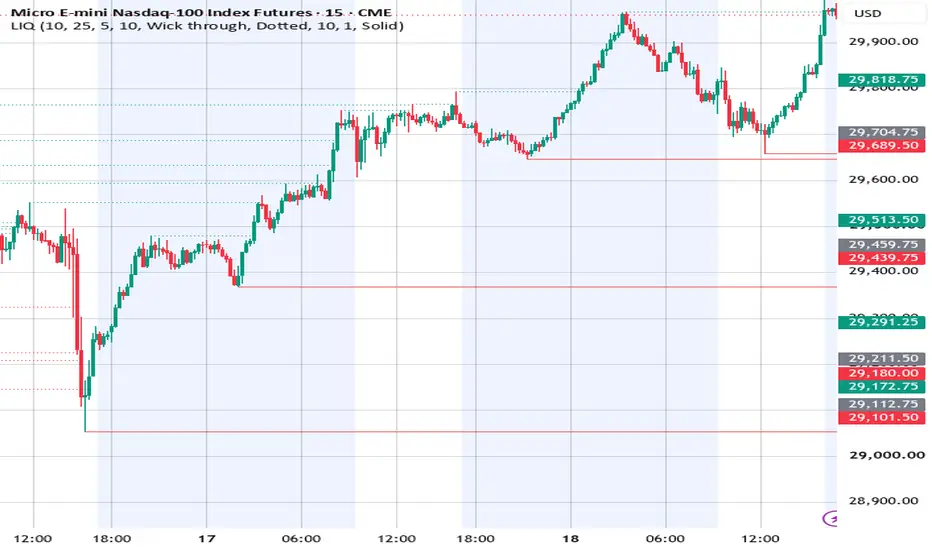
Liquidity Lines
Marks resting liquidity at confirmed swing highs and lows, and shows you when it gets taken.
Every confirmed pivot high and pivot low gets a horizontal line that extends to the right and stays there until price trades through it. When a level is swept, the line dims and stops at the bar that took it — so at any moment the bright lines are the liquidity still sitting on the chart, and the faded ones are the history of what's already been run.
How the levels are placed
Three details that determine whether a level sits where orders actually rest:
Levels are drawn on the wick, not the close. Stops sit above the high and below the low, so that's where the line goes.
Each line starts at its own pivot bar. A pivot can only be confirmed some bars after it forms, and drawing the line from the confirmation bar misplaces it in time. This walks each line back to the swing it belongs to.
Equal highs and equal lows merge. A new pivot that forms within tolerance of a live level joins that level instead of drawing a second line a few ticks away, and the line thickens with each touch. A double or triple top reads as one heavy line rather than three thin ones stacked together — one pool of orders, drawn as one level, weighted by how many times price has left stops there.
Settings
Swing length — the main control. Higher values return fewer, more significant levels; lower values surface the minor intraday pools. 10 is a balanced default.
Merge tolerance — how close two pivots must be to count as the same pool, measured as a percentage of ATR so it scales across instruments and timeframes.
Break trigger — wick-through treats a level as taken the moment price trades past it; close-through only counts a body close beyond it.
Stop line at the break — on, swept lines terminate where they were taken. Off, they keep extending in a dimmed state.
Dim amount, colors, widths and line styles are all adjustable, including separate styling for live and swept levels.
Notes
Levels confirm after the pivot completes, which means a level appears on the chart some bars after the swing that formed it. The line is drawn back to the correct bar, but it cannot exist before the pivot is confirmed.
This is a levels tool. It does not generate entries, exits, or directional signals, and it makes no claim about what price will do when a level is reached.
Marks resting liquidity at confirmed swing highs and lows, and shows you when it gets taken.
Every confirmed pivot high and pivot low gets a horizontal line that extends to the right and stays there until price trades through it. When a level is swept, the line dims and stops at the bar that took it — so at any moment the bright lines are the liquidity still sitting on the chart, and the faded ones are the history of what's already been run.
How the levels are placed
Three details that determine whether a level sits where orders actually rest:
Levels are drawn on the wick, not the close. Stops sit above the high and below the low, so that's where the line goes.
Each line starts at its own pivot bar. A pivot can only be confirmed some bars after it forms, and drawing the line from the confirmation bar misplaces it in time. This walks each line back to the swing it belongs to.
Equal highs and equal lows merge. A new pivot that forms within tolerance of a live level joins that level instead of drawing a second line a few ticks away, and the line thickens with each touch. A double or triple top reads as one heavy line rather than three thin ones stacked together — one pool of orders, drawn as one level, weighted by how many times price has left stops there.
Settings
Swing length — the main control. Higher values return fewer, more significant levels; lower values surface the minor intraday pools. 10 is a balanced default.
Merge tolerance — how close two pivots must be to count as the same pool, measured as a percentage of ATR so it scales across instruments and timeframes.
Break trigger — wick-through treats a level as taken the moment price trades past it; close-through only counts a body close beyond it.
Stop line at the break — on, swept lines terminate where they were taken. Off, they keep extending in a dimmed state.
Dim amount, colors, widths and line styles are all adjustable, including separate styling for live and swept levels.
Notes
Levels confirm after the pivot completes, which means a level appears on the chart some bars after the swing that formed it. The line is drawn back to the correct bar, but it cannot exist before the pivot is confirmed.
This is a levels tool. It does not generate entries, exits, or directional signals, and it makes no claim about what price will do when a level is reached.
Skrip sumber terbuka
Dalam semangat TradingView sebenar, pencipta skrip ini telah menjadikannya sumber terbuka, jadi pedagang boleh menilai dan mengesahkan kefungsiannya. Terima kasih kepada penulis! Walaupuan anda boleh menggunakan secara percuma, ingat bahawa penerbitan semula kod ini tertakluk kepada Peraturan Dalaman.

Penafian
Maklumat dan penerbitan adalah tidak bertujuan, dan tidak membentuk, nasihat atau cadangan kewangan, pelaburan, dagangan atau jenis lain yang diberikan atau disahkan oleh TradingView. Baca lebih dalam Terma Penggunaan.
Skrip sumber terbuka
Dalam semangat TradingView sebenar, pencipta skrip ini telah menjadikannya sumber terbuka, jadi pedagang boleh menilai dan mengesahkan kefungsiannya. Terima kasih kepada penulis! Walaupuan anda boleh menggunakan secara percuma, ingat bahawa penerbitan semula kod ini tertakluk kepada Peraturan Dalaman.
Penafian
Maklumat dan penerbitan adalah tidak bertujuan, dan tidak membentuk, nasihat atau cadangan kewangan, pelaburan, dagangan atau jenis lain yang diberikan atau disahkan oleh TradingView. Baca lebih dalam Terma Penggunaan.