OPEN-SOURCE SCRIPT
Past Session POC / VAH / VAL (Full Day)
Past Session POC / VAH / VAL (Full Day)
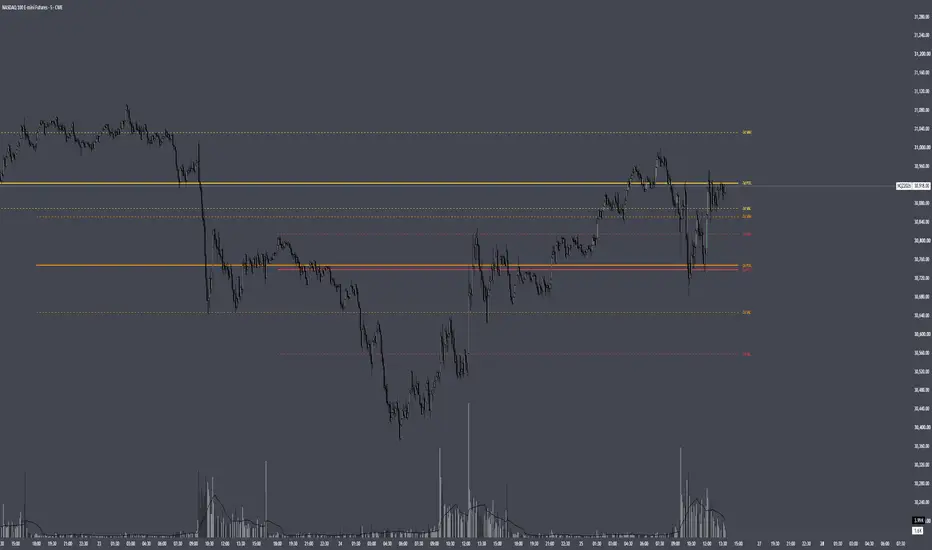
Plots the Point of Control, Value Area High and Value Area Low from up to 5 previous full trading sessions (for CME futures, the 18:00 ET open through the 17:00 ET close).
HOW IT WORKS
Instead of estimating volume from chart candles, the script pulls lower-timeframe data (1 minute by default) and distributes each intrabar's volume across the price levels it actually traded through. This builds a full volume-at-price profile for each session, so the levels closely match TradingView's built-in Session Volume Profile when the row settings are the same.
- POC: the price row with the highest traded volume
- Value Area: expands outward from the POC, comparing the next two rows above and below and adding the larger side, until the chosen % of session volume (default 70%) is covered
- VAH / VAL: the top and bottom of that value area
SETTINGS
Profile: set Rows Layout, Row Size and Value Area % to match your Session Volume Profile. "Ticks Per Row" is recommended for precise levels (e.g. 4 ticks = 1 point on NQ).
Sessions: show or hide the POC, VAH and VAL for each of the last 5 sessions individually, each with its own colour.
Display: line widths and styles, how far lines extend past the current bar, and label position and size.
NOTES
- Intrabar Timeframe must be equal to or lower than the chart timeframe.
- Levels are calculated once each session closes, so they do not repaint.
- Built from intrabar candle data, not tick data, so on sessions where two rows are nearly tied the POC can occasionally differ by one row from the built-in profile.
Plots the Point of Control, Value Area High and Value Area Low from up to 5 previous full trading sessions (for CME futures, the 18:00 ET open through the 17:00 ET close).
HOW IT WORKS
Instead of estimating volume from chart candles, the script pulls lower-timeframe data (1 minute by default) and distributes each intrabar's volume across the price levels it actually traded through. This builds a full volume-at-price profile for each session, so the levels closely match TradingView's built-in Session Volume Profile when the row settings are the same.
- POC: the price row with the highest traded volume
- Value Area: expands outward from the POC, comparing the next two rows above and below and adding the larger side, until the chosen % of session volume (default 70%) is covered
- VAH / VAL: the top and bottom of that value area
SETTINGS
Profile: set Rows Layout, Row Size and Value Area % to match your Session Volume Profile. "Ticks Per Row" is recommended for precise levels (e.g. 4 ticks = 1 point on NQ).
Sessions: show or hide the POC, VAH and VAL for each of the last 5 sessions individually, each with its own colour.
Display: line widths and styles, how far lines extend past the current bar, and label position and size.
NOTES
- Intrabar Timeframe must be equal to or lower than the chart timeframe.
- Levels are calculated once each session closes, so they do not repaint.
- Built from intrabar candle data, not tick data, so on sessions where two rows are nearly tied the POC can occasionally differ by one row from the built-in profile.
Skrip sumber terbuka
Dalam semangat TradingView sebenar, pencipta skrip ini telah menjadikannya sumber terbuka, jadi pedagang boleh menilai dan mengesahkan kefungsiannya. Terima kasih kepada penulis! Walaupuan anda boleh menggunakan secara percuma, ingat bahawa penerbitan semula kod ini tertakluk kepada Peraturan Dalaman.

Penafian
Maklumat dan penerbitan adalah tidak bertujuan, dan tidak membentuk, nasihat atau cadangan kewangan, pelaburan, dagangan atau jenis lain yang diberikan atau disahkan oleh TradingView. Baca lebih dalam Terma Penggunaan.
Skrip sumber terbuka
Dalam semangat TradingView sebenar, pencipta skrip ini telah menjadikannya sumber terbuka, jadi pedagang boleh menilai dan mengesahkan kefungsiannya. Terima kasih kepada penulis! Walaupuan anda boleh menggunakan secara percuma, ingat bahawa penerbitan semula kod ini tertakluk kepada Peraturan Dalaman.
Penafian
Maklumat dan penerbitan adalah tidak bertujuan, dan tidak membentuk, nasihat atau cadangan kewangan, pelaburan, dagangan atau jenis lain yang diberikan atau disahkan oleh TradingView. Baca lebih dalam Terma Penggunaan.