OPEN-SOURCE SCRIPT
Telah dikemas kini Session KillZones [7Bridges]
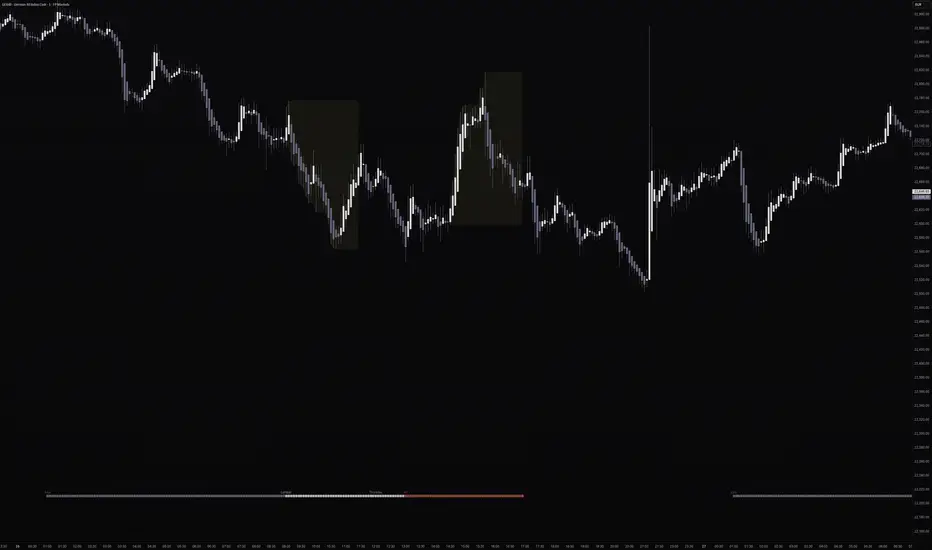
Session Killzones by 7Bridges indicator display the killzones of asian, LND and NY sessions. There is also a custom session of your choice.
The times of each killzone are GMT time and you can adjust it in the settings.
You have also the beginning of the day, GMT and EST timezones.
By default the killzones are set like that on the GMT/UTC timezone :
-> Asia : 00:00 - 06:00
-> Pre London : 06:00 - 07:00
-> London : 07:00 - 10:00
-> New York : 12:00 - 15:00
-> Custom session : choose your own time
What makes the indicator very different is that the session is not overlapping the price but you have bars below and above the price.
Settings:
-> you can chose to display the Killzones (Asia, pre LND, LND and NY)
-> you can manages the time of the sessions
-> you can chose to display the start of the day (GMT/UTC and EST )
The indicator is displayed by default only for all the timeframes below 60min.
The times of each killzone are GMT time and you can adjust it in the settings.
You have also the beginning of the day, GMT and EST timezones.
By default the killzones are set like that on the GMT/UTC timezone :
-> Asia : 00:00 - 06:00
-> Pre London : 06:00 - 07:00
-> London : 07:00 - 10:00
-> New York : 12:00 - 15:00
-> Custom session : choose your own time
What makes the indicator very different is that the session is not overlapping the price but you have bars below and above the price.
Settings:
-> you can chose to display the Killzones (Asia, pre LND, LND and NY)
-> you can manages the time of the sessions
-> you can chose to display the start of the day (GMT/UTC and EST )
The indicator is displayed by default only for all the timeframes below 60min.
Nota Keluaran
Code cleaningNota Keluaran
Major update :- Possibility to choose the colors, shape and position of the Killzones Session
- Customisable 2 sessions (to monitor your own trading session)
- The 2 sessions are displayed by shapes at the top or bottom (and by a rectangle on the price for the EOD markup)
Nota Keluaran
Session KillZones [7Bridges] is a TradingView indicator that visually maps the major trading sessions and kill zones directly on your chart.At the bottom of the chart, a color-coded strip shows you at a glance which session is currently active — Asia, Pre-London, London Kill Zone, or New York Kill Zone — with the session name displayed at the open. The full day of the week is also shown in the strip at a configurable time, so you always know where you are in the trading week without needing a separate indicator.
Two fully customizable personal sessions (My Session 1 & 2) can be configured to match your own trading hours. When enabled, they display both a strip marker and a live price range box that expands in real time with the session high and low, then freezes at the close — giving you a clear visual reference of the range built during your session.
All sessions are timezone-aware with automatic DST handling, and every setting includes a tooltip explaining what it does.
UPDATES
Timezone & DST support
Each session now has its own timezone selector (9 options including Exchange). Named timezones like Europe/London and America/New_York handle Daylight Saving Time automatically — no manual adjustment needed when clocks change.
Smarter session defaults
Asia: 09:00–17:00 Tokyo time
Pre-London: 07:00–08:00 London time (off by default)
London KZ: 08:00–12:00 London time
NY KZ: 08:00–12:00 New York time
Live price range boxes (My Session 1 & 2)
The session boxes now follow price in real time — they expand with each new high/low during the session and freeze cleanly when it closes. Fill only, no border. Both default to #fff176 at 5% opacity. My Session 1 defaults to 08:00–10:30 London, My Session 2 to 09:30–12:00 New York.
Day of week label
The full day name (Monday, Tuesday…) now appears directly in the bottom strip on every historical bar. Display time is configurable (default 06:00 GMT) to avoid overlapping with session labels.
Cleaner settings panel
All inputs have clear, descriptive labels and tooltip icons explaining exactly what each setting does. The panel is logically ordered: main sessions → custom sessions → Day of Week → Day Start markers at the very bottom.
Nota Keluaran
Release Note:Update default values
Skrip sumber terbuka
Dalam semangat TradingView sebenar, pencipta skrip ini telah menjadikannya sumber terbuka, jadi pedagang boleh menilai dan mengesahkan kefungsiannya. Terima kasih kepada penulis! Walaupuan anda boleh menggunakan secara percuma, ingat bahawa penerbitan semula kod ini tertakluk kepada Peraturan Dalaman.

Penafian
Maklumat dan penerbitan adalah tidak bertujuan, dan tidak membentuk, nasihat atau cadangan kewangan, pelaburan, dagangan atau jenis lain yang diberikan atau disahkan oleh TradingView. Baca lebih dalam Terma Penggunaan.
Skrip sumber terbuka
Dalam semangat TradingView sebenar, pencipta skrip ini telah menjadikannya sumber terbuka, jadi pedagang boleh menilai dan mengesahkan kefungsiannya. Terima kasih kepada penulis! Walaupuan anda boleh menggunakan secara percuma, ingat bahawa penerbitan semula kod ini tertakluk kepada Peraturan Dalaman.
Penafian
Maklumat dan penerbitan adalah tidak bertujuan, dan tidak membentuk, nasihat atau cadangan kewangan, pelaburan, dagangan atau jenis lain yang diberikan atau disahkan oleh TradingView. Baca lebih dalam Terma Penggunaan.