BoaBias: MTF ALMA SuperTrend & Stats
█ WHAT IT DOES
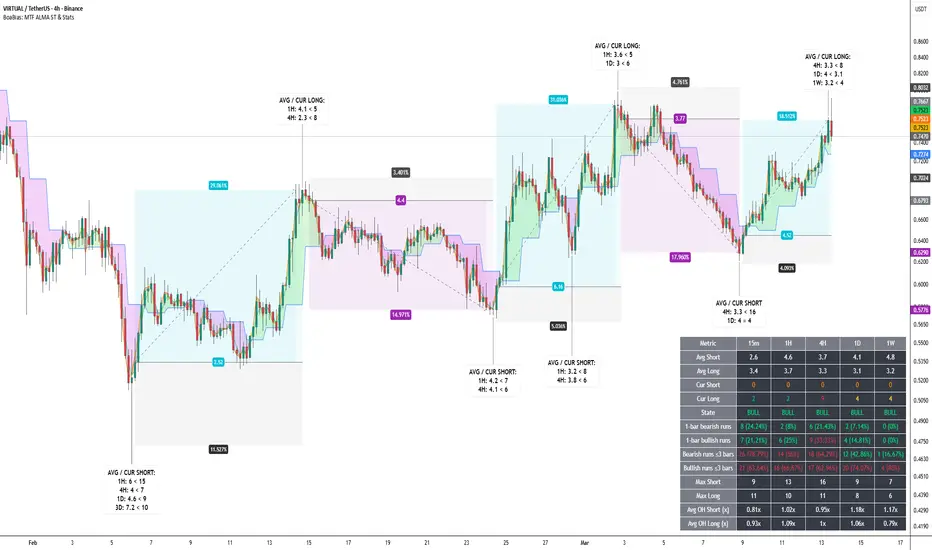
Multi-timeframe ALMA with SuperTrend-style regime logic on 15m, 1H, 4H, 1D, 1W on one chart. Per-TF ALMA lines; separate bar colors for regime; optional filled bands between adjacent TF ALMAs. Optional statistics table: average and current run lengths, State (BULL / BEAR / NEUT), 1-bar and short-run (≤N bars) counts, max runs, and Avg OH stretch columns. OH vs avg (per TF) controls how Cur Short / Cur Long cells highlight vs their rolling averages. MTF overheat labels on history (toggle in settings; on in default preset): ·S (bear run stretch) below the bar, ·L (bull run stretch) above the bar; one timeframe per text line; minimum overheated TF count is separate for bear vs bull; vertical stack spacing limits overlap on consecutive bars. No alert() in Pine — use TradingView’s alert UI if needed.
█ HOW IT WORKS
█ ORIGINALITY
MTF overlay of ALMA-based SD SuperTrend combined with a per-TF run statistics layer, per-TF overheat multipliers, and MTF overheat labels (separate bear/bull gating + stack spacing; toggleable). Pine v6, self-contained. Inspired by public ALMA / SuperTrend discussion; wiring, table, heat logic, and labels are specific to this script.
█ HOW TO USE
█ PERFORMANCE / LOAD TIME
The script runs multiple MTF security calls and statistics on each bar. On first load or a long visible history, TradingView may need several seconds to finish — wait before assuming the table or labels failed. If the chart feels heavy, reduce loaded history, disable the table or overheat labels, or lower window sizes and the Max/OH scan cap.
█ LIMITATIONS
Trend logic lags; ranges whipsaw; MTF adds context, not certainty. Combine with other analysis.
Multi-timeframe ALMA with SuperTrend-style regime logic on 15m, 1H, 4H, 1D, 1W on one chart. Per-TF ALMA lines; separate bar colors for regime; optional filled bands between adjacent TF ALMAs. Optional statistics table: average and current run lengths, State (BULL / BEAR / NEUT), 1-bar and short-run (≤N bars) counts, max runs, and Avg OH stretch columns. OH vs avg (per TF) controls how Cur Short / Cur Long cells highlight vs their rolling averages. MTF overheat labels on history (toggle in settings; on in default preset): ·S (bear run stretch) below the bar, ·L (bull run stretch) above the bar; one timeframe per text line; minimum overheated TF count is separate for bear vs bull; vertical stack spacing limits overlap on consecutive bars. No alert() in Pine — use TradingView’s alert UI if needed.
█ HOW IT WORKS
- ALMA: Arnaud Legoux moving average via ta.alma() (length, sigma, offset).
- SuperTrend-style bands: upper = ALMA + factor × stdev; lower = ALMA − factor × stdev; regime flips on band-cross style logic.
- MTF: request.security with barmerge.gaps_off and barmerge.lookahead_off (no lookahead). Parameters are per timeframe.
- Statistics: Rolling window per TF for completed and current regime runs; chop metrics for very short runs; max run and Avg OH scans use min(window, Max bars for Max/OH scan) internally.
- Labels: Toggle in inputs (on in defaults). Same heat thresholds as table per TF; label fill colors follow bar regime colors (bear / bull) with white text.
█ ORIGINALITY
MTF overlay of ALMA-based SD SuperTrend combined with a per-TF run statistics layer, per-TF overheat multipliers, and MTF overheat labels (separate bear/bull gating + stack spacing; toggleable). Pine v6, self-contained. Inspired by public ALMA / SuperTrend discussion; wiring, table, heat logic, and labels are specific to this script.
█ HOW TO USE
- First use: Wrong scale? Right-click → Pin to scale → Pin to right scale.
- Enable/disable each timeframe; tune Factor, SD length, ALMA length, sigma, offset per TF.
- Statistics: Set window length and Max bars for Max/OH scan (performance vs accuracy).
- OH vs avg (per TF): Adjust each TF’s multiplier — drives red highlight on Cur Short/Long vs average and optional label conditions.
- MTF overheat labels: On in the default preset (you can disable or change which TFs are included). Tune Min TFs per side (·S vs ·L), stack step (× ATR), and max label count (platform cap 500). Optional: only if chart ALMA flips — MTF overheat (min TFs + list) is read from the previous bar; ·S prints on the current bar if that prior bar was MTF·S overheated and the chart closes BEAR→BULL; ·L if prior was MTF·L and chart BULL→BEAR. With the option off, overheat and label stay on the same bar.
- Chop rows: “Runs ≤ N bars” counts short regime lengths for context — not broker “fake” fills.
- Interpretation: Stretched runs vs average are context, not predictions.
- Performance: First attach or long history: full recalculation may take several seconds — wait until processing finishes. To speed up: less chart history, turn off the table or MTF labels, or reduce statistics windows / Max bars for Max/OH scan.
█ PERFORMANCE / LOAD TIME
The script runs multiple MTF security calls and statistics on each bar. On first load or a long visible history, TradingView may need several seconds to finish — wait before assuming the table or labels failed. If the chart feels heavy, reduce loaded history, disable the table or overheat labels, or lower window sizes and the Max/OH scan cap.
█ LIMITATIONS
Trend logic lags; ranges whipsaw; MTF adds context, not certainty. Combine with other analysis.

1,387 trades · WR 58.5% · avg hold 11.2d · avg RR +1.5 · max DD 6.7%
Crypto · stocks · indices · commodities · FX
Market Edge: technical scoring
Research Hub: news & fundamentals. Metrics on my site — link below
Educational only · NFA
Crypto · stocks · indices · commodities · FX
Market Edge: technical scoring
Research Hub: news & fundamentals. Metrics on my site — link below
Educational only · NFA
Penafian
Maklumat dan penerbitan adalah tidak bertujuan, dan tidak membentuk, nasihat atau cadangan kewangan, pelaburan, dagangan atau jenis lain yang diberikan atau disahkan oleh TradingView. Baca lebih dalam Terma Penggunaan.
1,387 trades · WR 58.5% · avg hold 11.2d · avg RR +1.5 · max DD 6.7%
Crypto · stocks · indices · commodities · FX
Market Edge: technical scoring
Research Hub: news & fundamentals. Metrics on my site — link below
Educational only · NFA
Crypto · stocks · indices · commodities · FX
Market Edge: technical scoring
Research Hub: news & fundamentals. Metrics on my site — link below
Educational only · NFA
Penafian
Maklumat dan penerbitan adalah tidak bertujuan, dan tidak membentuk, nasihat atau cadangan kewangan, pelaburan, dagangan atau jenis lain yang diberikan atau disahkan oleh TradingView. Baca lebih dalam Terma Penggunaan.