OPEN-SOURCE SCRIPT
VEK Position Size Calculator
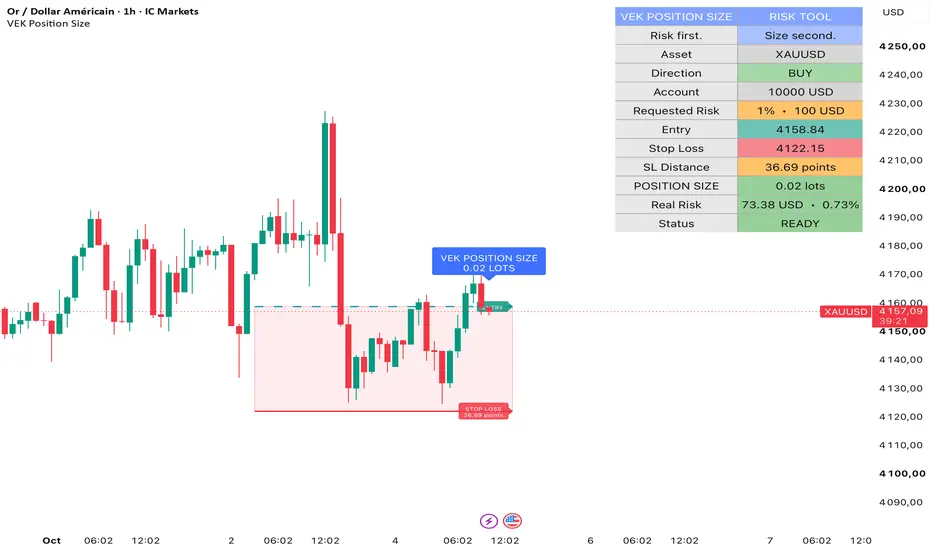
VEK Position Size Calculator — Free & Open Source Risk Management Tool
VEK Position Size Calculator is a free and open-source risk management tool designed to help traders calculate an appropriate position size before entering a trade.
The purpose of the script is simple: instead of choosing a position size first and accepting whatever risk results from it, the trader defines the maximum amount of capital they are prepared to risk and the location of the Stop Loss. The calculator then determines the position size that corresponds to those parameters.
The script does not generate trading signals and does not attempt to predict market direction. Entry and Stop Loss levels are defined by the trader.
HOW TO USE
1. Enter your account capital.
2. Select your account currency.
3. Define the percentage of capital you are willing to risk.
4. Place your planned Entry price.
5. Place your Stop Loss price.
6. The calculator measures the Entry-to-Stop-Loss distance.
7. It determines the applicable point/contract value and performs currency conversion when required.
8. It calculates the corresponding position size.
9. The resulting size is rounded down according to the applicable size increment.
10. The dashboard displays both the requested risk and the estimated real risk after position-size rounding.
In Entry + SL mode, the Entry and Stop Loss levels can be placed and moved directly on the chart.
The script automatically determines the direction of the planned trade from the relationship between Entry and Stop Loss:
• Stop Loss below Entry = BUY
• Stop Loss above Entry = SELL
POSITION SIZING METHODOLOGY
The calculation begins by determining the monetary amount the trader has chosen to risk:
Requested Risk = Account Capital × Risk %
For example, an account capital of 10,000 with a selected risk of 1% represents a requested maximum risk of 100 in the selected account currency.
The script then calculates the absolute price distance between the planned Entry and Stop Loss.
The monetary value of a 1.0 price movement for one unit of position size is determined using the applicable instrument specifications. When the instrument's profit currency differs from the selected account currency, the value is converted into the account currency when currency-rate data is available through TradingView.
The raw position size is then calculated as:
Position Size = Requested Risk / (Entry-to-SL Price Distance × Point Value)
POSITION SIZE ROUNDING AND REAL RISK
A theoretical position size is not always executable because instruments and brokers can impose minimum position sizes and size increments.
For this reason, the calculator rounds the calculated position size DOWN to the applicable size increment.
Rounding down is intentional. The calculator does not round a theoretical size upward when doing so could increase the actual risk above the amount requested by the trader.
After rounding, the script recalculates the estimated monetary risk of the resulting position:
Real Risk = Entry-to-SL Price Distance × Point Value × Final Position Size
The dashboard displays this Real Risk both as an amount in the selected account currency and as a percentage of account capital.
This allows the trader to compare the initially requested risk with the estimated risk represented by the final calculated position size.
If the calculated position size is below the minimum size defined for the instrument, the script does not automatically increase the position to the minimum.
Instead, it displays a "BELOW MINIMUM SIZE" status and shows the estimated risk that the minimum position size would represent.
SUPPORTED MARKETS AND CONTRACT HANDLING
The calculator is designed to work across multiple asset classes.
It includes predefined handling for:
• Forex
• Gold
• Silver
• Bitcoin
• Nasdaq
• US30
• US500
• DAX
• F40
• AUS200
• UK100
• JP225
The script also includes Native and Custom modes for instruments or broker specifications that do not correspond to the predefined mappings.
AUTO, NATIVE AND CUSTOM MODES
AUTO MODE
In Auto mode, predefined broker-style lot conventions are applied automatically to supported IC Markets symbols.
For other brokers, feeds and asset classes that are not mapped to those predefined families, the script falls back to TradingView's available native contract metadata.
This approach is intentional because contract specifications can vary between brokers even when instruments have similar names.
NATIVE MODE
Native mode forces the calculator to use TradingView's available native symbol information, including point value and minimum contract information when available.
Depending on the asset class, the resulting position may therefore be expressed as shares, contracts or units rather than Forex-style lots.
CUSTOM MODE
Custom mode is available when the automatic or native specifications do not match the trader's broker.
It allows the user to manually define:
• Point value
• Profit currency
• Minimum position size
• Position-size increment
This makes it possible to adapt the calculation to broker-specific contract specifications.
MANUAL SL DISTANCE MODE
In addition to the interactive Entry + SL mode, the calculator includes a Manual SL Distance mode.
In this mode, the trader:
• Selects BUY or SELL
• Defines the Entry
• Enters the desired Stop Loss distance manually
For Forex, the distance is expressed in pips where applicable.
For predefined CFD families, the distance is expressed in points.
For universal/native instruments, the distance is expressed in price units.
The script then reconstructs the Stop Loss location and applies the same risk and position-sizing methodology.
ACCOUNT CURRENCY CONVERSION
The calculator supports the following account currencies:
EUR, USD, GBP, CHF, JPY, AUD, CAD and NZD.
When the instrument's profit currency differs from the selected account currency, the calculator requests the corresponding currency conversion rate through TradingView and converts the point value before calculating position size.
If the required conversion data is unavailable, the dashboard reports that the currency conversion is unavailable instead of silently producing a position size from incomplete information.
DASHBOARD AND CHART DISPLAY
The dashboard provides a summary of the planned position, including:
• Asset
• Trade direction
• Account capital
• Requested risk in percentage and account currency
• Entry price
• Stop Loss price
• Stop Loss distance
• Calculated position size
• Estimated real risk after rounding
• Calculator status
The chart can also display the Entry level, Stop Loss level, Entry-to-SL risk zone and calculated position size.
PURPOSE AND LIMITATIONS
VEK Position Size Calculator is intentionally focused on position sizing and risk management.
It does NOT:
• Generate BUY or SELL signals
• Predict market direction
• Select trades
• Recommend an Entry
• Recommend a Stop Loss
• Provide Take Profit targets
• Calculate projected trading profits
• Provide Break Even management
• Provide Profit Lock management
• Promise or estimate trading performance
The trader remains responsible for the market analysis, Entry and Stop Loss used in the calculation.
The calculator's purpose is to answer one specific risk-management question:
"Given my account size, my chosen risk and my Stop Loss distance, what position size should I use?"
IMPORTANT
Contract sizes, point values, minimum quantities and position-size increments can differ between brokers and data feeds.
Users should always verify the instrument specifications displayed by their broker before placing a trade.
If the automatic assumptions do not correspond to the broker's specifications, Native or Custom mode should be used as appropriate.
OPEN SOURCE
VEK Position Size Calculator is published as an open-source script.
The source code is publicly available so traders can inspect the calculation methodology, understand how position sizing is determined, verify the assumptions used by the calculator and adapt the educational concepts to their own risk-management process.
This tool is provided for risk-management and educational purposes. It does not constitute financial advice or a recommendation to enter any trade.
Risk first. Size second.
VEK Position Size Calculator is a free and open-source risk management tool designed to help traders calculate an appropriate position size before entering a trade.
The purpose of the script is simple: instead of choosing a position size first and accepting whatever risk results from it, the trader defines the maximum amount of capital they are prepared to risk and the location of the Stop Loss. The calculator then determines the position size that corresponds to those parameters.
The script does not generate trading signals and does not attempt to predict market direction. Entry and Stop Loss levels are defined by the trader.
HOW TO USE
1. Enter your account capital.
2. Select your account currency.
3. Define the percentage of capital you are willing to risk.
4. Place your planned Entry price.
5. Place your Stop Loss price.
6. The calculator measures the Entry-to-Stop-Loss distance.
7. It determines the applicable point/contract value and performs currency conversion when required.
8. It calculates the corresponding position size.
9. The resulting size is rounded down according to the applicable size increment.
10. The dashboard displays both the requested risk and the estimated real risk after position-size rounding.
In Entry + SL mode, the Entry and Stop Loss levels can be placed and moved directly on the chart.
The script automatically determines the direction of the planned trade from the relationship between Entry and Stop Loss:
• Stop Loss below Entry = BUY
• Stop Loss above Entry = SELL
POSITION SIZING METHODOLOGY
The calculation begins by determining the monetary amount the trader has chosen to risk:
Requested Risk = Account Capital × Risk %
For example, an account capital of 10,000 with a selected risk of 1% represents a requested maximum risk of 100 in the selected account currency.
The script then calculates the absolute price distance between the planned Entry and Stop Loss.
The monetary value of a 1.0 price movement for one unit of position size is determined using the applicable instrument specifications. When the instrument's profit currency differs from the selected account currency, the value is converted into the account currency when currency-rate data is available through TradingView.
The raw position size is then calculated as:
Position Size = Requested Risk / (Entry-to-SL Price Distance × Point Value)
POSITION SIZE ROUNDING AND REAL RISK
A theoretical position size is not always executable because instruments and brokers can impose minimum position sizes and size increments.
For this reason, the calculator rounds the calculated position size DOWN to the applicable size increment.
Rounding down is intentional. The calculator does not round a theoretical size upward when doing so could increase the actual risk above the amount requested by the trader.
After rounding, the script recalculates the estimated monetary risk of the resulting position:
Real Risk = Entry-to-SL Price Distance × Point Value × Final Position Size
The dashboard displays this Real Risk both as an amount in the selected account currency and as a percentage of account capital.
This allows the trader to compare the initially requested risk with the estimated risk represented by the final calculated position size.
If the calculated position size is below the minimum size defined for the instrument, the script does not automatically increase the position to the minimum.
Instead, it displays a "BELOW MINIMUM SIZE" status and shows the estimated risk that the minimum position size would represent.
SUPPORTED MARKETS AND CONTRACT HANDLING
The calculator is designed to work across multiple asset classes.
It includes predefined handling for:
• Forex
• Gold
• Silver
• Bitcoin
• Nasdaq
• US30
• US500
• DAX
• F40
• AUS200
• UK100
• JP225
The script also includes Native and Custom modes for instruments or broker specifications that do not correspond to the predefined mappings.
AUTO, NATIVE AND CUSTOM MODES
AUTO MODE
In Auto mode, predefined broker-style lot conventions are applied automatically to supported IC Markets symbols.
For other brokers, feeds and asset classes that are not mapped to those predefined families, the script falls back to TradingView's available native contract metadata.
This approach is intentional because contract specifications can vary between brokers even when instruments have similar names.
NATIVE MODE
Native mode forces the calculator to use TradingView's available native symbol information, including point value and minimum contract information when available.
Depending on the asset class, the resulting position may therefore be expressed as shares, contracts or units rather than Forex-style lots.
CUSTOM MODE
Custom mode is available when the automatic or native specifications do not match the trader's broker.
It allows the user to manually define:
• Point value
• Profit currency
• Minimum position size
• Position-size increment
This makes it possible to adapt the calculation to broker-specific contract specifications.
MANUAL SL DISTANCE MODE
In addition to the interactive Entry + SL mode, the calculator includes a Manual SL Distance mode.
In this mode, the trader:
• Selects BUY or SELL
• Defines the Entry
• Enters the desired Stop Loss distance manually
For Forex, the distance is expressed in pips where applicable.
For predefined CFD families, the distance is expressed in points.
For universal/native instruments, the distance is expressed in price units.
The script then reconstructs the Stop Loss location and applies the same risk and position-sizing methodology.
ACCOUNT CURRENCY CONVERSION
The calculator supports the following account currencies:
EUR, USD, GBP, CHF, JPY, AUD, CAD and NZD.
When the instrument's profit currency differs from the selected account currency, the calculator requests the corresponding currency conversion rate through TradingView and converts the point value before calculating position size.
If the required conversion data is unavailable, the dashboard reports that the currency conversion is unavailable instead of silently producing a position size from incomplete information.
DASHBOARD AND CHART DISPLAY
The dashboard provides a summary of the planned position, including:
• Asset
• Trade direction
• Account capital
• Requested risk in percentage and account currency
• Entry price
• Stop Loss price
• Stop Loss distance
• Calculated position size
• Estimated real risk after rounding
• Calculator status
The chart can also display the Entry level, Stop Loss level, Entry-to-SL risk zone and calculated position size.
PURPOSE AND LIMITATIONS
VEK Position Size Calculator is intentionally focused on position sizing and risk management.
It does NOT:
• Generate BUY or SELL signals
• Predict market direction
• Select trades
• Recommend an Entry
• Recommend a Stop Loss
• Provide Take Profit targets
• Calculate projected trading profits
• Provide Break Even management
• Provide Profit Lock management
• Promise or estimate trading performance
The trader remains responsible for the market analysis, Entry and Stop Loss used in the calculation.
The calculator's purpose is to answer one specific risk-management question:
"Given my account size, my chosen risk and my Stop Loss distance, what position size should I use?"
IMPORTANT
Contract sizes, point values, minimum quantities and position-size increments can differ between brokers and data feeds.
Users should always verify the instrument specifications displayed by their broker before placing a trade.
If the automatic assumptions do not correspond to the broker's specifications, Native or Custom mode should be used as appropriate.
OPEN SOURCE
VEK Position Size Calculator is published as an open-source script.
The source code is publicly available so traders can inspect the calculation methodology, understand how position sizing is determined, verify the assumptions used by the calculator and adapt the educational concepts to their own risk-management process.
This tool is provided for risk-management and educational purposes. It does not constitute financial advice or a recommendation to enter any trade.
Risk first. Size second.
Skrip sumber terbuka
Dalam semangat TradingView sebenar, pencipta skrip ini telah menjadikannya sumber terbuka, jadi pedagang boleh menilai dan mengesahkan kefungsiannya. Terima kasih kepada penulis! Walaupuan anda boleh menggunakan secara percuma, ingat bahawa penerbitan semula kod ini tertakluk kepada Peraturan Dalaman.

VEK Pro Flow — Professional TradingView tools for trade planning & risk management.
VEK Trade Planner: whop.com/vek-pro-flow/vek-trade-planner/
Questions & support: support.vekproflow@gmail.com
VEK Trade Planner: whop.com/vek-pro-flow/vek-trade-planner/
Questions & support: support.vekproflow@gmail.com
Penafian
Maklumat dan penerbitan adalah tidak bertujuan, dan tidak membentuk, nasihat atau cadangan kewangan, pelaburan, dagangan atau jenis lain yang diberikan atau disahkan oleh TradingView. Baca lebih dalam Terma Penggunaan.
Skrip sumber terbuka
Dalam semangat TradingView sebenar, pencipta skrip ini telah menjadikannya sumber terbuka, jadi pedagang boleh menilai dan mengesahkan kefungsiannya. Terima kasih kepada penulis! Walaupuan anda boleh menggunakan secara percuma, ingat bahawa penerbitan semula kod ini tertakluk kepada Peraturan Dalaman.
VEK Pro Flow — Professional TradingView tools for trade planning & risk management.
VEK Trade Planner: whop.com/vek-pro-flow/vek-trade-planner/
Questions & support: support.vekproflow@gmail.com
VEK Trade Planner: whop.com/vek-pro-flow/vek-trade-planner/
Questions & support: support.vekproflow@gmail.com
Penafian
Maklumat dan penerbitan adalah tidak bertujuan, dan tidak membentuk, nasihat atau cadangan kewangan, pelaburan, dagangan atau jenis lain yang diberikan atau disahkan oleh TradingView. Baca lebih dalam Terma Penggunaan.