Session Drive - Opening Range Breakout (ORB) [bitpunk]
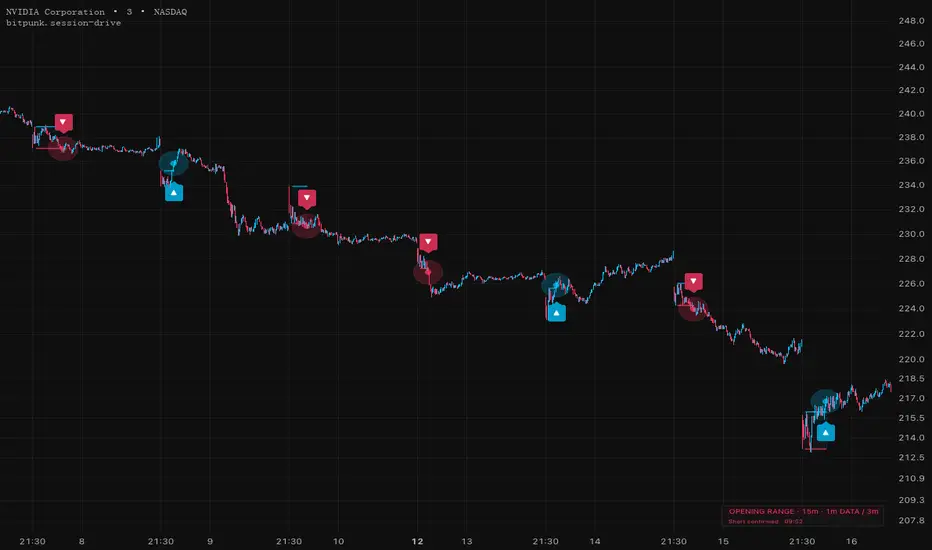
Session Drive - Opening Range Breakout (ORB) [bitpunk]
Mark the first accepted breakout of the New York cash opening range. Designed for liquid US stocks and ETFs.
Supported chart timeframes: 1m, 3m and 5m only. Other chart timeframes are unsupported; the indicator does not calculate setups or generate entry signals on them.
1. READING THE SETUP
The opening range is fixed at 09:30–09:45 America/New_York. Its complete high and low become the breakout references. The clock follows New York daylight saving time; changing the chart's display timezone does not change the opening.
By default, five adjacent completed one-minute closes above the high confirm ▲; five below the low confirm ▼. Confirmation Closes accepts 1–6: lower counts accept earlier; higher counts require longer persistence. A close inside or exactly on an edge, a side change, missing minutes or malformed prices resets pending confirmation. The confirming close must finish strictly before 11:30. The first accepted signal consumes the session, allowing at most one long or short indication per day.
The box develops during the opening and locks when the range is complete. Exact colored boundaries show an eligible setup; archived boxes retain earlier ranges quietly. The panel reports the latest confirmed state, including pending acceptance, unavailable data and the accepted signal time. It is not a historical crosshair inspector.
2. ONE DATA CLOCK, THREE VIEWS
All calculations use one-minute regular-session data. A 1m, 3m or 5m chart observes the same opening and confirmation sequence. There is no automatic or selectable opening window.
On a 3m/5m chart, the entry label identifies the candle containing the confirming minute. The signal may appear while that larger candle is still developing. Its pin and Long/Short Entry Close preserve the actual one-minute closing price; Entry Time records that minute's closing timestamp. The larger candle's close is not the signal price. Source Close Time and Entry Time in the Data Window use UTC epoch seconds.
3. DISPLAY AND SIGNAL CONTROLS
Enable Signals defaults on. Off hides entry labels, pins/glow and entry price/time outputs, and mutes signal alerts. Setup calculations, state and structure continue updating.
Structure, Previous Structures, panel position/size, Normal/Enhanced effects and Bull/Bear colors change presentation only. Enhanced uses larger white arrows and a source-price pin/glow. Up to twelve earlier boxes can be retained.
4. ALERTS
Select Any alert() function call for one message per new source event, for example:
This route uses the source price/time without waiting for a 3m/5m candle to close. A newly started instance does not catch up an earlier event already inside the current candle. Directional Long Entry / Short Entry conditions also expose the source entry price, but their selected TradingView frequency can delay delivery to the larger candle's close. Choose one route and recreate saved alerts after changing the script or inputs.
5. SCOPE AND LIMITATIONS
The implementation combines a fixed opening range, fixed-minute confirmation and a one-event session lifecycle so the observation timeframe does not redefine the setup. It is independently implemented.
Use standard 1m, 3m or 5m charts only. Symbols must be US stocks or ETFs with a New York exchange timezone. Crypto, direct indices, forex, futures and synthetic candles cannot signal. Missing opening minutes invalidate the day's range; unavailable minute history never falls back to chart OHLC. Source history is bounded, and feed revisions or adjustments can change historical readings.
Breakouts can fail. Five-close confirmation adds delay and does not ensure continuation. The script supplies visual entry indications, with no orders, stops, exits, position sizing or performance guarantee.
Mark the first accepted breakout of the New York cash opening range. Designed for liquid US stocks and ETFs.
Supported chart timeframes: 1m, 3m and 5m only. Other chart timeframes are unsupported; the indicator does not calculate setups or generate entry signals on them.
1. READING THE SETUP
The opening range is fixed at 09:30–09:45 America/New_York. Its complete high and low become the breakout references. The clock follows New York daylight saving time; changing the chart's display timezone does not change the opening.
By default, five adjacent completed one-minute closes above the high confirm ▲; five below the low confirm ▼. Confirmation Closes accepts 1–6: lower counts accept earlier; higher counts require longer persistence. A close inside or exactly on an edge, a side change, missing minutes or malformed prices resets pending confirmation. The confirming close must finish strictly before 11:30. The first accepted signal consumes the session, allowing at most one long or short indication per day.
The box develops during the opening and locks when the range is complete. Exact colored boundaries show an eligible setup; archived boxes retain earlier ranges quietly. The panel reports the latest confirmed state, including pending acceptance, unavailable data and the accepted signal time. It is not a historical crosshair inspector.
2. ONE DATA CLOCK, THREE VIEWS
All calculations use one-minute regular-session data. A 1m, 3m or 5m chart observes the same opening and confirmation sequence. There is no automatic or selectable opening window.
On a 3m/5m chart, the entry label identifies the candle containing the confirming minute. The signal may appear while that larger candle is still developing. Its pin and Long/Short Entry Close preserve the actual one-minute closing price; Entry Time records that minute's closing timestamp. The larger candle's close is not the signal price. Source Close Time and Entry Time in the Data Window use UTC epoch seconds.
3. DISPLAY AND SIGNAL CONTROLS
Enable Signals defaults on. Off hides entry labels, pins/glow and entry price/time outputs, and mutes signal alerts. Setup calculations, state and structure continue updating.
Structure, Previous Structures, panel position/size, Normal/Enhanced effects and Bull/Bear colors change presentation only. Enhanced uses larger white arrows and a source-price pin/glow. Up to twelve earlier boxes can be retained.
4. ALERTS
Select Any alert() function call for one message per new source event, for example:
1m ▲ LONG @123.45 · NY 09:50
This route uses the source price/time without waiting for a 3m/5m candle to close. A newly started instance does not catch up an earlier event already inside the current candle. Directional Long Entry / Short Entry conditions also expose the source entry price, but their selected TradingView frequency can delay delivery to the larger candle's close. Choose one route and recreate saved alerts after changing the script or inputs.
5. SCOPE AND LIMITATIONS
The implementation combines a fixed opening range, fixed-minute confirmation and a one-event session lifecycle so the observation timeframe does not redefine the setup. It is independently implemented.
Use standard 1m, 3m or 5m charts only. Symbols must be US stocks or ETFs with a New York exchange timezone. Crypto, direct indices, forex, futures and synthetic candles cannot signal. Missing opening minutes invalidate the day's range; unavailable minute history never falls back to chart OHLC. Source history is bounded, and feed revisions or adjustments can change historical readings.
Breakouts can fail. Five-close confirmation adds delay and does not ensure continuation. The script supplies visual entry indications, with no orders, stops, exits, position sizing or performance guarantee.

Open research and indicators on stocks and crypto. Explore the work at bitpunk.io
Penafian
Maklumat dan penerbitan adalah tidak bertujuan, dan tidak membentuk, nasihat atau cadangan kewangan, pelaburan, dagangan atau jenis lain yang diberikan atau disahkan oleh TradingView. Baca lebih dalam Terma Penggunaan.
Open research and indicators on stocks and crypto. Explore the work at bitpunk.io
Penafian
Maklumat dan penerbitan adalah tidak bertujuan, dan tidak membentuk, nasihat atau cadangan kewangan, pelaburan, dagangan atau jenis lain yang diberikan atau disahkan oleh TradingView. Baca lebih dalam Terma Penggunaan.