OPEN-SOURCE SCRIPT
Telah dikemas kini MechArt ATR Box 12 V1.4
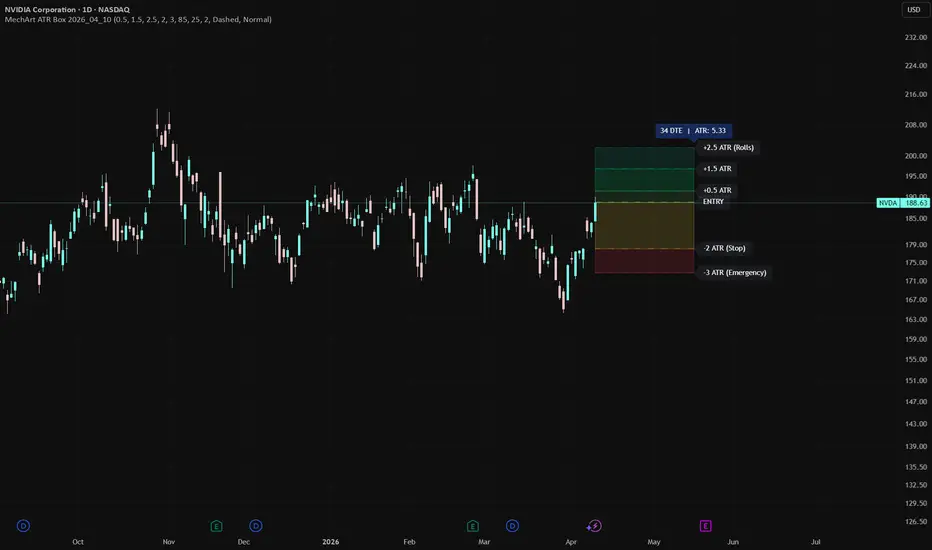
MechArt ATR Box — Trade Management Zones
This indicator visualizes structured trade management levels around a defined entry price using ATR (Average True Range) as the measurement unit. It's designed for options traders and swing traders who manage positions with clearly defined roll marks and stop levels.
What It Does
Once you set an entry price, entry date, and expiration date, the indicator draws a complete zone map across the life of your trade — from open to expiration. All levels are calculated from the Daily ATR(14) value at the time of entry, giving you volatility-adjusted roll marks rather than arbitrary fixed distances.
Levels Drawn
🟢 +2.5 ATR — Third Roll. Additional rolls every 1.0 ATR above.
🟢 +1.5 ATR — Second Roll
🟢 +0.5 ATR — First Roll
⬜ Entry — Your trade entry price baseline
🟡 -2.0 ATR — Stop loss level
🔴 -3.0 ATR — Emergency exit level
All multipliers are fully adjustable in the Settings panel.
Features
• ATR-based levels that automatically scale to each asset's volatility
• Stacked color-coded boxes for instant visual zone identification
• Horizontal lines with customizable style, width, and opacity
• Dynamic labels that reflect your actual multiplier settings
• DTE (Days to Expiration) + ATR value displayed on the chart
• Pre-loaded with 12 configurable tickers in the open Pine Script — simply update entry prices to your trades
• Smart default mode for any unlisted ticker: auto-sets entry to current price and expiration to the nearest Friday ~21 days out
• Full style customization: colors, opacity, line style, label size
How to Use
1. Find your ticker in the script's ticker block and update the entryPrice to your actual trade entry
2. Adjust entryDate and expirationDate to match your position
3. Load the indicator — zones and levels draw automatically
4. Use the Settings panel to fine-tune multipliers and visual styling to your preference
Best Used For
Long Calls, OVTLYR Plan M, use your creativity.
This indicator visualizes structured trade management levels around a defined entry price using ATR (Average True Range) as the measurement unit. It's designed for options traders and swing traders who manage positions with clearly defined roll marks and stop levels.
What It Does
Once you set an entry price, entry date, and expiration date, the indicator draws a complete zone map across the life of your trade — from open to expiration. All levels are calculated from the Daily ATR(14) value at the time of entry, giving you volatility-adjusted roll marks rather than arbitrary fixed distances.
Levels Drawn
🟢 +2.5 ATR — Third Roll. Additional rolls every 1.0 ATR above.
🟢 +1.5 ATR — Second Roll
🟢 +0.5 ATR — First Roll
⬜ Entry — Your trade entry price baseline
🟡 -2.0 ATR — Stop loss level
🔴 -3.0 ATR — Emergency exit level
All multipliers are fully adjustable in the Settings panel.
Features
• ATR-based levels that automatically scale to each asset's volatility
• Stacked color-coded boxes for instant visual zone identification
• Horizontal lines with customizable style, width, and opacity
• Dynamic labels that reflect your actual multiplier settings
• DTE (Days to Expiration) + ATR value displayed on the chart
• Pre-loaded with 12 configurable tickers in the open Pine Script — simply update entry prices to your trades
• Smart default mode for any unlisted ticker: auto-sets entry to current price and expiration to the nearest Friday ~21 days out
• Full style customization: colors, opacity, line style, label size
How to Use
1. Find your ticker in the script's ticker block and update the entryPrice to your actual trade entry
2. Adjust entryDate and expirationDate to match your position
3. Load the indicator — zones and levels draw automatically
4. Use the Settings panel to fine-tune multipliers and visual styling to your preference
Best Used For
Long Calls, OVTLYR Plan M, use your creativity.
Nota Keluaran
________________________________________MechArt ATR Box — Position Management Overlay 📦📐
Visualizes ATR-based price targets and risk levels for a set of active positions, drawn as stacked colored boxes anchored from entry date to expiration date. Designed for options-aware position management where both upside targets and hard stop levels need to be visible at a glance.
________________________________________
⚙️ How It Works
When you load this indicator on any of the supported tickers, it automatically pulls the entry price and entry date you've configured, retrieves the 14-period daily ATR as of that entry date using ta.valuewhen, and projects five price levels:
• 🟩 +L1 — Entry + 0.5× ATR (first roll)
• 🟢 +L2 — Entry + 1.5× ATR (roll)
• 🟦 +L3 — Entry + 2.5× ATR (roll)
• 🟨 −Stop — Entry − 2.0× ATR (standard stop)
• 🟥 −Emergency — Entry − 3.0× ATR (hard floor)
Each zone is rendered as a filled, stacked box spanning from entry date to expiration date, with a horizontal line and a labeled callout at the right edge. A floating info label at the top shows current DTE and the ATR value used to build the levels.
________________________________________
🔄 Roll Logic
Roll at +0.5 ATR, then every 1 ATR thereafter. Each green box represents one roll interval. Continue rolling as price advances through the levels and exit the position on your exit signal.
________________________________________
✏️ Setting Up Your Trades
The script includes 12 ticker slots pre-filled with example trades, these are placeholders. Open the Pine Editor and replace each ticker symbol, entry price, entry date, and expiration date with your own live positions. The ATR at entry is calculated automatically from the date you provide, so no manual lookup is needed!
🔁 On any unlisted ticker (one not in your configured slots), the indicator defaults to the current close as entry, calculates a 28-day minimum forward expiration snapped to the nearest Monthly Option (3rd Friday of the month), and uses the live daily ATR — useful for quick what-if visualization before you commit a trade.
________________________________________
🎨 Inputs & Customization
All five ATR multipliers are adjustable in the ATR Multipliers group — dial them in to match your trade plan without touching the code. Box fill opacity, line colors, line width, line style (solid / dashed / dotted), label text color, and DTE label font size are all configurable through the style groups.
________________________________________
🎯 Intended Use
Load on any of your configured tickers' daily or intraday charts. The boxes give you an immediate read on where price sits relative to your targets and risk levels, and the DTE counter keeps the expiration clock visible without switching windows.
________________________________________
Skrip sumber terbuka
Dalam semangat TradingView sebenar, pencipta skrip ini telah menjadikannya sumber terbuka, jadi pedagang boleh menilai dan mengesahkan kefungsiannya. Terima kasih kepada penulis! Walaupuan anda boleh menggunakan secara percuma, ingat bahawa penerbitan semula kod ini tertakluk kepada Peraturan Dalaman.

Penafian
Maklumat dan penerbitan adalah tidak bertujuan, dan tidak membentuk, nasihat atau cadangan kewangan, pelaburan, dagangan atau jenis lain yang diberikan atau disahkan oleh TradingView. Baca lebih dalam Terma Penggunaan.
Skrip sumber terbuka
Dalam semangat TradingView sebenar, pencipta skrip ini telah menjadikannya sumber terbuka, jadi pedagang boleh menilai dan mengesahkan kefungsiannya. Terima kasih kepada penulis! Walaupuan anda boleh menggunakan secara percuma, ingat bahawa penerbitan semula kod ini tertakluk kepada Peraturan Dalaman.
Penafian
Maklumat dan penerbitan adalah tidak bertujuan, dan tidak membentuk, nasihat atau cadangan kewangan, pelaburan, dagangan atau jenis lain yang diberikan atau disahkan oleh TradingView. Baca lebih dalam Terma Penggunaan.