OPEN-SOURCE SCRIPT
GANN Emblem Pro * By Kingshuk Ghosh
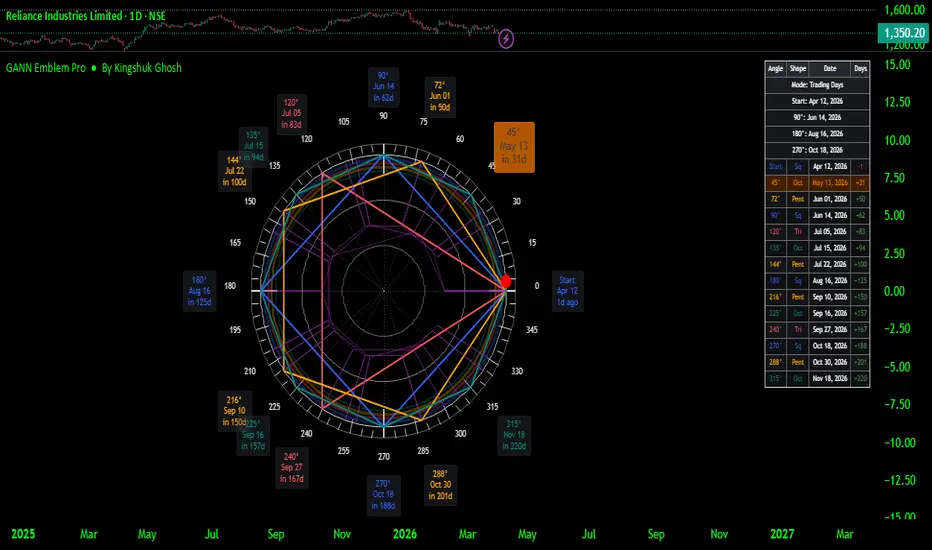
Imagine someone in the 1920s — a trader named W.D. Gann — decided that markets don't just move because of boring things like earnings reports and central bank gossip. No, no. He believed time itself was geometric. That price and time were two sides of the same cosmic coin, and if you drew the right circles at the right angles, the market would practically whisper its next move in your ear.
Fast forward a hundred years, and this script draws exactly that — a Gann Wheel, also called the "Wheel of 24" or "Square of Nine" derivative — right on your TradingView chart. It's a beautiful, ornate, clock-like emblem built around a single important price point (called a pivot), projecting forward in time at specific angular intervals: 45°, 90°, 120°, 144°, 180°, 240°, 270°, and 288°. Each of those angles corresponds to a real calendar date in the future. Those dates are, according to Gann theory, moments when the market may pause, reverse, or throw a tantrum.
Think of it as a very elegant, very ancient-looking calendar — drawn by someone who clearly had strong opinions about geometry.
*********************************************************************************************************
What Does It Actually Show You?
The wheel is made up of several layers, each doing its own job:
The Ring itself is the circular backbone — the clock face. It has tick marks every 5 degrees and degree numbers every 15 degrees, so you always know where you are on the wheel.
The Shapes inside are the real action. Four geometric figures are inscribed inside the ring, each dividing the circle differently and each highlighting a different set of time projections:
The Cardinal Square cuts the circle into four equal quarters at 0°, 90°, 180°, and 270°. These are the big, loud, classical Gann dates — the ones even a skeptic might keep an eye on.
The Ordinal Triangle hits 0°, 120°, and 240° — three equal slices of the pie, like a perfectly cut pizza nobody asked for.
The Quintile Pentagon lands at 72° intervals — five points, associated with natural cycles and harmonic balance.
The Octant Star fires off every 45° — eight spokes, maximum coverage, for traders who want a date projection every few weeks.
The Date Labels float around the outside of the ring, each one telling you the actual calendar date that a particular degree projects to, based on your chosen pivot point. The upcoming date that's closest to today gets a bright orange highlighted bubble so you can't miss it — it practically jumps off the screen.
The Dashboard Table in the corner lists every projected date neatly in a sortable table, complete with a countdown showing how many days away each date is. Red means it's already passed. Green means it's still ahead. The next upcoming date glows orange throughout.
****************************************************************************************************
How Do You Use It?
Step 1 — Find your pivot. A pivot is just a significant recent high or low on the chart — a point where price clearly reversed. The script can detect this automatically by scanning for pivot highs or lows over a lookback window you define. Alternatively, if you already have a specific date in mind (say, a major crash low or a breakout high), you can override it manually with the anchor date setting.
Step 2 — Set your time scale. This decides what one degree of arc equals in real time. Calendar Days is the classic Gann default — 360 degrees maps to roughly one year. You can also switch to Trading Days, Weeks, or Months depending on whether you're a day trader, swing trader, or someone who checks charts once a month while sipping tea.
Step 3 — Tune the geometry. Adjust the radius settings so the wheel fits your chart nicely without overlapping your candles or looking like it was drawn by a caffeinated compass. The X radius controls how wide it spreads across bars, and the Y radius controls the price height.
Step 4 — Watch the dates. As time moves forward on your chart, pay attention when the market approaches one of the projected dates — especially the 90°, 180°, and 270° marks, which are considered the heavyweights. Some traders watch for reversals, breakouts, or unusual volume around these windows.
Step 5 — Add your own judgment. Combine the wheel dates with other analysis — support/resistance levels, moving averages, volume patterns — and treat the projected dates as zones of potential interest, not guaranteed fireworks.
***************************************************************************************************
Who Is This For?
This tool is for traders and market students who are curious about time-based analysis — a less conventional but historically fascinating branch of technical analysis. If you already use tools like Fibonacci retracements or Elliott Wave theory, Gann time projections will feel like a natural addition to your toolkit. If you're completely new to technical analysis, this is a wonderful rabbit hole — just make sure you have snacks.
****************************************************************************************************
⚠️ The Disclaimer (Please Actually Read This One)
This script is an educational and analytical tool rooted in Gann theory, which is itself a subject of genuine debate in the trading community. The projected dates it generates are based on geometric and mathematical relationships — they are not predictions, not financial advice, and definitely not a hotline to the universe.
Markets are influenced by an almost comically large number of variables — geopolitics, central bank policy, quarterly earnings, a badly-worded tweet, and occasionally a shipping container stuck sideways in a canal. No wheel, no matter how beautifully drawn, accounts for all of that.
Past performance of any analytical method does not guarantee future results. Using this tool to make real financial decisions without proper risk management, position sizing, and broader market context is roughly equivalent to navigating a road trip using only the stars — romantic, but you will probably miss your exit.
Trade responsibly. And remember even W.D. Gann himself reportedly had losing trades.
Happy Trading !!
Fast forward a hundred years, and this script draws exactly that — a Gann Wheel, also called the "Wheel of 24" or "Square of Nine" derivative — right on your TradingView chart. It's a beautiful, ornate, clock-like emblem built around a single important price point (called a pivot), projecting forward in time at specific angular intervals: 45°, 90°, 120°, 144°, 180°, 240°, 270°, and 288°. Each of those angles corresponds to a real calendar date in the future. Those dates are, according to Gann theory, moments when the market may pause, reverse, or throw a tantrum.
Think of it as a very elegant, very ancient-looking calendar — drawn by someone who clearly had strong opinions about geometry.
*********************************************************************************************************
What Does It Actually Show You?
The wheel is made up of several layers, each doing its own job:
The Ring itself is the circular backbone — the clock face. It has tick marks every 5 degrees and degree numbers every 15 degrees, so you always know where you are on the wheel.
The Shapes inside are the real action. Four geometric figures are inscribed inside the ring, each dividing the circle differently and each highlighting a different set of time projections:
The Cardinal Square cuts the circle into four equal quarters at 0°, 90°, 180°, and 270°. These are the big, loud, classical Gann dates — the ones even a skeptic might keep an eye on.
The Ordinal Triangle hits 0°, 120°, and 240° — three equal slices of the pie, like a perfectly cut pizza nobody asked for.
The Quintile Pentagon lands at 72° intervals — five points, associated with natural cycles and harmonic balance.
The Octant Star fires off every 45° — eight spokes, maximum coverage, for traders who want a date projection every few weeks.
The Date Labels float around the outside of the ring, each one telling you the actual calendar date that a particular degree projects to, based on your chosen pivot point. The upcoming date that's closest to today gets a bright orange highlighted bubble so you can't miss it — it practically jumps off the screen.
The Dashboard Table in the corner lists every projected date neatly in a sortable table, complete with a countdown showing how many days away each date is. Red means it's already passed. Green means it's still ahead. The next upcoming date glows orange throughout.
****************************************************************************************************
How Do You Use It?
Step 1 — Find your pivot. A pivot is just a significant recent high or low on the chart — a point where price clearly reversed. The script can detect this automatically by scanning for pivot highs or lows over a lookback window you define. Alternatively, if you already have a specific date in mind (say, a major crash low or a breakout high), you can override it manually with the anchor date setting.
Step 2 — Set your time scale. This decides what one degree of arc equals in real time. Calendar Days is the classic Gann default — 360 degrees maps to roughly one year. You can also switch to Trading Days, Weeks, or Months depending on whether you're a day trader, swing trader, or someone who checks charts once a month while sipping tea.
Step 3 — Tune the geometry. Adjust the radius settings so the wheel fits your chart nicely without overlapping your candles or looking like it was drawn by a caffeinated compass. The X radius controls how wide it spreads across bars, and the Y radius controls the price height.
Step 4 — Watch the dates. As time moves forward on your chart, pay attention when the market approaches one of the projected dates — especially the 90°, 180°, and 270° marks, which are considered the heavyweights. Some traders watch for reversals, breakouts, or unusual volume around these windows.
Step 5 — Add your own judgment. Combine the wheel dates with other analysis — support/resistance levels, moving averages, volume patterns — and treat the projected dates as zones of potential interest, not guaranteed fireworks.
***************************************************************************************************
Who Is This For?
This tool is for traders and market students who are curious about time-based analysis — a less conventional but historically fascinating branch of technical analysis. If you already use tools like Fibonacci retracements or Elliott Wave theory, Gann time projections will feel like a natural addition to your toolkit. If you're completely new to technical analysis, this is a wonderful rabbit hole — just make sure you have snacks.
****************************************************************************************************
⚠️ The Disclaimer (Please Actually Read This One)
This script is an educational and analytical tool rooted in Gann theory, which is itself a subject of genuine debate in the trading community. The projected dates it generates are based on geometric and mathematical relationships — they are not predictions, not financial advice, and definitely not a hotline to the universe.
Markets are influenced by an almost comically large number of variables — geopolitics, central bank policy, quarterly earnings, a badly-worded tweet, and occasionally a shipping container stuck sideways in a canal. No wheel, no matter how beautifully drawn, accounts for all of that.
Past performance of any analytical method does not guarantee future results. Using this tool to make real financial decisions without proper risk management, position sizing, and broader market context is roughly equivalent to navigating a road trip using only the stars — romantic, but you will probably miss your exit.
Trade responsibly. And remember even W.D. Gann himself reportedly had losing trades.
Happy Trading !!
Skrypt open-source
W zgodzie z duchem TradingView twórca tego skryptu udostępnił go jako open-source, aby użytkownicy mogli przejrzeć i zweryfikować jego działanie. Ukłony dla autora. Korzystanie jest bezpłatne, jednak ponowna publikacja kodu podlega naszym Zasadom serwisu.

Wyłączenie odpowiedzialności
Informacje i publikacje nie stanowią i nie powinny być traktowane jako porady finansowe, inwestycyjne, tradingowe ani jakiekolwiek inne rekomendacje dostarczane lub zatwierdzone przez TradingView. Więcej informacji znajduje się w Warunkach użytkowania.
Skrypt open-source
W zgodzie z duchem TradingView twórca tego skryptu udostępnił go jako open-source, aby użytkownicy mogli przejrzeć i zweryfikować jego działanie. Ukłony dla autora. Korzystanie jest bezpłatne, jednak ponowna publikacja kodu podlega naszym Zasadom serwisu.
Wyłączenie odpowiedzialności
Informacje i publikacje nie stanowią i nie powinny być traktowane jako porady finansowe, inwestycyjne, tradingowe ani jakiekolwiek inne rekomendacje dostarczane lub zatwierdzone przez TradingView. Więcej informacji znajduje się w Warunkach użytkowania.