OPEN-SOURCE SCRIPT
TE Position Size & Risk Contract Count Stop Distance and Risk
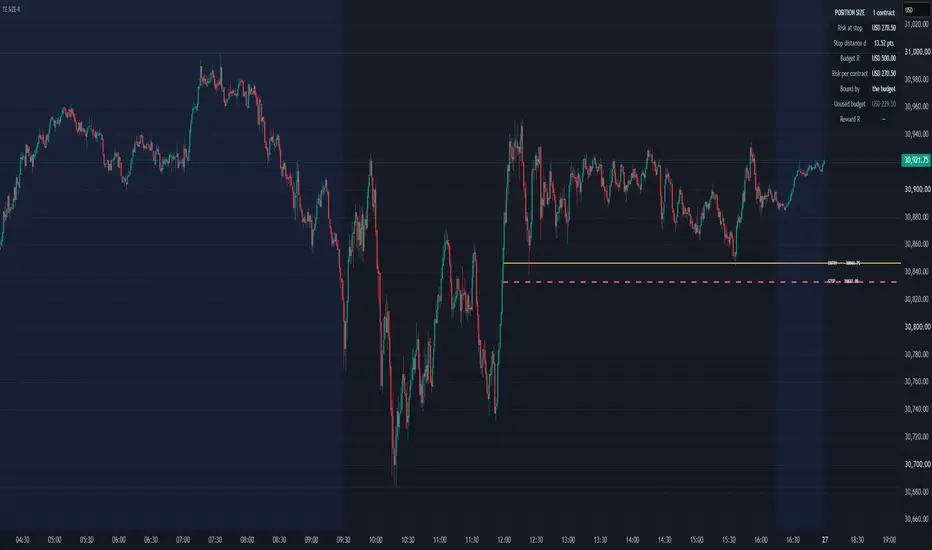
TE Position Size & Risk answers one specific question:
How many units fit this stop and this risk budget?
Set an entry and stop directly on the chart. The indicator measures the distance between them, reads the instrument's own tick size and point value, applies the risk budget and returns the number of whole units that fit.

ENTRY, STOP AND DIRECTION
Entry E and Stop S are draggable price inputs.
Direction is inferred automatically:
stop < entry = long
stop > entry = short
stop = entry = no plan
There is no separate long/short switch that can contradict the prices drawn on the chart.
Stop distance is:
d = |E - S|
The same distance is also reported in ticks and as a percentage of entry.
POSITION SIZE
Risk per unit is:
riskPerUnit = d × pointValue + cost
Position size is then:
units = min(floor(R / riskPerUnit), cap)
R is the risk budget entered by the user.
The calculation always rounds DOWN to whole units. Rounding upward could produce a position whose calculated risk exceeds the budget.

INSTRUMENT-AWARE CALCULATION
There is no hardcoded table of futures contracts or stock symbols.
The indicator reads the symbol's own point value, tick size, currency and instrument type.
This allows the same sizing calculation to adapt to futures, shares and other supported instruments without manually selecting a contract specification.
RISK BUDGET
The budget can be entered as either:
Fixed amount
or
Percent of account
Percent mode calculates:
R = Account Size × Risk % / 100
Both values are manually entered. The indicator has no connection to a brokerage account and does not know the user's actual balance or existing exposure.
COSTS ARE INCLUDED
Commission and slippage allowance can be entered as a round-turn cost per unit.
That cost is included directly in the denominator:
riskPerUnit = stopDistance × pointValue + cost
This matters because ignoring transaction costs can produce a larger calculated position than the stated budget supports.

ACTUAL PLANNED RISK
Because position size must be rounded down to whole units, the amount actually at risk may be lower than the original budget.
plannedRisk = units × riskPerUnit
unusedBudget = R - plannedRisk
The panel displays both values rather than implying that the full risk budget is necessarily being used.
If even one unit exceeds the budget, the indicator reports BELOW ONE UNIT and shows what one unit would risk instead of displaying zero as though it were a usable position size.
MAXIMUM SIZE CAP
A user-defined maximum-unit cap can also be applied:
units = min(floor(R / riskPerUnit), cap)
The readout identifies whether the risk budget or the maximum-unit cap actually determined the final position size.
TARGET AND REWARD/RISK
A target is optional.
When supplied:
Gross R = |T - E| / d
The indicator also calculates a cost-adjusted reward multiple using the entered transaction costs.
This allows the chart to display both the geometric reward/risk relationship and the same plan after its entered costs are accounted for.

ON-CHART READOUT
The panel can display:
Position size
Risk at stop
Stop distance
Risk budget
Risk per unit
Binding constraint
Unused budget
Gross and cost-adjusted reward multiple
Entry, stop and target can also be drawn directly on the chart with hover-enabled explanations.
WHAT IT DOES NOT DO
This is a calculator, not a trading system.
It does not recommend an entry.
It does not recommend a stop.
It does not recommend a risk percentage.
It does not recommend a position size independently of the inputs supplied.
It does not manage an open trade.
It does not connect to a broker or account.
It does not measure the probability of reaching a target or stop.
The risk calculation also assumes execution at the specified stop price. Gaps, slippage and fast markets can produce losses greater than the calculated figure.
TE Position Size & Risk converts a user-defined entry, stop and risk budget into transparent position-sizing arithmetic directly on the chart.
Trader's Edge
Financial Disclaimer: For educational and informational purposes only. Nothing in this indicator constitutes financial, investment or trading advice, or a recommendation to buy, sell or hold any instrument. Position sizing calculations are based entirely on user-supplied inputs and assumptions. Actual losses may exceed calculated risk because of slippage, gaps, fees, liquidity and market conditions.
How many units fit this stop and this risk budget?
Set an entry and stop directly on the chart. The indicator measures the distance between them, reads the instrument's own tick size and point value, applies the risk budget and returns the number of whole units that fit.
ENTRY, STOP AND DIRECTION
Entry E and Stop S are draggable price inputs.
Direction is inferred automatically:
stop < entry = long
stop > entry = short
stop = entry = no plan
There is no separate long/short switch that can contradict the prices drawn on the chart.
Stop distance is:
d = |E - S|
The same distance is also reported in ticks and as a percentage of entry.
POSITION SIZE
Risk per unit is:
riskPerUnit = d × pointValue + cost
Position size is then:
units = min(floor(R / riskPerUnit), cap)
R is the risk budget entered by the user.
The calculation always rounds DOWN to whole units. Rounding upward could produce a position whose calculated risk exceeds the budget.
INSTRUMENT-AWARE CALCULATION
There is no hardcoded table of futures contracts or stock symbols.
The indicator reads the symbol's own point value, tick size, currency and instrument type.
This allows the same sizing calculation to adapt to futures, shares and other supported instruments without manually selecting a contract specification.
RISK BUDGET
The budget can be entered as either:
Fixed amount
or
Percent of account
Percent mode calculates:
R = Account Size × Risk % / 100
Both values are manually entered. The indicator has no connection to a brokerage account and does not know the user's actual balance or existing exposure.
COSTS ARE INCLUDED
Commission and slippage allowance can be entered as a round-turn cost per unit.
That cost is included directly in the denominator:
riskPerUnit = stopDistance × pointValue + cost
This matters because ignoring transaction costs can produce a larger calculated position than the stated budget supports.
ACTUAL PLANNED RISK
Because position size must be rounded down to whole units, the amount actually at risk may be lower than the original budget.
plannedRisk = units × riskPerUnit
unusedBudget = R - plannedRisk
The panel displays both values rather than implying that the full risk budget is necessarily being used.
If even one unit exceeds the budget, the indicator reports BELOW ONE UNIT and shows what one unit would risk instead of displaying zero as though it were a usable position size.
MAXIMUM SIZE CAP
A user-defined maximum-unit cap can also be applied:
units = min(floor(R / riskPerUnit), cap)
The readout identifies whether the risk budget or the maximum-unit cap actually determined the final position size.
TARGET AND REWARD/RISK
A target is optional.
When supplied:
Gross R = |T - E| / d
The indicator also calculates a cost-adjusted reward multiple using the entered transaction costs.
This allows the chart to display both the geometric reward/risk relationship and the same plan after its entered costs are accounted for.
ON-CHART READOUT
The panel can display:
Position size
Risk at stop
Stop distance
Risk budget
Risk per unit
Binding constraint
Unused budget
Gross and cost-adjusted reward multiple
Entry, stop and target can also be drawn directly on the chart with hover-enabled explanations.
WHAT IT DOES NOT DO
This is a calculator, not a trading system.
It does not recommend an entry.
It does not recommend a stop.
It does not recommend a risk percentage.
It does not recommend a position size independently of the inputs supplied.
It does not manage an open trade.
It does not connect to a broker or account.
It does not measure the probability of reaching a target or stop.
The risk calculation also assumes execution at the specified stop price. Gaps, slippage and fast markets can produce losses greater than the calculated figure.
TE Position Size & Risk converts a user-defined entry, stop and risk budget into transparent position-sizing arithmetic directly on the chart.
Trader's Edge
Financial Disclaimer: For educational and informational purposes only. Nothing in this indicator constitutes financial, investment or trading advice, or a recommendation to buy, sell or hold any instrument. Position sizing calculations are based entirely on user-supplied inputs and assumptions. Actual losses may exceed calculated risk because of slippage, gaps, fees, liquidity and market conditions.
Skrypt open-source
W zgodzie z duchem TradingView twórca tego skryptu udostępnił go jako open-source, aby użytkownicy mogli przejrzeć i zweryfikować jego działanie. Ukłony dla autora. Korzystanie jest bezpłatne, jednak ponowna publikacja kodu podlega naszym Zasadom serwisu.

Wyłączenie odpowiedzialności
Informacje i publikacje nie stanowią i nie powinny być traktowane jako porady finansowe, inwestycyjne, tradingowe ani jakiekolwiek inne rekomendacje dostarczane lub zatwierdzone przez TradingView. Więcej informacji znajduje się w Warunkach użytkowania.
Skrypt open-source
W zgodzie z duchem TradingView twórca tego skryptu udostępnił go jako open-source, aby użytkownicy mogli przejrzeć i zweryfikować jego działanie. Ukłony dla autora. Korzystanie jest bezpłatne, jednak ponowna publikacja kodu podlega naszym Zasadom serwisu.
Wyłączenie odpowiedzialności
Informacje i publikacje nie stanowią i nie powinny być traktowane jako porady finansowe, inwestycyjne, tradingowe ani jakiekolwiek inne rekomendacje dostarczane lub zatwierdzone przez TradingView. Więcej informacji znajduje się w Warunkach użytkowania.