OPEN-SOURCE SCRIPT
Zaktualizowano ATR Stop - Classic w/Signals
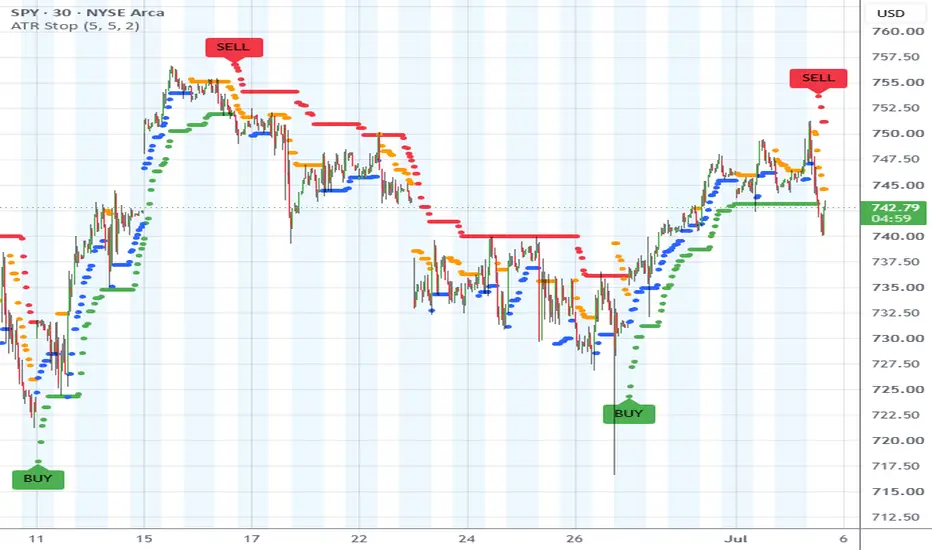
ATR Stop – Classic w/ Signals
A clean implementation of a traditional ATR-based trailing stop with optional buy/sell signals and customizable label styling.
This indicator plots a dynamic stop line derived from the Average True Range (ATR). The stop trails price in trending conditions and flips direction when price crosses the stop level. When a flip occurs, the script generates BUY and SELL signals and plots labels directly near the ATR stop line.
How It Works
The stop is calculated using the standard ATR trailing stop method:
Long Stop:
Close − (ATR × Multiplier)
Short Stop:
Close + (ATR × Multiplier)
The script maintains a directional state:
When price closes above the stop, the indicator switches to long mode.
When price closes below the stop, it switches to short mode.
The stop then trails price using the maximum/minimum of previous stop values to prevent the stop from moving against the active trend.
Signals
Signals occur when price crosses the ATR stop:
BUY: Close crosses above the stop
SELL: Close crosses below the stop
Labels are plotted close to the ATR line to visually align the signal with the trailing stop.
Optional non-repainting confirmation allows signals to appear only after the bar closes.
Features
Classic ATR trailing stop logic
BUY/SELL signal labels
Optional non-repainting signals (close confirmation)
Optional bar coloring based on trend direction
Customizable label colors and text color
ATR stop plotted using circle style for clear visibility
Labels positioned relative to the ATR stop line
Inputs
ATR Period
Length used to calculate the Average True Range.
Multiplier
Controls the distance of the stop from price. Higher values produce wider stops.
Barcolor
Optionally colors price bars based on trend direction.
Non-Repainting Signals
If enabled, signals are confirmed only after the bar closes.
Label Style
BUY Color
SELL Color
Text Color
Typical Use
This type of ATR stop is commonly used for:
Trend-following systems
Dynamic trailing stops
Breakout confirmation
Trade management
The indicator helps visualize trend direction while providing a simple signal when price crosses the trailing stop.
A clean implementation of a traditional ATR-based trailing stop with optional buy/sell signals and customizable label styling.
This indicator plots a dynamic stop line derived from the Average True Range (ATR). The stop trails price in trending conditions and flips direction when price crosses the stop level. When a flip occurs, the script generates BUY and SELL signals and plots labels directly near the ATR stop line.
How It Works
The stop is calculated using the standard ATR trailing stop method:
Long Stop:
Close − (ATR × Multiplier)
Short Stop:
Close + (ATR × Multiplier)
The script maintains a directional state:
When price closes above the stop, the indicator switches to long mode.
When price closes below the stop, it switches to short mode.
The stop then trails price using the maximum/minimum of previous stop values to prevent the stop from moving against the active trend.
Signals
Signals occur when price crosses the ATR stop:
BUY: Close crosses above the stop
SELL: Close crosses below the stop
Labels are plotted close to the ATR line to visually align the signal with the trailing stop.
Optional non-repainting confirmation allows signals to appear only after the bar closes.
Features
Classic ATR trailing stop logic
BUY/SELL signal labels
Optional non-repainting signals (close confirmation)
Optional bar coloring based on trend direction
Customizable label colors and text color
ATR stop plotted using circle style for clear visibility
Labels positioned relative to the ATR stop line
Inputs
ATR Period
Length used to calculate the Average True Range.
Multiplier
Controls the distance of the stop from price. Higher values produce wider stops.
Barcolor
Optionally colors price bars based on trend direction.
Non-Repainting Signals
If enabled, signals are confirmed only after the bar closes.
Label Style
BUY Color
SELL Color
Text Color
Typical Use
This type of ATR stop is commonly used for:
Trend-following systems
Dynamic trailing stops
Breakout confirmation
Trade management
The indicator helps visualize trend direction while providing a simple signal when price crosses the trailing stop.
Informacje o Wersji
Pine category updated.Informacje o Wersji
Signal Label toggle added.User inputs regrouped.
Candle coloring logic removed.
Internal defaults updated.
Informacje o Wersji
Updated to Pine v6.Short title added.
Internal min/max/step values adjusted for an improved user experience.
User inputs and indicator logic remain unchanged.
Informacje o Wersji
**Update Description — Detailed, Human Version**---
**What's New: A Second Trailing Stop Line**
The big addition in this update is a second trailing stop line that runs alongside the original.
The original line is now called the Primary. Nothing about it has changed — it's still the wide line that trails price at a large distance, stays green while the overall move is up, turns red when it's down, and only flips direction when something meaningful happens. It ignores the small stuff on purpose. That's its job: defining the dominant trend.
The new Secondary line does the opposite job. It trails price much more closely, so it reacts to the ordinary pullbacks and bounces that the Primary line deliberately looks past. It shows blue when heading up and orange when heading down, and both colors are adjustable in the settings. There's also a toggle to hide it entirely if you'd rather run the chart with just the original line.
**How to Read the Two Lines Together**
- When both lines point the same direction, price is moving cleanly with the trend — nothing is fighting it.
- When the tighter Secondary line turns against the Primary, price is taking a breather against the main trend. In an uptrend that's a pullback; in a downtrend it's a relief bounce. Those stretches are worth paying attention to, because price is temporarily moving against the bigger picture.
- When the Secondary flips back into agreement with the Primary, that counter-move has likely run its course and the main trend is picking back up.
The Secondary line is purely visual. It doesn't print any labels and doesn't fire any alerts — it's there to give the chart context, not to generate signals.
**Settings Panel Improvements**
- Inputs are now organized into clearly labeled sections — one for the Primary line, one for the Secondary line, and one for label styling — so the settings are easier to navigate than the old flat list.
- Both multipliers now adjust in half-step increments instead of whole numbers, allowing much finer control over how tightly each line hugs price.
- The Secondary multiplier can go as low as one-half for anyone who wants an extremely tight trailing distance.
- Each line is now properly named in the chart's style settings ("Primary ATR Stop" and "Secondary ATR Stop"), so it's obvious which one you're adjusting.
**What Didn't Change**
- BUY and SELL labels work exactly as before, with the same color options, and remain tied exclusively to the Primary line.
- Both alert conditions are unchanged.
- The non-repainting option behaves identically — when it's on, signals still wait for the bar to fully close before confirming, so nothing appears and then vanishes mid-bar.
**Under the Hood**
Some housekeeping was done internally. Both lines now run on one shared calculation engine instead of duplicated logic, which guarantees they behave identically and makes future updates cleaner. Leftover clutter from the original version was also removed. None of this changes how the indicator calculates or how it looks — existing charts will display exactly the same as before.
---
That version keeps every detail from the technical comparison but reads like a person explaining their update rather than a spec sheet. If the platform you're posting to favors a shorter changelog up top, the "What's New" section alone works as a standalone summary.
Informacje o Wersji
**Update Description — ATR Stop - Classic w/Signals****What Changed**
- **Reorganized settings layout.** The "Atr Period" input now lives inside the **Primary ATR Stop** group alongside the "Primary Multiplier," instead of sitting alone at the top of the settings panel. Both inputs that control the primary line are now in one place, making the settings easier to navigate. Note the ATR period still applies to both lines — only the multiplier differs between primary and secondary.
- **New: Custom label text inputs.** Two new text fields were added to the **Label Style** group:
- **BUY Label Text** — defaults to "BUY". Whatever you type here is what appears on the label when a buy signal fires.
- **SELL Label Text** — defaults to "SELL". Same idea for sell signals.
This lets you rename signals to anything you want — "LONG"/"SHORT", "ENTER"/"EXIT", or even symbols like ▲/▼ for a cleaner, minimal chart look.
- **Increased label history.** Added `max_labels_count = 500` so up to 500 labels stay visible on the chart. Previously, TradingView's default (~50) silently deleted older BUY/SELL labels as new ones appeared.
**What Didn't Change**
- All signal logic, ATR stop calculations, alerts, and the non-repainting option work exactly as before. This update is settings organization and customization only — no behavioral changes to the indicator itself.
Skrypt open-source
W zgodzie z duchem TradingView twórca tego skryptu udostępnił go jako open-source, aby użytkownicy mogli przejrzeć i zweryfikować jego działanie. Ukłony dla autora. Korzystanie jest bezpłatne, jednak ponowna publikacja kodu podlega naszym Zasadom serwisu.

Wyłączenie odpowiedzialności
Informacje i publikacje nie stanowią i nie powinny być traktowane jako porady finansowe, inwestycyjne, tradingowe ani jakiekolwiek inne rekomendacje dostarczane lub zatwierdzone przez TradingView. Więcej informacji znajduje się w Warunkach użytkowania.
Skrypt open-source
W zgodzie z duchem TradingView twórca tego skryptu udostępnił go jako open-source, aby użytkownicy mogli przejrzeć i zweryfikować jego działanie. Ukłony dla autora. Korzystanie jest bezpłatne, jednak ponowna publikacja kodu podlega naszym Zasadom serwisu.
Wyłączenie odpowiedzialności
Informacje i publikacje nie stanowią i nie powinny być traktowane jako porady finansowe, inwestycyjne, tradingowe ani jakiekolwiek inne rekomendacje dostarczane lub zatwierdzone przez TradingView. Więcej informacji znajduje się w Warunkach użytkowania.