OPEN-SOURCE SCRIPT
[AnkeAlgo] Horizon Range Flow
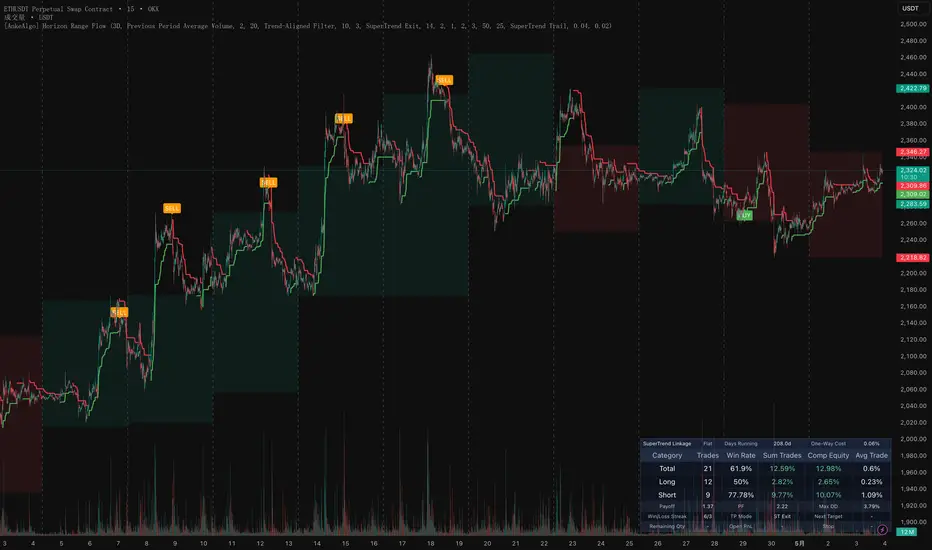
This indicator is built around a structured workflow that combines reference-period highs and lows, volume confirmation, trend bands, and SuperTrend linkage. It is designed to help traders track key range breaks, confirm directional flips, and manage exits with more structure.
Core Concept
- The script records the high and low of the last completed reference period and uses them as key structural boundaries for the current phase.
- When price breaks below the previous period low or above the previous period high, the script checks whether the selected volume filter is satisfied.
- If SuperTrend linkage is enabled, the setup is armed first and the final signal is only confirmed after a SuperTrend flip.
- The indicator combines structure, confirmation, execution management, and performance stats in one workflow.
How Signals Are Triggered
- The script first tracks the complete high-low range of the selected reference timeframe, with `3D` as the default setting.
- When a new reference period starts, the previous period high and low become the active structural levels.
- If price trades below the previous period low and the selected volume condition passes, a long setup is armed.
- If price trades above the previous period high and the selected volume condition passes, a short setup is armed.
- When `SuperTrend Linkage` is enabled, the script waits for a SuperTrend directional flip before printing the final `BUY` or `SELL` signal.
- When linkage is disabled, the breakout itself can trigger the final signal immediately after the filter conditions are met.
This is not just a basic previous high/low breakout marker. It is a combined framework for structure recognition, volume confirmation, trend filtering, SuperTrend timing, and linked trade management.
Key Features
- Reference Period Range Detection: Defines structural boundaries from higher timeframe highs and lows.
- Volume Filter: Supports previous period average volume, recent N-bar average volume, and previous bar volume.
- Trend Band: Visualizes bullish, bearish, or neutral structure using completed period relationships.
- SuperTrend Linkage: Delays final signal confirmation until SuperTrend flips, reducing premature entries.
- Flexible Exit Modes: Supports `SuperTrend Exit`, `ATR Dynamic Exit`, and `ATR Scale-Out Exit`.
- Performance Panel: Tracks total trades, win rate, summed return, compounded equity, average trade, payoff, PF, max drawdown, streaks, open PnL, remaining size, and stop price.
Parameter Groups
- Period Settings: Defines the reference timeframe used to build the structural range.
- Display Settings: Controls separators, completed range levels, colors, and signal visibility.
- Filter Settings: Configures volume filter mode, multiplier, and moving average length.
- Trend Band: Controls trend band visibility and trend-based filtering.
- SuperTrend: Sets ATR length, factor, display, and linkage behavior.
- Linkage Trading: Controls exit mode, ATR target multiples, partial scale-out settings, remaining position handling, fees, and slippage assumptions.
Use Cases
- Traders who want to work with higher timeframe structural highs and lows instead of random intraperiod levels.
- Users who prefer combining breakout logic with volume confirmation.
- Trend-following or reversal traders who want a SuperTrend flip as a final directional confirmation.
- Authors who want signals, exit logic, and performance statistics visible on the same chart.
Linked Trade Management
When `SuperTrend Linkage` is enabled, the script stores entry price, stop level, and ATR-based targets after a confirmed signal, then manages the position according to the selected exit mode:
- SuperTrend Exit: Exits primarily on SuperTrend reversal.
- ATR Dynamic Exit: Uses a single ATR-based target for full exit.
- ATR Scale-Out Exit: Supports 1R, 2R, and 3R partial profit-taking, with the remainder either trailing on SuperTrend or exiting at 3R.
Why The Statistics Panel Matters
One of the strongest professional features in this script is the built-in statistics table. Instead of showing only entry labels and exit logic, the indicator also keeps a running record of how the linked execution model behaves over time.
- Total / Long / Short Breakdown: The panel separates overall performance from long-only and short-only performance, making it easier to identify directional bias.
- Win Rate and Avg Trade: These metrics help measure signal efficiency instead of relying on visual chart impressions alone.
- Summed Return vs Compounded Equity: The script shows both cumulative trade contribution and compounded equity growth, which gives a more realistic view of consistency.
- Profit Factor and Payoff Ratio: These are especially useful when evaluating whether the stop-and-target structure is mathematically healthy.
- Max Drawdown and Streaks: Drawdown and consecutive win/loss streak tracking help assess robustness, not just profitability.
- Open PnL, Remaining Qty, Next Target, and Stop: The panel is also operational, not just analytical, because it displays the current trade state in real time.
For advanced users, this table turns the script from a visual signal tool into a compact execution-monitoring dashboard. It helps evaluate not only whether a setup triggers, but also how the trade model behaves statistically across time.
Code Walkthrough
To make the publication more transparent for advanced users, here is a quick breakdown of how the core logic is implemented in code.
1. Reference Period State Management
This section is what keeps the indicator anchored to a higher-timeframe structure. Instead of reacting to every local swing, the script waits for a completed reference period and then carries its high, low, and average volume into the next phase as the active benchmark.
2. Volume Filter Logic
From a code-design perspective, this is an efficient way to expose multiple confirmation models without duplicating signal logic. The signal engine does not care which volume model is selected; it only reads a final boolean gate through `volumePass`.
3. Armed Setup and SuperTrend Confirmation
This is one of the more professional touches in the script. The breakout and the confirmation are separated into two stages: first the structure break is detected, then the final execution signal waits for a SuperTrend flip. That separation helps avoid turning every raw liquidity sweep into an immediate trade signal.
4. Exit Engine and Trade Statistics
The script does more than plot entries and exits. It also maintains internal trade state, partial profit execution, equity compounding, and performance aggregation. That is why the stats panel can display values such as win rate, profit factor, max drawdown, average trade, and running open PnL directly from the indicator logic.
The professional value of this script is not only in its signal labels, but in the way it organizes structure detection, confirmation timing, trade management, and performance accounting into one coherent Pine workflow.
Best Practice Notes
- Use the indicator on instruments with clear structural swings and adjust the reference timeframe to match market rhythm.
- Enable both volume filtering and SuperTrend linkage if you want stricter confirmation.
- Use `ATR Scale-Out Exit` when you want to manage partial profits instead of relying on one fixed target.
- This tool works best as part of a broader process that includes market structure, session context, and independent risk control.
Risk Notice
This indicator is a structure and execution-assistance tool, not financial advice. Results can vary significantly across markets, timeframes, and parameter settings, so always validate the logic before using it in live conditions.
Skrypt open-source
W zgodzie z duchem TradingView twórca tego skryptu udostępnił go jako open-source, aby użytkownicy mogli przejrzeć i zweryfikować jego działanie. Ukłony dla autora. Korzystanie jest bezpłatne, jednak ponowna publikacja kodu podlega naszym Zasadom serwisu.

Wyłączenie odpowiedzialności
Informacje i publikacje nie stanowią i nie powinny być traktowane jako porady finansowe, inwestycyjne, tradingowe ani jakiekolwiek inne rekomendacje dostarczane lub zatwierdzone przez TradingView. Więcej informacji znajduje się w Warunkach użytkowania.
Skrypt open-source
W zgodzie z duchem TradingView twórca tego skryptu udostępnił go jako open-source, aby użytkownicy mogli przejrzeć i zweryfikować jego działanie. Ukłony dla autora. Korzystanie jest bezpłatne, jednak ponowna publikacja kodu podlega naszym Zasadom serwisu.
Wyłączenie odpowiedzialności
Informacje i publikacje nie stanowią i nie powinny być traktowane jako porady finansowe, inwestycyjne, tradingowe ani jakiekolwiek inne rekomendacje dostarczane lub zatwierdzone przez TradingView. Więcej informacji znajduje się w Warunkach użytkowania.