Zaktualizowano
Level Map from Text
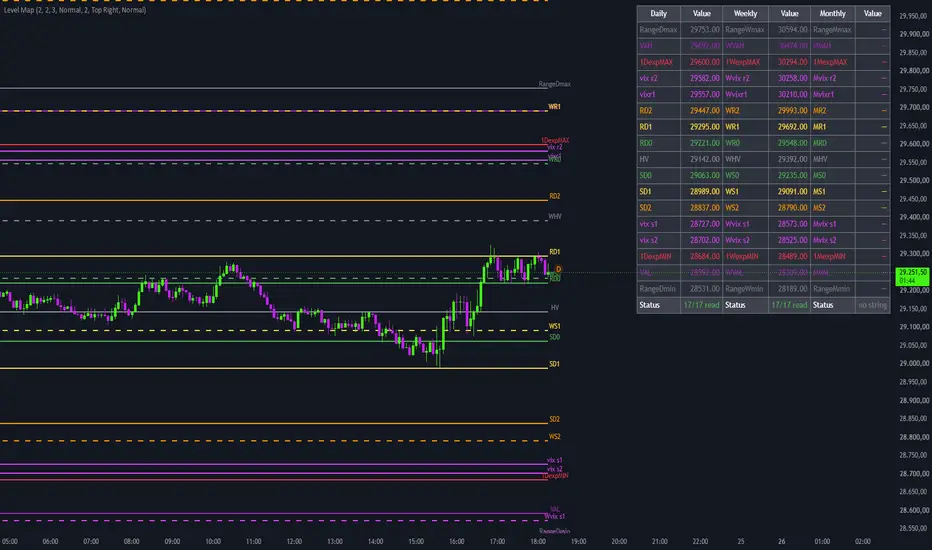
Level Map from Text turns a line of text into a map of price levels on your chart. You paste up to three strings, one for the current day, one for the current week and one for the current month, and the script draws every level with its name, its color and a table of all values. It is meant for traders who receive their levels as text, from a daily plan, a newsletter or their own notes, and want them on the chart in a few seconds instead of drawing seventeen lines by hand.
WHAT IT SHOWS
• Up to three maps of seventeen levels each: daily, weekly and monthly. • Daily lines are solid, weekly lines dashed and monthly lines dotted. Each map starts at the beginning of its current period and extends to the last bar. • The name of every level is written to the right of the last bar. • A table lists every level with its value, from the top of the map to the bottom, plus a status row that tells you how many of the seventeen levels were read from your string (for example "17/17 read" in green, or "15/17 read" in orange when something is missing).
HOW TO USE IT
Add the script to the chart of the instrument the levels refer to.
Open the settings and paste the strings in the "Daily string", "Weekly string" and "Monthly string" boxes. You can leave any of them empty.
Check the status row in the table: "17/17 read" means every level was recognised.
When you receive new levels, replace the strings in the settings.
THE STRING FORMAT
A string is a list of names and values separated by commas:
 ES1!: vix r1, 6750, vix r2, 6762, vix s1, 6650, vix s2, 6638, 1DexpMAX, 6770, 1DexpMIN, 6630, RD0, 6712, RD1, 6725, RD2, 6741, SD0, 6688, SD1, 6675, SD2, 6659, HV, 6700, VAH, 6790, VAL, 6610, range daily max, 6820, range daily min, 6580
• The "$TICKER:" part at the start is optional and ignored. • The order of the levels does not matter, and spaces and upper or lower case are ignored. "Name value" without the comma in between is also accepted. • Decimals must use the dot (6750.25, not 6750,25). • Levels with an unknown name are skipped, and the status row shows how many were read.
The seventeen slots, from the top of the map to the bottom, are: range max, VAH, exp max, vix r2, vix r1, R2, R1, R0, HV, S0, S1, S2, vix s1, vix s2, exp min, VAL, range min. The weekly and monthly maps use the same names with a W or M (for example WVAH, 1WexpMAX, WR0, MHV, range weekly max). Every slot has its own color, which you can change in the settings.
LIMITATIONS
• The script does not calculate any level: it only draws the values you paste. If a value in the string is wrong, the line on the chart is wrong. • The strings stay in the settings until you change them. Old levels are not removed automatically when a new day, week or month starts: replace the strings when you get new ones. • The strings refer to one instrument. If you change the symbol of the chart, the same levels are drawn on the new symbol, so use a separate copy of the script, or separate strings, for each instrument.
This is a charting tool, not trading advice.
WHAT IT SHOWS
• Up to three maps of seventeen levels each: daily, weekly and monthly. • Daily lines are solid, weekly lines dashed and monthly lines dotted. Each map starts at the beginning of its current period and extends to the last bar. • The name of every level is written to the right of the last bar. • A table lists every level with its value, from the top of the map to the bottom, plus a status row that tells you how many of the seventeen levels were read from your string (for example "17/17 read" in green, or "15/17 read" in orange when something is missing).
HOW TO USE IT
Add the script to the chart of the instrument the levels refer to.
Open the settings and paste the strings in the "Daily string", "Weekly string" and "Monthly string" boxes. You can leave any of them empty.
Check the status row in the table: "17/17 read" means every level was recognised.
When you receive new levels, replace the strings in the settings.
THE STRING FORMAT
A string is a list of names and values separated by commas:
ES1!: vix r1, 6750, vix r2, 6762, vix s1, 6650, vix s2, 6638, 1DexpMAX, 6770, 1DexpMIN, 6630, RD0, 6712, RD1, 6725, RD2, 6741, SD0, 6688, SD1, 6675, SD2, 6659, HV, 6700, VAH, 6790, VAL, 6610, range daily max, 6820, range daily min, 6580• The "$TICKER:" part at the start is optional and ignored. • The order of the levels does not matter, and spaces and upper or lower case are ignored. "Name value" without the comma in between is also accepted. • Decimals must use the dot (6750.25, not 6750,25). • Levels with an unknown name are skipped, and the status row shows how many were read.
The seventeen slots, from the top of the map to the bottom, are: range max, VAH, exp max, vix r2, vix r1, R2, R1, R0, HV, S0, S1, S2, vix s1, vix s2, exp min, VAL, range min. The weekly and monthly maps use the same names with a W or M (for example WVAH, 1WexpMAX, WR0, MHV, range weekly max). Every slot has its own color, which you can change in the settings.
LIMITATIONS
• The script does not calculate any level: it only draws the values you paste. If a value in the string is wrong, the line on the chart is wrong. • The strings stay in the settings until you change them. Old levels are not removed automatically when a new day, week or month starts: replace the strings when you get new ones. • The strings refer to one instrument. If you change the symbol of the chart, the same levels are drawn on the new symbol, so use a separate copy of the script, or separate strings, for each instrument.
This is a charting tool, not trading advice.
Informacje o Wersji
Fixed the string reader: level names containing a lowercase “r” (vix r1, vix r2, range daily max, range daily min) were skipped, so the table showed fewer than 17 levels read. All seventeen levels are now read correctly. Short names for the range extremes, such as RDmax or rwmin, are now accepted too. 
“A winner is just a man who never gave up.”
Wyłączenie odpowiedzialności
Informacje i publikacje nie stanowią i nie powinny być traktowane jako porady finansowe, inwestycyjne, tradingowe ani jakiekolwiek inne rekomendacje dostarczane lub zatwierdzone przez TradingView. Więcej informacji znajduje się w Warunkach użytkowania.
“A winner is just a man who never gave up.”
Wyłączenie odpowiedzialności
Informacje i publikacje nie stanowią i nie powinny być traktowane jako porady finansowe, inwestycyjne, tradingowe ani jakiekolwiek inne rekomendacje dostarczane lub zatwierdzone przez TradingView. Więcej informacji znajduje się w Warunkach użytkowania.