Zaktualizowano
Buy and Sell Alerts using VWAP
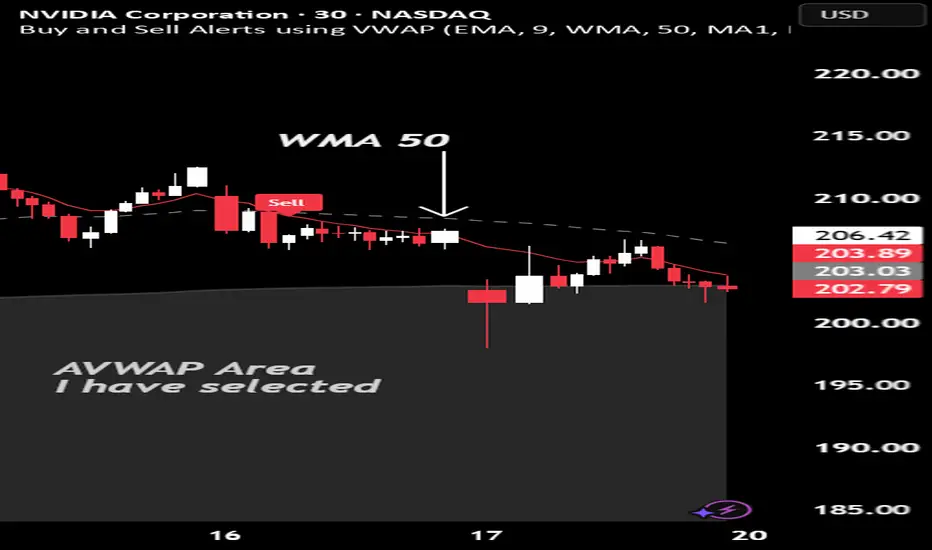
This is my first script, which I hope you'll enjoy.
The script generates alerts for buy and sell trades using VWAP and volume threshold that you select.
Indicators and Moving Averages:
This script allows you to choose which moving averages like VWAP, 9EMA, 10, 20, 50, 100, 200, and 325 SMAs you want to see on your chart.
Volume Threshold:
You can set a volume threshold, which is the minimum required volume required for buy and sell signals to be considered valid. (For example, I like 60,000 on SPY, 5 minute chart.)
Buy and Sell Signals:
The script checks if the stock prices crosses above or below the VWAP and if the trading volume is above the threshold you set.
If the price crosses above the VWAP and the volume is sufficient, a "Buy" signal is generated.
If the price crosses below the VWAP and the volume is sufficient, a "Sell" signal is generated.
This hopefully user-friendly indicator will alert you when certain conditions trading conditions are met, helping to make it a little easier to make informed trading decisions.
The script generates alerts for buy and sell trades using VWAP and volume threshold that you select.
Indicators and Moving Averages:
This script allows you to choose which moving averages like VWAP, 9EMA, 10, 20, 50, 100, 200, and 325 SMAs you want to see on your chart.
Volume Threshold:
You can set a volume threshold, which is the minimum required volume required for buy and sell signals to be considered valid. (For example, I like 60,000 on SPY, 5 minute chart.)
Buy and Sell Signals:
The script checks if the stock prices crosses above or below the VWAP and if the trading volume is above the threshold you set.
If the price crosses above the VWAP and the volume is sufficient, a "Buy" signal is generated.
If the price crosses below the VWAP and the volume is sufficient, a "Sell" signal is generated.
This hopefully user-friendly indicator will alert you when certain conditions trading conditions are met, helping to make it a little easier to make informed trading decisions.
Informacje o Wersji
Buy and Sell Alerts using VWAP Update A clean, powerful, and highly customizable indicator that generates buy and sell signals based on crossovers between Price, VWAP, AVWAP, and Moving Averages.Key Features & Improvements:
- Flexible crossover sources: Price, VWAP, AVWAP, MA1, MA2, MA3
- 3 fully customizable Moving Averages (choose EMA/SMA/WMA + length)
- AVWAP with user-defined anchor date/time
- Fully customizable Buy & Sell icons (choose shape and color)
- Clean icons with no text for a clutter-free chart
- Icons properly positioned relative to the actual crossover point
- Volume filter for higher-quality signals
- Organized, easy-to-use settings panel
How to Use the AVWAP Date:Enable AVWAP in the settings.
Set the AVWAP Anchor Date/Time to a meaningful starting point (e.g., a recent swing low/high, start of the week/month, earnings date, or major reversal point). The AVWAP will then calculate the volume-weighted average price from that anchor date forward to the current bar.
Tip: Choose a significant turning point on the chart for the most useful AVWAP reference line.
How to Use the Volume Threshold:
This filters signals so they only appear when the current bar’s volume is greater than your set value.
- Set to 0 = Show all signals (no filtering).
- Set to a higher value (e.g., 500,000 or 1,000,000 depending on the stock) = Only show signals on stronger volume bars.
- Best practice: Start with a value around the average volume of the stock you’re trading, or use 0 while learning the indicator. This helps reduce noise and focus on higher-conviction setups.
Recap: Enhanced & Simplified version with improved usability, customization, and cleaner visuals.
Thank you for trying my scripts as I'm learning and growing!
Informacje o Wersji
Latest Update - New & Improved Features:- Flexible crossover alerts between any two sources (Price, VWAP, AVWAP, MA1, MA2, MA3)
- Full support for EMA, SMA, and WMA on all moving averages
- Clear on-chart Buy (green) and Sell (red) labels
- New: Strong trend detection with orange candle color + background highlight on significant crossovers
Full color customization for all lines, labels, and strong trend elements in the Style tab
Invert Buy/Sell direction toggle for flexibility
Recommended Settings:
MA1 (Faster): EMA 20
MA2 (Slower): SMA 200
Source A = MA1, Source B = MA2
How the Strong Trend Orange Highlight Works:
The ATR Multiplier (default 1.5) measures how strong a crossover is. Lower value (e.g. 0.8–1.0) = more orange signals (moderate moves)
Higher value (e.g. 2.0+) = only major, high-conviction moves get highlighted
This helps filter out weak/choppy crosses and highlights only the ones with real momentum.
Why the Invert Buy/Sell Direction option exists:
Because you can freely choose any Source A and Source B, the natural meaning of “A crosses above B” can sometimes appear reversed depending on whether the faster or slower line is selected as A. The invert toggle lets you correct the direction instantly without swapping your sources.
Thanks for going along for the ride with me! :)

Wyłączenie odpowiedzialności
Informacje i publikacje nie stanowią i nie powinny być traktowane jako porady finansowe, inwestycyjne, tradingowe ani jakiekolwiek inne rekomendacje dostarczane lub zatwierdzone przez TradingView. Więcej informacji znajduje się w Warunkach użytkowania.
Wyłączenie odpowiedzialności
Informacje i publikacje nie stanowią i nie powinny być traktowane jako porady finansowe, inwestycyjne, tradingowe ani jakiekolwiek inne rekomendacje dostarczane lub zatwierdzone przez TradingView. Więcej informacji znajduje się w Warunkach użytkowania.