OPEN-SOURCE SCRIPT
VWAP Trend Zones + TPSL [Zofesu]
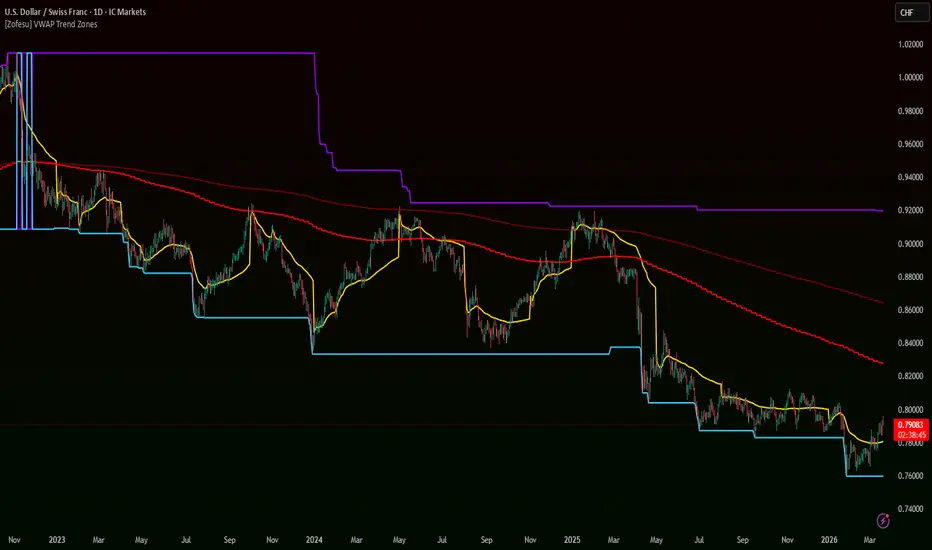
Technical Logic:
This indicator is a comprehensive trend-following and risk-management suite. It combines Multi-Timeframe (MTF) trend analysis with institutional Volume-Weighted Average Price (VWAP) levels and dynamic exit zones.
MTF Trend Engine: The core trend bias is determined on a Higher Timeframe (default: Weekly).
Users can choose between two modes:
Institutional VWAP Layers: The script plots two independent VWAP lines with customizable anchors (Daily, Weekly, Monthly, or Quarterly). These act as "Mean Reversion" levels or dynamic support/resistance zones (Only one activated by default).
Dynamic Risk Mapping (SL/TP): Unlike static pips/points, this script calculates exit levels based on market structure (Swing Highs/Lows) over a lookback period (default: 300 bars). This ensures that Stop Loss and Take Profit levels are placed behind actual technical barriers.
Visuals:
How to Use:
This indicator is a comprehensive trend-following and risk-management suite. It combines Multi-Timeframe (MTF) trend analysis with institutional Volume-Weighted Average Price (VWAP) levels and dynamic exit zones.
MTF Trend Engine: The core trend bias is determined on a Higher Timeframe (default: Weekly).
Users can choose between two modes:
- EMA Cross: A classic crossover between a Fast (90) and Slow (200) EMA.
- HMA Direction: Based on the slope and directional change of the Hull Moving Average for faster trend detection.
Institutional VWAP Layers: The script plots two independent VWAP lines with customizable anchors (Daily, Weekly, Monthly, or Quarterly). These act as "Mean Reversion" levels or dynamic support/resistance zones (Only one activated by default).
Dynamic Risk Mapping (SL/TP): Unlike static pips/points, this script calculates exit levels based on market structure (Swing Highs/Lows) over a lookback period (default: 300 bars). This ensures that Stop Loss and Take Profit levels are placed behind actual technical barriers.
Visuals:
- Primary MTF Line: The main trend filter line. It turns Green during a bullish regime and Red during a bearish regime.
- Secondary MTF Line: Only visible in EMA Cross mode, providing a deeper view of the trend's strength.
- VWAP Lines: Gold (VWAP 1) and White (VWAP 2) lines represent the volume-weighted average price for the selected period.
- Dynamic Levels:
-Purple Line: Dynamic Stop Loss (based on recent swings).
-Blue Line: Dynamic Take Profit (based on opposite swings). - Bar Coloring: Candles are tinted to reflect the MTF trend bias, allowing for instant market sentiment recognition.
How to Use:
- Trend Confirmation: Identify the primary trend via candle colors and the MTF lines. Trade only in the direction of the MTF filter.
- Entry Zones: Look for entries when price is near the VWAP line (Mean Reversion) or after a pullback to the MTF lines within a strong trend. Target TP lines.
- Risk Management: Use the Purple (SL) and Blue (TP) lines to define your trade's risk-to-reward ratio. The "SL Offset" input allows you to add a buffer (in ticks) to protect against liquidity sweeps (wicks).
- Customization: For scalping, lower the Higher Timeframe (e.g., from Weekly to H1). For swing trading, keep the Weekly/Monthly filters for maximum stability.
Skrypt open-source
W zgodzie z duchem TradingView twórca tego skryptu udostępnił go jako open-source, aby użytkownicy mogli przejrzeć i zweryfikować jego działanie. Ukłony dla autora. Korzystanie jest bezpłatne, jednak ponowna publikacja kodu podlega naszym Zasadom serwisu.

Think Act Believe. Use SL. Use BreakEven. Respect the market. Your ego and arrogance can destroy your trading account. Never leave the table unless you have a closed trade or SL/BE. Indicator does not guarantee profit.
discord.gg/FcSJpSvNnv
discord.gg/FcSJpSvNnv
Wyłączenie odpowiedzialności
Informacje i publikacje nie stanowią i nie powinny być traktowane jako porady finansowe, inwestycyjne, tradingowe ani jakiekolwiek inne rekomendacje dostarczane lub zatwierdzone przez TradingView. Więcej informacji znajduje się w Warunkach użytkowania.
Skrypt open-source
W zgodzie z duchem TradingView twórca tego skryptu udostępnił go jako open-source, aby użytkownicy mogli przejrzeć i zweryfikować jego działanie. Ukłony dla autora. Korzystanie jest bezpłatne, jednak ponowna publikacja kodu podlega naszym Zasadom serwisu.
Think Act Believe. Use SL. Use BreakEven. Respect the market. Your ego and arrogance can destroy your trading account. Never leave the table unless you have a closed trade or SL/BE. Indicator does not guarantee profit.
discord.gg/FcSJpSvNnv
discord.gg/FcSJpSvNnv
Wyłączenie odpowiedzialności
Informacje i publikacje nie stanowią i nie powinny być traktowane jako porady finansowe, inwestycyjne, tradingowe ani jakiekolwiek inne rekomendacje dostarczane lub zatwierdzone przez TradingView. Więcej informacji znajduje się w Warunkach użytkowania.