Zaktualizowano
[blackcat] L1 Main Force Monitor
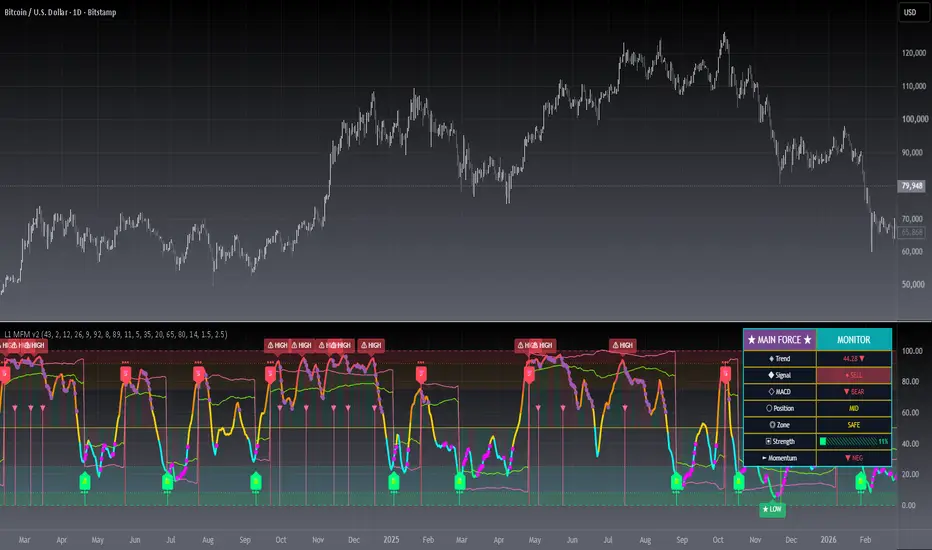
█ OVERVIEW
The Main Force Monitor is a comprehensive oscillator-based indicator designed to track institutional money flow and identify optimal entry and exit points. It combines price position analysis with MACD divergence detection to generate high-probability trading signals.
█ CONCEPTS
This indicator utilizes a dual-smoothed price position algorithm combined with MACD histogram divergence analysis to identify main force accumulation and distribution phases.
Key principles:
• Price position relative to range extremes reveals institutional activity
• MACD divergence signals potential trend reversals
• Multi-condition confirmation reduces false signals
• Zone-based analysis identifies high-probability entry areas
█ HOW TO USE
1 — Add the indicator to your chart from the indicators menu
2 — Observe the main trend line for overall market direction
3 — Watch for B signals in oversold zones for potential long entries
4 — Watch for S signals in overbought zones for potential exit/short opportunities
5 — Use the status table for quick reference of current market conditions
Input Parameters
Trend Settings
• Trend Length: Period for calculating price range extremes - default 43
• Smooth Length: Smoothing factor for the main trend line - default 2
MACD Settings
• MACD Fast Length: Fast EMA period for MACD calculation - default 12
• MACD Slow Length: Slow EMA period for MACD calculation - default 26
• MACD Signal Length: Signal line period for MACD - default 9
Threshold Settings
• Overbought Level: Upper threshold for overbought condition - default 92
• Oversold Level: Lower threshold for oversold condition - default 8
• Trend High Threshold: High zone threshold for sell signals - default 89
• Trend Low Threshold: Low zone threshold for buy signals - default 11
Signal Settings
• Min Bars Between Signals: Minimum candle spacing between signals - default 5
Visual Settings
• Show Status Table: Toggle the information panel display
• Show BS Labels: Toggle buy/sell signal labels
• Show Zone Fills: Toggle colored zone backgrounds
• Show Trend Colors: Toggle dynamic trend line coloring
• Show Momentum Bars: Toggle momentum histogram display
█ SIGNALS
Visual Elements
• B Label: Buy signal triggered when trend is oversold and conditions align
• S Label: Sell signal triggered when trend is overbought and conditions align
• ▲ Arrow: Trend crossed above oversold level - potential bullish transition
• ▼ Arrow: Trend crossed below overbought level - potential bearish transition
• ★ LOW Label: Price entering oversold zone - watch for reversal opportunity
• ⚠ HIGH Label: Price entering overbought zone - exercise caution
Color Coding
• Green zone 0-8: Oversold territory - potential buy opportunity
• Cyan zone 8-25: Low opportunity area
• Gold zone 25-75: Neutral trading range
• Orange zone 75-92: High risk area
• Red zone 92-100: Overbought territory - potential sell opportunity
Status Table Information
• Trend: Current trend value with direction indicator
• Signal: Current signal status - BUY, SELL, or NEUTRAL
• MACD: MACD histogram bias - BULL or BEAR
• Position: Current price position - HIGH, MID, or LOW
• Zone: Market zone classification
• Strength: Visual strength bar showing trend intensity
• Momentum: Current momentum direction
█ LIMITATIONS
• Best suited for trending markets - may produce false signals in choppy conditions
• Signals are based on historical data and may lag during rapid market moves
• Default parameters are optimized for general use - adjustment may be needed for specific assets
• Does not account for fundamental analysis or external market factors
• Should be used in conjunction with other analysis methods for confirmation
█ NOTES
• The indicator uses a signal frequency control to prevent consecutive signals
• Buy signals use a relaxed OR logic for more frequent opportunities
• Sell signals require ALL conditions to be met for stricter confirmation
• The main trend line changes color based on its position in the 0-100 range
• Works on all timeframes but recommended for 15-minute and above
═════════════════════════════════════════════════════════════════════════
For questions or feedback, use comments section below.
The Main Force Monitor is a comprehensive oscillator-based indicator designed to track institutional money flow and identify optimal entry and exit points. It combines price position analysis with MACD divergence detection to generate high-probability trading signals.
█ CONCEPTS
This indicator utilizes a dual-smoothed price position algorithm combined with MACD histogram divergence analysis to identify main force accumulation and distribution phases.
Key principles:
• Price position relative to range extremes reveals institutional activity
• MACD divergence signals potential trend reversals
• Multi-condition confirmation reduces false signals
• Zone-based analysis identifies high-probability entry areas
█ HOW TO USE
1 — Add the indicator to your chart from the indicators menu
2 — Observe the main trend line for overall market direction
3 — Watch for B signals in oversold zones for potential long entries
4 — Watch for S signals in overbought zones for potential exit/short opportunities
5 — Use the status table for quick reference of current market conditions
Input Parameters
Trend Settings
• Trend Length: Period for calculating price range extremes - default 43
• Smooth Length: Smoothing factor for the main trend line - default 2
MACD Settings
• MACD Fast Length: Fast EMA period for MACD calculation - default 12
• MACD Slow Length: Slow EMA period for MACD calculation - default 26
• MACD Signal Length: Signal line period for MACD - default 9
Threshold Settings
• Overbought Level: Upper threshold for overbought condition - default 92
• Oversold Level: Lower threshold for oversold condition - default 8
• Trend High Threshold: High zone threshold for sell signals - default 89
• Trend Low Threshold: Low zone threshold for buy signals - default 11
Signal Settings
• Min Bars Between Signals: Minimum candle spacing between signals - default 5
Visual Settings
• Show Status Table: Toggle the information panel display
• Show BS Labels: Toggle buy/sell signal labels
• Show Zone Fills: Toggle colored zone backgrounds
• Show Trend Colors: Toggle dynamic trend line coloring
• Show Momentum Bars: Toggle momentum histogram display
█ SIGNALS
Visual Elements
• B Label: Buy signal triggered when trend is oversold and conditions align
• S Label: Sell signal triggered when trend is overbought and conditions align
• ▲ Arrow: Trend crossed above oversold level - potential bullish transition
• ▼ Arrow: Trend crossed below overbought level - potential bearish transition
• ★ LOW Label: Price entering oversold zone - watch for reversal opportunity
• ⚠ HIGH Label: Price entering overbought zone - exercise caution
Color Coding
• Green zone 0-8: Oversold territory - potential buy opportunity
• Cyan zone 8-25: Low opportunity area
• Gold zone 25-75: Neutral trading range
• Orange zone 75-92: High risk area
• Red zone 92-100: Overbought territory - potential sell opportunity
Status Table Information
• Trend: Current trend value with direction indicator
• Signal: Current signal status - BUY, SELL, or NEUTRAL
• MACD: MACD histogram bias - BULL or BEAR
• Position: Current price position - HIGH, MID, or LOW
• Zone: Market zone classification
• Strength: Visual strength bar showing trend intensity
• Momentum: Current momentum direction
█ LIMITATIONS
• Best suited for trending markets - may produce false signals in choppy conditions
• Signals are based on historical data and may lag during rapid market moves
• Default parameters are optimized for general use - adjustment may be needed for specific assets
• Does not account for fundamental analysis or external market factors
• Should be used in conjunction with other analysis methods for confirmation
█ NOTES
• The indicator uses a signal frequency control to prevent consecutive signals
• Buy signals use a relaxed OR logic for more frequent opportunities
• Sell signals require ALL conditions to be met for stricter confirmation
• The main trend line changes color based on its position in the 0-100 range
• Works on all timeframes but recommended for 15-minute and above
═════════════════════════════════════════════════════════════════════════
For questions or feedback, use comments section below.
Informacje o Wersji
█ OVERVIEWblackcat L1 Main Force Monitor is an oscillator that maps price position and momentum into a 0-100 scale to highlight institutional buying and selling pressure. It plots a smoothed Main Force Trend line plus clear Buy and Sell signals to help traders time reversals and trend continuations.
█ CONCEPTS
The script transforms the price range into a normalized 0-100 position, then double-smooths it into a Main Force Trend. A MACD histogram and recent price structure are combined with the trend to filter signals. Signals are governed by a state machine with edge triggering and a cooldown so each Buy or Sell fires once per opportunity.
Key principles:
• Trend normalization: price position is expressed on a 0-100 scale
• Dual confirmation: trend, MACD and price action must agree
• Symmetric logic: Buy and Sell use mirrored conditions for balanced signals
• Signal governance: edge-trigger plus cooldown reduces whipsaws
█ HOW TO USE
1 — Add the indicator to any chart; it appears in its own pane below price.
2 — Read the Main Force Trend line: above 80 signals strong overheating, below 20 signals deep weakness.
3 — Act on labels: B marks a Buy opportunity, S marks a Sell opportunity.
Input Parameters
• Trend Length: lookback for price-range normalization (default 43)
• Smooth Length: smoothing passes for the trend line (default 2)
• MACD Fast / Slow / Signal: confirmation settings (12 / 26 / 9)
• Overbought / Oversold: zone boundaries (92 / 8)
• Trend High / Low Threshold: strict-signal trigger levels (89 / 11)
• Min Bars Between Signals: cooldown between repeated signals (default 5)
• Alternate Buy/Sell: enforce alternating signals via state machine (on)
• Secondary Buy/Sell Zone: relaxed signal band for more frequent signals
• Stop / Target (xATR): distance of reference levels from the signal
• Show Target/Stop, Zone Fills, Trend Colors, Momentum, State Bg, Table: visual toggles
█ FEATURES
• Main Force Trend line with dynamic gradient coloring by strength
• Buy (B) and Sell (S) labels plus histogram markers
• ATR-based Target and Stop reference lines on the oscillator scale
• Optional background tint reflecting the current signal bias
• Vibrant zone fills for overbought / oversold / risk / opportunity
• Momentum bars and a live status dashboard table
• Full alertcondition set: Buy, Sell, Cross, Zone, Target, Stop
█ SIGNALS
Visual Elements
• B label (green): potential Buy when the trend is low and turning up
• S label (red): potential Sell when the trend is high and turning down
• ▲ / ▼ markers: trend crossing above oversold or below overbought
• Target (lime) / Stop (pink) lines: reference levels after a signal
• Status table: trend value, signal, MACD, zone, strength, momentum
█ IMPLEMENTATION NOTES
Open-source: built with ta.rma for smoothing, ta.ema for MACD, ta.atr for the Target/Stop bands and ta.crossover / ta.crossunder for zone transitions. All calculations use closed-bar values, so signals do not repaint intrabar. Signals are edge-triggered and pass through a cooldown and an optional alternating state machine.
█ LIMITATIONS
• Oscillator signals can lag at fast turning points
• May produce more signals in choppy, range-bound markets
• Best on timeframes from 15m to daily; weaker below 5m
• Not a standalone trading system - use with price action and risk control
█ NOTES
• Free and open source; use and modify freely, attribution appreciated
• All inputs are exposed so behavior can be tuned per market
════════════════════════════════════════════════════════════════════════
For questions or feedback, please use the comments section below.
Feel free to use and modify - attribution appreciated.

Don't miss out! The first and most important thing to do is to join my Discord chat now! Click here to start your adventure: discord.com/invite/ZTGpQJq My new github for more pine development soon: github.com/wxt-coder
Wyłączenie odpowiedzialności
Informacje i publikacje nie stanowią i nie powinny być traktowane jako porady finansowe, inwestycyjne, tradingowe ani jakiekolwiek inne rekomendacje dostarczane lub zatwierdzone przez TradingView. Więcej informacji znajduje się w Warunkach użytkowania.
Don't miss out! The first and most important thing to do is to join my Discord chat now! Click here to start your adventure: discord.com/invite/ZTGpQJq My new github for more pine development soon: github.com/wxt-coder
Wyłączenie odpowiedzialności
Informacje i publikacje nie stanowią i nie powinny być traktowane jako porady finansowe, inwestycyjne, tradingowe ani jakiekolwiek inne rekomendacje dostarczane lub zatwierdzone przez TradingView. Więcej informacji znajduje się w Warunkach użytkowania.