Zaktualizowano
RCV Daily Checklist & Trader Profiles
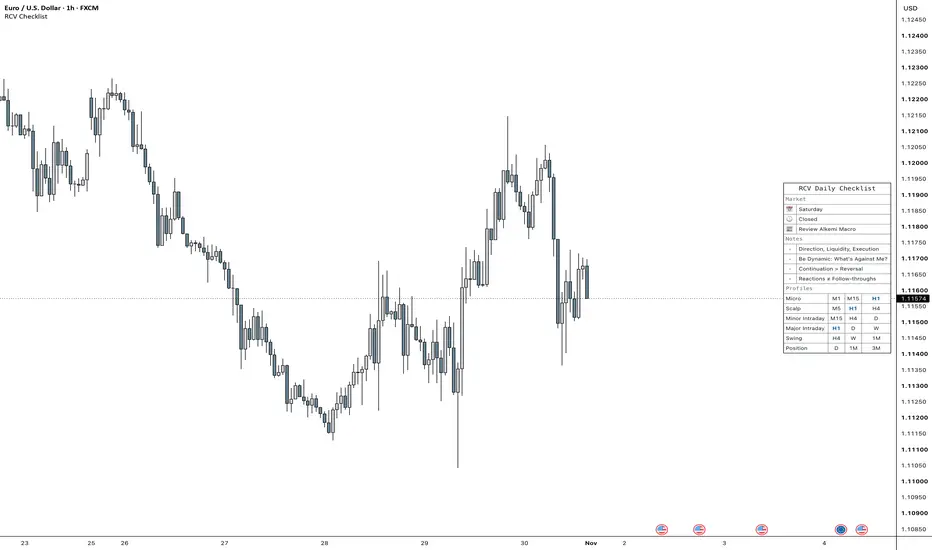
RCV Daily Checklist puts a short pre-trade routine and the six RCV trader profiles in one panel. There is nothing to tick. It is a reminder you read before you take a trade.
How to use
1. Add it to the chart. The panel sits at Middle Right by default.
2. Write your own rules under Settings > Checklist > Notes, one per line, up to 10.
3. Pick your profile under Trader Profiles to shade it, or to show only yours.
What the panel shows
- Market: today's day and the trading session open now, in New York time. Tokyo 20:00, Pre-London 00:00, London Open 02:00, London 05:00, LDN/NY Overlap 08:00, NY 12:00, New Day Open 17:00, Sydney 18:00. From Friday 17:00 to Sunday 17:00 it shows Closed, except on crypto charts. Hover the session to see the full list of times.
- A reminder to review the Alkemi Macro indicator on TradingView for today's calendar, risk mood and news. It can be turned off.
- Notes: your rules. The defaults are "Direction, Liquidity, Execution", "Be Dynamic: What's Against Me?", "Continuation > Reversal" and "Reactions ≠ Follow-throughs".
- Profiles: six timeframe sets, each read left to right as STF (the chart you enter on), MTF (one step up, where you read the story) and HTF (the bigger picture and the furthest target).
Micro: M1, M15, H1
Scalp: M5, H1, H4
Minor Intraday: M15, H4, D
Major Intraday: H1, D, W
Swing: H4, W, 1M
Position: D, 1M, 3M
The chart's own timeframe shows in bold blue wherever it appears. Hover a profile name to see how long its story lasts and when to redo it.
Layout and look
Stacked puts the profiles under the checklist as one more section. Side by Side puts them to the right as their own block, with a small gap. Either part can be turned off, and each profile can be hidden on its own. Text size, position, theme (Light, Dark or Custom), grid and frame apply to the whole panel. The Mobile size reads well on phone screenshots.
How to use
1. Add it to the chart. The panel sits at Middle Right by default.
2. Write your own rules under Settings > Checklist > Notes, one per line, up to 10.
3. Pick your profile under Trader Profiles to shade it, or to show only yours.
What the panel shows
- Market: today's day and the trading session open now, in New York time. Tokyo 20:00, Pre-London 00:00, London Open 02:00, London 05:00, LDN/NY Overlap 08:00, NY 12:00, New Day Open 17:00, Sydney 18:00. From Friday 17:00 to Sunday 17:00 it shows Closed, except on crypto charts. Hover the session to see the full list of times.
- A reminder to review the Alkemi Macro indicator on TradingView for today's calendar, risk mood and news. It can be turned off.
- Notes: your rules. The defaults are "Direction, Liquidity, Execution", "Be Dynamic: What's Against Me?", "Continuation > Reversal" and "Reactions ≠ Follow-throughs".
- Profiles: six timeframe sets, each read left to right as STF (the chart you enter on), MTF (one step up, where you read the story) and HTF (the bigger picture and the furthest target).
Micro: M1, M15, H1
Scalp: M5, H1, H4
Minor Intraday: M15, H4, D
Major Intraday: H1, D, W
Swing: H4, W, 1M
Position: D, 1M, 3M
The chart's own timeframe shows in bold blue wherever it appears. Hover a profile name to see how long its story lasts and when to redo it.
Layout and look
Stacked puts the profiles under the checklist as one more section. Side by Side puts them to the right as their own block, with a small gap. Either part can be turned off, and each profile can be hidden on its own. Text size, position, theme (Light, Dark or Custom), grid and frame apply to the whole panel. The Mobile size reads well on phone screenshots.
Informacje o Wersji
Removed a website link from the Alkemi Macro reminder's hover text. It now points to the Alkemi Macro indicator on TradingView. No other changes.
Wyłączenie odpowiedzialności
Informacje i publikacje nie stanowią i nie powinny być traktowane jako porady finansowe, inwestycyjne, tradingowe ani jakiekolwiek inne rekomendacje dostarczane lub zatwierdzone przez TradingView. Więcej informacji znajduje się w Warunkach użytkowania.
Wyłączenie odpowiedzialności
Informacje i publikacje nie stanowią i nie powinny być traktowane jako porady finansowe, inwestycyjne, tradingowe ani jakiekolwiek inne rekomendacje dostarczane lub zatwierdzone przez TradingView. Więcej informacji znajduje się w Warunkach użytkowania.