Dual EMA ZloiV
OVERVIEW
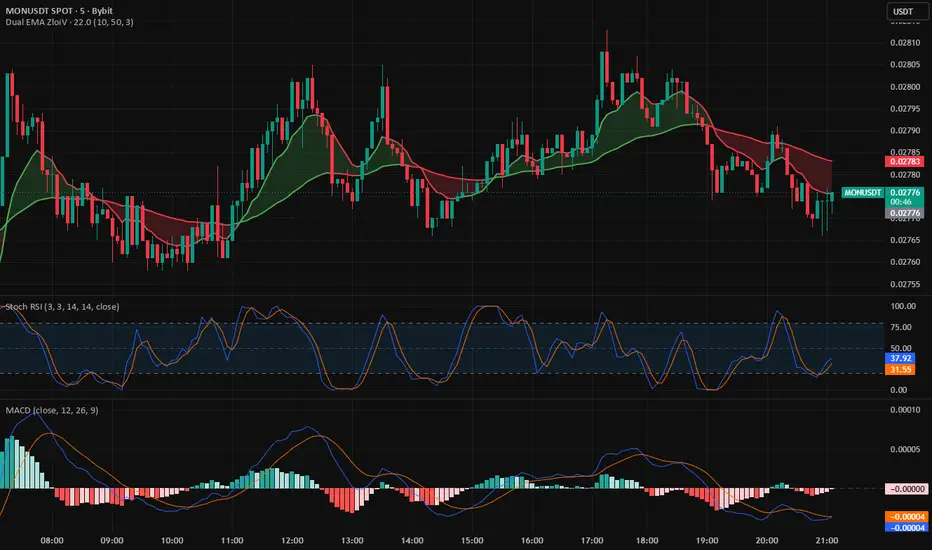
Dual EMA ZloiV is a trend‑following indicator based on two exponential moving averages that color both the EMAs and the ribbon between them according to the current market direction. It is designed as a clean trend filter that quickly highlights bullish, bearish, and neutral phases without additional oscillators or visual noise.
FEATURES
Two customizable EMAs (fast and slow) with separate length and color settings for uptrend and downtrend, so you can adapt the tool to any market or timeframe.
Dynamic color change of each EMA depending on its slope and relative position, making trend shifts visually obvious on the chart.
Optional ribbon between the EMAs that reflects the overall trend direction (bullish/bearish/neutral) and helps you see momentum transitions at a glance.
Minimalistic design focused purely on trend visualization, so you can use it as a universal building block on top of your own strategies, entries and exits.
HOW TO USE
Use Dual EMA ZloiV as your primary trend filter: trade in the direction of the ribbon and EMA colors, and avoid or size down trades that go against the current trend.
Shorter EMA lengths work better for scalping and intraday trading, while longer lengths are more suitable for swing and positional setups.
Combine the indicator with your preferred entry tools (RSI, Stoch RSI, price action patterns, volume, etc.): Dual EMA ZloiV defines the direction, and other tools fine‑tune entries and exits.
LIMITATIONS
This script does not generate trade signals or execute orders; it only visualizes trend conditions based on two EMAs.
In choppy or low‑volatility markets the EMAs can frequently change color, so consider adding a separate trend/volatility filter (e.g., ADX, ATR, volume) in your system to reduce whipsaws.
Dual EMA ZloiV is a trend‑following indicator based on two exponential moving averages that color both the EMAs and the ribbon between them according to the current market direction. It is designed as a clean trend filter that quickly highlights bullish, bearish, and neutral phases without additional oscillators or visual noise.
FEATURES
Two customizable EMAs (fast and slow) with separate length and color settings for uptrend and downtrend, so you can adapt the tool to any market or timeframe.
Dynamic color change of each EMA depending on its slope and relative position, making trend shifts visually obvious on the chart.
Optional ribbon between the EMAs that reflects the overall trend direction (bullish/bearish/neutral) and helps you see momentum transitions at a glance.
Minimalistic design focused purely on trend visualization, so you can use it as a universal building block on top of your own strategies, entries and exits.
HOW TO USE
Use Dual EMA ZloiV as your primary trend filter: trade in the direction of the ribbon and EMA colors, and avoid or size down trades that go against the current trend.
Shorter EMA lengths work better for scalping and intraday trading, while longer lengths are more suitable for swing and positional setups.
Combine the indicator with your preferred entry tools (RSI, Stoch RSI, price action patterns, volume, etc.): Dual EMA ZloiV defines the direction, and other tools fine‑tune entries and exits.
LIMITATIONS
This script does not generate trade signals or execute orders; it only visualizes trend conditions based on two EMAs.
In choppy or low‑volatility markets the EMAs can frequently change color, so consider adding a separate trend/volatility filter (e.g., ADX, ATR, volume) in your system to reduce whipsaws.

Wyłączenie odpowiedzialności
Informacje i publikacje nie stanowią i nie powinny być traktowane jako porady finansowe, inwestycyjne, tradingowe ani jakiekolwiek inne rekomendacje dostarczane lub zatwierdzone przez TradingView. Więcej informacji znajduje się w Warunkach użytkowania.
Wyłączenie odpowiedzialności
Informacje i publikacje nie stanowią i nie powinny być traktowane jako porady finansowe, inwestycyjne, tradingowe ani jakiekolwiek inne rekomendacje dostarczane lub zatwierdzone przez TradingView. Więcej informacji znajduje się w Warunkach użytkowania.