Earnings Gap Levels by Momentum_trade
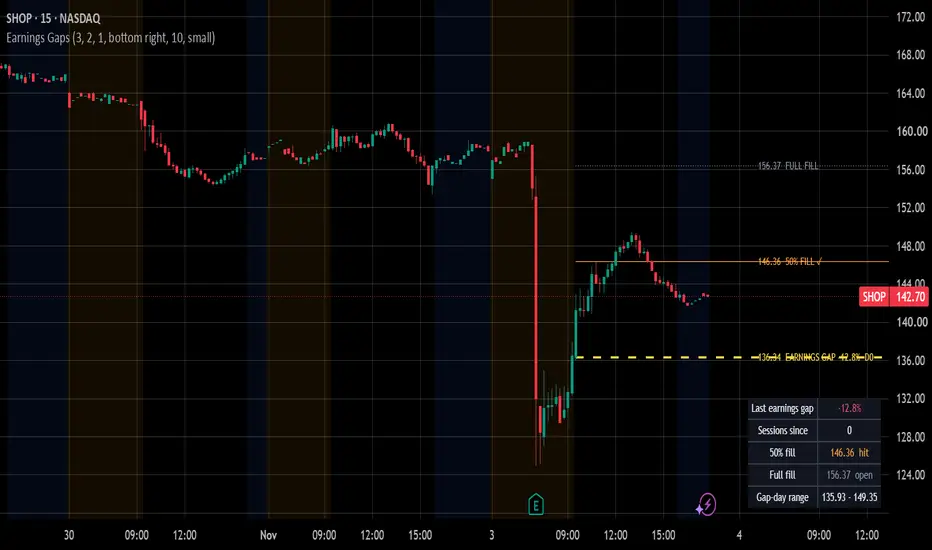
Earnings Gap Levels marks the gap a stock leaves on its earnings report and tracks whether that gap gets filled.
I trade earnings gaps every day, and the same three levels decide most of these trades: where the gap opened, where 50% of the gap sits, and where the stock closed before the report. This script draws them automatically, so you don't have to redraw them on every ticker.
HOW IT WORKS
• Earnings dates come from TradingView's own earnings data (request.earnings).
• The gap is measured from the last regular-session close before the report to the regular-session open (9:30 open vs 16:00 close on intraday charts, premarket is ignored).
• It checks the report day (before-open reports) and the next session (after-close reports). If both sessions gap, the bigger move is used.
• Only gaps at or above the "Min gap %" setting (default 3%) are drawn.
WHAT YOU SEE
• Gap open (yellow, dashed) with the gap size and how many sessions have passed: "136.43 EARNINGS GAP -12.7% D0"
• 50% fill (orange) - gets a ✓ once price trades through it
• Full fill = pre-gap close (gray) - turns solid once the gap is fully filled
• Optional gap-day high / low
• A small table with the latest gap: size, sessions since, 50% and full fill status, gap-day range
ALERTS
• Latest earnings gap: 50% fill touched
• Latest earnings gap: fully filled
HOW I USE IT
• Gap down that can't reclaim the 50% level = sellers still in control, bounces into it are where I look for shorts.
• Gap up that holds above the gap open = buyers defending, pullbacks to the open are the long spot.
• Once the full fill prints, the earnings move is usually done and the stock goes back to its normal range.
SETTINGS
Min gap %, days after report to look for the gap, how many gaps to keep, show/hide each level, hide filled gaps, table position, label size and colors.
Works on daily and intraday charts of stocks with earnings data. Weekly and monthly charts are not supported.
Not financial advice.
I trade earnings gaps every day, and the same three levels decide most of these trades: where the gap opened, where 50% of the gap sits, and where the stock closed before the report. This script draws them automatically, so you don't have to redraw them on every ticker.
HOW IT WORKS
• Earnings dates come from TradingView's own earnings data (request.earnings).
• The gap is measured from the last regular-session close before the report to the regular-session open (9:30 open vs 16:00 close on intraday charts, premarket is ignored).
• It checks the report day (before-open reports) and the next session (after-close reports). If both sessions gap, the bigger move is used.
• Only gaps at or above the "Min gap %" setting (default 3%) are drawn.
WHAT YOU SEE
• Gap open (yellow, dashed) with the gap size and how many sessions have passed: "136.43 EARNINGS GAP -12.7% D0"
• 50% fill (orange) - gets a ✓ once price trades through it
• Full fill = pre-gap close (gray) - turns solid once the gap is fully filled
• Optional gap-day high / low
• A small table with the latest gap: size, sessions since, 50% and full fill status, gap-day range
ALERTS
• Latest earnings gap: 50% fill touched
• Latest earnings gap: fully filled
HOW I USE IT
• Gap down that can't reclaim the 50% level = sellers still in control, bounces into it are where I look for shorts.
• Gap up that holds above the gap open = buyers defending, pullbacks to the open are the long spot.
• Once the full fill prints, the earnings move is usually done and the stock goes back to its normal range.
SETTINGS
Min gap %, days after report to look for the gap, how many gaps to keep, show/hide each level, hide filled gaps, table position, label size and colors.
Works on daily and intraday charts of stocks with earnings data. Weekly and monthly charts are not supported.
Not financial advice.

Prop trader at hi2morrow — affiliates.hi2morrow.com/Tracking/S/6ac647e9da625518afeb7835
Wyłączenie odpowiedzialności
Informacje i publikacje nie stanowią i nie powinny być traktowane jako porady finansowe, inwestycyjne, tradingowe ani jakiekolwiek inne rekomendacje dostarczane lub zatwierdzone przez TradingView. Więcej informacji znajduje się w Warunkach użytkowania.
Prop trader at hi2morrow — affiliates.hi2morrow.com/Tracking/S/6ac647e9da625518afeb7835
Wyłączenie odpowiedzialności
Informacje i publikacje nie stanowią i nie powinny być traktowane jako porady finansowe, inwestycyjne, tradingowe ani jakiekolwiek inne rekomendacje dostarczane lub zatwierdzone przez TradingView. Więcej informacji znajduje się w Warunkach użytkowania.