OPEN-SOURCE SCRIPT
Zaktualizowano GCM Orbital Suite (OBV-RSI-BB-TRENDLINE-ATR-VOL)
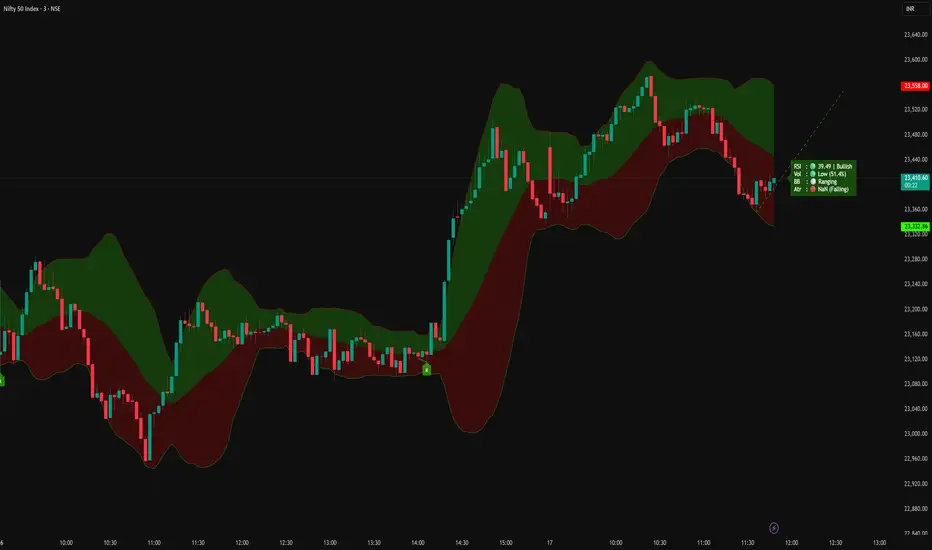
Description:
Title: GCM Orbital Suite (OBV-RSI-BB-TRENDLINE-ATR-VOL)
(The Ultimate 5-Factor Confluence Terminal)
"Precision in Motion, Clarity in Chaos: Master the Market with GCM Orbital."
-uniGram
Overview:
Welcome to the GCM Orbital Suite, an institutional-grade technical analysis engine engineered by uniGram. Built for precision, speed, and absolute clarity, this suite aggregates five critical market dimensions - Trend Structure, Volatility, Momentum, Volume, and Price Action- into a single, highly optimized visual terminal.
Say goodbye to cluttered charts and analysis paralysis. The Orbital Suite is designed to keep you focused purely on data-driven execution.
⚙️ The Core Engine (5-Pillar Matrix):
• Dynamic Trend Projection (TPL): Algorithmic swing detection automatically plots and projects both historical and active support/resistance channels, keeping you ahead of the curve.
• Bollinger Bands (BB) State Tracker: Monitors market phases in real-time, instantly identifying deep consolidations (Squeezes) and explosive Volatility Breakouts.
• RSI & Divergence Engine: Features a smoothed momentum tracker integrated with an automated Hidden/Regular Divergence detection system to spot trend reversals before they happen.
• Smart Volume & OBV Profiling: Follow the smart money. It tracks real-time volume surges combined with On-Balance Volume (OBV) slope analysis to confirm buying/selling pressure.
• ATR Volatility Tracker: Delivers exact Average True Range (ATR) values to pinpoint volatility expansion or contraction, aiding in professional stop-loss placement.
🎛️ Dynamic Heatmap Dashboard (HUD):
The crown jewel of the Orbital Suite is its Heads-Up Display. Engineered with a strict "Traffic Light" confluence logic (🟢 / 🔴 / ⚪), it provides instant visual confirmation of the market state.
• Smart Backgrounds: The dashboard background dynamically adapts-dimming to Gray during sideways chop, glowing with a soft transparent shade during steady trends, and flashing a strong solid color on perfect 'Super Breakout' confluence.
🔔 Automated Pro Alerts:
Built-in native alertcondition triggers for:
• 🟢 Super Bullish Breakouts (RSI + BB Confluence)
• 🔴 Super Bearish Breakouts (RSI + BB Confluence)
• 🚀 TL (Trendline) Upward Breakouts
• 💥 TL (Trendline) Downward Breakouts
How to Trade with GCM Orbital Suite
To maximize success with this terminal, follow a strict Rule-Based Execution strategy. Do not trade on a single signal; wait for the Orbital Confluence.
1. The Setup (The Hunt):
• Monitor the Dashboard for a "Consolidating" or "Squeezing" state. This indicates energy is building up for a massive move.
2. The Confirmation (The Trigger):
• Long Entry: Wait for a Bull Breakout on the BB line, RSI showing Bullish momentum (🟢), and Volume/OBV confirming with a Green signal. The Dashboard will glow Green.
• Short Entry: Wait for a Bear Breakout on the BB line, RSI showing Bearish momentum (🔴), and Volume/OBV confirming with a Red signal. The Dashboard will glow Red.
3. Trendline Synergy:
• Ensure the price is breaking out of the GCM Trendlines. A breakout aligned with the Dashboard color is a high-probability institutional entry.
4. Risk Management (The Shield):
Use the ATR Value provided in the dashboard to set your Stop-Loss. A common professional practice is setting SL at 1.5 \times ATR or 2 \times ATR from the entry price.
🛡️ Risk Management
"Trading is not about being right; it's about how much you make when you are right and how little you lose when you are wrong. The GCM Orbital Suite provides the data, but your discipline provides the profit. Always risk only 1-2% of your capital per trade and let the ATR values guide your stop-loss placement."
⚖️ Legal Disclaimer
Disclaimer: Trading involves significant risk. This script is for educational and informational purposes only and does not constitute financial advice. Past performance is not indicative of future results. The author (uniGram) shall not be held liable for any financial losses incurred from using this tool. Always perform your own due diligence before making investment decisions.
Trade without noise. Trade with uniGram.
HAPPY TRADING
________________________________________
Kannada Description (ಕನ್ನಡ ವಿವರಣೆ)
ಶೀರ್ಷಿಕೆ: GCM ಆರ್ಬಿಟಲ್ ಸೂಟ್: (OBV-RSI-BB-TRENDLINE-ATR-VOL)
ಪಕ್ಕಾ ಇನ್ಸ್ಟಿಟ್ಯೂಷನಲ್ ಟ್ರೇಡಿಂಗ್ ಟರ್ಮಿನಲ್
"ಮಾರುಕಟ್ಟೆಯ ಗೊಂದಲಕ್ಕೆ ಪರ್ಫೆಕ್ಟ್ ಪರಿಹಾರ: GCM ಆರ್ಬಿಟಲ್ ಸೂಟ್ನೊಂದಿಗೆ ನಿಮ್ಮ ಟ್ರೇಡಿಂಗ್ ಜರ್ನಿ ಪವರ್ಫುಲ್ ಮಾಡಿ."
-uniGram
ವಿವರಣೆ:
uniGram ಹೆಮ್ಮೆಯಿಂದ ಪ್ರಸ್ತುತಪಡಿಸುತ್ತಿರುವ 'GCM ಆರ್ಬಿಟಲ್ ಸೂಟ್' ಕೇವಲ ಒಂದು ಇಂಡಿಕೇಟರ್ ಅಲ್ಲ, ಇದೊಂದು ಅತ್ಯಾಧುನಿಕ ಡೇಟಾ ಇಂಜಿನ್. ಚಾರ್ಟ್ನಲ್ಲಿ ಯಾವುದೇ ಗೊಂದಲಗಳಿಲ್ಲದೆ, ಮಾರ್ಕೆಟ್ನ 5 ಪ್ರಮುಖ ಆಯಾಮಗಳನ್ನು (ಟ್ರೆಂಡ್, ವೊಲಾಟಿಲಿಟಿ, ಮೊಮೆಂಟಮ್, ವಾಲ್ಯೂಮ್ ಮತ್ತು ಪ್ರೈಸ್ ಆಕ್ಷನ್) ಒಂದೇ ಡ್ಯಾಶ್ಬೋರ್ಡ್ನಲ್ಲಿ ತರುವ ಪವರ್ಫುಲ್ ಸಿಸ್ಟಮ್ ಇದಾಗಿದೆ.
ಹಲವಾರು ಇಂಡಿಕೇಟರ್ಗಳನ್ನು ಹಾಕಿ ಕನ್ಫ್ಯೂಸ್ ಆಗುವ ಬದಲು, ಪಕ್ಕಾ ಡೇಟಾ ಆಧಾರಿತ (Data-driven) ಎಂಟ್ರಿ ಮತ್ತು ಎಕ್ಸಿಟ್ ತೆಗೆದುಕೊಳ್ಳಲು ಈ ಟೂಲ್ ಅನ್ನು ವಿನ್ಯಾಸಗೊಳಿಸಲಾಗಿದೆ.
⚙️ ಪ್ರಮುಖ ಫೀಚರ್ಸ್ (5-ಪಿಲ್ಲರ್ ಸಿಸ್ಟಮ್):
• ಆಟೋಮ್ಯಾಟಿಕ್ ಟ್ರೆಂಡ್ಲೈನ್ಸ್ (Auto TPL): ಅಲ್ಗಾರಿದಮಿಕ್ ಸ್ವಿಂಗ್ ಟ್ರ್ಯಾಕಿಂಗ್ ಮೂಲಕ ಸಪೋರ್ಟ್ ಮತ್ತು ರೆಸಿಸ್ಟೆನ್ಸ್ ಲೈನ್ಗಳನ್ನು ತಾನೇ ಡ್ರಾ ಮಾಡುತ್ತದೆ ಮತ್ತು ಮುಂದಿನ ಪ್ರೈಸ್ ಲೆವೆಲ್ಗಳನ್ನು ಪ್ರಕ್ಷೇಪಿಸುತ್ತದೆ (Projection).
• ಬೋಲಿಂಜರ್ ಬ್ಯಾಂಡ್ಸ್ ಬ್ರೇಕ್ಔಟ್ ಮ್ಯಾಟ್ರಿಕ್ಸ್ (BB): ಮಾರ್ಕೆಟ್ ಕನ್ಸಾಲಿಡೇಶನ್ (Squeeze) ನಲ್ಲಿದೆಯೋ ಅಥವಾ ಬ್ರೇಕ್ಔಟ್ ಆಗುತ್ತಿದೆಯೋ ಎಂಬುದನ್ನು ಲೈವ್ ಆಗಿ ಟ್ರ್ಯಾಕ್ ಮಾಡುತ್ತದೆ.
• RSI & ಡೈವರ್ಜೆನ್ಸ್ ಇಂಜಿನ್: ಸ್ಮೂತ್ ಆದ RSI ಡೇಟಾದ ಜೊತೆಗೆ, ಚಾರ್ಟ್ ಮೇಲೆ ಆಟೋಮ್ಯಾಟಿಕ್ ಆಗಿ ರಿವರ್ಸಲ್ ಪಾಯಿಂಟ್ಗಳನ್ನು (Divergence) ಪತ್ತೆಹಚ್ಚುವ ಟೆಕ್ನಾಲಜಿ.
• OBV & ವಾಲ್ಯೂಮ್ ಟ್ರ್ಯಾಕರ್: ಸ್ಮಾರ್ಟ್ ಮನಿ (Smart Money) ಎಲ್ಲಿಗೆ ಹೋಗುತ್ತಿದೆ ಎಂದು ತಿಳಿಯಲು, ಲೈವ್ ವಾಲ್ಯೂಮ್ ಶೇಕಡಾವಾರು ಮತ್ತು OBV ಸ್ಲೋಪ್ ಅನಾಲಿಸಿಸ್.
• ATR ವೊಲಾಟಿಲಿಟಿ ಟ್ರ್ಯಾಕರ್: ಮಾರ್ಕೆಟ್ನಲ್ಲಿ ಪವರ್ ಇದೆಯೋ ಇಲ್ಲವೋ ಎಂದು ನಿಖರವಾಗಿ ಅಳೆಯಲು ಮತ್ತು ಪರ್ಫೆಕ್ಟ್ ಸ್ಟಾಪ್ಲಾಸ್ ಇಡಲು ಬೇಕಾದ ನಿಖರ ATR ವ್ಯಾಲ್ಯೂ.
🎛️ ಡೈನಾಮಿಕ್ ಹೀಟ್ಮ್ಯಾಪ್ ಡ್ಯಾಶ್ಬೋರ್ಡ್ (HUD):
ಈ ಸಿಸ್ಟಮ್ನ ಮಾಸ್ಟರ್ಪೀಸ್ ಇದರ 'ಟ್ರಾಫಿಕ್ ಲೈಟ್' ಡ್ಯಾಶ್ಬೋರ್ಡ್. ಯಾವುದೇ ಕನ್ಫ್ಯೂಷನ್ ಇಲ್ಲದೆ ಕೇವಲ 🟢, 🔴 ಮತ್ತು ⚪ ಎಮೋಜಿಗಳ ಮೂಲಕ ರಿಯಲ್-ಟೈಮ್ ಟ್ರೆಂಡ್ ಅನ್ನು ತೋರಿಸುತ್ತದೆ.
• ಮಾರ್ಕೆಟ್ ಸೈಲೆಂಟ್ ಇದ್ದಾಗ ಡ್ಯಾಶ್ಬೋರ್ಡ್ ಬಣ್ಣ ಗ್ರೇ (Gray) ಆಗಿರುತ್ತದೆ.
• ಎಲ್ಲಾ 5 ಡೇಟಾಗಳು ಒಂದೇ ಡೈರೆಕ್ಷನ್ ತೋರಿಸಿ ಪಕ್ಕಾ ಎಂಟ್ರಿ ಸಿಕ್ಕಾಗ, ಡ್ಯಾಶ್ಬೋರ್ಡ್ ಆಕರ್ಷಕವಾಗಿ ಹಸಿರು ಅಥವಾ ಕೆಂಪು ಬಣ್ಣಕ್ಕೆ ತಿರುಗುತ್ತದೆ (Heatmap Glow).
🔔 ಆಟೋಮ್ಯಾಟೆಡ್ ಟ್ರೇಡಿಂಗ್ ಅಲರ್ಟ್ಸ್:
ಚಾರ್ಟ್ ಮುಂದೆ ಕಾಯುವ ಅವಶ್ಯಕತೆಯಿಲ್ಲ. ಟ್ರೆಂಡ್ಲೈನ್ ಬ್ರೇಕ್ಔಟ್ ಆದಾಗ ಮತ್ತು ಪಕ್ಕಾ ಸೂಪರ್ ಬುಲ್ಲಿಷ್/ಬೇರಿಶ್ ಸಿಗ್ನಲ್ ಬಂದಾಗ ನೇರವಾಗಿ TradingView Alerts ಮೂಲಕ ನೋಟಿಫಿಕೇಶನ್ ಪಡೆಯಬಹುದು.
GCM ಆರ್ಬಿಟಲ್ ಸೂಟ್ ಬಳಸಿ ಟ್ರೇಡ್ ಮಾಡುವುದು ಹೇಗೆ?
ಈ ಸಿಸ್ಟಮ್ ಅನ್ನು ಬಳಸುವಾಗ ಕೇವಲ ಒಂದು ಸಿಗ್ನಲ್ ಮೇಲೆ ಅವಲಂಬಿತವಾಗಬೇಡಿ. ಬದಲಾಗಿ ಈ ಕೆಳಗಿನ ನಿಯಮ-ಆಧಾರಿತ (Rule-based) ಕ್ರಮವನ್ನು ಅನುಸರಿಸಿ:
1. ಮಾರ್ಕೆಟ್ ಗಮನಿಸಿ (The Hunt):
• ಡ್ಯಾಶ್ಬೋರ್ಡ್ನಲ್ಲಿ "Consolidating" ಅಥವಾ "Squeezy" ಎಂದು ತೋರಿಸುವವರೆಗೆ ಕಾಯಿರಿ. ಇದರರ್ಥ ಮಾರ್ಕೆಟ್ ಒಂದು ದೊಡ್ಡ ಮೂವ್ಮೆಂಟ್ ನೀಡಲು ರೆಡಿಯಾಗುತ್ತಿದೆ ಎಂದು.
2. ಕನ್ಫರ್ಮೇಷನ್ (The Trigger):
• ಬೈ (Buy) ಸಿಗ್ನಲ್: ಪ್ರೈಸ್ ಅಪ್ಪರ್ ಬೋಲಿಂಜರ್ ಬ್ಯಾಂಡ್ ಅನ್ನು ಬ್ರೇಕ್ ಮಾಡಬೇಕು, RSI ಹಸಿರು (🟢) ಇರಬೇಕು ಮತ್ತು ವಾಲ್ಯೂಮ್/OBV ಕೂಡ ಹಸಿರು ತೋರಿಸಬೇಕು. ಈ ಸಮಯದಲ್ಲಿ ಡ್ಯಾಶ್ಬೋರ್ಡ್ ಪೂರ್ತಿಯಾಗಿ ಹಸಿರು ಬಣ್ಣಕ್ಕೆ ತಿರುಗುತ್ತದೆ.
• ಸೆಲ್ (Sell) ಸಿಗ್ನಲ್: ಪ್ರೈಸ್ ಲೋವರ್ ಬ್ಯಾಂಡ್ ಬ್ರೇಕ್ ಮಾಡಬೇಕು, RSI ಮತ್ತು ವಾಲ್ಯೂಮ್/OBV ಕೆಂಪು (🔴) ಇರಬೇಕು. ಈ ಸಮಯದಲ್ಲಿ ಡ್ಯಾಶ್ಬೋರ್ಡ್ ಕೆಂಪು ಬಣ್ಣಕ್ಕೆ ತಿರುಗುತ್ತದೆ.
3. ಟ್ರೆಂಡ್ಲೈನ್ ಸಿನರ್ಜಿ:
• ಬ್ರೇಕ್ಔಟ್ ಆಗುವಾಗ ನಮ್ಮ GCM ಟ್ರೆಂಡ್ಲೈನ್ಗಳು ಕೂಡ ಬ್ರೇಕ್ ಆಗಿರಬೇಕು. ಡ್ಯಾಶ್ಬೋರ್ಡ್ ಬಣ್ಣ ಮತ್ತು ಟ್ರೆಂಡ್ಲೈನ್ ಬ್ರೇಕ್ಔಟ್ ಒಂದೇ ದಿಕ್ಕಿನಲ್ಲಿದ್ದರೆ ಅದು ಪಕ್ಕಾ ಇನ್ಸ್ಟಿಟ್ಯೂಷನಲ್ ಎಂಟ್ರಿ.
4. ರಿಸ್ಕ್ ಮ್ಯಾನೇಜ್ಮೆಂಟ್ (The Shield):
• ಸ್ಟಾಪ್ಲಾಸ್ ಇಡಲು ಡ್ಯಾಶ್ಬೋರ್ಡ್ನಲ್ಲಿರುವ ATR ವ್ಯಾಲ್ಯೂ ಬಳಸಿ. ಸಾಮಾನ್ಯವಾಗಿ ಎಂಟ್ರಿ ಪ್ರೈಸ್ನಿಂದ 1.5 times ATR ಅಥವಾ 2 \times ATR ದೂರದಲ್ಲಿ ಸ್ಟಾಪ್ಲಾಸ್ ಇಡುವುದು ಪ್ರೊಫೆಷನಲ್ ಕ್ರಮ.
🛡️ ರಿಸ್ಕ್ ಮ್ಯಾನೇಜ್ಮೆಂಟ್
"ಟ್ರೇಡಿಂಗ್ ಎಂದರೆ ಕೇವಲ ಸರಿ ಇರುವುದಲ್ಲ; ನೀವು ಸರಿಯಾದಾಗ ಎಷ್ಟು ಸಂಪಾದಿಸುತ್ತೀರಿ ಮತ್ತು ತಪ್ಪಾದಾಗ ಎಷ್ಟು ಕಳೆದುಕೊಳ್ಳುತ್ತೀರಿ ಎಂಬುದರಲ್ಲಿದೆ ಅಸಲಿ ಮ್ಯಾಜಿಕ್. GCM ಆರ್ಬಿಟಲ್ ಸೂಟ್ ನಿಮಗೆ ಡೇಟಾವನ್ನು ನೀಡುತ್ತದೆ, ಆದರೆ ನಿಮ್ಮ ಶಿಸ್ತು ನಿಮಗೆ ಲಾಭವನ್ನು ನೀಡುತ್ತದೆ. ಪ್ರತಿ ಟ್ರೇಡ್ನಲ್ಲಿ ನಿಮ್ಮ ಬಂಡವಾಳದ ಕೇವಲ 1-2% ಮಾತ್ರ ರಿಸ್ಕ್ ತಗೊಳ್ಳಿ ಮತ್ತು ಪರ್ಫೆಕ್ಟ್ ಸ್ಟಾಪ್ಲಾಸ್ ಇಡಲು ಈ ಸಿಸ್ಟಮ್ ನೀಡುವ ATR ವ್ಯಾಲ್ಯೂಗಳನ್ನು ಬಳಸಿ."
⚖️ ಹಕ್ಕು ನಿರಾಕರಣೆ (Disclaimer):
ಟ್ರೇಡಿಂಗ್ನಲ್ಲಿ ಹಣಕಾಸಿನ ಅಪಾಯವಿರುತ್ತದೆ. ಈ ಸ್ಕ್ರಿಪ್ಟ್ ಕೇವಲ ಮಾಹಿತಿ ಮತ್ತು ಶೈಕ್ಷಣಿಕ ಉದ್ದೇಶಕ್ಕಾಗಿ ಮಾತ್ರವಾಗಿದ್ದು, ಇದು ಯಾವುದೇ ಹಣಕಾಸು ಹೂಡಿಕೆಯ ಸಲಹೆಯಲ್ಲ. ಈ ಟೂಲ್ ಬಳಸಿ ಆಗುವ ಯಾವುದೇ ಲಾಭ ಅಥವಾ ನಷ್ಟಗಳಿಗೆ ಲೇಖಕರು (uniGram) ಜವಾಬ್ದಾರರಾಗಿರುವುದಿಲ್ಲ. ಯಾವುದೇ ನಿರ್ಧಾರ ತೆಗೆದುಕೊಳ್ಳುವ ಮೊದಲು ಸ್ವಂತ ವಿವೇಚನೆಯಿಂದ ಆಲೋಚಿಸಿ ಅಥವಾ ನಿಮ್ಮ ಹಣಕಾಸು ಸಲಹೆಗಾರರನ್ನು ಸಂಪರ್ಕಿಸಿ.
ಗೊಂದಲವಿಲ್ಲದೆ ಟ್ರೇಡ್ ಮಾಡಿ. uniGram ನೊಂದಿಗೆ ಪ್ರೊಫೆಷನಲ್ ಆಗಿ ಟ್ರೇಡ್ ಮಾಡಿ.
ಹ್ಯಾಪಿ ಟ್ರೇಡಿಂಗ್
Title: GCM Orbital Suite (OBV-RSI-BB-TRENDLINE-ATR-VOL)
(The Ultimate 5-Factor Confluence Terminal)
"Precision in Motion, Clarity in Chaos: Master the Market with GCM Orbital."
-uniGram
Overview:
Welcome to the GCM Orbital Suite, an institutional-grade technical analysis engine engineered by uniGram. Built for precision, speed, and absolute clarity, this suite aggregates five critical market dimensions - Trend Structure, Volatility, Momentum, Volume, and Price Action- into a single, highly optimized visual terminal.
Say goodbye to cluttered charts and analysis paralysis. The Orbital Suite is designed to keep you focused purely on data-driven execution.
⚙️ The Core Engine (5-Pillar Matrix):
• Dynamic Trend Projection (TPL): Algorithmic swing detection automatically plots and projects both historical and active support/resistance channels, keeping you ahead of the curve.
• Bollinger Bands (BB) State Tracker: Monitors market phases in real-time, instantly identifying deep consolidations (Squeezes) and explosive Volatility Breakouts.
• RSI & Divergence Engine: Features a smoothed momentum tracker integrated with an automated Hidden/Regular Divergence detection system to spot trend reversals before they happen.
• Smart Volume & OBV Profiling: Follow the smart money. It tracks real-time volume surges combined with On-Balance Volume (OBV) slope analysis to confirm buying/selling pressure.
• ATR Volatility Tracker: Delivers exact Average True Range (ATR) values to pinpoint volatility expansion or contraction, aiding in professional stop-loss placement.
🎛️ Dynamic Heatmap Dashboard (HUD):
The crown jewel of the Orbital Suite is its Heads-Up Display. Engineered with a strict "Traffic Light" confluence logic (🟢 / 🔴 / ⚪), it provides instant visual confirmation of the market state.
• Smart Backgrounds: The dashboard background dynamically adapts-dimming to Gray during sideways chop, glowing with a soft transparent shade during steady trends, and flashing a strong solid color on perfect 'Super Breakout' confluence.
🔔 Automated Pro Alerts:
Built-in native alertcondition triggers for:
• 🟢 Super Bullish Breakouts (RSI + BB Confluence)
• 🔴 Super Bearish Breakouts (RSI + BB Confluence)
• 🚀 TL (Trendline) Upward Breakouts
• 💥 TL (Trendline) Downward Breakouts
How to Trade with GCM Orbital Suite
To maximize success with this terminal, follow a strict Rule-Based Execution strategy. Do not trade on a single signal; wait for the Orbital Confluence.
1. The Setup (The Hunt):
• Monitor the Dashboard for a "Consolidating" or "Squeezing" state. This indicates energy is building up for a massive move.
2. The Confirmation (The Trigger):
• Long Entry: Wait for a Bull Breakout on the BB line, RSI showing Bullish momentum (🟢), and Volume/OBV confirming with a Green signal. The Dashboard will glow Green.
• Short Entry: Wait for a Bear Breakout on the BB line, RSI showing Bearish momentum (🔴), and Volume/OBV confirming with a Red signal. The Dashboard will glow Red.
3. Trendline Synergy:
• Ensure the price is breaking out of the GCM Trendlines. A breakout aligned with the Dashboard color is a high-probability institutional entry.
4. Risk Management (The Shield):
Use the ATR Value provided in the dashboard to set your Stop-Loss. A common professional practice is setting SL at 1.5 \times ATR or 2 \times ATR from the entry price.
🛡️ Risk Management
"Trading is not about being right; it's about how much you make when you are right and how little you lose when you are wrong. The GCM Orbital Suite provides the data, but your discipline provides the profit. Always risk only 1-2% of your capital per trade and let the ATR values guide your stop-loss placement."
⚖️ Legal Disclaimer
Disclaimer: Trading involves significant risk. This script is for educational and informational purposes only and does not constitute financial advice. Past performance is not indicative of future results. The author (uniGram) shall not be held liable for any financial losses incurred from using this tool. Always perform your own due diligence before making investment decisions.
Trade without noise. Trade with uniGram.
HAPPY TRADING
________________________________________
Kannada Description (ಕನ್ನಡ ವಿವರಣೆ)
ಶೀರ್ಷಿಕೆ: GCM ಆರ್ಬಿಟಲ್ ಸೂಟ್: (OBV-RSI-BB-TRENDLINE-ATR-VOL)
ಪಕ್ಕಾ ಇನ್ಸ್ಟಿಟ್ಯೂಷನಲ್ ಟ್ರೇಡಿಂಗ್ ಟರ್ಮಿನಲ್
"ಮಾರುಕಟ್ಟೆಯ ಗೊಂದಲಕ್ಕೆ ಪರ್ಫೆಕ್ಟ್ ಪರಿಹಾರ: GCM ಆರ್ಬಿಟಲ್ ಸೂಟ್ನೊಂದಿಗೆ ನಿಮ್ಮ ಟ್ರೇಡಿಂಗ್ ಜರ್ನಿ ಪವರ್ಫುಲ್ ಮಾಡಿ."
-uniGram
ವಿವರಣೆ:
uniGram ಹೆಮ್ಮೆಯಿಂದ ಪ್ರಸ್ತುತಪಡಿಸುತ್ತಿರುವ 'GCM ಆರ್ಬಿಟಲ್ ಸೂಟ್' ಕೇವಲ ಒಂದು ಇಂಡಿಕೇಟರ್ ಅಲ್ಲ, ಇದೊಂದು ಅತ್ಯಾಧುನಿಕ ಡೇಟಾ ಇಂಜಿನ್. ಚಾರ್ಟ್ನಲ್ಲಿ ಯಾವುದೇ ಗೊಂದಲಗಳಿಲ್ಲದೆ, ಮಾರ್ಕೆಟ್ನ 5 ಪ್ರಮುಖ ಆಯಾಮಗಳನ್ನು (ಟ್ರೆಂಡ್, ವೊಲಾಟಿಲಿಟಿ, ಮೊಮೆಂಟಮ್, ವಾಲ್ಯೂಮ್ ಮತ್ತು ಪ್ರೈಸ್ ಆಕ್ಷನ್) ಒಂದೇ ಡ್ಯಾಶ್ಬೋರ್ಡ್ನಲ್ಲಿ ತರುವ ಪವರ್ಫುಲ್ ಸಿಸ್ಟಮ್ ಇದಾಗಿದೆ.
ಹಲವಾರು ಇಂಡಿಕೇಟರ್ಗಳನ್ನು ಹಾಕಿ ಕನ್ಫ್ಯೂಸ್ ಆಗುವ ಬದಲು, ಪಕ್ಕಾ ಡೇಟಾ ಆಧಾರಿತ (Data-driven) ಎಂಟ್ರಿ ಮತ್ತು ಎಕ್ಸಿಟ್ ತೆಗೆದುಕೊಳ್ಳಲು ಈ ಟೂಲ್ ಅನ್ನು ವಿನ್ಯಾಸಗೊಳಿಸಲಾಗಿದೆ.
⚙️ ಪ್ರಮುಖ ಫೀಚರ್ಸ್ (5-ಪಿಲ್ಲರ್ ಸಿಸ್ಟಮ್):
• ಆಟೋಮ್ಯಾಟಿಕ್ ಟ್ರೆಂಡ್ಲೈನ್ಸ್ (Auto TPL): ಅಲ್ಗಾರಿದಮಿಕ್ ಸ್ವಿಂಗ್ ಟ್ರ್ಯಾಕಿಂಗ್ ಮೂಲಕ ಸಪೋರ್ಟ್ ಮತ್ತು ರೆಸಿಸ್ಟೆನ್ಸ್ ಲೈನ್ಗಳನ್ನು ತಾನೇ ಡ್ರಾ ಮಾಡುತ್ತದೆ ಮತ್ತು ಮುಂದಿನ ಪ್ರೈಸ್ ಲೆವೆಲ್ಗಳನ್ನು ಪ್ರಕ್ಷೇಪಿಸುತ್ತದೆ (Projection).
• ಬೋಲಿಂಜರ್ ಬ್ಯಾಂಡ್ಸ್ ಬ್ರೇಕ್ಔಟ್ ಮ್ಯಾಟ್ರಿಕ್ಸ್ (BB): ಮಾರ್ಕೆಟ್ ಕನ್ಸಾಲಿಡೇಶನ್ (Squeeze) ನಲ್ಲಿದೆಯೋ ಅಥವಾ ಬ್ರೇಕ್ಔಟ್ ಆಗುತ್ತಿದೆಯೋ ಎಂಬುದನ್ನು ಲೈವ್ ಆಗಿ ಟ್ರ್ಯಾಕ್ ಮಾಡುತ್ತದೆ.
• RSI & ಡೈವರ್ಜೆನ್ಸ್ ಇಂಜಿನ್: ಸ್ಮೂತ್ ಆದ RSI ಡೇಟಾದ ಜೊತೆಗೆ, ಚಾರ್ಟ್ ಮೇಲೆ ಆಟೋಮ್ಯಾಟಿಕ್ ಆಗಿ ರಿವರ್ಸಲ್ ಪಾಯಿಂಟ್ಗಳನ್ನು (Divergence) ಪತ್ತೆಹಚ್ಚುವ ಟೆಕ್ನಾಲಜಿ.
• OBV & ವಾಲ್ಯೂಮ್ ಟ್ರ್ಯಾಕರ್: ಸ್ಮಾರ್ಟ್ ಮನಿ (Smart Money) ಎಲ್ಲಿಗೆ ಹೋಗುತ್ತಿದೆ ಎಂದು ತಿಳಿಯಲು, ಲೈವ್ ವಾಲ್ಯೂಮ್ ಶೇಕಡಾವಾರು ಮತ್ತು OBV ಸ್ಲೋಪ್ ಅನಾಲಿಸಿಸ್.
• ATR ವೊಲಾಟಿಲಿಟಿ ಟ್ರ್ಯಾಕರ್: ಮಾರ್ಕೆಟ್ನಲ್ಲಿ ಪವರ್ ಇದೆಯೋ ಇಲ್ಲವೋ ಎಂದು ನಿಖರವಾಗಿ ಅಳೆಯಲು ಮತ್ತು ಪರ್ಫೆಕ್ಟ್ ಸ್ಟಾಪ್ಲಾಸ್ ಇಡಲು ಬೇಕಾದ ನಿಖರ ATR ವ್ಯಾಲ್ಯೂ.
🎛️ ಡೈನಾಮಿಕ್ ಹೀಟ್ಮ್ಯಾಪ್ ಡ್ಯಾಶ್ಬೋರ್ಡ್ (HUD):
ಈ ಸಿಸ್ಟಮ್ನ ಮಾಸ್ಟರ್ಪೀಸ್ ಇದರ 'ಟ್ರಾಫಿಕ್ ಲೈಟ್' ಡ್ಯಾಶ್ಬೋರ್ಡ್. ಯಾವುದೇ ಕನ್ಫ್ಯೂಷನ್ ಇಲ್ಲದೆ ಕೇವಲ 🟢, 🔴 ಮತ್ತು ⚪ ಎಮೋಜಿಗಳ ಮೂಲಕ ರಿಯಲ್-ಟೈಮ್ ಟ್ರೆಂಡ್ ಅನ್ನು ತೋರಿಸುತ್ತದೆ.
• ಮಾರ್ಕೆಟ್ ಸೈಲೆಂಟ್ ಇದ್ದಾಗ ಡ್ಯಾಶ್ಬೋರ್ಡ್ ಬಣ್ಣ ಗ್ರೇ (Gray) ಆಗಿರುತ್ತದೆ.
• ಎಲ್ಲಾ 5 ಡೇಟಾಗಳು ಒಂದೇ ಡೈರೆಕ್ಷನ್ ತೋರಿಸಿ ಪಕ್ಕಾ ಎಂಟ್ರಿ ಸಿಕ್ಕಾಗ, ಡ್ಯಾಶ್ಬೋರ್ಡ್ ಆಕರ್ಷಕವಾಗಿ ಹಸಿರು ಅಥವಾ ಕೆಂಪು ಬಣ್ಣಕ್ಕೆ ತಿರುಗುತ್ತದೆ (Heatmap Glow).
🔔 ಆಟೋಮ್ಯಾಟೆಡ್ ಟ್ರೇಡಿಂಗ್ ಅಲರ್ಟ್ಸ್:
ಚಾರ್ಟ್ ಮುಂದೆ ಕಾಯುವ ಅವಶ್ಯಕತೆಯಿಲ್ಲ. ಟ್ರೆಂಡ್ಲೈನ್ ಬ್ರೇಕ್ಔಟ್ ಆದಾಗ ಮತ್ತು ಪಕ್ಕಾ ಸೂಪರ್ ಬುಲ್ಲಿಷ್/ಬೇರಿಶ್ ಸಿಗ್ನಲ್ ಬಂದಾಗ ನೇರವಾಗಿ TradingView Alerts ಮೂಲಕ ನೋಟಿಫಿಕೇಶನ್ ಪಡೆಯಬಹುದು.
GCM ಆರ್ಬಿಟಲ್ ಸೂಟ್ ಬಳಸಿ ಟ್ರೇಡ್ ಮಾಡುವುದು ಹೇಗೆ?
ಈ ಸಿಸ್ಟಮ್ ಅನ್ನು ಬಳಸುವಾಗ ಕೇವಲ ಒಂದು ಸಿಗ್ನಲ್ ಮೇಲೆ ಅವಲಂಬಿತವಾಗಬೇಡಿ. ಬದಲಾಗಿ ಈ ಕೆಳಗಿನ ನಿಯಮ-ಆಧಾರಿತ (Rule-based) ಕ್ರಮವನ್ನು ಅನುಸರಿಸಿ:
1. ಮಾರ್ಕೆಟ್ ಗಮನಿಸಿ (The Hunt):
• ಡ್ಯಾಶ್ಬೋರ್ಡ್ನಲ್ಲಿ "Consolidating" ಅಥವಾ "Squeezy" ಎಂದು ತೋರಿಸುವವರೆಗೆ ಕಾಯಿರಿ. ಇದರರ್ಥ ಮಾರ್ಕೆಟ್ ಒಂದು ದೊಡ್ಡ ಮೂವ್ಮೆಂಟ್ ನೀಡಲು ರೆಡಿಯಾಗುತ್ತಿದೆ ಎಂದು.
2. ಕನ್ಫರ್ಮೇಷನ್ (The Trigger):
• ಬೈ (Buy) ಸಿಗ್ನಲ್: ಪ್ರೈಸ್ ಅಪ್ಪರ್ ಬೋಲಿಂಜರ್ ಬ್ಯಾಂಡ್ ಅನ್ನು ಬ್ರೇಕ್ ಮಾಡಬೇಕು, RSI ಹಸಿರು (🟢) ಇರಬೇಕು ಮತ್ತು ವಾಲ್ಯೂಮ್/OBV ಕೂಡ ಹಸಿರು ತೋರಿಸಬೇಕು. ಈ ಸಮಯದಲ್ಲಿ ಡ್ಯಾಶ್ಬೋರ್ಡ್ ಪೂರ್ತಿಯಾಗಿ ಹಸಿರು ಬಣ್ಣಕ್ಕೆ ತಿರುಗುತ್ತದೆ.
• ಸೆಲ್ (Sell) ಸಿಗ್ನಲ್: ಪ್ರೈಸ್ ಲೋವರ್ ಬ್ಯಾಂಡ್ ಬ್ರೇಕ್ ಮಾಡಬೇಕು, RSI ಮತ್ತು ವಾಲ್ಯೂಮ್/OBV ಕೆಂಪು (🔴) ಇರಬೇಕು. ಈ ಸಮಯದಲ್ಲಿ ಡ್ಯಾಶ್ಬೋರ್ಡ್ ಕೆಂಪು ಬಣ್ಣಕ್ಕೆ ತಿರುಗುತ್ತದೆ.
3. ಟ್ರೆಂಡ್ಲೈನ್ ಸಿನರ್ಜಿ:
• ಬ್ರೇಕ್ಔಟ್ ಆಗುವಾಗ ನಮ್ಮ GCM ಟ್ರೆಂಡ್ಲೈನ್ಗಳು ಕೂಡ ಬ್ರೇಕ್ ಆಗಿರಬೇಕು. ಡ್ಯಾಶ್ಬೋರ್ಡ್ ಬಣ್ಣ ಮತ್ತು ಟ್ರೆಂಡ್ಲೈನ್ ಬ್ರೇಕ್ಔಟ್ ಒಂದೇ ದಿಕ್ಕಿನಲ್ಲಿದ್ದರೆ ಅದು ಪಕ್ಕಾ ಇನ್ಸ್ಟಿಟ್ಯೂಷನಲ್ ಎಂಟ್ರಿ.
4. ರಿಸ್ಕ್ ಮ್ಯಾನೇಜ್ಮೆಂಟ್ (The Shield):
• ಸ್ಟಾಪ್ಲಾಸ್ ಇಡಲು ಡ್ಯಾಶ್ಬೋರ್ಡ್ನಲ್ಲಿರುವ ATR ವ್ಯಾಲ್ಯೂ ಬಳಸಿ. ಸಾಮಾನ್ಯವಾಗಿ ಎಂಟ್ರಿ ಪ್ರೈಸ್ನಿಂದ 1.5 times ATR ಅಥವಾ 2 \times ATR ದೂರದಲ್ಲಿ ಸ್ಟಾಪ್ಲಾಸ್ ಇಡುವುದು ಪ್ರೊಫೆಷನಲ್ ಕ್ರಮ.
🛡️ ರಿಸ್ಕ್ ಮ್ಯಾನೇಜ್ಮೆಂಟ್
"ಟ್ರೇಡಿಂಗ್ ಎಂದರೆ ಕೇವಲ ಸರಿ ಇರುವುದಲ್ಲ; ನೀವು ಸರಿಯಾದಾಗ ಎಷ್ಟು ಸಂಪಾದಿಸುತ್ತೀರಿ ಮತ್ತು ತಪ್ಪಾದಾಗ ಎಷ್ಟು ಕಳೆದುಕೊಳ್ಳುತ್ತೀರಿ ಎಂಬುದರಲ್ಲಿದೆ ಅಸಲಿ ಮ್ಯಾಜಿಕ್. GCM ಆರ್ಬಿಟಲ್ ಸೂಟ್ ನಿಮಗೆ ಡೇಟಾವನ್ನು ನೀಡುತ್ತದೆ, ಆದರೆ ನಿಮ್ಮ ಶಿಸ್ತು ನಿಮಗೆ ಲಾಭವನ್ನು ನೀಡುತ್ತದೆ. ಪ್ರತಿ ಟ್ರೇಡ್ನಲ್ಲಿ ನಿಮ್ಮ ಬಂಡವಾಳದ ಕೇವಲ 1-2% ಮಾತ್ರ ರಿಸ್ಕ್ ತಗೊಳ್ಳಿ ಮತ್ತು ಪರ್ಫೆಕ್ಟ್ ಸ್ಟಾಪ್ಲಾಸ್ ಇಡಲು ಈ ಸಿಸ್ಟಮ್ ನೀಡುವ ATR ವ್ಯಾಲ್ಯೂಗಳನ್ನು ಬಳಸಿ."
⚖️ ಹಕ್ಕು ನಿರಾಕರಣೆ (Disclaimer):
ಟ್ರೇಡಿಂಗ್ನಲ್ಲಿ ಹಣಕಾಸಿನ ಅಪಾಯವಿರುತ್ತದೆ. ಈ ಸ್ಕ್ರಿಪ್ಟ್ ಕೇವಲ ಮಾಹಿತಿ ಮತ್ತು ಶೈಕ್ಷಣಿಕ ಉದ್ದೇಶಕ್ಕಾಗಿ ಮಾತ್ರವಾಗಿದ್ದು, ಇದು ಯಾವುದೇ ಹಣಕಾಸು ಹೂಡಿಕೆಯ ಸಲಹೆಯಲ್ಲ. ಈ ಟೂಲ್ ಬಳಸಿ ಆಗುವ ಯಾವುದೇ ಲಾಭ ಅಥವಾ ನಷ್ಟಗಳಿಗೆ ಲೇಖಕರು (uniGram) ಜವಾಬ್ದಾರರಾಗಿರುವುದಿಲ್ಲ. ಯಾವುದೇ ನಿರ್ಧಾರ ತೆಗೆದುಕೊಳ್ಳುವ ಮೊದಲು ಸ್ವಂತ ವಿವೇಚನೆಯಿಂದ ಆಲೋಚಿಸಿ ಅಥವಾ ನಿಮ್ಮ ಹಣಕಾಸು ಸಲಹೆಗಾರರನ್ನು ಸಂಪರ್ಕಿಸಿ.
ಗೊಂದಲವಿಲ್ಲದೆ ಟ್ರೇಡ್ ಮಾಡಿ. uniGram ನೊಂದಿಗೆ ಪ್ರೊಫೆಷನಲ್ ಆಗಿ ಟ್ರೇಡ್ ಮಾಡಿ.
ಹ್ಯಾಪಿ ಟ್ರೇಡಿಂಗ್
Informacje o Wersji
Update Notes (English)🚀 GCM Orbital Suite - Recent Updates:
• True Squeeze Filter Added: Upgraded the Dashboard logic to detect "Creeping Trends". The heatmap will no longer show a Gray (Squeeze) background if the price is silently rallying within the bands.
• Visual Enhancements: Fine-tuned the 'Rally' background shade opacity (75 transparency) for a cleaner, strain-free look.
• BB Fill Adjustment: Bollinger Bands background fill opacity is now set to an elegant 18% as default.
• Pixel-Perfect Alignment: Minor text adjustments (e.g., 'Atr') in the HUD dashboard to maintain a 100% vertically aligned, professional terminal look.
• Rebranding: Officially titled as GCM Orbital Suite with a clean 11-character short title for a clutter-free chart.
________________________________________
ಅಪ್ಡೇಟ್ ನೋಟ್ಸ್ (Kannada)
🚀 GCM ಆರ್ಬಿಟಲ್ ಸೂಟ್ - ಹೊಸ ಅಪ್ಡೇಟ್ಸ್:
• 'ಟ್ರೂ ಸ್ಕ್ವೀಜ್' (True Squeeze) ಫಿಲ್ಟರ್: ಮಾರ್ಕೆಟ್ ಬ್ಯಾಂಡ್ ಒಳಗೆ ಸೈಲೆಂಟ್ ಆಗಿ ರ್ಯಾಲಿ (Creeping Trend) ಮಾಡುತ್ತಿರುವಾಗ ಡ್ಯಾಶ್ಬೋರ್ಡ್ ಗ್ರೇ (Gray) ಬಣ್ಣದಲ್ಲಿ ಉಳಿಯದಂತೆ ಸ್ಮಾರ್ಟ್ ಲಾಜಿಕ್ ಸೇರಿಸಲಾಗಿದೆ.
• ವಿಷುಯಲ್ ಅಡ್ಜಸ್ಟ್ಮೆಂಟ್ಸ್: ಕಣ್ಣಿಗೆ ಆರಾಮದಾಯಕವಾಗಿ ಕಾಣುವಂತೆ 'ರ್ಯಾಲಿ' (Rally) ಶೇಡ್ನ ಒಪಾಸಿಟಿಯನ್ನು 75 ಕ್ಕೆ ಬದಲಾಯಿಸಲಾಗಿದೆ.
• ಬೋಲಿಂಜರ್ ಬ್ಯಾಂಡ್ಸ್ (BB) ಬ್ಯಾಕ್ಗ್ರೌಂಡ್: BB ಒಳಗಿನ ಬಣ್ಣವನ್ನು (Fill opacity) 18% ಕ್ಕೆ ಸೆಟ್ ಮಾಡಿ ಇನ್ನಷ್ಟು ಕ್ಲೀನ್ ಆಗಿ ಕಾಣುವಂತೆ ಮಾಡಲಾಗಿದೆ.
• ಪರ್ಫೆಕ್ಟ್ ಅಲೈನ್ಮೆಂಟ್: ಡ್ಯಾಶ್ಬೋರ್ಡ್ನಲ್ಲಿರುವ ಅಕ್ಷರಗಳನ್ನು (ಉದಾಹರಣೆಗೆ 'Atr') ಸರಿಪಡಿಸಿ, ಎಮೋಜಿಗಳು ಮತ್ತು ಕೋಲನ್ (:) 100% ಪರ್ಫೆಕ್ಟ್ ಆಗಿ ಒಂದೇ ನೇರದಲ್ಲಿ ಬರುವಂತೆ ಮಾಡಲಾಗಿದೆ.
• ಹೊಸ ಹೆಸರು: ಚಾರ್ಟ್ ಮೇಲೆ ಕ್ಲೀನ್ ಆಗಿ ಕಾಣಲು GCM ORBITAL ಎಂಬ ಶಾರ್ಟ್ ಟೈಟಲ್ನೊಂದಿಗೆ ಅಫಿಶಿಯಲ್ ಆಗಿ ರಿ-ಬ್ರ್ಯಾಂಡ್ ಮಾಡಲಾಗಿದೆ.
Skrypt open-source
W zgodzie z duchem TradingView twórca tego skryptu udostępnił go jako open-source, aby użytkownicy mogli przejrzeć i zweryfikować jego działanie. Ukłony dla autora. Korzystanie jest bezpłatne, jednak ponowna publikacja kodu podlega naszym Zasadom serwisu.

- uniGram
Wyłączenie odpowiedzialności
Informacje i publikacje nie stanowią i nie powinny być traktowane jako porady finansowe, inwestycyjne, tradingowe ani jakiekolwiek inne rekomendacje dostarczane lub zatwierdzone przez TradingView. Więcej informacji znajduje się w Warunkach użytkowania.
Skrypt open-source
W zgodzie z duchem TradingView twórca tego skryptu udostępnił go jako open-source, aby użytkownicy mogli przejrzeć i zweryfikować jego działanie. Ukłony dla autora. Korzystanie jest bezpłatne, jednak ponowna publikacja kodu podlega naszym Zasadom serwisu.
- uniGram
Wyłączenie odpowiedzialności
Informacje i publikacje nie stanowią i nie powinny być traktowane jako porady finansowe, inwestycyjne, tradingowe ani jakiekolwiek inne rekomendacje dostarczane lub zatwierdzone przez TradingView. Więcej informacji znajduje się w Warunkach użytkowania.