SMT Divergence AI [PickMyTrade]
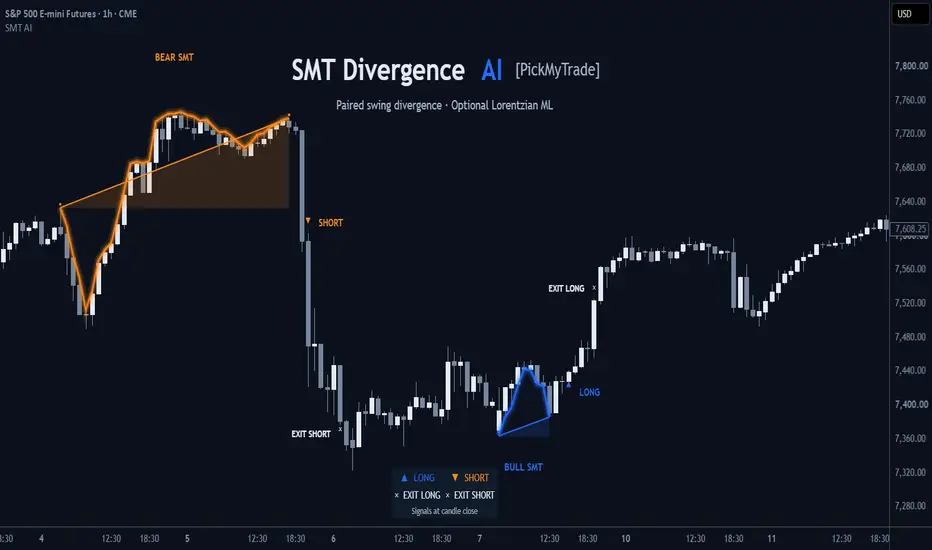
SMT Divergence AI compares confirmed paired swings in Nasdaq and S&P 500 futures. A bearish divergence occurs when one market makes a higher swing high and the other makes a lower high. A bullish divergence uses a lower low in one market and a higher low in the other.
The indicator separates three events that can occur on different candles. First it matches confirmed swings across the two markets. Then it checks for price confirmation. Finally, Rules mode tracks a single model position with its own exit conditions. This lets you see which divergences became signals and which candles triggered those signals.
――――――――――――――――――――
🔷 READ THE CHART
🔸 Blue contours show bullish paired swings. Orange contours show bearish paired swings.
🔸 The contours connect historical pivots after they are confirmed, so their starting points predate the signal.
🔸 The blue ▲ and orange ▼ mark the actual LONG and SHORT signal candles. A white × marks the exit candle.
🔸 Hover a marker to see its reason and reference close.

――――――――――――――――――――
🔷 START WITH RULES
🔸 Open a standard NQ, ES, MNQ, or MES futures chart and use Auto companion selection with matched contracts and comparable sessions. The cover uses ES on the 1-hour chart.
🔸 Rules mode is the default. It waits for price confirmation and issues signals at candle close.
🔸 The stop and target are set at entry. By default the stop distance uses one ATR and the target is twice the initial risk.
🔸 A stop, target, opposite confirmation, maximum hold or data interruption can end the model position.
――――――――――――――――――――
🔷 OPTIONAL MODES
🔸 ML-assisted applies a Lorentzian nearest-neighbor filter to confirmed entries. It compares each candidate with earlier completed reference plans using assumed costs. The estimate is model net payoff in R, where 1R is the planned initial risk. The filter needs completed examples before it can support an entry.
🔸 ICT FVG 15m runs on standard NQ or ES 15-minute charts. It uses confirmed hourly paired SMT, a local sweep, a displaced structure break and a fair value gap midpoint retest. It places a model stop beyond the swept extreme, aims for an untouched 15-minute swing, and uses a regular 4:45 p.m. New York cutoff. The entry screen assumes two ticks of slippage and $2.50 commission per side per contract.
🔸 SMT retest is a separate swing-pivot retest model. It shows a six-candle working limit window and simulated fills.
――――――――――――――――――――
🔷 SETTINGS AND ALERTS
🔸 Use Entry / exit markers to switch between Text and Symbols.
🔸 The status panel can show the current model state.
🔸 Rules and ML-assisted support candle-close alert conditions and optional JSON commands for compatible receivers.
🔸 Reference prices can differ from actual fills. The retest modes display modeled fills inferred from chart bars. Continuous contracts, session settings and feed revisions can affect historical signals.
The indicator separates three events that can occur on different candles. First it matches confirmed swings across the two markets. Then it checks for price confirmation. Finally, Rules mode tracks a single model position with its own exit conditions. This lets you see which divergences became signals and which candles triggered those signals.
――――――――――――――――――――
🔷 READ THE CHART
🔸 Blue contours show bullish paired swings. Orange contours show bearish paired swings.
🔸 The contours connect historical pivots after they are confirmed, so their starting points predate the signal.
🔸 The blue ▲ and orange ▼ mark the actual LONG and SHORT signal candles. A white × marks the exit candle.
🔸 Hover a marker to see its reason and reference close.
――――――――――――――――――――
🔷 START WITH RULES
🔸 Open a standard NQ, ES, MNQ, or MES futures chart and use Auto companion selection with matched contracts and comparable sessions. The cover uses ES on the 1-hour chart.
🔸 Rules mode is the default. It waits for price confirmation and issues signals at candle close.
🔸 The stop and target are set at entry. By default the stop distance uses one ATR and the target is twice the initial risk.
🔸 A stop, target, opposite confirmation, maximum hold or data interruption can end the model position.
――――――――――――――――――――
🔷 OPTIONAL MODES
🔸 ML-assisted applies a Lorentzian nearest-neighbor filter to confirmed entries. It compares each candidate with earlier completed reference plans using assumed costs. The estimate is model net payoff in R, where 1R is the planned initial risk. The filter needs completed examples before it can support an entry.
🔸 ICT FVG 15m runs on standard NQ or ES 15-minute charts. It uses confirmed hourly paired SMT, a local sweep, a displaced structure break and a fair value gap midpoint retest. It places a model stop beyond the swept extreme, aims for an untouched 15-minute swing, and uses a regular 4:45 p.m. New York cutoff. The entry screen assumes two ticks of slippage and $2.50 commission per side per contract.
🔸 SMT retest is a separate swing-pivot retest model. It shows a six-candle working limit window and simulated fills.
――――――――――――――――――――
🔷 SETTINGS AND ALERTS
🔸 Use Entry / exit markers to switch between Text and Symbols.
🔸 The status panel can show the current model state.
🔸 Rules and ML-assisted support candle-close alert conditions and optional JSON commands for compatible receivers.
🔸 Reference prices can differ from actual fills. The retest modes display modeled fills inferred from chart bars. Continuous contracts, session settings and feed revisions can affect historical signals.

Automate TradingView alerts to brokers no coding needed. Trade futures, forex, or crypto, copy trades across unlimited accounts, & control risk with ease.
For Tradovate: bit.ly/4a1KBrY
For all other supported brokers: bit.ly/4qEbU2G
For Tradovate: bit.ly/4a1KBrY
For all other supported brokers: bit.ly/4qEbU2G
Wyłączenie odpowiedzialności
Informacje i publikacje nie stanowią i nie powinny być traktowane jako porady finansowe, inwestycyjne, tradingowe ani jakiekolwiek inne rekomendacje dostarczane lub zatwierdzone przez TradingView. Więcej informacji znajduje się w Warunkach użytkowania.