OPEN-SOURCE SCRIPT
ICT Smart Money Execution Engine PRO
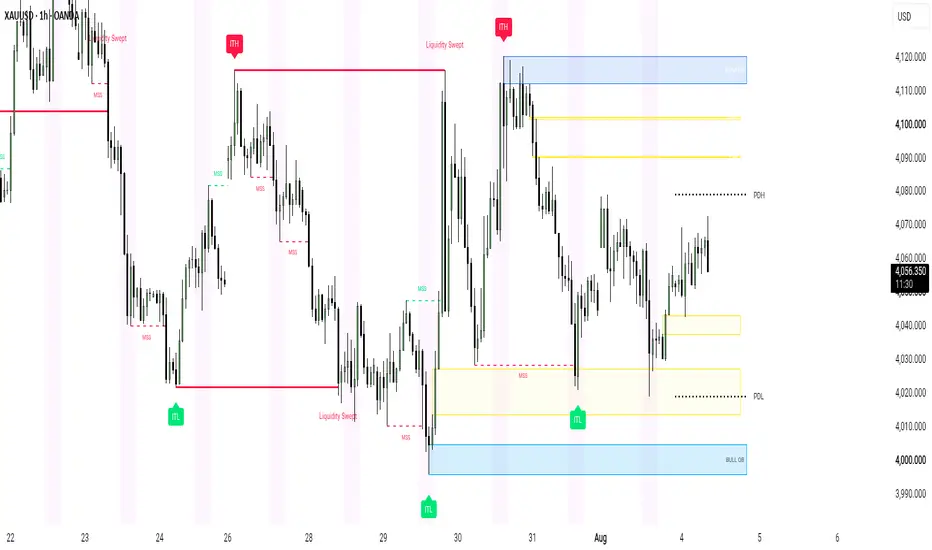
ICT Smart Money Execution Engine PRO
ICT Smart Money Execution Engine PRO is an advanced, high precision technical analysis tool designed for traders practicing Inner Circle Trader and Smart Money Concepts methodologies. It automatically maps structural context, liquidity sweeps, macro price extremes, and key session windows while keeping your charting environment ultra clean.
Key Features Overview
1. Intermediate Term Highs and Lows Badge Labels
Identifies major market turning points with distinct solid badge style labels. Intermediate Term Highs are clearly displayed with red ITH badges above swing points, and Intermediate Term Lows are displayed with green ITL badges below swing points.
2. Auto Mitigating Previous Day High and Low
Projects active daily boundaries on your chart. To prevent visual clutter, Previous Day High and Previous Day Low lines automatically delete as soon as price touches or mitigates them.
3. Red Line Termination Liquidity Sweeps
Tracks high probability liquidity pools sitting above swing highs and below swing lows. When price sweeps liquidity, a solid 2x width red line connects the original swing point directly to the sweeping candle wick, terminating instantly with a clear Liquidity Swept label.
4. Dynamic Auto Mitigating Fair Value Gaps
Automatically identifies bullish and bearish price imbalances across all timeframes. Unmitigated FVG boxes dynamically clean up and vanish as soon as price returns to fill them.
5. Volume Validated Order Blocks
Detects key institutional order block zones using a customizable 50 bar lookback by default. Zones remain active until price firmly closes beyond their boundaries.
6. Clean New York Session Highlight
Provides a single, ultra light background overlay specifically for the New York Session window, eliminating the distraction of multiple overlapping global sessions.
7. Market Structure Shift Detection
Tracks momentum reversals in real time by drawing clean dashed structure lines and MSS labels when key structural pivots are broken by candle closes.
How to Use
Step 1: Determine Macro Bias
Use the red ITH and green ITL badges to locate institutional swing extremes and understand the broader market trend.
Step 2: Focus on New York Session
Analyze price action during the highlighted New York Session window when market volume and institutional volatility are highest.
Step 3: Identify Liquidity Sweeps
Watch for price to sweep an active Previous Day High, Previous Day Low, or recent swing level marked by the bold red Liquidity Swept line.
Step 4: Execute on Structural Confirmation
Wait for a Market Structure Shift signal following a liquidity sweep, then evaluate entries on retaps into active Order Blocks or Fair Value Gaps.
Settings Overview
ITH / ITL Settings
- Show ITH / ITL Badge Labels: Toggle visibility of intermediate swing badges.
- Lookback Sensitivity Length: Adjust pivot lookback sensitivity for detecting macro highs and lows.
- Colors: Customization options for ITH and ITL badge background colors.
Previous Day High and Low Settings
- Show Active PDH / PDL: Toggle display of auto disappearing daily levels.
- Line Width and Style: Choose between solid, dotted, or dashed line styles and adjust thickness.
Fair Value Gap Settings
- Show Active FVGs: Toggle dynamic imbalance box visibility.
- FVG Transparency: Adjust fill opacity for bullish and bearish boxes.
Order Block Settings
- OB Lookback Length: Customize the pivot length used for order block detection (default is set to 50).
Liquidity Sweep Settings
- Show Liquidity Sweeps: Toggle sweep lines and labels.
- Sweep Line Color: Customize the color of the 2x width sweep termination line.
Session Settings
- Show Only New York Session: Toggle visibility of the session background highlight.
- NY Session Window: Set exact session hours to match your local or UTC-4/5 preferences.
Disclaimer
This script is built strictly for educational, analytical, and charting enhancement purposes. It does not provide financial advice, automated trading signals, trade management, or guaranteed results. Trading financial markets involves substantial risk of capital loss. Always perform your own analysis and practice strict risk management.
ICT Smart Money Execution Engine PRO is an advanced, high precision technical analysis tool designed for traders practicing Inner Circle Trader and Smart Money Concepts methodologies. It automatically maps structural context, liquidity sweeps, macro price extremes, and key session windows while keeping your charting environment ultra clean.
Key Features Overview
1. Intermediate Term Highs and Lows Badge Labels
Identifies major market turning points with distinct solid badge style labels. Intermediate Term Highs are clearly displayed with red ITH badges above swing points, and Intermediate Term Lows are displayed with green ITL badges below swing points.
2. Auto Mitigating Previous Day High and Low
Projects active daily boundaries on your chart. To prevent visual clutter, Previous Day High and Previous Day Low lines automatically delete as soon as price touches or mitigates them.
3. Red Line Termination Liquidity Sweeps
Tracks high probability liquidity pools sitting above swing highs and below swing lows. When price sweeps liquidity, a solid 2x width red line connects the original swing point directly to the sweeping candle wick, terminating instantly with a clear Liquidity Swept label.
4. Dynamic Auto Mitigating Fair Value Gaps
Automatically identifies bullish and bearish price imbalances across all timeframes. Unmitigated FVG boxes dynamically clean up and vanish as soon as price returns to fill them.
5. Volume Validated Order Blocks
Detects key institutional order block zones using a customizable 50 bar lookback by default. Zones remain active until price firmly closes beyond their boundaries.
6. Clean New York Session Highlight
Provides a single, ultra light background overlay specifically for the New York Session window, eliminating the distraction of multiple overlapping global sessions.
7. Market Structure Shift Detection
Tracks momentum reversals in real time by drawing clean dashed structure lines and MSS labels when key structural pivots are broken by candle closes.
How to Use
Step 1: Determine Macro Bias
Use the red ITH and green ITL badges to locate institutional swing extremes and understand the broader market trend.
Step 2: Focus on New York Session
Analyze price action during the highlighted New York Session window when market volume and institutional volatility are highest.
Step 3: Identify Liquidity Sweeps
Watch for price to sweep an active Previous Day High, Previous Day Low, or recent swing level marked by the bold red Liquidity Swept line.
Step 4: Execute on Structural Confirmation
Wait for a Market Structure Shift signal following a liquidity sweep, then evaluate entries on retaps into active Order Blocks or Fair Value Gaps.
Settings Overview
ITH / ITL Settings
- Show ITH / ITL Badge Labels: Toggle visibility of intermediate swing badges.
- Lookback Sensitivity Length: Adjust pivot lookback sensitivity for detecting macro highs and lows.
- Colors: Customization options for ITH and ITL badge background colors.
Previous Day High and Low Settings
- Show Active PDH / PDL: Toggle display of auto disappearing daily levels.
- Line Width and Style: Choose between solid, dotted, or dashed line styles and adjust thickness.
Fair Value Gap Settings
- Show Active FVGs: Toggle dynamic imbalance box visibility.
- FVG Transparency: Adjust fill opacity for bullish and bearish boxes.
Order Block Settings
- OB Lookback Length: Customize the pivot length used for order block detection (default is set to 50).
Liquidity Sweep Settings
- Show Liquidity Sweeps: Toggle sweep lines and labels.
- Sweep Line Color: Customize the color of the 2x width sweep termination line.
Session Settings
- Show Only New York Session: Toggle visibility of the session background highlight.
- NY Session Window: Set exact session hours to match your local or UTC-4/5 preferences.
Disclaimer
This script is built strictly for educational, analytical, and charting enhancement purposes. It does not provide financial advice, automated trading signals, trade management, or guaranteed results. Trading financial markets involves substantial risk of capital loss. Always perform your own analysis and practice strict risk management.
Skrypt open-source
W zgodzie z duchem TradingView twórca tego skryptu udostępnił go jako open-source, aby użytkownicy mogli przejrzeć i zweryfikować jego działanie. Ukłony dla autora. Korzystanie jest bezpłatne, jednak ponowna publikacja kodu podlega naszym Zasadom serwisu.

TELEGRAM
t.me/+iAj6deCfF9swNWI8
Telegram 2nd
t.me/+0G4yqhqD3PU1ZGFk
Telegram : Username @Forex_Ace9
t.me/+iAj6deCfF9swNWI8
Telegram 2nd
t.me/+0G4yqhqD3PU1ZGFk
Telegram : Username @Forex_Ace9
Wyłączenie odpowiedzialności
Informacje i publikacje nie stanowią i nie powinny być traktowane jako porady finansowe, inwestycyjne, tradingowe ani jakiekolwiek inne rekomendacje dostarczane lub zatwierdzone przez TradingView. Więcej informacji znajduje się w Warunkach użytkowania.
Skrypt open-source
W zgodzie z duchem TradingView twórca tego skryptu udostępnił go jako open-source, aby użytkownicy mogli przejrzeć i zweryfikować jego działanie. Ukłony dla autora. Korzystanie jest bezpłatne, jednak ponowna publikacja kodu podlega naszym Zasadom serwisu.
TELEGRAM
t.me/+iAj6deCfF9swNWI8
Telegram 2nd
t.me/+0G4yqhqD3PU1ZGFk
Telegram : Username @Forex_Ace9
t.me/+iAj6deCfF9swNWI8
Telegram 2nd
t.me/+0G4yqhqD3PU1ZGFk
Telegram : Username @Forex_Ace9
Wyłączenie odpowiedzialności
Informacje i publikacje nie stanowią i nie powinny być traktowane jako porady finansowe, inwestycyjne, tradingowe ani jakiekolwiek inne rekomendacje dostarczane lub zatwierdzone przez TradingView. Więcej informacji znajduje się w Warunkach użytkowania.