Обновлено
Auto Center Chart
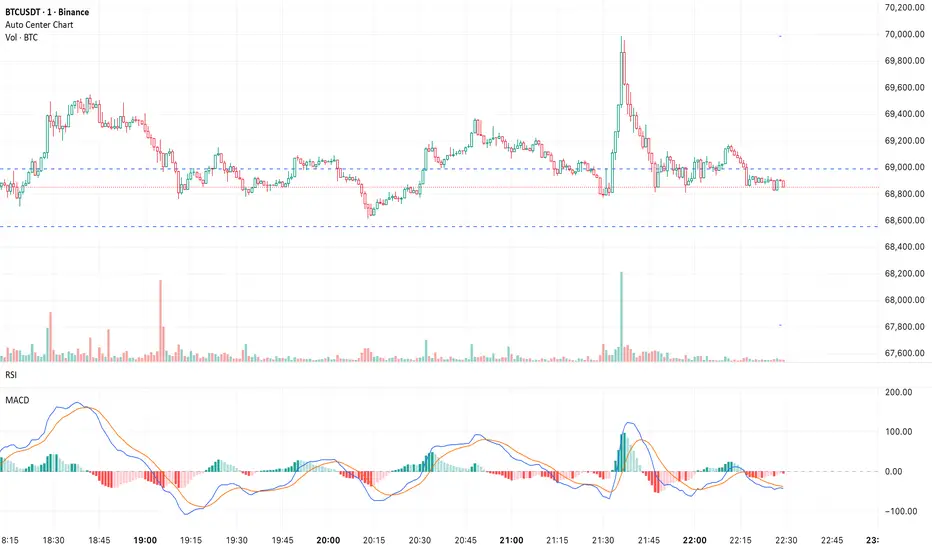
Automatically centers the chart within the current visible chart window.
This utility indicator scans the visible range to determine its High and Low, then adjusts autoscale so that the most recent completed candle remains visually centered — without drawing any visible objects or cluttering the chart.
Why This Is Useful:
- Prevents price from hugging the top or bottom of the screen
- Reduces visual bias during analysis
- Improves clarity when planning risk/reward
- Keeps the active candle visually balanced
- Eliminates constant manual scale adjustments
The script only influences scaling at the right edge and does not change when hovering over historical candles.
Important Notes:
- Requires Auto (fits data to screen) to be enabled in chart settings
- May not work as expected if other indicators are also forcing autoscale or adding extra chart space
- Designed for standard time-based charts
If another script modifies scaling or the chart is not in Auto mode, TradingView’s scaling engine can override this indicator.
This utility indicator scans the visible range to determine its High and Low, then adjusts autoscale so that the most recent completed candle remains visually centered — without drawing any visible objects or cluttering the chart.
Why This Is Useful:
- Prevents price from hugging the top or bottom of the screen
- Reduces visual bias during analysis
- Improves clarity when planning risk/reward
- Keeps the active candle visually balanced
- Eliminates constant manual scale adjustments
The script only influences scaling at the right edge and does not change when hovering over historical candles.
Important Notes:
- Requires Auto (fits data to screen) to be enabled in chart settings
- May not work as expected if other indicators are also forcing autoscale or adding extra chart space
- Designed for standard time-based charts
If another script modifies scaling or the chart is not in Auto mode, TradingView’s scaling engine can override this indicator.
Информация о релизе
Update: Improved StabilityRefined the autoscale recalculation timing to reduce chart “jump” behavior when a new bar begins.
Auto-centering now updates more smoothly while maintaining the same functionality and visual balance.

Отказ от ответственности
Информация и публикации не предназначены для предоставления и не являются финансовыми, инвестиционными, торговыми или другими видами советов или рекомендаций, предоставленных или одобренных TradingView. Подробнее читайте в Условиях использования.
Отказ от ответственности
Информация и публикации не предназначены для предоставления и не являются финансовыми, инвестиционными, торговыми или другими видами советов или рекомендаций, предоставленных или одобренных TradingView. Подробнее читайте в Условиях использования.