Richard Dennis Turtle Breakout System [Jayadev Rana]
WHAT IT IS
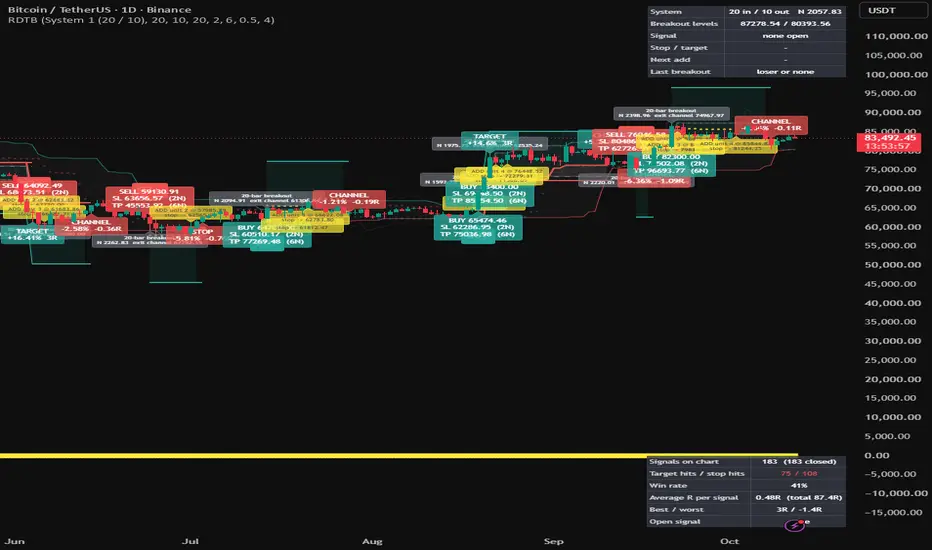
A channel-breakout trend-following signal indicator in the tradition of the famous 1980s trading experiment: enter on a breakout of an N-bar price channel, size and manage the position in units of volatility (N), add units as the trend extends, and exit on a shorter reverse channel. Every BUY and SELL is printed with its stop-loss and target, unit adds are marked with the new stop, the levels are drawn as lines until the signal resolves, and every exit is labelled with its result.
HOW IT WORKS
1. Systems. System 1 signals on a 20-bar breakout and exits on a 10-bar reverse breakout; System 2 uses 55 and 20; custom lengths are available. N is a 20-bar average true range.
2. Signals. BUY when the high exceeds the highest high of the previous entry-channel bars; SELL when the low breaks the lowest low. The entry price is the channel edge. An optional skip rule ignores a System 1 breakout when the previous breakout was a winner.
3. Stop-loss and target. Stop = entry minus two N (input). Target = entry plus a chosen number of N (default six). The original rules relied on the exit channel instead of a target; the target here is an addition so that every signal shows a reward level.
4. Unit adds. Every half N (input) in the signal's favour another unit is marked, up to the maximum, and the stop for the whole position moves to two N below the newest unit. A circle and a label show each add with the new stop.
5. Exits. The active stop is the closer of the N-based stop and the exit channel. The signal closes on that stop, or on the target. Exit labels say STOP, CHANNEL or TARGET.
ON THE CHART
Entry channel lines with a shaded channel, exit channel circles, 2N bands around price for scale, next-unit level circles while a signal is open, breakout labels with N and the exit channel value, BUY / SELL labels with entry, stop and target, entry / stop / target lines with risk and reward fills, add labels, exit labels, a status table (system, N, breakout levels, open signal and units, stop and target, next add) and the journal table (signals, hits, win rate, average R, best and worst, open signal R).
INPUTS
System choice and custom lengths, N length, skip rule, long and short switches, stop distance, target distance, add step, maximum units, display toggles.
ALERTS
BUY, SELL, add unit, target hit, stop hit, channel exit.
INTENDED USE
Daily and 4-hour charts of futures, forex, crypto and trending stocks. Trend following takes many small stops and a few large winners; the journal table makes that profile visible.
LIMITATIONS
Breakouts are known only when price trades through the channel, so a live fill may differ from the printed channel price. The journal counts signals on the loaded history without costs or sizing. Educational tool, not financial advice.
A channel-breakout trend-following signal indicator in the tradition of the famous 1980s trading experiment: enter on a breakout of an N-bar price channel, size and manage the position in units of volatility (N), add units as the trend extends, and exit on a shorter reverse channel. Every BUY and SELL is printed with its stop-loss and target, unit adds are marked with the new stop, the levels are drawn as lines until the signal resolves, and every exit is labelled with its result.
HOW IT WORKS
1. Systems. System 1 signals on a 20-bar breakout and exits on a 10-bar reverse breakout; System 2 uses 55 and 20; custom lengths are available. N is a 20-bar average true range.
2. Signals. BUY when the high exceeds the highest high of the previous entry-channel bars; SELL when the low breaks the lowest low. The entry price is the channel edge. An optional skip rule ignores a System 1 breakout when the previous breakout was a winner.
3. Stop-loss and target. Stop = entry minus two N (input). Target = entry plus a chosen number of N (default six). The original rules relied on the exit channel instead of a target; the target here is an addition so that every signal shows a reward level.
4. Unit adds. Every half N (input) in the signal's favour another unit is marked, up to the maximum, and the stop for the whole position moves to two N below the newest unit. A circle and a label show each add with the new stop.
5. Exits. The active stop is the closer of the N-based stop and the exit channel. The signal closes on that stop, or on the target. Exit labels say STOP, CHANNEL or TARGET.
ON THE CHART
Entry channel lines with a shaded channel, exit channel circles, 2N bands around price for scale, next-unit level circles while a signal is open, breakout labels with N and the exit channel value, BUY / SELL labels with entry, stop and target, entry / stop / target lines with risk and reward fills, add labels, exit labels, a status table (system, N, breakout levels, open signal and units, stop and target, next add) and the journal table (signals, hits, win rate, average R, best and worst, open signal R).
INPUTS
System choice and custom lengths, N length, skip rule, long and short switches, stop distance, target distance, add step, maximum units, display toggles.
ALERTS
BUY, SELL, add unit, target hit, stop hit, channel exit.
INTENDED USE
Daily and 4-hour charts of futures, forex, crypto and trending stocks. Trend following takes many small stops and a few large winners; the journal table makes that profile visible.
LIMITATIONS
Breakouts are known only when price trades through the channel, so a live fill may differ from the printed channel price. The journal counts signals on the loaded history without costs or sizing. Educational tool, not financial advice.

Отказ от ответственности
Информация и публикации не предназначены для предоставления и не являются финансовыми, инвестиционными, торговыми или другими видами советов или рекомендаций, предоставленных или одобренных TradingView. Подробнее читайте в Условиях использования.
Отказ от ответственности
Информация и публикации не предназначены для предоставления и не являются финансовыми, инвестиционными, торговыми или другими видами советов или рекомендаций, предоставленных или одобренных TradingView. Подробнее читайте в Условиях использования.