Rounded Numbers
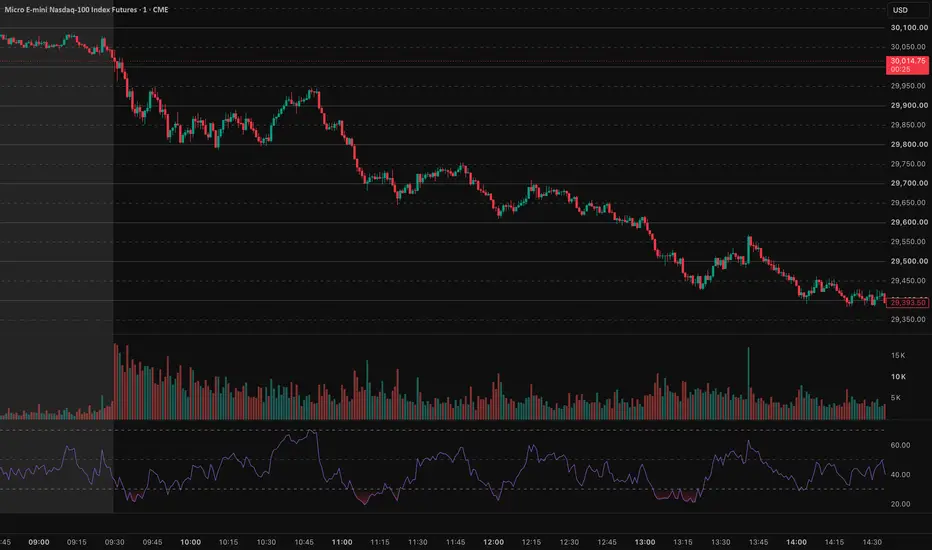
Automatically draws horizontal price levels at regular intervals across the visible chart range.
Set the Step size to choose the distance between levels. For example, a step size of 50 draws levels at 29,000, 29,050, 29,100, and so on.
Use Offset to add extra levels above and below the visible price range. Highlight levels at a separate interval with their own color, line style, and width. For example, with a step size of 50 and a highlight interval of 100, levels such as 29,000 and 29,100 can be styled differently from 29,050 and 29,150.
Customize the regular and highlighted levels independently. The maximum line setting limits how many levels are displayed.
Default settings: Step size 50, dashed regular lines, and highlighted levels every 100 price units.
Set the Step size to choose the distance between levels. For example, a step size of 50 draws levels at 29,000, 29,050, 29,100, and so on.
Use Offset to add extra levels above and below the visible price range. Highlight levels at a separate interval with their own color, line style, and width. For example, with a step size of 50 and a highlight interval of 100, levels such as 29,000 and 29,100 can be styled differently from 29,050 and 29,150.
Customize the regular and highlighted levels independently. The maximum line setting limits how many levels are displayed.
Default settings: Step size 50, dashed regular lines, and highlighted levels every 100 price units.

Отказ от ответственности
Информация и публикации не предназначены для предоставления и не являются финансовыми, инвестиционными, торговыми или другими видами советов или рекомендаций, предоставленных или одобренных TradingView. Подробнее читайте в Условиях использования.
Отказ от ответственности
Информация и публикации не предназначены для предоставления и не являются финансовыми, инвестиционными, торговыми или другими видами советов или рекомендаций, предоставленных или одобренных TradingView. Подробнее читайте в Условиях использования.