OPEN-SOURCE SCRIPT
Обновлено Macro Candles+ (M1D)
Macro Candles+
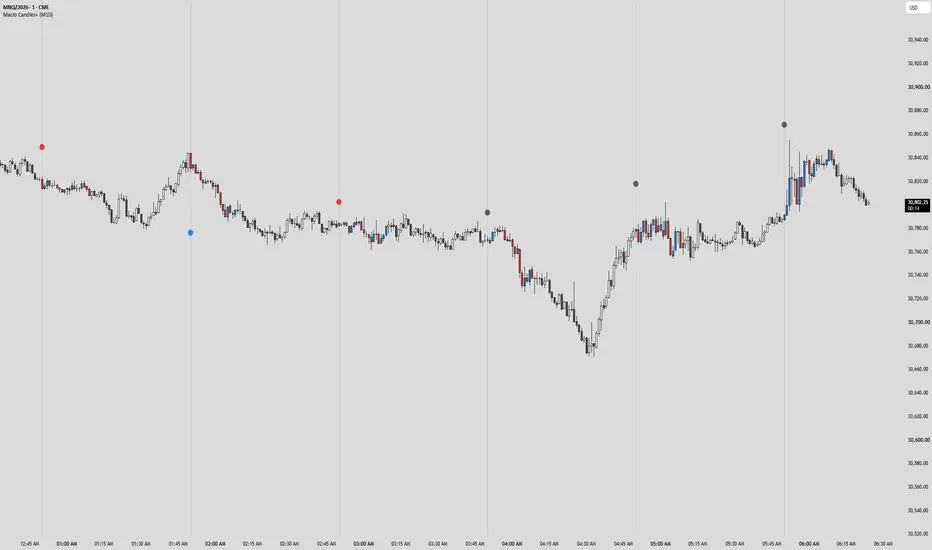
Colours the candles that print inside each ICT macro window and grades every macro against the one before it. A macro runs from ten minutes before the hour to ten minutes after it, New York time. Inside the window the candles take the macro's colour; outside it the chart's own candles show untouched. It draws nothing else: one dotted line at each macro's open and one dot carrying the reading.
What it does
1 · The window. Every macro is XX:50 to XX+1:10 on the New York clock, resolved through the exchange-independent time zone so it stays true across daylight saving on any symbol. A macro exists only if its opening candle printed. Around a session close the last candles of one hour can run straight into the first candles of a later one with nothing between them; those candles belong to a window that never opened and are left alone.
2 · The grade. Each macro opens against the previous macro's high and low. Opening above that high grades it bullish, opening below that low grades it bearish, and opening inside the range grades it consolidation. The grade is set on the opening candle and held.
3 · The re-grade. A macro can change its grade once. One that opened above the previous high turns bearish on the first candle that closes back below that high, and one that opened below the previous low turns bullish on the first close back above it. A consolidation macro turns bearish on the first close below the previous low and bullish on the first close above its high. Candles already printed keep the colour they had, so the candle where the grade changed stays visible. One change per macro, then it holds to the close.
4 · The candles. Body, border and wick take the macro's colour, so a coloured run reads at any zoom. The wick can be set to its own colour instead. Two other colour modes are available: each candle in its own up or down colour, or every macro candle in one colour.
5 · The open line and the dot. One dotted vertical at each macro open. Beside it, a small dot in the macro's colour: above price for a bearish or consolidation macro, below price for a bullish one, sitting a set distance clear of the surrounding candles and stepping away from any candle that later reaches it. Hovering the dot shows the reading in words, and a re-grade recolours the dot, moves it to the other side of price and rewrites the reading.
6 · Which macros. Every hour by default. Spacing shows a macro every two, three or up to twelve hours, counted from midnight New York, and each of the twenty-four opening hours has its own switch on top of that.
Visual grammar
Bullish is blue, bearish is red and consolidation is a dark grey, all three adjustable. The open line is a neutral grey dotted line of width one. Nothing carries a background or a text label; the dot is the only marker, and its reading lives in the hover.
Method & repainting
The opening grade is read from the opening candle's open and never revised. A re-grade evaluates on confirmed candles only, so a colour change is never undone by a later tick. The previous macro's high and low are its full range, wick to wick, and the first macro on a loaded chart has no previous range to read against, so it stays uncoloured. On one-hour and higher charts a twenty-minute window has no candle to colour; the script draws nothing and says so in a small corner note.
Settings
Colour mode, bullish, bearish and consolidation colours, the re-grade switch, candle colouring on or off, wick colour; the open line, its colour and width; the bias dot, its cushion from price and its size; spacing in hours, history in days, and a switch for each of the twenty-four hours.
Built by M1D. For education and study of price delivery — not financial advice.
Colours the candles that print inside each ICT macro window and grades every macro against the one before it. A macro runs from ten minutes before the hour to ten minutes after it, New York time. Inside the window the candles take the macro's colour; outside it the chart's own candles show untouched. It draws nothing else: one dotted line at each macro's open and one dot carrying the reading.
What it does
1 · The window. Every macro is XX:50 to XX+1:10 on the New York clock, resolved through the exchange-independent time zone so it stays true across daylight saving on any symbol. A macro exists only if its opening candle printed. Around a session close the last candles of one hour can run straight into the first candles of a later one with nothing between them; those candles belong to a window that never opened and are left alone.
2 · The grade. Each macro opens against the previous macro's high and low. Opening above that high grades it bullish, opening below that low grades it bearish, and opening inside the range grades it consolidation. The grade is set on the opening candle and held.
3 · The re-grade. A macro can change its grade once. One that opened above the previous high turns bearish on the first candle that closes back below that high, and one that opened below the previous low turns bullish on the first close back above it. A consolidation macro turns bearish on the first close below the previous low and bullish on the first close above its high. Candles already printed keep the colour they had, so the candle where the grade changed stays visible. One change per macro, then it holds to the close.
4 · The candles. Body, border and wick take the macro's colour, so a coloured run reads at any zoom. The wick can be set to its own colour instead. Two other colour modes are available: each candle in its own up or down colour, or every macro candle in one colour.
5 · The open line and the dot. One dotted vertical at each macro open. Beside it, a small dot in the macro's colour: above price for a bearish or consolidation macro, below price for a bullish one, sitting a set distance clear of the surrounding candles and stepping away from any candle that later reaches it. Hovering the dot shows the reading in words, and a re-grade recolours the dot, moves it to the other side of price and rewrites the reading.
6 · Which macros. Every hour by default. Spacing shows a macro every two, three or up to twelve hours, counted from midnight New York, and each of the twenty-four opening hours has its own switch on top of that.
Visual grammar
Bullish is blue, bearish is red and consolidation is a dark grey, all three adjustable. The open line is a neutral grey dotted line of width one. Nothing carries a background or a text label; the dot is the only marker, and its reading lives in the hover.
Method & repainting
The opening grade is read from the opening candle's open and never revised. A re-grade evaluates on confirmed candles only, so a colour change is never undone by a later tick. The previous macro's high and low are its full range, wick to wick, and the first macro on a loaded chart has no previous range to read against, so it stays uncoloured. On one-hour and higher charts a twenty-minute window has no candle to colour; the script draws nothing and says so in a small corner note.
Settings
Colour mode, bullish, bearish and consolidation colours, the re-grade switch, candle colouring on or off, wick colour; the open line, its colour and width; the bias dot, its cushion from price and its size; spacing in hours, history in days, and a switch for each of the twenty-four hours.
Built by M1D. For education and study of price delivery — not financial advice.
Информация о релизе
Graded at the open, held to the close, nothing repaintsA macro is graded once, on its first candle, against the previous macro's range: bullish when it opens above that high, bearish when it opens below that low, consolidation when it opens inside. The grade holds to the close and never changes. The mid-window re-grade setting is gone. A macro is simply the candles that open from :50 to :09 New York on any chart below one hour, the same rule Intraday+ uses, so the 15m and 30m charts draw and nothing runs on past a session close. The wick colour setting is gone too: the chart's own candles take the macro colour and their wick and border follow the chart's candle settings.
A window the market halts inside is not a macro
A macro is twenty minutes of continuous trade. Where the bar stream breaks inside a window, at the futures halt or a session close, the :50 candles before it and the :00 candles after it are not one macro, so neither half draws. A break is a gap of more than thirty minutes between bars, so a quiet minute with no trade is not one. The :00 half is dropped the moment its first bar arrives after a break; the :50 half cannot see the halt ahead, so the script remembers each clock hour a break has been seen in and leaves that hour alone from then on.
Highest chart timeframe
A new setting under Macro candles, default 15 minutes: the script draws on that chart timeframe and everything below it, and stays off above it, with a note in the corner saying so.
Nothing else moves
The window, the colours, the open line, the dot placement, spacing, the hour switches and every other setting are unchanged.
Скрипт с открытым кодом
В истинном духе TradingView, создатель этого скрипта сделал его открытым исходным кодом, чтобы трейдеры могли проверить и убедиться в его функциональности. Браво автору! Вы можете использовать его бесплатно, но помните, что перепубликация кода подчиняется нашим Правилам поведения.

Отказ от ответственности
Информация и публикации не предназначены для предоставления и не являются финансовыми, инвестиционными, торговыми или другими видами советов или рекомендаций, предоставленных или одобренных TradingView. Подробнее читайте в Условиях использования.
Скрипт с открытым кодом
В истинном духе TradingView, создатель этого скрипта сделал его открытым исходным кодом, чтобы трейдеры могли проверить и убедиться в его функциональности. Браво автору! Вы можете использовать его бесплатно, но помните, что перепубликация кода подчиняется нашим Правилам поведения.
Отказ от ответственности
Информация и публикации не предназначены для предоставления и не являются финансовыми, инвестиционными, торговыми или другими видами советов или рекомендаций, предоставленных или одобренных TradingView. Подробнее читайте в Условиях использования.