Cash Session Markers WW
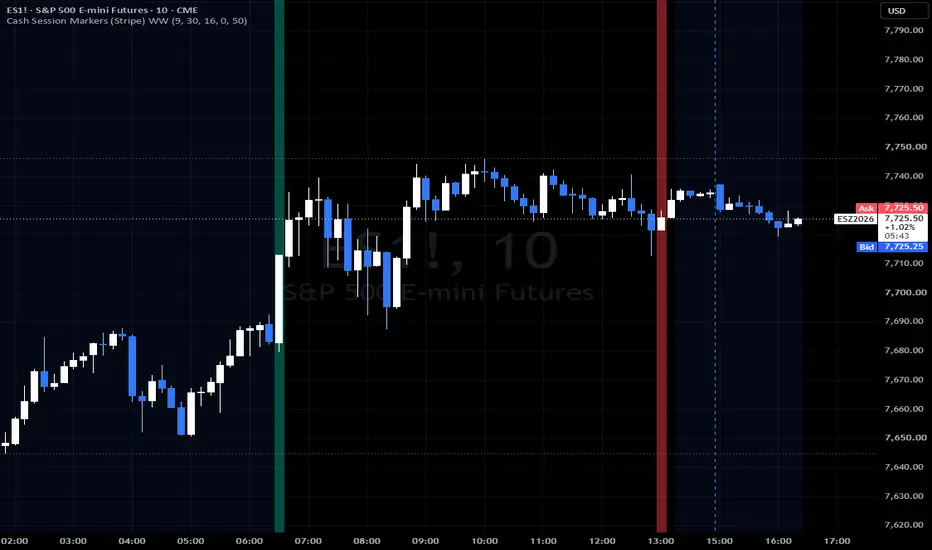
Overview
========
Cash Session Markers (Stripe) WW is a lightweight, reliable visual marker designed to highlight specific session open and close events directly on your intraday charts.
Many session indicators attempt to calculate trading hours dynamically using complex, baked-in exchange logic or syminfo.timezone checks. These often break when applied across different asset classes, synthetic feeds, CFDs, or local client timezone configurations. This indicator avoids automated session calculations entirely, giving you explicit, manual time-open and time-close settings.
What It Does
============
- Explicit Time Targets: Evaluates bar timestamps directly against user-defined open and close hours/minutes using explicit New York time (America/New_York).
- Universal Symbol Support: Works seamlessly across equities, index futures, FX, and CFD instruments regardless of your local chart time zone or the exchange's reported session templates.
- Clean Vertical Striping: Uses full-pane background highlights (bgcolor) to mark session transitions clearly across price action and pane indicators without relying on deprecated line styles or shape plotting rules.
- Stackable Time Brackets: Add the indicator to your chart multiple times and customize the open/close times and stripe colors for each instance. This allows you to define custom windows, macro time brackets, or key transition periods tailored specifically to your trading rules and strategy.
Settings & Inputs
=================
- Open Hour (NY Time) (Default: 9): Hour for the session open marker (24h format, New York time).
- Open Minute (NY Time) (Default: 30): Minute for the session open marker (New York time).
- Close Hour (NY Time) (Default: 16): Hour for the session close marker (24h format, New York time).
- Close Minute (NY Time) (Default: 0): Minute for the session close marker (New York time).
- Open Stripe Color (Default: Aqua): Color assigned to the session open marker.
- Close Stripe Color (Default: Orange): Color assigned to the session close marker.
- Stripe Transparency (Default: 20): Transparency level from 0 (completely solid) to 100 (invisible).
How to Use
==========
1. Apply the indicator to any intraday timeframe (e.g., 1m, 5m, 15m).
2. By default, it marks the standard US equity regular trading hours (RTH) cash session open at 09:30 NY and cash close at 16:00 NY.
3. Adjust the inputs if you want to mark other specific fixed times (such as the European cash open, London fix, or daily settlement).
4. Multi-Instance Brackets: To frame custom sessions or rule-based strategy windows (such as pre-market, initial balance, lunch lulls, or London/NY overlap), apply the indicator a second time, choose distinct colors, and set the start and end of your desired time bracket.
========
Cash Session Markers (Stripe) WW is a lightweight, reliable visual marker designed to highlight specific session open and close events directly on your intraday charts.
Many session indicators attempt to calculate trading hours dynamically using complex, baked-in exchange logic or syminfo.timezone checks. These often break when applied across different asset classes, synthetic feeds, CFDs, or local client timezone configurations. This indicator avoids automated session calculations entirely, giving you explicit, manual time-open and time-close settings.
What It Does
============
- Explicit Time Targets: Evaluates bar timestamps directly against user-defined open and close hours/minutes using explicit New York time (America/New_York).
- Universal Symbol Support: Works seamlessly across equities, index futures, FX, and CFD instruments regardless of your local chart time zone or the exchange's reported session templates.
- Clean Vertical Striping: Uses full-pane background highlights (bgcolor) to mark session transitions clearly across price action and pane indicators without relying on deprecated line styles or shape plotting rules.
- Stackable Time Brackets: Add the indicator to your chart multiple times and customize the open/close times and stripe colors for each instance. This allows you to define custom windows, macro time brackets, or key transition periods tailored specifically to your trading rules and strategy.
Settings & Inputs
=================
- Open Hour (NY Time) (Default: 9): Hour for the session open marker (24h format, New York time).
- Open Minute (NY Time) (Default: 30): Minute for the session open marker (New York time).
- Close Hour (NY Time) (Default: 16): Hour for the session close marker (24h format, New York time).
- Close Minute (NY Time) (Default: 0): Minute for the session close marker (New York time).
- Open Stripe Color (Default: Aqua): Color assigned to the session open marker.
- Close Stripe Color (Default: Orange): Color assigned to the session close marker.
- Stripe Transparency (Default: 20): Transparency level from 0 (completely solid) to 100 (invisible).
How to Use
==========
1. Apply the indicator to any intraday timeframe (e.g., 1m, 5m, 15m).
2. By default, it marks the standard US equity regular trading hours (RTH) cash session open at 09:30 NY and cash close at 16:00 NY.
3. Adjust the inputs if you want to mark other specific fixed times (such as the European cash open, London fix, or daily settlement).
4. Multi-Instance Brackets: To frame custom sessions or rule-based strategy windows (such as pre-market, initial balance, lunch lulls, or London/NY overlap), apply the indicator a second time, choose distinct colors, and set the start and end of your desired time bracket.

Отказ от ответственности
Информация и публикации не предназначены для предоставления и не являются финансовыми, инвестиционными, торговыми или другими видами советов или рекомендаций, предоставленных или одобренных TradingView. Подробнее читайте в Условиях использования.
Отказ от ответственности
Информация и публикации не предназначены для предоставления и не являются финансовыми, инвестиционными, торговыми или другими видами советов или рекомендаций, предоставленных или одобренных TradingView. Подробнее читайте в Условиях использования.