PO3 STRAT Fusion Customisable
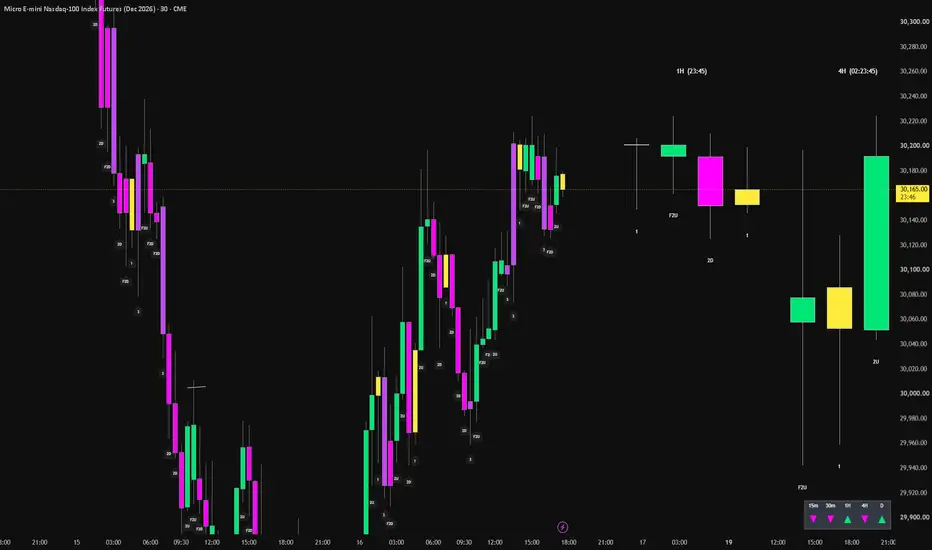
# PO3 STRAT Fusion
**Multi-Timeframe Candles | The STRAT | Candle Classification | Custom Alerts**
## Overview
PO3 STRAT Fusion combines multi-timeframe candle visualisation with The STRAT price-action methodology in one customisable TradingView indicator.
Designed for traders who use candle structure, directional bias and multi-timeframe alignment, the indicator provides a clear view of price action without constantly switching chart timeframes.
It combines STRAT candle colouring and classification, higher-timeframe candle panels, a directional dashboard, custom alerts and optional technical tools.
## Key Features
### 1. STRAT Candle Classification
Automatically identifies and labels six candle classifications:
- **1 (Inside Bar):** The candle remains within the previous candle's high and low.
- **2U (Two Up):** Breaks the previous high without breaking the previous low.
- **2D (Two Down):** Breaks the previous low without breaking the previous high.
- **3 (Outside Bar):** Breaks both the previous high and low.
- **F2U (Failed Two Up):** Breaks the previous high but closes back within the previous candle's range.
- **F2D (Failed Two Down):** Breaks the previous low but closes back within the previous candle's range.
Chart candles are colour-coded according to their STRAT classification, with editable colours and optional labels positioned beneath the candles.
Default colours:
- 1: Yellow
- 2U / F2U: Green
- 2D / F2D: Fuchsia
- 3: Purple
Failed-2 highlighting can be enabled separately, while classification labels remain available independently.
### 2. Multi-Timeframe PO3 Candle Panels
Displays higher-timeframe candles to the right of the main chart, allowing traders to monitor developing price structure alongside their active trading timeframe.
- Two panels enabled by default: **1H and 4H**.
- Optional third timeframe panel.
- Adjustable timeframes, candle counts, widths and spacing.
- Current developing candle displayed at the right of each panel.
- STRAT classifications beneath higher-timeframe candles.
- Optional candle countdown timers.
- Customisable candle colours, wicks and outlines.
### 3. Multi-Timeframe Directional Dashboard
A compact dashboard displays directional information across five timeframes:
**15m | 30m | 1H | 4H | Daily**
Green and fuchsia directional arrows provide a quick visual reference for multi-timeframe alignment.
Dashboard position, visibility and colours are adjustable.
### 4. Custom STRAT Candle Alerts
Six separate TradingView alert conditions are available:
- Inside Bar (1)
- Two Up (2U)
- Two Down (2D)
- Outside Bar (3)
- Failed Two Up (F2U)
- Failed Two Down (F2D)
All alerts use one user-selectable timeframe and are evaluated on confirmed candle closes.
Alerts operate independently of the indicator's visual settings, so chart colouring, labels and higher-timeframe panels can be disabled without disabling alert functionality.
Individual alerts must be created through TradingView's alert interface.
For reliable candle-by-candle detection, use an alert timeframe equal to or higher than the chart timeframe.
### 5. Additional Chart Tools
Optional tools include:
- Up to three adjustable Exponential Moving Averages (EMAs).
- Volume Weighted Average Price (VWAP), displayed as a single line.
- Fair Value Gap (FVG) zones with customisable appearance and extension.
These features can be enabled or disabled independently to suit individual trading preferences.
## Customisation
The indicator includes organised settings for candle appearance, STRAT labels, multi-timeframe panels, countdown timers, dashboard positioning, alerts and optional technical tools.
Chart colouring and numbering can be controlled separately, allowing traders to maintain a clean chart while retaining the underlying STRAT analysis.
## How to Use
Use the main chart to identify STRAT candle structures and potential directional shifts.
Monitor the higher-timeframe PO3 panels to assess broader candle development and identify whether shorter-timeframe price action aligns with higher-timeframe structure.
Use the directional dashboard as a supplementary reference and configure alerts for the specific STRAT candle types relevant to your trading strategy.
Optional EMAs, VWAP and FVG zones can provide additional context for trend, price location and potential reaction areas.
## Important Information
PO3 STRAT Fusion is a price-action visualisation and alerting tool, not an automated trading strategy.
Developing candles may change classification before closing. Confirmed candle alerts are designed to avoid signals based on unfinished candles.
The indicator does not guarantee future price direction, trade profitability or successful outcomes. Traders should apply independent analysis, appropriate risk management and their own trading rules.
**PO3 STRAT Fusion Customisable**
**Multi-Timeframe Candles | The STRAT | Candle Classification | Custom Alerts**
## Overview
PO3 STRAT Fusion combines multi-timeframe candle visualisation with The STRAT price-action methodology in one customisable TradingView indicator.
Designed for traders who use candle structure, directional bias and multi-timeframe alignment, the indicator provides a clear view of price action without constantly switching chart timeframes.
It combines STRAT candle colouring and classification, higher-timeframe candle panels, a directional dashboard, custom alerts and optional technical tools.
## Key Features
### 1. STRAT Candle Classification
Automatically identifies and labels six candle classifications:
- **1 (Inside Bar):** The candle remains within the previous candle's high and low.
- **2U (Two Up):** Breaks the previous high without breaking the previous low.
- **2D (Two Down):** Breaks the previous low without breaking the previous high.
- **3 (Outside Bar):** Breaks both the previous high and low.
- **F2U (Failed Two Up):** Breaks the previous high but closes back within the previous candle's range.
- **F2D (Failed Two Down):** Breaks the previous low but closes back within the previous candle's range.
Chart candles are colour-coded according to their STRAT classification, with editable colours and optional labels positioned beneath the candles.
Default colours:
- 1: Yellow
- 2U / F2U: Green
- 2D / F2D: Fuchsia
- 3: Purple
Failed-2 highlighting can be enabled separately, while classification labels remain available independently.
### 2. Multi-Timeframe PO3 Candle Panels
Displays higher-timeframe candles to the right of the main chart, allowing traders to monitor developing price structure alongside their active trading timeframe.
- Two panels enabled by default: **1H and 4H**.
- Optional third timeframe panel.
- Adjustable timeframes, candle counts, widths and spacing.
- Current developing candle displayed at the right of each panel.
- STRAT classifications beneath higher-timeframe candles.
- Optional candle countdown timers.
- Customisable candle colours, wicks and outlines.
### 3. Multi-Timeframe Directional Dashboard
A compact dashboard displays directional information across five timeframes:
**15m | 30m | 1H | 4H | Daily**
Green and fuchsia directional arrows provide a quick visual reference for multi-timeframe alignment.
Dashboard position, visibility and colours are adjustable.
### 4. Custom STRAT Candle Alerts
Six separate TradingView alert conditions are available:
- Inside Bar (1)
- Two Up (2U)
- Two Down (2D)
- Outside Bar (3)
- Failed Two Up (F2U)
- Failed Two Down (F2D)
All alerts use one user-selectable timeframe and are evaluated on confirmed candle closes.
Alerts operate independently of the indicator's visual settings, so chart colouring, labels and higher-timeframe panels can be disabled without disabling alert functionality.
Individual alerts must be created through TradingView's alert interface.
For reliable candle-by-candle detection, use an alert timeframe equal to or higher than the chart timeframe.
### 5. Additional Chart Tools
Optional tools include:
- Up to three adjustable Exponential Moving Averages (EMAs).
- Volume Weighted Average Price (VWAP), displayed as a single line.
- Fair Value Gap (FVG) zones with customisable appearance and extension.
These features can be enabled or disabled independently to suit individual trading preferences.
## Customisation
The indicator includes organised settings for candle appearance, STRAT labels, multi-timeframe panels, countdown timers, dashboard positioning, alerts and optional technical tools.
Chart colouring and numbering can be controlled separately, allowing traders to maintain a clean chart while retaining the underlying STRAT analysis.
## How to Use
Use the main chart to identify STRAT candle structures and potential directional shifts.
Monitor the higher-timeframe PO3 panels to assess broader candle development and identify whether shorter-timeframe price action aligns with higher-timeframe structure.
Use the directional dashboard as a supplementary reference and configure alerts for the specific STRAT candle types relevant to your trading strategy.
Optional EMAs, VWAP and FVG zones can provide additional context for trend, price location and potential reaction areas.
## Important Information
PO3 STRAT Fusion is a price-action visualisation and alerting tool, not an automated trading strategy.
Developing candles may change classification before closing. Confirmed candle alerts are designed to avoid signals based on unfinished candles.
The indicator does not guarantee future price direction, trade profitability or successful outcomes. Traders should apply independent analysis, appropriate risk management and their own trading rules.
**PO3 STRAT Fusion Customisable**

Отказ от ответственности
Информация и публикации не предназначены для предоставления и не являются финансовыми, инвестиционными, торговыми или другими видами советов или рекомендаций, предоставленных или одобренных TradingView. Подробнее читайте в Условиях использования.
Отказ от ответственности
Информация и публикации не предназначены для предоставления и не являются финансовыми, инвестиционными, торговыми или другими видами советов или рекомендаций, предоставленных или одобренных TradingView. Подробнее читайте в Условиях использования.