- Trading Bot - Stochastic MACD (Pro) - Robot Strategy -
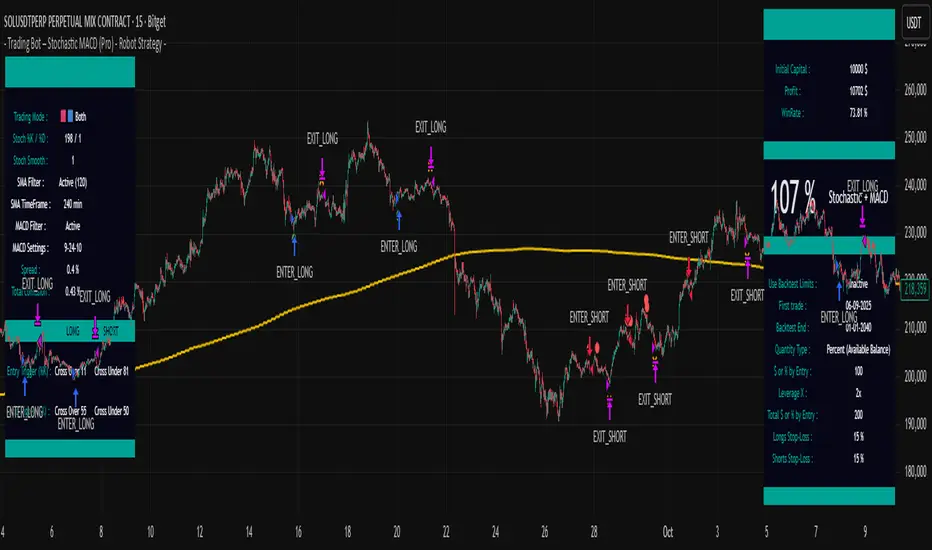
The Stochastic MACD (Pro) strategy is an automation-first trend-following and momentum system that combines three distinct analytical layers: a Stochastic oscillator for overbought/oversold detection, a MACD filter for trend confirmation, and an optional multi-timeframe SMA filter for macro trend alignment. It is designed from the ground up to be operated by a trading bot: every signal is accompanied by a complete set of structured trading parameters transmitted through TradingView's alert system via invisible plot() outputs embedded in a JSON webhook payload. The bot receives the trade direction, quantity type, leverage, position amount, and stop-loss levels with every alert — enabling fully autonomous order execution without any manual intervention.
Unlike standard stochastic strategies that trade on simple crossovers, this strategy uses raw %K threshold crossings with independent entry and exit levels, confirmed by MACD trend direction, creating a multi-factor confirmation system that filters out low-probability signals. The strategy is optimized for single-entry, single-exit operation (no pyramiding), making it ideal for clean automation.
BUILT FOR AUTOMATION — JSON WEBHOOK INTEGRATION
A core differentiator of this strategy is its complete automation-readiness. The script does not simply generate buy/sell alerts — it transmits a full set of structured trading parameters on every signal, designed to be consumed by a webhook-based trading bot.
The strategy uses Pine Script's plot() function with display=display.none to create invisible data channels. These plots do not appear on the chart but are accessible via TradingView's {{plot("PlotName")}} placeholder in alert messages. Combined with TradingView's built-in variables ({{ticker}}, {{strategy.order.comment}}, {{interval}}), this enables the construction of a complete JSON payload such as:
What each field transmits:
- comment: The order action — ENTER_LONG, EXIT_LONG, ENTER_SHORT, or EXIT_SHORT — telling the bot exactly what to do.
- ticker: The asset symbol, so a single bot instance can manage multiple assets.
- interval: The chart timeframe, allowing the bot to validate that the signal matches the expected configuration.
- trading_mode: A numeric code indicating the active trading mode.
- qty_type: A numeric code indicating the position sizing method (1=Percent Available, 2=Percent Total, 3=Cash).
- leverage: The configured leverage multiplier, so the bot can place correctly sized orders on the exchange.
- amount_pct: The configured amount (% or $) per entry.
- stop_loss_long_pct / stop_loss_short_pct: The stop-loss percentages for each direction (100 = disabled).
This architecture means the bot does not need to be separately configured with position sizes or risk parameters — everything is defined once in the TradingView strategy settings and automatically transmitted with every alert. Changing a parameter in the strategy immediately updates what the bot receives, ensuring permanent synchronization between backtest settings and live execution.
WHAT MAKES THIS STRATEGY ORIGINAL
- Raw %K threshold crossings (not smoothed crossovers): Standard stochastic strategies use %K/%D crossovers to generate signals. This strategy instead monitors when the raw %K line crosses specific threshold levels (default: 14% for long entry, 85% for short entry). This provides more precise timing and avoids the lag introduced by %D smoothing. The %K period is intentionally set to a high value (default: 150), creating a slow stochastic that captures larger-scale momentum cycles rather than noise.
- Separate entry and exit thresholds: Long entry triggers when %K crosses above 14%, while long exit triggers when %K exceeds 55%. Short entry triggers when %K crosses below 85%, with short exit when %K falls below 50%. These four independent levels allow fine-tuning of trade timing and holding duration — a flexibility not available in simple crossover scripts.
- MACD directional filter: When enabled (default), the MACD filter requires the MACD line to be above the signal line for longs (bullish momentum), and the signal line to be above MACD for shorts (bearish momentum). This prevents counter-trend entries during strong directional moves.
- Multi-timeframe SMA filter: An optional 200-period SMA calculated on a configurable higher timeframe (default: 4-hour) restricts entries to the dominant macro trend: longs only when price is above the SMA, shorts only when below. This multi-timeframe approach aligns short-term signals with higher timeframe context.
- Bar-close confirmation: All entry and exit conditions use barstate.isconfirmed, ensuring that signals are only processed after the candle has fully closed. This eliminates repainting.
- Post-stop-loss cooldown system: After a stop-loss event, the strategy can enforce a configurable cooldown period and optionally require price to cross the SMA filter before re-entry, preventing rapid re-entries into adverse conditions.
HOW THE STRATEGY WORKS — DETAILED METHODOLOGY
1. Stochastic %K Calculation
The strategy calculates the Stochastic %K using the standard formula: %K = (close - lowest_low) / (highest_high - lowest_low) * 100, with a configurable lookback period (default: 150). The %D smoothing is set to 1 (no smoothing), and %K smoothing is also 1, giving the raw stochastic value. This high-period, unsmoothed stochastic acts as a slow-cycle momentum indicator rather than a fast-reaction oscillator.
2. MACD Calculation
The MACD is calculated as the difference between a fast EMA (default: 10-period) and a slow EMA (default: 26-period). The signal line is an EMA of the MACD line (default: 9-period). The directional relationship between MACD and signal determines the momentum filter:
- MACD > Signal = bullish momentum (longs allowed)
- Signal > MACD = bearish momentum (shorts allowed)
3. Multi-Timeframe SMA Filter
When enabled, a 200-period SMA is calculated on the specified higher timeframe (default: 4-hour / "240") using request.security(). This provides a macro trend reference:
- Price above SMA = bullish macro trend (longs allowed)
- Price below SMA = bearish macro trend (shorts allowed)
4. Entry Conditions
A long entry requires ALL of the following on a confirmed bar:
- The raw %K was below the long entry level on the previous bar AND is now above it (upward crossing of the threshold)
- MACD filter is bullish (if enabled)
- SMA filter is bullish (if enabled)
- No position is currently open
- No cooldown is active
- No block from same-bar exit
A short entry requires the mirror conditions: %K was above the short entry level and is now below it, MACD is bearish, SMA is bearish.
5. Exit Conditions
Long exit triggers when %K rises above the long exit level (default: 55%) on a confirmed bar. Short exit triggers when %K falls below the short exit level (default: 50%) on a confirmed bar. These exits use strategy.close().
6. Stop-Loss and Cooldown
Optional percentage-based stop-losses can be set independently for longs and shorts (default: disabled at 100%). The cooldown system (disabled by default) blocks new entries after a stop-loss for a configurable number of bars and optionally requires a price-SMA cross before re-entry.
DEFAULT STRATEGY PROPERTIES
- Initial Capital: $10,000
- Pyramiding: 0 (single position only)
- Commission: 0.06% per trade (optimized for low-spread pairs)
- calc_on_every_tick: false (no repainting)
- Default Mode: Long Only
- Stochastic %K Period: 150
- Long Entry Level: 14% | Long Exit Level: 55%
- Short Entry Level: 85% | Short Exit Level: 50%
- MACD: Enabled (Fast=10, Slow=26, Signal=9)
- SMA Filter: Disabled (200-period on 4h timeframe when enabled)
- Stop-Loss: Disabled (100%) by default
- Cooldown After Stop-Loss: Disabled by default
- Quantity: 100% of available balance
- Leverage: 1x
HOW TO USE THIS STRATEGY
- Select your trading mode: Long Only, Short Only, or Both.
- Adjust the Stochastic %K period. Higher values (100-200) capture larger momentum cycles suitable for higher timeframes. Lower values (14-50) react faster for lower timeframes.
- Configure the four threshold levels: long entry, long exit, short entry, short exit. Lower entry levels for longs provide deeper oversold entries but fewer signals. Higher exit levels allow trades to run longer.
- Enable or disable the MACD filter. When enabled, it adds momentum direction confirmation. Adjust Fast, Slow, and Signal lengths as needed.
- Enable or disable the multi-timeframe SMA filter. When enabled, set the SMA length and the timeframe for macro trend filtering.
- Configure your position size and leverage. At 0% pyramiding, each trade uses the full allocated amount.
- Optionally set stop-loss percentages and the cooldown mechanism.
- Use the spread calculator to estimate actual trading costs.
- Enable the on-chart information display to monitor all active parameters, indicator values, filter status, and performance metrics.
WHY THIS STRATEGY IS INVITE-ONLY
- The three-layer signal confirmation system (Stochastic threshold + MACD direction + multi-timeframe SMA) creates a unique multi-factor framework that goes well beyond standard stochastic crossover scripts.
- The use of raw %K threshold crossings with independent entry/exit levels — rather than %K/%D crossovers — is an unconventional approach optimized for cycle-based momentum detection.
- The high-period stochastic (150) functions as a slow-cycle identifier, which is a deliberately different use case from the standard 14-period fast stochastic.
- The multi-timeframe SMA filter using request.security() adds a higher-timeframe trend alignment layer not typically found in basic stochastic strategies.
- Full bot-automation readiness with structured alert messages, invisible plot outputs for webhook systems, and bar-close-confirmed signals that eliminate repainting.
- Post-stop-loss cooldown with optional SMA-cross re-entry protection.
- Comprehensive on-chart information display with real-time monitoring of all parameters, indicator values, and trade statistics.
- The strategy is part of a suite of automation-ready tools designed for systematic traders requiring reliable, unattended execution.
LIMITATIONS AND IMPORTANT NOTES
- The Stochastic oscillator can remain in extreme zones for extended periods during strong trends, causing missed opportunities or delayed entries. The MACD and SMA filters help mitigate this but do not eliminate it.
- The high-period %K (150) is designed for detecting larger cycles. It will be slow to react to rapid reversals on short timeframes.
- Past backtest performance does not guarantee future results. Market conditions and cycle characteristics change over time.
- Default parameters are optimized starting points. Each asset and timeframe combination requires its own optimization.
- The commission is set to 0.06% by default, which corresponds to low-spread pairs. Adjust this value in Strategy Properties for assets with higher spreads.
- When automating, ensure your bot's position sizing matches the strategy settings.
- Non-standard chart types (Heikin Ashi, Renko, Kagi, Point and Figure, Range) should not be used for backtesting as they produce unrealistic results.
DISCLAIMER
This script is provided for educational and informational purposes only. It does not constitute financial advice. Trading financial instruments involves substantial risk of loss. Past performance is not indicative of future results. Always conduct your own research and consult with a qualified financial advisor before making any investment decisions. Use this strategy at your own risk.
Скрипт с ограниченным доступом
Только пользователи, одобренные автором, могут получить доступ к этому скрипту. Вам нужно отправить запрос и получить разрешение на его использование. Обычно доступ предоставляется после оплаты. Для получения подробной информации следуйте инструкциям автора ниже или свяжитесь с Trading-Bot-France напрямую.
TradingView НЕ рекомендует оплачивать или использовать скрипт, если вы полностью не доверяете его автору и не понимаете, как он работает. Вы также можете найти бесплатные, открытые альтернативы в наших скриптах сообщества.
Инструкции от автора

Отказ от ответственности
Скрипт с ограниченным доступом
Только пользователи, одобренные автором, могут получить доступ к этому скрипту. Вам нужно отправить запрос и получить разрешение на его использование. Обычно доступ предоставляется после оплаты. Для получения подробной информации следуйте инструкциям автора ниже или свяжитесь с Trading-Bot-France напрямую.
TradingView НЕ рекомендует оплачивать или использовать скрипт, если вы полностью не доверяете его автору и не понимаете, как он работает. Вы также можете найти бесплатные, открытые альтернативы в наших скриптах сообщества.