Equal Highs and Lows [D4A]
Overview
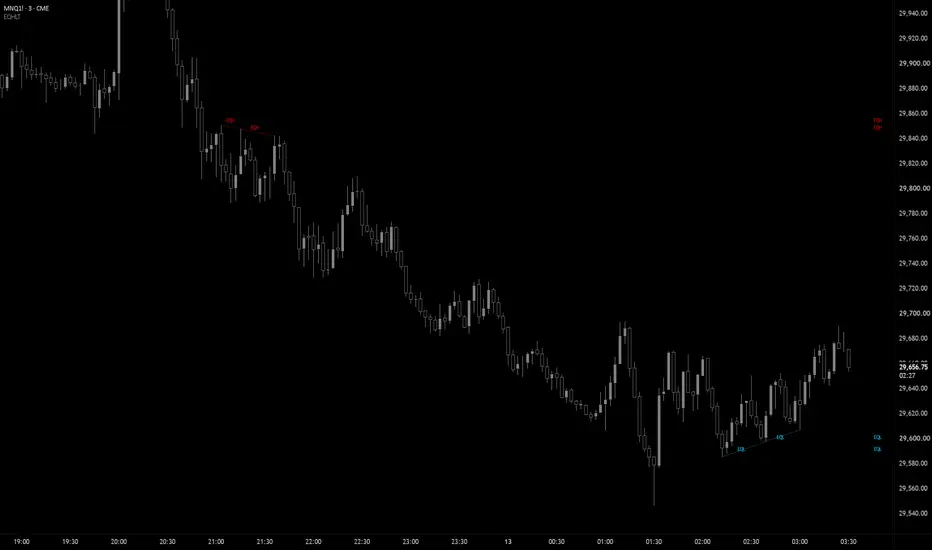
This indicator identifies and displays **Relative Equal High (EQH)** and **Equal Low (EQL)** zones, highlighting price levels where the market has stalled or reversed from before. These areas are considered liquidity zones because they mark locations where price has previously paused, reversed, or encountered significant buying or selling activity, and as a result there is a concentration of buy-stops or sell-stops in these zones. In trading approaches such as Smart Money Concepts (SMC/ICT), equal highs and lows are considered important liquidity targets that may influence future market movement, as larger participants are thought to seek the liquidity concentrated around these levels.
How this script is different from other similar tools
- It marks two pivots as Equal Highs only if the second pivot is lower (within the threshold) than the 1st one and likewise, two pivots are marked as Equal Lows only if the second pivot is situated higher (within the threshold) than the 1st pivot. In other words the price has still a reason to re-visit this area
- It provides three different, user configurable pivot lengths that the script scans at the same type in search of EQHL. Most scripts use only one pivot length thus missing on many potential targets
- Apart from main labels, it draws also side labels at defined location which can be convenient to see all EQHL target levels at glance
How It Works
The indicator analyses **pivot highs** and **pivot lows** to locate meaningful swing points on the chart. When two consecutive pivots form within a user-defined price threshold, they are recognized as an Equal Highs or Equal Lows. A line is then drawn between the matching pivots, and the zone is labelled for easy identification.
Since market prices rarely align at exactly the same value, the indicator includes a **ATR Threshold** setting. This parameter specifies the maximum percentage difference allowed between two pivot levels for them to qualify as equal, giving traders the flexibility to adjust the detection based on market volatility and their preferred level of precision.
How to Use
(EQH/EQL) are strong liquidity targets: Use the marked levels as potential targets for take-profits, as price often seeks out these "equal" levels to sweep liquidity.
SETTINGS
- Show EQHL - show labels and drawings
- # of bars to use - limits the number of bars used to find EQHL
- Threshold / ATR Length - are used to establish difference between two levels being considered "equal high" or "equal low"
- Show Labels - define labels shown
- Show Side Labels - enables additional labels on the side of the chart
- Right Coordinate - how many bars to the right the side labels are displayed at
- Pivot Length - there are three different lengths to configure to cover large distance difference between two pivots
- Remove All Drawings After Sweep - when EQH or EQL levels are swept, the corresponding drawings are removed from memory
-----------------
Disclaimer
The content provided in this script is for educational and informational purposes only. It does not constitute financial advice, investment recommendations, or a solicitation to buy or sell any financial instruments. I will not accept liability for any loss or damage, including without limitation any loss of profit, which may arise directly or indirectly from the use of or reliance on such information.
All investments involve risk, and the past performance of a security, industry, sector, market, financial product, trading strategy, backtest, or individual's trading does not guarantee future results or returns. Investors are fully responsible for any investment decisions they make. Such decisions should be based solely on an evaluation of their financial circumstances, investment objectives, risk tolerance, and liquidity needs.
This indicator identifies and displays **Relative Equal High (EQH)** and **Equal Low (EQL)** zones, highlighting price levels where the market has stalled or reversed from before. These areas are considered liquidity zones because they mark locations where price has previously paused, reversed, or encountered significant buying or selling activity, and as a result there is a concentration of buy-stops or sell-stops in these zones. In trading approaches such as Smart Money Concepts (SMC/ICT), equal highs and lows are considered important liquidity targets that may influence future market movement, as larger participants are thought to seek the liquidity concentrated around these levels.
How this script is different from other similar tools
- It marks two pivots as Equal Highs only if the second pivot is lower (within the threshold) than the 1st one and likewise, two pivots are marked as Equal Lows only if the second pivot is situated higher (within the threshold) than the 1st pivot. In other words the price has still a reason to re-visit this area
- It provides three different, user configurable pivot lengths that the script scans at the same type in search of EQHL. Most scripts use only one pivot length thus missing on many potential targets
- Apart from main labels, it draws also side labels at defined location which can be convenient to see all EQHL target levels at glance
How It Works
The indicator analyses **pivot highs** and **pivot lows** to locate meaningful swing points on the chart. When two consecutive pivots form within a user-defined price threshold, they are recognized as an Equal Highs or Equal Lows. A line is then drawn between the matching pivots, and the zone is labelled for easy identification.
Since market prices rarely align at exactly the same value, the indicator includes a **ATR Threshold** setting. This parameter specifies the maximum percentage difference allowed between two pivot levels for them to qualify as equal, giving traders the flexibility to adjust the detection based on market volatility and their preferred level of precision.
How to Use
(EQH/EQL) are strong liquidity targets: Use the marked levels as potential targets for take-profits, as price often seeks out these "equal" levels to sweep liquidity.
SETTINGS
- Show EQHL - show labels and drawings
- # of bars to use - limits the number of bars used to find EQHL
- Threshold / ATR Length - are used to establish difference between two levels being considered "equal high" or "equal low"
- Show Labels - define labels shown
- Show Side Labels - enables additional labels on the side of the chart
- Right Coordinate - how many bars to the right the side labels are displayed at
- Pivot Length - there are three different lengths to configure to cover large distance difference between two pivots
- Remove All Drawings After Sweep - when EQH or EQL levels are swept, the corresponding drawings are removed from memory
-----------------
Disclaimer
The content provided in this script is for educational and informational purposes only. It does not constitute financial advice, investment recommendations, or a solicitation to buy or sell any financial instruments. I will not accept liability for any loss or damage, including without limitation any loss of profit, which may arise directly or indirectly from the use of or reliance on such information.
All investments involve risk, and the past performance of a security, industry, sector, market, financial product, trading strategy, backtest, or individual's trading does not guarantee future results or returns. Investors are fully responsible for any investment decisions they make. Such decisions should be based solely on an evaluation of their financial circumstances, investment objectives, risk tolerance, and liquidity needs.

Отказ от ответственности
Информация и публикации не предназначены для предоставления и не являются финансовыми, инвестиционными, торговыми или другими видами советов или рекомендаций, предоставленных или одобренных TradingView. Подробнее читайте в Условиях использования.
Отказ от ответственности
Информация и публикации не предназначены для предоставления и не являются финансовыми, инвестиционными, торговыми или другими видами советов или рекомендаций, предоставленных или одобренных TradingView. Подробнее читайте в Условиях использования.