OPEN-SOURCE SCRIPT
% of ATR
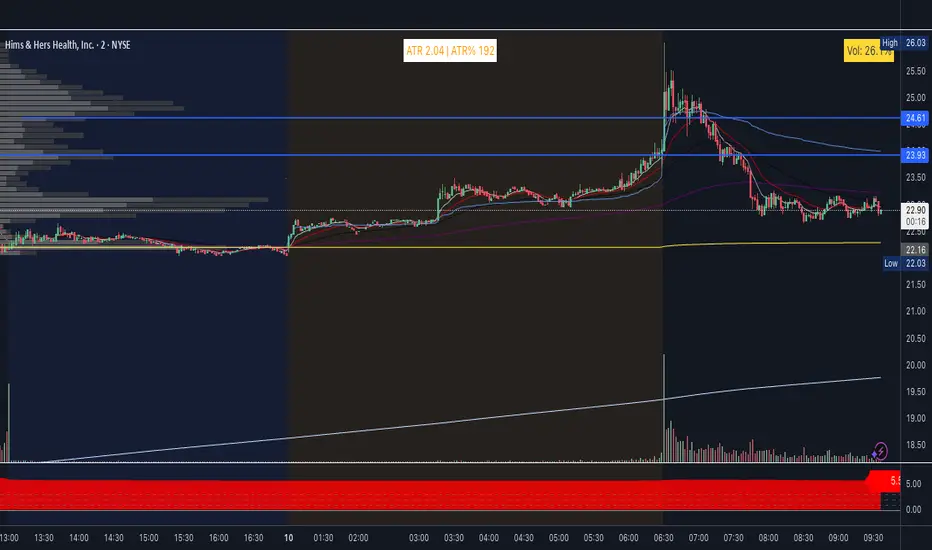
ATR and extended hours
ATR now shows a value in pre-market and after-hours. The indicator uses the last completed daily bar’s ATR (via ta.atr(length)[1] and lookahead_on) so it no longer returns empty when the 1D EOD feed has no “current” bar outside RTH.
High of day / Low of day
HOD and LOD are now updated on all intraday bars (pre-market, regular session, and after-hours). The previous 9:30 AM filter was removed so the day’s high and low are tracked correctly from the first bar of the day.
Label format
Table text format: ATR ##.## | H ##.## L ##.## | ATR% ##
ATR and H/L use two decimals; ATR% is a whole number.
Settings
Show High/Low (H/L) – Toggle to include or hide H and L in the label.
ATR % Thresholds – Four configurable levels (defaults 25, 100, 200, 300) define the five ATR% bands for coloring.
ATR % Colors – Five colors (Color 1 = lowest %, Color 5 = highest %) in a dedicated group; band logic uses the threshold inputs above.
Color logic
Color bands are driven by the new threshold inputs (no more hardcoded 25/100/200/300. Band boundaries are fully user-configurable.
ATR now shows a value in pre-market and after-hours. The indicator uses the last completed daily bar’s ATR (via ta.atr(length)[1] and lookahead_on) so it no longer returns empty when the 1D EOD feed has no “current” bar outside RTH.
High of day / Low of day
HOD and LOD are now updated on all intraday bars (pre-market, regular session, and after-hours). The previous 9:30 AM filter was removed so the day’s high and low are tracked correctly from the first bar of the day.
Label format
Table text format: ATR ##.## | H ##.## L ##.## | ATR% ##
ATR and H/L use two decimals; ATR% is a whole number.
Settings
Show High/Low (H/L) – Toggle to include or hide H and L in the label.
ATR % Thresholds – Four configurable levels (defaults 25, 100, 200, 300) define the five ATR% bands for coloring.
ATR % Colors – Five colors (Color 1 = lowest %, Color 5 = highest %) in a dedicated group; band logic uses the threshold inputs above.
Color logic
Color bands are driven by the new threshold inputs (no more hardcoded 25/100/200/300. Band boundaries are fully user-configurable.
Скрипт с открытым кодом
В истинном духе TradingView, создатель этого скрипта сделал его открытым исходным кодом, чтобы трейдеры могли проверить и убедиться в его функциональности. Браво автору! Вы можете использовать его бесплатно, но помните, что перепубликация кода подчиняется нашим Правилам поведения.

Отказ от ответственности
Информация и публикации не предназначены для предоставления и не являются финансовыми, инвестиционными, торговыми или другими видами советов или рекомендаций, предоставленных или одобренных TradingView. Подробнее читайте в Условиях использования.
Скрипт с открытым кодом
В истинном духе TradingView, создатель этого скрипта сделал его открытым исходным кодом, чтобы трейдеры могли проверить и убедиться в его функциональности. Браво автору! Вы можете использовать его бесплатно, но помните, что перепубликация кода подчиняется нашим Правилам поведения.
Отказ от ответственности
Информация и публикации не предназначены для предоставления и не являются финансовыми, инвестиционными, торговыми или другими видами советов или рекомендаций, предоставленных или одобренных TradingView. Подробнее читайте в Условиях использования.