OPEN-SOURCE SCRIPT
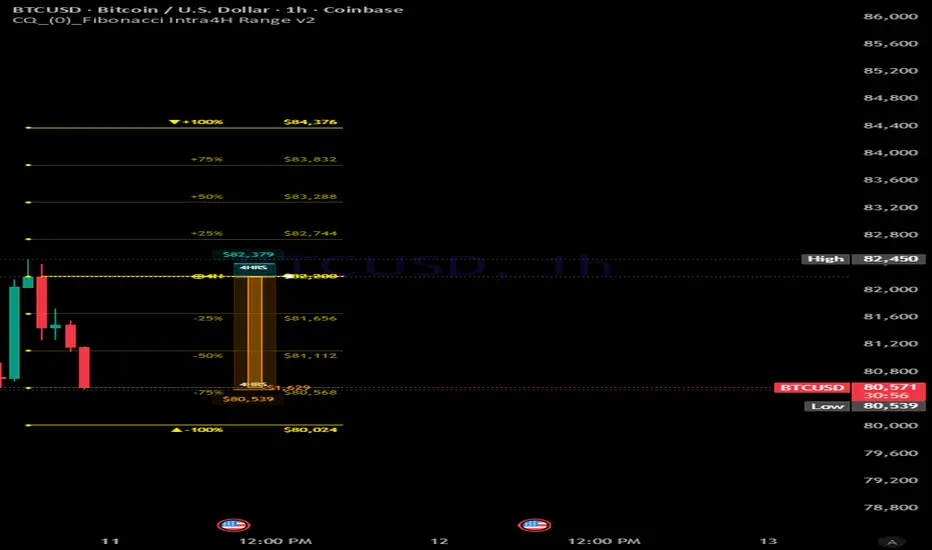
CQ_(0)_Fibonacci Intra4H Range v2
================================================================================
FIBONACCI INTRA 4H RANGE INDICATOR | TradingView Pine Script v6
User Manual BASED ON UKUTALABS INTRADAY RANGE SCRIPT
================================================================================
--------------------------------------------------------------------------------
1. OVERVIEW
--------------------------------------------------------------------------------
The Fibonacci Intra 4H Range indicator projects statistically grounded price
targets above and below the current 4-hour candle's open price. It calculates
a rolling average range from recent 4H bars and uses that average as the basis
for a set of Fibonacci-proportioned horizontal levels, giving intraday traders
a visual map of where price is likely to travel -- or stall -- within any given
4-hour session.
IMPORTANT: This indicator only displays on intraday charts (timeframes below
1 day). It is automatically hidden on Daily, Weekly, and Monthly charts.
Key capabilities:
- Fibonacci levels: Draws horizontal price lines at 11 Fibonacci-based
multiples of the average 4H range, both above and below the 4H open.
- Vertical range spine: A vertical line connects the -100% and +100% levels
at the bar of the 4H open, visually framing the full expected session range.
- 4H price tendency gauge: A live widget drawn to the right of price shows
where the current bar sits relative to the 4H open, high, and low, including
a running P&L from the 4H open.
- Display history control: Choose to display 1, 2, 6, or all historical 4H
range sets simultaneously.
- Full visual customization: Each level has its own color, enable/disable
toggle, line style, label settings, and circle markers.
--------------------------------------------------------------------------------
2. HOW IT WORKS
--------------------------------------------------------------------------------
The indicator follows a six-step process on every bar:
1. 4H data is fetched.
Using request.security, the script retrieves the open, high, low, and
close values from the 4-hour timeframe, regardless of the chart timeframe
currently viewed.
2. New 4H bars are detected.
The script checks ta.change(time('240')) to identify the first intraday
bar of every new 4H candle. This is the trigger point for all drawing
operations.
3. Range history is recorded.
At each new 4H bar, the prior 4H candle's range (high - low) is pushed
into a rolling buffer. The buffer size is set by the "4H Bars to Average
Range" input (default: 6 bars). When the buffer exceeds this size, the
oldest value is dropped.
4. Average range is calculated.
The arithmetic mean of all values in the buffer becomes the average range
-- the single number used to derive every Fibonacci level price.
Formula: Level price = 4H Open +/- (Average Range x Fibonacci multiple / 100)
5. Lines and labels are drawn.
A new set of horizontal lines, label boxes, optional circle markers, and
a vertical spine is created at the 4H open bar for all enabled Fibonacci
levels. Each set is stored in an Intra4HRange object that tracks its own
lines, labels, and circles.
6. Lines extend and old sets are pruned.
On every bar, all active lines are extended rightward to the horizontal
offset position. Based on Display Mode, sets that exceed the maximum are
automatically deleted to keep the chart uncluttered.
--------------------------------------------------------------------------------
3. SETTINGS REFERENCE
--------------------------------------------------------------------------------
3.1 CONFIGURATION
---------------------------------------
Display Mode
Controls how many historical 4H range sets are visible.
This Bar -- shows only the current 4H range set (default)
2 Bars -- keeps the last 2 sets visible
6 Bars -- keeps the last 6 sets visible
All -- no pruning; all historical sets are shown
Hidden -- disables all drawing entirely
3.2 AVERAGE RANGE SETTINGS
---------------------------------------
4H Bars to Average Range
Number of completed 4H bars used to compute the rolling average range.
Default: 6. Increase this value (e.g. 10-20) to smooth out spike
distortions; decrease it for faster adaptation to recent volatility.
3.3 LABEL SETTINGS
---------------------------------------
Show Labels
Toggles the price label boxes shown at each level line.
Font Size
Size of label text. Options: Tiny, Small, Medium, Large. Default: Small.
Text Alignment
Horizontal alignment of label text within its box.
Options: Left, Center, Right. Default: Right.
Position (Horizontal Offset)
How far to the right (in bars) the level lines and labels extend from the
current bar. Range: 0-100. Default: 19. The gauge offset is automatically
derived as this value minus 6.
3.4 LINE SETTINGS
---------------------------------------
Line Width
Pixel thickness of each level line.
Line Style
Visual style for level lines.
Options: Solid, Dashed, Dotted. Default: Solid.
3.5 CIRCLE SETTINGS
---------------------------------------
Show Circles
Toggles the filled dot markers drawn at the left-hand start of each level
line. Circles share the highlight color and help anchor each level visually
on busy charts.
Circle Size
Size of the dot markers. Options: Tiny, Small, Normal, Large. Default: Small.
--------------------------------------------------------------------------------
4. FIBONACCI LEVELS
--------------------------------------------------------------------------------
Each enabled level produces two horizontal lines: one above (+) and one below
(-) the 4H open price, at a distance equal to the average range multiplied by
the level's factor. Levels can be individually enabled or disabled, and each
has its own color picker.
NOTE: The 100% level is always rendered in the highlight color (yellow-gold by
default), regardless of the general line color setting. It represents a full
average-range move and is the most significant target on the chart.
Level Multiplier Default Notes
------ ----------- --------- -----------------------------------------------
15% x 0.15 Enabled Early momentum probe
25% x 0.25 Enabled First-quarter level
40% x 0.40 Enabled Pre-midpoint stall zone
50% x 0.50 Enabled Midpoint of average range -- significant level
60% x 0.60 Enabled Post-midpoint extension
75% x 0.75 Enabled Three-quarter range
100% x 1.00 Enabled Full average range -- primary target, highlighted
125% x 1.25 Disabled First extension, use in trending sessions
150% x 1.50 Disabled Extension
175% x 1.75 Disabled Extension
200% x 2.00 Disabled Double range, extreme trending markets only
Color inputs:
Line Color
Applied to all standard levels (15% through 200%). Each level has its own
independent color picker.
Highlighted Items Color
Applied to the 4H open baseline, the 100% level lines, and the vertical
range spine. Defaults to bright yellow-gold.
Vertical range spine:
A vertical line is drawn at the 4H open bar, connecting the -100% level to
the +100% level. It uses the highlight color at 60% transparency. Unlike the
horizontal lines, the spine does not extend rightward -- it marks the origin
bar only, serving as a visual frame for the full expected session range.
--------------------------------------------------------------------------------
5. 4H PRICE TENDENCY GAUGE
--------------------------------------------------------------------------------
The gauge is a compact real-time widget drawn to the right of the current bar
(offset = Position - 6 bars). It gives an at-a-glance read of where price sits
within the active 4H candle.
Gauge structure:
Bullish box (top)
Spans from the 4H open up to the 4H high. Fills with the bullish background
color when price is above the 4H open.
Bearish box (bottom)
Spans from the 4H open down to the 4H low. Fills with the bearish background
color when price is below the 4H open.
Price fill bar
A smaller box inside the bullish or bearish zone tracks the current close
relative to the 4H open, filling proportionally.
High and low labels
The 4H session high and low are labeled in their respective foreground colors.
Open marker
A white arrow and horizontal tick mark the exact 4H open price on the gauge.
P&L label
A floating label to the right of the gauge shows the dollar distance and
percentage move from the 4H open to the current close. Hovering the label
(tooltip) shows the full breakdown including the 4H opening price.
Gauge color settings:
Gauge Background (Bullish)
Background color of the upper gauge box. Default: dark teal.
Foreground (Bullish)
Color for the high label and price fill bar when bullish. Default: bright teal.
Gauge Background (Bearish)
Background color of the lower gauge box. Default: dark amber/brown.
Foreground (Bearish)
Color for the low label and price fill bar when bearish. Default: bright amber.
NOTE: The gauge can be disabled entirely using the "Draw 4H Price Tendency
Gauge" toggle at the top of the Gauge settings group.
--------------------------------------------------------------------------------
6. USAGE TIPS
--------------------------------------------------------------------------------
6.1 RECOMMENDED CHART TIMEFRAMES
---------------------------------------
1-minute and 5-minute Full level detail visible; gauge updates every tick.
15-minute Good balance of level visibility and chart readability.
30-minute and 1-hour Levels remain visible but fewer bars appear between them.
6.2 TUNING THE AVERAGE RANGE
---------------------------------------
Low setting (3-4 bars)
Adapts quickly to recent volatility. Best during regime changes or
highly news-driven markets.
Default (6 bars)
Balances recency with stability. Works well for most instruments.
High setting (10-20 bars)
Smooths out spike distortions. Recommended when a single outlier session
is skewing all levels.
6.3 READING THE LEVELS
---------------------------------------
50% and 100% levels
The most commonly respected. Watch for reactions, consolidation, and
reversals near these before taking entries or exits.
Price inside the range
If price is trading between the -50% and +50% levels, the session is still
range-bound. Wait for a breakout of the 50% level before assuming
directional continuation.
Price near +/-100%
A statistically high percentage of sessions close within the full average
range. When price approaches the 100% level, a pause or reversal is more
likely unless a strong catalyst is present.
Extension levels (125%-200%)
Enable only during unusually strong trending conditions or high-impact news
releases. These levels are disabled by default.
6.4 USING THE VERTICAL SPINE
---------------------------------------
The vertical spine at the 4H open bar frames the entire expected session range
visually. Use it to:
- Quickly judge whether the current move is inside or outside the historical norm.
- Identify the open bar's position on a crowded chart when multiple 4H sets
are displayed.
6.5 DISPLAY MODE GUIDANCE
---------------------------------------
This Bar Best for clean charts focused on the current session only.
2 Bars Compare the current session to the immediately preceding one.
6 Bars Validate whether the average range setting produces realistic
levels across multiple sessions.
All Use sparingly -- can produce excessive visual clutter.
Hidden Temporarily hide all drawings without removing the indicator.
6.6 HORIZONTAL OFFSET POSITIONING
---------------------------------------
Adjust Position (Horizontal Offset) to push labels far enough right that they
don't overlap price action. A value of 15-25 bars works for most intraday
timeframes. On faster timeframes (1-minute), a higher offset may be needed.
6.7 GAUGE P&L TOOLTIP
---------------------------------------
Hover over the P&L floating label to see the full breakdown: percentage move,
dollar move, and the exact 4H opening price. Useful for scaling out of
positions at meaningful fractions of the expected range.
--------------------------------------------------------------------------------
7. QUICK REFERENCE
--------------------------------------------------------------------------------
Timeframe guard Only active on intraday charts (below Daily).
Data source 4H OHLC fetched via request.security with lookahead on.
Range calculation Rolling average of (4H High - 4H Low) over N bars.
Level formula Price = 4H Open +/- (Avg Range x Multiple / 100)
Highlighted level 100% is always shown in the highlight color.
Vertical spine Connects -100% to +100% at the 4H open bar;
uses highlight color at 60% opacity.
Gauge offset Drawn at (Position - 6) bars right of current bar.
Line/label persistence Controlled by Display Mode; old sets auto-deleted.
Max objects 500 lines, 500 boxes, 500 labels (Pine Script limits).
================================================================================
END OF MANUAL
================================================================================
FIBONACCI INTRA 4H RANGE INDICATOR | TradingView Pine Script v6
User Manual BASED ON UKUTALABS INTRADAY RANGE SCRIPT
================================================================================
--------------------------------------------------------------------------------
1. OVERVIEW
--------------------------------------------------------------------------------
The Fibonacci Intra 4H Range indicator projects statistically grounded price
targets above and below the current 4-hour candle's open price. It calculates
a rolling average range from recent 4H bars and uses that average as the basis
for a set of Fibonacci-proportioned horizontal levels, giving intraday traders
a visual map of where price is likely to travel -- or stall -- within any given
4-hour session.
IMPORTANT: This indicator only displays on intraday charts (timeframes below
1 day). It is automatically hidden on Daily, Weekly, and Monthly charts.
Key capabilities:
- Fibonacci levels: Draws horizontal price lines at 11 Fibonacci-based
multiples of the average 4H range, both above and below the 4H open.
- Vertical range spine: A vertical line connects the -100% and +100% levels
at the bar of the 4H open, visually framing the full expected session range.
- 4H price tendency gauge: A live widget drawn to the right of price shows
where the current bar sits relative to the 4H open, high, and low, including
a running P&L from the 4H open.
- Display history control: Choose to display 1, 2, 6, or all historical 4H
range sets simultaneously.
- Full visual customization: Each level has its own color, enable/disable
toggle, line style, label settings, and circle markers.
--------------------------------------------------------------------------------
2. HOW IT WORKS
--------------------------------------------------------------------------------
The indicator follows a six-step process on every bar:
1. 4H data is fetched.
Using request.security, the script retrieves the open, high, low, and
close values from the 4-hour timeframe, regardless of the chart timeframe
currently viewed.
2. New 4H bars are detected.
The script checks ta.change(time('240')) to identify the first intraday
bar of every new 4H candle. This is the trigger point for all drawing
operations.
3. Range history is recorded.
At each new 4H bar, the prior 4H candle's range (high - low) is pushed
into a rolling buffer. The buffer size is set by the "4H Bars to Average
Range" input (default: 6 bars). When the buffer exceeds this size, the
oldest value is dropped.
4. Average range is calculated.
The arithmetic mean of all values in the buffer becomes the average range
-- the single number used to derive every Fibonacci level price.
Formula: Level price = 4H Open +/- (Average Range x Fibonacci multiple / 100)
5. Lines and labels are drawn.
A new set of horizontal lines, label boxes, optional circle markers, and
a vertical spine is created at the 4H open bar for all enabled Fibonacci
levels. Each set is stored in an Intra4HRange object that tracks its own
lines, labels, and circles.
6. Lines extend and old sets are pruned.
On every bar, all active lines are extended rightward to the horizontal
offset position. Based on Display Mode, sets that exceed the maximum are
automatically deleted to keep the chart uncluttered.
--------------------------------------------------------------------------------
3. SETTINGS REFERENCE
--------------------------------------------------------------------------------
3.1 CONFIGURATION
---------------------------------------
Display Mode
Controls how many historical 4H range sets are visible.
This Bar -- shows only the current 4H range set (default)
2 Bars -- keeps the last 2 sets visible
6 Bars -- keeps the last 6 sets visible
All -- no pruning; all historical sets are shown
Hidden -- disables all drawing entirely
3.2 AVERAGE RANGE SETTINGS
---------------------------------------
4H Bars to Average Range
Number of completed 4H bars used to compute the rolling average range.
Default: 6. Increase this value (e.g. 10-20) to smooth out spike
distortions; decrease it for faster adaptation to recent volatility.
3.3 LABEL SETTINGS
---------------------------------------
Show Labels
Toggles the price label boxes shown at each level line.
Font Size
Size of label text. Options: Tiny, Small, Medium, Large. Default: Small.
Text Alignment
Horizontal alignment of label text within its box.
Options: Left, Center, Right. Default: Right.
Position (Horizontal Offset)
How far to the right (in bars) the level lines and labels extend from the
current bar. Range: 0-100. Default: 19. The gauge offset is automatically
derived as this value minus 6.
3.4 LINE SETTINGS
---------------------------------------
Line Width
Pixel thickness of each level line.
Line Style
Visual style for level lines.
Options: Solid, Dashed, Dotted. Default: Solid.
3.5 CIRCLE SETTINGS
---------------------------------------
Show Circles
Toggles the filled dot markers drawn at the left-hand start of each level
line. Circles share the highlight color and help anchor each level visually
on busy charts.
Circle Size
Size of the dot markers. Options: Tiny, Small, Normal, Large. Default: Small.
--------------------------------------------------------------------------------
4. FIBONACCI LEVELS
--------------------------------------------------------------------------------
Each enabled level produces two horizontal lines: one above (+) and one below
(-) the 4H open price, at a distance equal to the average range multiplied by
the level's factor. Levels can be individually enabled or disabled, and each
has its own color picker.
NOTE: The 100% level is always rendered in the highlight color (yellow-gold by
default), regardless of the general line color setting. It represents a full
average-range move and is the most significant target on the chart.
Level Multiplier Default Notes
------ ----------- --------- -----------------------------------------------
15% x 0.15 Enabled Early momentum probe
25% x 0.25 Enabled First-quarter level
40% x 0.40 Enabled Pre-midpoint stall zone
50% x 0.50 Enabled Midpoint of average range -- significant level
60% x 0.60 Enabled Post-midpoint extension
75% x 0.75 Enabled Three-quarter range
100% x 1.00 Enabled Full average range -- primary target, highlighted
125% x 1.25 Disabled First extension, use in trending sessions
150% x 1.50 Disabled Extension
175% x 1.75 Disabled Extension
200% x 2.00 Disabled Double range, extreme trending markets only
Color inputs:
Line Color
Applied to all standard levels (15% through 200%). Each level has its own
independent color picker.
Highlighted Items Color
Applied to the 4H open baseline, the 100% level lines, and the vertical
range spine. Defaults to bright yellow-gold.
Vertical range spine:
A vertical line is drawn at the 4H open bar, connecting the -100% level to
the +100% level. It uses the highlight color at 60% transparency. Unlike the
horizontal lines, the spine does not extend rightward -- it marks the origin
bar only, serving as a visual frame for the full expected session range.
--------------------------------------------------------------------------------
5. 4H PRICE TENDENCY GAUGE
--------------------------------------------------------------------------------
The gauge is a compact real-time widget drawn to the right of the current bar
(offset = Position - 6 bars). It gives an at-a-glance read of where price sits
within the active 4H candle.
Gauge structure:
Bullish box (top)
Spans from the 4H open up to the 4H high. Fills with the bullish background
color when price is above the 4H open.
Bearish box (bottom)
Spans from the 4H open down to the 4H low. Fills with the bearish background
color when price is below the 4H open.
Price fill bar
A smaller box inside the bullish or bearish zone tracks the current close
relative to the 4H open, filling proportionally.
High and low labels
The 4H session high and low are labeled in their respective foreground colors.
Open marker
A white arrow and horizontal tick mark the exact 4H open price on the gauge.
P&L label
A floating label to the right of the gauge shows the dollar distance and
percentage move from the 4H open to the current close. Hovering the label
(tooltip) shows the full breakdown including the 4H opening price.
Gauge color settings:
Gauge Background (Bullish)
Background color of the upper gauge box. Default: dark teal.
Foreground (Bullish)
Color for the high label and price fill bar when bullish. Default: bright teal.
Gauge Background (Bearish)
Background color of the lower gauge box. Default: dark amber/brown.
Foreground (Bearish)
Color for the low label and price fill bar when bearish. Default: bright amber.
NOTE: The gauge can be disabled entirely using the "Draw 4H Price Tendency
Gauge" toggle at the top of the Gauge settings group.
--------------------------------------------------------------------------------
6. USAGE TIPS
--------------------------------------------------------------------------------
6.1 RECOMMENDED CHART TIMEFRAMES
---------------------------------------
1-minute and 5-minute Full level detail visible; gauge updates every tick.
15-minute Good balance of level visibility and chart readability.
30-minute and 1-hour Levels remain visible but fewer bars appear between them.
6.2 TUNING THE AVERAGE RANGE
---------------------------------------
Low setting (3-4 bars)
Adapts quickly to recent volatility. Best during regime changes or
highly news-driven markets.
Default (6 bars)
Balances recency with stability. Works well for most instruments.
High setting (10-20 bars)
Smooths out spike distortions. Recommended when a single outlier session
is skewing all levels.
6.3 READING THE LEVELS
---------------------------------------
50% and 100% levels
The most commonly respected. Watch for reactions, consolidation, and
reversals near these before taking entries or exits.
Price inside the range
If price is trading between the -50% and +50% levels, the session is still
range-bound. Wait for a breakout of the 50% level before assuming
directional continuation.
Price near +/-100%
A statistically high percentage of sessions close within the full average
range. When price approaches the 100% level, a pause or reversal is more
likely unless a strong catalyst is present.
Extension levels (125%-200%)
Enable only during unusually strong trending conditions or high-impact news
releases. These levels are disabled by default.
6.4 USING THE VERTICAL SPINE
---------------------------------------
The vertical spine at the 4H open bar frames the entire expected session range
visually. Use it to:
- Quickly judge whether the current move is inside or outside the historical norm.
- Identify the open bar's position on a crowded chart when multiple 4H sets
are displayed.
6.5 DISPLAY MODE GUIDANCE
---------------------------------------
This Bar Best for clean charts focused on the current session only.
2 Bars Compare the current session to the immediately preceding one.
6 Bars Validate whether the average range setting produces realistic
levels across multiple sessions.
All Use sparingly -- can produce excessive visual clutter.
Hidden Temporarily hide all drawings without removing the indicator.
6.6 HORIZONTAL OFFSET POSITIONING
---------------------------------------
Adjust Position (Horizontal Offset) to push labels far enough right that they
don't overlap price action. A value of 15-25 bars works for most intraday
timeframes. On faster timeframes (1-minute), a higher offset may be needed.
6.7 GAUGE P&L TOOLTIP
---------------------------------------
Hover over the P&L floating label to see the full breakdown: percentage move,
dollar move, and the exact 4H opening price. Useful for scaling out of
positions at meaningful fractions of the expected range.
--------------------------------------------------------------------------------
7. QUICK REFERENCE
--------------------------------------------------------------------------------
Timeframe guard Only active on intraday charts (below Daily).
Data source 4H OHLC fetched via request.security with lookahead on.
Range calculation Rolling average of (4H High - 4H Low) over N bars.
Level formula Price = 4H Open +/- (Avg Range x Multiple / 100)
Highlighted level 100% is always shown in the highlight color.
Vertical spine Connects -100% to +100% at the 4H open bar;
uses highlight color at 60% opacity.
Gauge offset Drawn at (Position - 6) bars right of current bar.
Line/label persistence Controlled by Display Mode; old sets auto-deleted.
Max objects 500 lines, 500 boxes, 500 labels (Pine Script limits).
================================================================================
END OF MANUAL
================================================================================
Скрипт с открытым кодом
В истинном духе TradingView, создатель этого скрипта сделал его открытым исходным кодом, чтобы трейдеры могли проверить и убедиться в его функциональности. Браво автору! Вы можете использовать его бесплатно, но помните, что перепубликация кода подчиняется нашим Правилам поведения.

Отказ от ответственности
Информация и публикации не предназначены для предоставления и не являются финансовыми, инвестиционными, торговыми или другими видами советов или рекомендаций, предоставленных или одобренных TradingView. Подробнее читайте в Условиях использования.
Скрипт с открытым кодом
В истинном духе TradingView, создатель этого скрипта сделал его открытым исходным кодом, чтобы трейдеры могли проверить и убедиться в его функциональности. Браво автору! Вы можете использовать его бесплатно, но помните, что перепубликация кода подчиняется нашим Правилам поведения.
Отказ от ответственности
Информация и публикации не предназначены для предоставления и не являются финансовыми, инвестиционными, торговыми или другими видами советов или рекомендаций, предоставленных или одобренных TradingView. Подробнее читайте в Условиях использования.