
PURPOSE OF THIS HOW-TO
This HOW-TO explains how AutoClimate™ can be used to organize a market-side decision: whether the user's own plan should currently focus on long opportunities, short opportunities, or no trade.
The indicator evaluates direction, confirmation, elapsed duration, and volatility-adjusted distance. It provides analytical context, not a standalone instruction to buy, sell, or hold.
STEP 1 — SELECT THE ANALYTICAL HORIZON
Choose the market and chart interval that correspond to the intended analytical or trade horizon. The same symbol can display different climates on different timeframes because each interval represents a different set of price behavior.
A user planning a longer-duration position may assess climate on a higher timeframe and then use a separate lower-timeframe process for execution. The timeframe relationship and execution rules remain the user's responsibility.
STEP 2 — READ DIRECTION AND CONFIRMATION
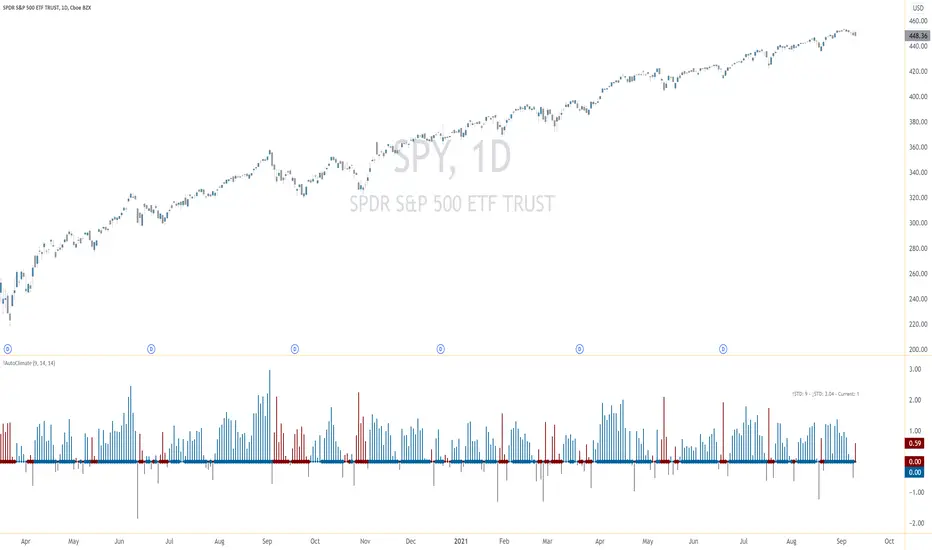
Dot color identifies the current directional classification. Dot thickness distinguishes whether that climate is presently confirmed or unconfirmed. Confirmation does not guarantee continuation, and an unconfirmed condition may later become confirmed.
STEP 3 — READ THE SIX STATISTICS
The statistics place the current climate in the context of the historical climates contained in the chart data available to the indicator.
When the current climate is up, compare the current values with the up-climate references. When the current climate is down, compare them with the down-climate references.
The Count reference uses one standard deviation and provides context for elapsed duration. The Max Distance reference uses two standard deviations and provides context for how far and fast price has extended during the climate. Approaching or exceeding either reference does not require the climate to end or price to reverse.
STEP 4 — READ THE ATR SPREAD
The ATR Spread measures the distance between current price and the model's reference price, expressed as a multiple of ATR for the selected timeframe.
The ATR Spread describes current volatility-adjusted distance. It is not an automatic entry, exit, or reversal signal.
STEP 5 — FORM THE MARKET-SIDE DECISION
Combine the readings rather than relying on any one component:
For example, a confirmed blue climate identifies an up-climate environment, but it does not automatically justify a long entry. The current Count, Max Distance, ATR Spread, price location, execution criteria, and risk limits must still be considered. The same principle applies in reverse to a confirmed red climate.
STEP 6 — CONFIGURE AND VALIDATE
EMA Length, DMI Length, and ATR Length affect the indicator's classifications and measurements. The available chart history also affects the statistical references. Users should evaluate the settings on the intended symbol, timeframe, session, chart type, and data feed.
Historical observation can help determine whether a configuration is suitable for a particular workflow, but historical behavior does not guarantee future results. Reevaluate the configuration when the market, timeframe, feed, or analytical objective changes.
IMPORTANT LIMITATIONS
Trading involves risk. Users remain responsible for determining suitability, validating the analysis, and applying their own execution and risk-management rules. Nothing in this publication constitutes financial, investment, or trading advice.
This HOW-TO explains how AutoClimate™ can be used to organize a market-side decision: whether the user's own plan should currently focus on long opportunities, short opportunities, or no trade.
The indicator evaluates direction, confirmation, elapsed duration, and volatility-adjusted distance. It provides analytical context, not a standalone instruction to buy, sell, or hold.
STEP 1 — SELECT THE ANALYTICAL HORIZON
Choose the market and chart interval that correspond to the intended analytical or trade horizon. The same symbol can display different climates on different timeframes because each interval represents a different set of price behavior.
A user planning a longer-duration position may assess climate on a higher timeframe and then use a separate lower-timeframe process for execution. The timeframe relationship and execution rules remain the user's responsibility.
STEP 2 — READ DIRECTION AND CONFIRMATION
- Blue dots identify an up climate.
- Red dots identify a down climate.
- Thick dots represent confirmed climate conditions.
- Thin dots represent unconfirmed climate conditions.
Dot color identifies the current directional classification. Dot thickness distinguishes whether that climate is presently confirmed or unconfirmed. Confirmation does not guarantee continuation, and an unconfirmed condition may later become confirmed.
STEP 3 — READ THE SIX STATISTICS
The statistics place the current climate in the context of the historical climates contained in the chart data available to the indicator.
- Historical up-climate Max Distance reference, expressed in ATR multiples.
- Historical down-climate Max Distance reference, expressed in ATR multiples.
- Current climate extension, expressed in ATR multiples.
- Historical up-climate duration reference, expressed in bars.
- Historical down-climate duration reference, expressed in bars.
- Current climate duration, expressed as the number of elapsed bars.
When the current climate is up, compare the current values with the up-climate references. When the current climate is down, compare them with the down-climate references.
The Count reference uses one standard deviation and provides context for elapsed duration. The Max Distance reference uses two standard deviations and provides context for how far and fast price has extended during the climate. Approaching or exceeding either reference does not require the climate to end or price to reverse.
STEP 4 — READ THE ATR SPREAD
The ATR Spread measures the distance between current price and the model's reference price, expressed as a multiple of ATR for the selected timeframe.
- When the ATR Spread is positioned above the climate dot, price is extending in the direction associated with the identified climate.
- When the ATR Spread moves below the dot and turns gray, price has moved beyond the model's reference price in the opposite direction and is no longer extending in the climate's identified direction.
The ATR Spread describes current volatility-adjusted distance. It is not an automatic entry, exit, or reversal signal.
STEP 5 — FORM THE MARKET-SIDE DECISION
Combine the readings rather than relying on any one component:
- Use dot color to identify the current directional climate.
- Use dot thickness to determine whether that climate is confirmed or unconfirmed.
- Compare the current bar count with the duration reference for the same climate direction.
- Compare the current extension with the Max Distance reference for the same climate direction.
- Review the ATR Spread to understand the present distance from the model's reference price.
- Apply the user's own criteria to decide whether conditions support a long focus, a short focus, or no trade.
For example, a confirmed blue climate identifies an up-climate environment, but it does not automatically justify a long entry. The current Count, Max Distance, ATR Spread, price location, execution criteria, and risk limits must still be considered. The same principle applies in reverse to a confirmed red climate.
STEP 6 — CONFIGURE AND VALIDATE
EMA Length, DMI Length, and ATR Length affect the indicator's classifications and measurements. The available chart history also affects the statistical references. Users should evaluate the settings on the intended symbol, timeframe, session, chart type, and data feed.
Historical observation can help determine whether a configuration is suitable for a particular workflow, but historical behavior does not guarantee future results. Reevaluate the configuration when the market, timeframe, feed, or analytical objective changes.
IMPORTANT LIMITATIONS
- Climate classifications and confirmation status can change as new market data arrives.
- Confirmed conditions can fail, and unconfirmed conditions can later become confirmed.
- Historical duration provides context; it does not forecast the exact remaining life of a climate.
- A large Max Distance identifies an extended condition; it does not, by itself, predict a reversal.
- Historical statistics describe the analyzed sample and can support inferences about a normal range of behavior under comparable conditions. They do not guarantee future distance or duration.
- Different symbols, feeds, sessions, chart types, intervals, available history, and settings can produce different results.
- The indicator should not be the sole basis for a trading, investment, or hedging decision.
Trading involves risk. Users remain responsible for determining suitability, validating the analysis, and applying their own execution and risk-management rules. Nothing in this publication constitutes financial, investment, or trading advice.

Trade Smarter — See What Most Traders Don’t. Explore AutoClimate™ and AutoUFOs® (patented) in the UFO Trading Suite: tradingview.com/spaces/traddictiv/
คำจำกัดสิทธิ์ความรับผิดชอบ
ข้อมูลและบทความไม่ได้มีวัตถุประสงค์เพื่อก่อให้เกิดกิจกรรมทางการเงิน, การลงทุน, การซื้อขาย, ข้อเสนอแนะ หรือคำแนะนำประเภทอื่น ๆ ที่ให้หรือรับรองโดย TradingView อ่านเพิ่มเติมใน ข้อกำหนดการใช้งาน
Trade Smarter — See What Most Traders Don’t. Explore AutoClimate™ and AutoUFOs® (patented) in the UFO Trading Suite: tradingview.com/spaces/traddictiv/
คำจำกัดสิทธิ์ความรับผิดชอบ
ข้อมูลและบทความไม่ได้มีวัตถุประสงค์เพื่อก่อให้เกิดกิจกรรมทางการเงิน, การลงทุน, การซื้อขาย, ข้อเสนอแนะ หรือคำแนะนำประเภทอื่น ๆ ที่ให้หรือรับรองโดย TradingView อ่านเพิ่มเติมใน ข้อกำหนดการใช้งาน