OPEN-SOURCE SCRIPT
QuantumPips ReactionTrack
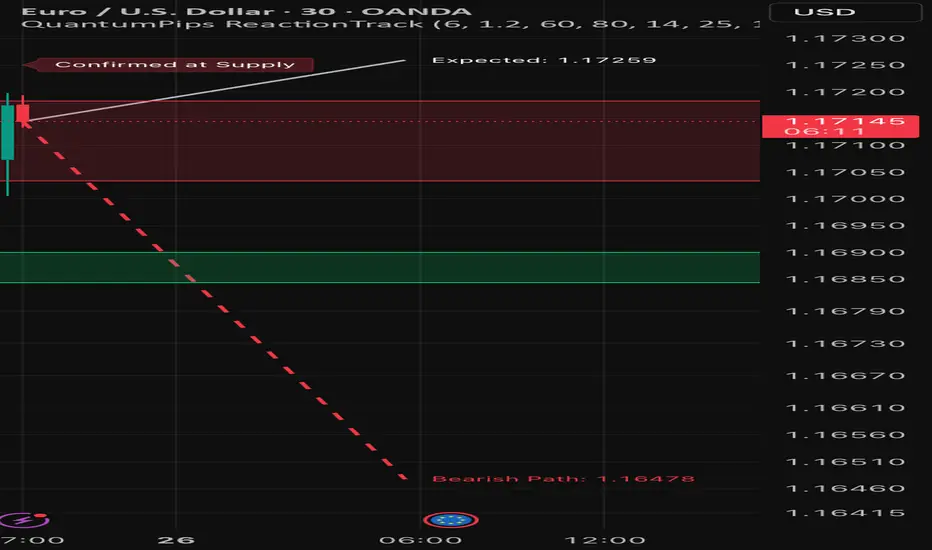
QuantumPips ReactionTrack is an indicator that marks the most recent Supply and Demand zones created by strong impulse candles, then waits for a confirmed reaction from those zones before drawing a forward projection path (expected move guide).
What it does (simple overview)
ReactionTrack follows a clean sequence:
It keeps your chart clean by showing only the most recent Supply and Demand zones.
1) Recent Zones (Supply & Demand)
ReactionTrack identifies impulse candles using:
When an impulse candle appears, the indicator builds a “recent zone” from the most recent opposite candle within the search window:
Bearish impulse → Recent Supply
Bullish impulse → Recent Demand
Zone Extension controls how far the zones extend forward on the chart.
Optional zone labels can be shown/hidden.
✅ Only the latest supply zone and latest demand zone are kept (older ones are replaced).
2) Reaction Confirmation (the “go” signal)
ReactionTrack confirms a reaction only when price is inside a zone and shows directional intent:
Basic confirmation
Optional: Close-break confirmation (stricter)
If enabled (Require Close Break For Confirmation), it also requires:
This helps filter weaker reactions and reduces noise.
3) Forward Projection Path (drawn only after confirmation)
Once a reaction is confirmed, the indicator holds an active context:
Only then it draws a forward path for Projection Length bars:
The projection is based on recent volatility (ATR/true range behavior) plus a drift component (trend slope vs ATR). It is meant as an expected-move guide, not a prediction.
On-chart labels (what you’ll see)
Optional confirmation labels:
How to use (simple workflow)
* This is an indicator for charting and analysis only. It does not execute trades and does not guarantee outcomes. Always use risk management. *
What it does (simple overview)
ReactionTrack follows a clean sequence:
- Detect impulse → build zones
- Wait for price to return to a zone
- Confirm the reaction
- Project a forward path only after confirmation
It keeps your chart clean by showing only the most recent Supply and Demand zones.
1) Recent Zones (Supply & Demand)
ReactionTrack identifies impulse candles using:
- Impulse Threshold (ATR x): candle range must be ≥ ATR × threshold
- Impulse Min Body %: candle body must be strong (filters wick-heavy candles)
When an impulse candle appears, the indicator builds a “recent zone” from the most recent opposite candle within the search window:
Bearish impulse → Recent Supply
- Finds the most recent bullish candle in the lookback
- Builds a supply zone from that candle’s structure
Bullish impulse → Recent Demand
- Finds the most recent bearish candle in the lookback
- Builds a demand zone from that candle’s structure
Zone Extension controls how far the zones extend forward on the chart.
Optional zone labels can be shown/hidden.
✅ Only the latest supply zone and latest demand zone are kept (older ones are replaced).
2) Reaction Confirmation (the “go” signal)
ReactionTrack confirms a reaction only when price is inside a zone and shows directional intent:
Basic confirmation
- Demand reaction: bullish candle (close > open) while price overlaps demand
- Supply reaction: bearish candle (close < open) while price overlaps supply
Optional: Close-break confirmation (stricter)
If enabled (Require Close Break For Confirmation), it also requires:
- Bullish confirmation: close > high[1]
- Bearish confirmation: close < low[1]
This helps filter weaker reactions and reduces noise.
3) Forward Projection Path (drawn only after confirmation)
Once a reaction is confirmed, the indicator holds an active context:
- Confirmed at Demand → bullish context
- Confirmed at Supply → bearish context
Only then it draws a forward path for Projection Length bars:
- Bullish: dashed path toward a projected upper level
- Bearish: dashed path toward a projected lower level
- Optional Mid projection line
- Optional Projection labels (target values)
The projection is based on recent volatility (ATR/true range behavior) plus a drift component (trend slope vs ATR). It is meant as an expected-move guide, not a prediction.
On-chart labels (what you’ll see)
- Recent Supply / Recent Demand (optional)
- Waiting for Confirmation (state label)
- Confirmed at Demand / Confirmed at Supply (state label)
Optional confirmation labels:
- Bullish Reaction Confirmed
- Bearish Reaction Confirmed
How to use (simple workflow)
- Let ReactionTrack print the newest Supply/Demand zones.
- Wait for price to return into one zone.
- Look for a confirmed reaction (stronger when Close Break is ON).
- Use the projected path as a planning guide (direction + potential target area), then apply your own entry/stop/TP rules.
* This is an indicator for charting and analysis only. It does not execute trades and does not guarantee outcomes. Always use risk management. *
สคริปต์โอเพนซอร์ซ
ด้วยเจตนารมณ์หลักของ TradingView ผู้สร้างสคริปต์นี้ได้ทำให้เป็นโอเพนซอร์ส เพื่อให้เทรดเดอร์สามารถตรวจสอบและยืนยันฟังก์ชันการทำงานของมันได้ ขอชื่นชมผู้เขียน! แม้ว่าคุณจะใช้งานได้ฟรี แต่โปรดจำไว้ว่าการเผยแพร่โค้ดซ้ำจะต้องเป็นไปตาม กฎระเบียบการใช้งาน ของเรา

QuantumPips — Trade Structure. Not Noise.
Market Structure Pro (Invite-only): quantumpips.io/msp
Educational only. Not financial advice.
Market Structure Pro (Invite-only): quantumpips.io/msp
Educational only. Not financial advice.
คำจำกัดสิทธิ์ความรับผิดชอบ
ข้อมูลและบทความไม่ได้มีวัตถุประสงค์เพื่อก่อให้เกิดกิจกรรมทางการเงิน, การลงทุน, การซื้อขาย, ข้อเสนอแนะ หรือคำแนะนำประเภทอื่น ๆ ที่ให้หรือรับรองโดย TradingView อ่านเพิ่มเติมใน ข้อกำหนดการใช้งาน
สคริปต์โอเพนซอร์ซ
ด้วยเจตนารมณ์หลักของ TradingView ผู้สร้างสคริปต์นี้ได้ทำให้เป็นโอเพนซอร์ส เพื่อให้เทรดเดอร์สามารถตรวจสอบและยืนยันฟังก์ชันการทำงานของมันได้ ขอชื่นชมผู้เขียน! แม้ว่าคุณจะใช้งานได้ฟรี แต่โปรดจำไว้ว่าการเผยแพร่โค้ดซ้ำจะต้องเป็นไปตาม กฎระเบียบการใช้งาน ของเรา
QuantumPips — Trade Structure. Not Noise.
Market Structure Pro (Invite-only): quantumpips.io/msp
Educational only. Not financial advice.
Market Structure Pro (Invite-only): quantumpips.io/msp
Educational only. Not financial advice.
คำจำกัดสิทธิ์ความรับผิดชอบ
ข้อมูลและบทความไม่ได้มีวัตถุประสงค์เพื่อก่อให้เกิดกิจกรรมทางการเงิน, การลงทุน, การซื้อขาย, ข้อเสนอแนะ หรือคำแนะนำประเภทอื่น ๆ ที่ให้หรือรับรองโดย TradingView อ่านเพิ่มเติมใน ข้อกำหนดการใช้งาน