iNaka Auto Fibo
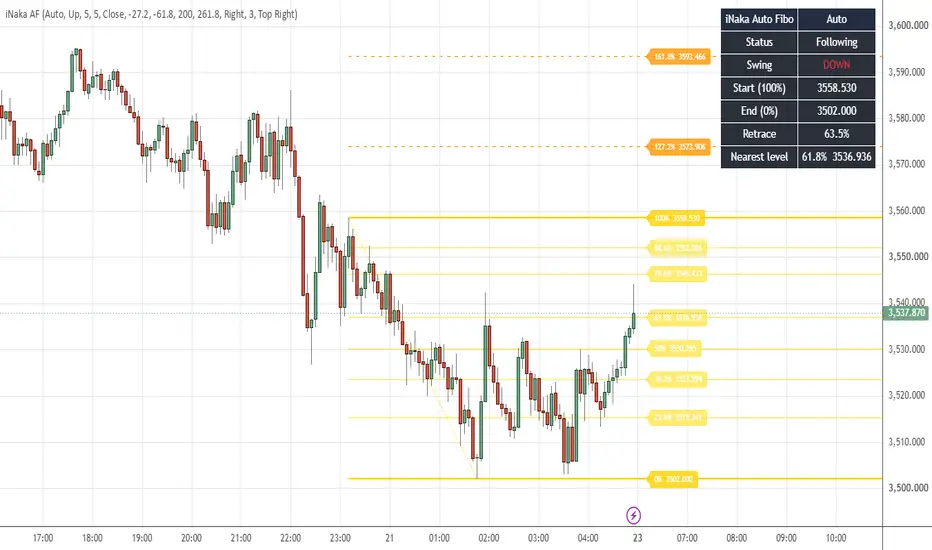
iNaka Auto Fibo draws a Fibonacci retracement on the swing price is making right now and keeps it on that swing as the move develops. You can let it find the swing by itself, give it a starting point and let it follow from there, or fix both ends by hand.
It is one self-contained tool, not a combination of indicators. The only building block it borrows is TradingView's confirmed pivot (ta.pivothigh / ta.pivotlow), which it uses to decide when a pullback has finished.
WHAT IT DRAWS
- The Fibonacci levels of the current swing, starting at the bar where the swing began and extending to the right, each labelled with its percent and price.
- A dotted swing line from the start of the swing to its end, so you can see exactly which move is being measured.
- A status panel: mode, swing direction, start and end price, how far price has retraced, and the nearest enabled level.
The swing has a START (where the move began) and an END (the furthest price it has reached). 0% sits on the end and 100% on the start. In an up swing the start is a low and the end is a high; a down swing is the mirror.
HOW THE SWING FOLLOWS PRICE
1. The end moves with every new extreme in the direction of the swing - every new high in an up swing.
2. The start steps forward after a pullback. When price pulls back from the end and then makes a new extreme, the deepest pullback pivot confirmed by then becomes the new start. In an up swing: a higher low followed by a higher high moves the start up to that higher low, so the levels always measure the latest leg rather than the whole trend. A pullback pivot that is confirmed only after the new high (a fast V) moves the start a few bars later, on the bar it confirms, if it lies above the current start - so a later, shallower higher low can replace a deeper one. A pivot that is not beyond the current start never moves it.
3. The swing flips when its start breaks. If price breaks the start, the up swing becomes a down swing: the old end (the high) becomes the new start, and the lowest point of the pullback becomes the new end. If a lower high (or, for a flip up, a higher low) was already confirmed during that pullback, the start moves straight to it, as rule 2 would have done. By default the start must be broken by a candle CLOSE; a wick through it is ignored. You can switch this to Wick.
THREE MODES
- Auto: the tool starts by itself on the first bar of the chart and follows the rules above with no input from you.
- Semi-Auto (default): when you add the indicator, click the bar the swing starts from, then set Start Direction (default Up) in the settings. From there the rules above take over - the start steps forward after each pullback and the swing flips if the start breaks. You can drag the point later.
- Manual: you choose the start and the end. Set End Point in the settings; until it is after the Start Point, the end keeps following the extreme. Once your End Point bar is reached, the whole Fibonacci is frozen. Manual never moves the start and never flips.
WHAT IS DIFFERENT ABOUT IT
- The anchor is a swing. Levels change only when price makes a new extreme, completes a confirmed pullback, or breaks the start.
- Semi-Auto combines a manual anchor with automatic following. You decide where the move began; the tool keeps the levels on the current leg of that move instead of leaving them fixed where you first put them.
- Alerts measure a cross against where the level is now. When the swing moves, every level moves with it. A cross is counted only when the close actually moves from one side of the level's current price to the other, so a level that jumped past price does not by itself trigger an alert. No level alerts fire on the bar the swing flips; the flip has its own alert.
- A higher timeframe keeps your click. The start lands on the bar that contains the point you chose, so switching from 1h to 4h does not move the anchor to the next bar.
SETTINGS
Anchor
- Anchor Mode: Auto, Semi-Auto or Manual (default Semi-Auto).
- Start Direction: Up or Down, for Semi-Auto and Manual.
- Start Point: the bar the swing starts from. You are asked to click it when the indicator is added.
- End Point (Manual only): the bar after which the Fibonacci is frozen.
Swing Engine
- Pivot Left / Pivot Right (5 / 5, up to 500 each): how many bars on each side a pullback pivot needs. Pivot Right is also the delay: a pullback pivot is only known that many bars after it prints. Larger values ignore smaller pullbacks, which is useful on very low timeframes.
- Flip When Start Breaks By: Close (default) or Wick.
Levels
- 0, 23.6, 38.2, 50, 61.8, 78.6, 88.6, 100, 127.2 and 161.8 percent, each with its own show/hide box.
- Custom 1-4: your own percents, off by default. Negative values lie beyond the end, which is where extension targets go (defaults -27.2, -61.8, 200, 261.8).
Style, Alerts and Panel
- Colours for the 0/100 levels, the retracement levels and the levels outside 0-100; label position (Right, Left or None); the swing line; the panel position; and Confirmed bars only for alerts.
HOW TO USE IT
- On an up-trending chart, use Semi-Auto: click the low the move started from (Start Direction stays Up). Watch how price behaves at 38.2, 50 and 61.8 on each pullback; when a pullback completes and price makes a new high, the levels re-anchor to the new leg.
- Use Auto when you want the tool to find and follow the swing everywhere, for example while scanning symbols.
- Use Manual when you want to study one specific move and keep its levels fixed.
- On 1-minute and other very low timeframes, raise Pivot Left / Right until small pullbacks stop moving the start. The trade-off is a longer delay before each start move.
LIMITATIONS, WHICH YOU SHOULD READ BEFORE USING IT
- A start move arrives at least Pivot Right bars after the pullback low (or high) prints. That delay is what keeps the tool non-repainting on closed bars, and no setting removes it.
- Within a forming bar the end, the levels, a start move and a flip can still change with every tick. Alerts should be set to fire once per bar close, which is what Confirmed bars only enforces by default.
- Auto mode starts on the first bar the chart has loaded, so its first swings depend on how much history is loaded. After a few flips the swing is decided by price alone. Judge Auto on the recent part of the chart.
- Only the current swing is drawn. Past swings and past positions of the levels are not kept on the chart.
- Levels above 100 lie beyond the START of the swing (below the low in an up swing), not beyond the end. For targets beyond the end, use negative Custom levels such as -27.2 or -61.8.
- In the alert list, custom levels are named Custom 1-4 rather than by their percent, because alert names are fixed text. The alert message includes the level's price.
- If the Start Point is earlier than the first bar the chart has loaded, the swing is anchored on that first bar and the panel says so.
- This is an analysis tool. It does not generate entries or exits, does not size or manage a position, and makes no claim about profitability.
ALERTS
Thirty-one conditions: for each of the 14 levels (the ten fixed levels and Custom 1-4), Close Crosses Above and Close Crosses Below; plus Fibo Start Moved, Fibo Direction Turns Up and Fibo Direction Turns Down. Each message carries the relevant price. Every level is in the list whether or not it is drawn. Use these conditions rather than a Crossing alert on a level's value: the levels move with the swing, so a Crossing alert also fires when a level jumps past price that has not moved. These conditions compare the close with where the level is now, and skip the bar the swing flips.
The chart shown uses Anchor Mode = Auto. All other settings are at their defaults.
Published open-source under the Mozilla Public License 2.0.

คำจำกัดสิทธิ์ความรับผิดชอบ
ข้อมูลและบทความไม่ได้มีวัตถุประสงค์เพื่อก่อให้เกิดกิจกรรมทางการเงิน, การลงทุน, การซื้อขาย, ข้อเสนอแนะ หรือคำแนะนำประเภทอื่น ๆ ที่ให้หรือรับรองโดย TradingView อ่านเพิ่มเติมใน ข้อกำหนดการใช้งาน
คำจำกัดสิทธิ์ความรับผิดชอบ
ข้อมูลและบทความไม่ได้มีวัตถุประสงค์เพื่อก่อให้เกิดกิจกรรมทางการเงิน, การลงทุน, การซื้อขาย, ข้อเสนอแนะ หรือคำแนะนำประเภทอื่น ๆ ที่ให้หรือรับรองโดย TradingView อ่านเพิ่มเติมใน ข้อกำหนดการใช้งาน