OPEN-SOURCE SCRIPT
BTC CME Weekend Gap Tracker
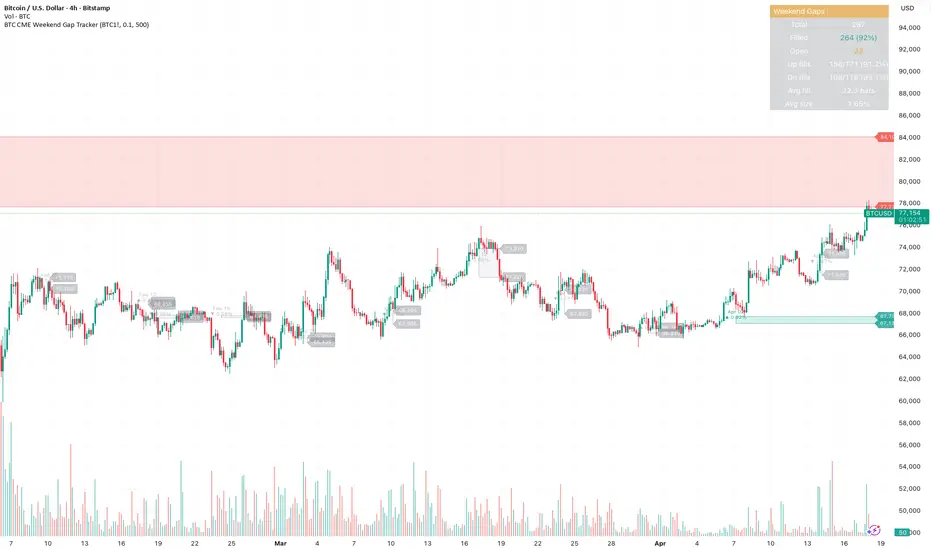
BTC CME Weekend Gap Tracker
Automatically detects and tracks weekend gaps on CME Bitcoin futures (BTC1!). When CME closes Friday evening and reopens Sunday/Monday, any price movement in spot during that window creates a gap — this indicator marks those gaps directly on your chart.
What it shows
Red boxes — weekend gap down (CME reopened lower than Friday close)
Green boxes — weekend gap up (CME reopened higher than Friday close)
Gray boxes — filled gaps (price has since traded back through the range)
Key features
Weekend-only filter — ignores daily maintenance gaps, only tracks the meaningful Friday-to-Monday gaps (and extended holiday closures)
Price levels labeled at the right edge of each unfilled gap so you can see exact gap boundaries at a glance
Date and percentage size shown inside each box
Unfilled gaps extend right until filled, then fade to gray
Stats table tracking total gaps, fill rate, gap-up vs gap-down fill rates, average fill time, and average gap size
How to use
Apply to any BTC chart (BTCUSD, BTCUSDT, BTCUSDT.P) on daily or intraday timeframes. The script pulls CME data automatically. Use unfilled gaps as potential price targets — historically, the majority of CME gaps fill over time, though large gaps in strong trends can remain open for extended periods.
Settings
Minimum gap size threshold (filter noise)
Max bars to track (history depth)
Toggle price levels, percentages, and dates independently
Customize gap colors
Alerts
Two alert conditions included: new weekend gap up and new weekend gap down. Set these up to get notified when CME reopens Monday with a gap.
Automatically detects and tracks weekend gaps on CME Bitcoin futures (BTC1!). When CME closes Friday evening and reopens Sunday/Monday, any price movement in spot during that window creates a gap — this indicator marks those gaps directly on your chart.
What it shows
Red boxes — weekend gap down (CME reopened lower than Friday close)
Green boxes — weekend gap up (CME reopened higher than Friday close)
Gray boxes — filled gaps (price has since traded back through the range)
Key features
Weekend-only filter — ignores daily maintenance gaps, only tracks the meaningful Friday-to-Monday gaps (and extended holiday closures)
Price levels labeled at the right edge of each unfilled gap so you can see exact gap boundaries at a glance
Date and percentage size shown inside each box
Unfilled gaps extend right until filled, then fade to gray
Stats table tracking total gaps, fill rate, gap-up vs gap-down fill rates, average fill time, and average gap size
How to use
Apply to any BTC chart (BTCUSD, BTCUSDT, BTCUSDT.P) on daily or intraday timeframes. The script pulls CME data automatically. Use unfilled gaps as potential price targets — historically, the majority of CME gaps fill over time, though large gaps in strong trends can remain open for extended periods.
Settings
Minimum gap size threshold (filter noise)
Max bars to track (history depth)
Toggle price levels, percentages, and dates independently
Customize gap colors
Alerts
Two alert conditions included: new weekend gap up and new weekend gap down. Set these up to get notified when CME reopens Monday with a gap.
สคริปต์แบบโอเพนซอร์ส
ด้วยเจตนารมณ์หลักของ TradingView ผู้สร้างสคริปต์นี้ได้ทำให้เป็นโอเพนซอร์ส เพื่อให้เทรดเดอร์สามารถตรวจสอบและยืนยันฟังก์ชันการทำงานของมันได้ ขอชื่นชมผู้เขียน! แม้ว่าคุณจะใช้งานได้ฟรี แต่โปรดจำไว้ว่าการเผยแพร่โค้ดซ้ำจะต้องเป็นไปตาม กฎระเบียบการใช้งาน ของเรา

คำจำกัดสิทธิ์ความรับผิดชอบ
ข้อมูลและบทความไม่ได้มีวัตถุประสงค์เพื่อก่อให้เกิดกิจกรรมทางการเงิน, การลงทุน, การซื้อขาย, ข้อเสนอแนะ หรือคำแนะนำประเภทอื่น ๆ ที่ให้หรือรับรองโดย TradingView อ่านเพิ่มเติมใน ข้อกำหนดการใช้งาน
สคริปต์แบบโอเพนซอร์ส
ด้วยเจตนารมณ์หลักของ TradingView ผู้สร้างสคริปต์นี้ได้ทำให้เป็นโอเพนซอร์ส เพื่อให้เทรดเดอร์สามารถตรวจสอบและยืนยันฟังก์ชันการทำงานของมันได้ ขอชื่นชมผู้เขียน! แม้ว่าคุณจะใช้งานได้ฟรี แต่โปรดจำไว้ว่าการเผยแพร่โค้ดซ้ำจะต้องเป็นไปตาม กฎระเบียบการใช้งาน ของเรา
คำจำกัดสิทธิ์ความรับผิดชอบ
ข้อมูลและบทความไม่ได้มีวัตถุประสงค์เพื่อก่อให้เกิดกิจกรรมทางการเงิน, การลงทุน, การซื้อขาย, ข้อเสนอแนะ หรือคำแนะนำประเภทอื่น ๆ ที่ให้หรือรับรองโดย TradingView อ่านเพิ่มเติมใน ข้อกำหนดการใช้งาน