finarchist| fi/risk Position Manager
What it does
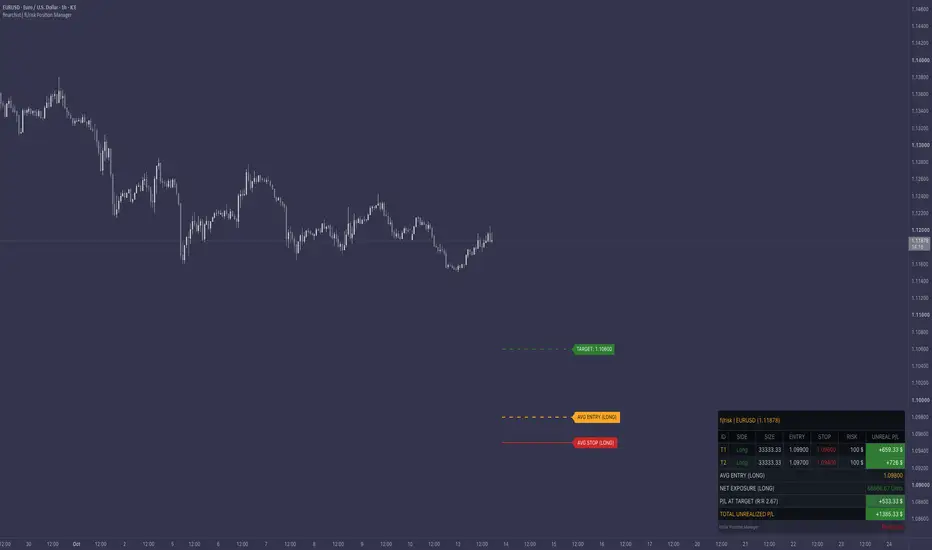
This indicator is a position size and risk calculator. You enter up to 10 tiers. Each tier has a side (long or short), an entry price, a stop price and the amount you are willing to lose on that tier. The script converts these inputs into a position size and shows everything in one table on the chart. Nothing is traded and the script does not generate buy or sell signals. It only calculates from the values you type in.
How it works
Position size per tier: the risk amount is divided by the stop distance multiplied by the point value of the symbol.
size = risk amount / (absolute value of (entry - stop) x point value)
Profit/loss per tier: the current price is compared with the entry, in the direction of the tier, and multiplied by size and point value. Long: (price - entry) x size x point value. Short: (entry - price) x size x point value.
Averages: long tiers and short tiers are averaged separately. Each average is weighted by size. The table shows the weighted average entry for the long side and for the short side, but only for the sides that exist. The same weighting is used for the average stop lines drawn on the chart.
Net exposure: long size minus short size. The table labels it long, short or flat.
Target: there are two modes.
- Price Level: you type a target price. The table shows the combined profit/loss of all valid tiers if price is at that level. If both long and short tiers exist, each leg is calculated at the target price and the results are added.
- Profit Amount: you type a profit amount. The script solves for the price at which the combined profit/loss equals that amount. This needs a net position. If long and short sizes cancel out exactly, the target cannot be calculated and the table shows a dash.
Reward-to-risk ratio: profit/loss at the target divided by the sum of the risk amounts of the valid tiers.
Validation: a tier is ignored in all totals if its entry equals its stop, if its risk amount is zero or negative, or if its stop is on the wrong side of the entry (below the entry for a short, above the entry for a long). Such a tier is marked in the table as invalid or check stop.
How to use
1. Add the indicator to a clean chart.
2. Open the settings. In the settings group, leave the symbol field empty to use the chart symbol, or pick another symbol. Set the currency unit text that should appear next to amounts.
3. In a tier group (T01 to T10), tick the tier on, choose long or short, then enter the risk amount, the entry price and the stop price.
4. Repeat for the other tiers you want to model. Tiers with an entry or stop of zero are skipped.
5. Optional: choose the target mode and enter a target value. The target line, the profit/loss at the target and the reward-to-risk ratio appear in the table.
6. Optional: use the font size, table position and table scaling inputs to fit the table to your screen.
7. Optional: create an alert from the alert dialog and select the condition named "fi/risk: target reached". The alert uses the high and low of the selected symbol.
What makes it different
- Up to 10 separate long and short tiers can be handled in a single table, with a separate average entry for each side.
- The position size of every tier is derived from a risk amount and a stop distance, so you do not have to calculate size by hand for each entry.
- The target can be given either as a price or as a profit amount.
- The script is open source, so every formula above can be read and checked in the code.
Limitations
- The point value depends on the symbol. The script reads it from the symbol information on TradingView. If it does not match your broker's contract size, the displayed sizes will not match either. Please check this before relying on any number.
- Commission, spread, slippage, swap and financing costs are not included.
- Sizes are not rounded to lot steps or minimum order sizes.
- If you select a symbol other than the chart symbol, the table still works, but the lines are not drawn on the chart because the price scales would not match. The table header shows which symbol is used.
- The script only calculates with the values you enter. It does not open orders, it does not read your account and it does not generate signals.
- Prices in the table use the tick format of the chart symbol.
Disclaimer
For educational and informational purposes only. Not financial advice.
---
This indicator is a position size and risk calculator. You enter up to 10 tiers. Each tier has a side (long or short), an entry price, a stop price and the amount you are willing to lose on that tier. The script converts these inputs into a position size and shows everything in one table on the chart. Nothing is traded and the script does not generate buy or sell signals. It only calculates from the values you type in.
How it works
Position size per tier: the risk amount is divided by the stop distance multiplied by the point value of the symbol.
size = risk amount / (absolute value of (entry - stop) x point value)
Profit/loss per tier: the current price is compared with the entry, in the direction of the tier, and multiplied by size and point value. Long: (price - entry) x size x point value. Short: (entry - price) x size x point value.
Averages: long tiers and short tiers are averaged separately. Each average is weighted by size. The table shows the weighted average entry for the long side and for the short side, but only for the sides that exist. The same weighting is used for the average stop lines drawn on the chart.
Net exposure: long size minus short size. The table labels it long, short or flat.
Target: there are two modes.
- Price Level: you type a target price. The table shows the combined profit/loss of all valid tiers if price is at that level. If both long and short tiers exist, each leg is calculated at the target price and the results are added.
- Profit Amount: you type a profit amount. The script solves for the price at which the combined profit/loss equals that amount. This needs a net position. If long and short sizes cancel out exactly, the target cannot be calculated and the table shows a dash.
Reward-to-risk ratio: profit/loss at the target divided by the sum of the risk amounts of the valid tiers.
Validation: a tier is ignored in all totals if its entry equals its stop, if its risk amount is zero or negative, or if its stop is on the wrong side of the entry (below the entry for a short, above the entry for a long). Such a tier is marked in the table as invalid or check stop.
How to use
1. Add the indicator to a clean chart.
2. Open the settings. In the settings group, leave the symbol field empty to use the chart symbol, or pick another symbol. Set the currency unit text that should appear next to amounts.
3. In a tier group (T01 to T10), tick the tier on, choose long or short, then enter the risk amount, the entry price and the stop price.
4. Repeat for the other tiers you want to model. Tiers with an entry or stop of zero are skipped.
5. Optional: choose the target mode and enter a target value. The target line, the profit/loss at the target and the reward-to-risk ratio appear in the table.
6. Optional: use the font size, table position and table scaling inputs to fit the table to your screen.
7. Optional: create an alert from the alert dialog and select the condition named "fi/risk: target reached". The alert uses the high and low of the selected symbol.
What makes it different
- Up to 10 separate long and short tiers can be handled in a single table, with a separate average entry for each side.
- The position size of every tier is derived from a risk amount and a stop distance, so you do not have to calculate size by hand for each entry.
- The target can be given either as a price or as a profit amount.
- The script is open source, so every formula above can be read and checked in the code.
Limitations
- The point value depends on the symbol. The script reads it from the symbol information on TradingView. If it does not match your broker's contract size, the displayed sizes will not match either. Please check this before relying on any number.
- Commission, spread, slippage, swap and financing costs are not included.
- Sizes are not rounded to lot steps or minimum order sizes.
- If you select a symbol other than the chart symbol, the table still works, but the lines are not drawn on the chart because the price scales would not match. The table header shows which symbol is used.
- The script only calculates with the values you enter. It does not open orders, it does not read your account and it does not generate signals.
- Prices in the table use the tick format of the chart symbol.
Disclaimer
For educational and informational purposes only. Not financial advice.
---

Trading experience is the search for possibility in price and time.
คำจำกัดสิทธิ์ความรับผิดชอบ
ข้อมูลและบทความไม่ได้มีวัตถุประสงค์เพื่อก่อให้เกิดกิจกรรมทางการเงิน, การลงทุน, การซื้อขาย, ข้อเสนอแนะ หรือคำแนะนำประเภทอื่น ๆ ที่ให้หรือรับรองโดย TradingView อ่านเพิ่มเติมใน ข้อกำหนดการใช้งาน
Trading experience is the search for possibility in price and time.
คำจำกัดสิทธิ์ความรับผิดชอบ
ข้อมูลและบทความไม่ได้มีวัตถุประสงค์เพื่อก่อให้เกิดกิจกรรมทางการเงิน, การลงทุน, การซื้อขาย, ข้อเสนอแนะ หรือคำแนะนำประเภทอื่น ๆ ที่ให้หรือรับรองโดย TradingView อ่านเพิ่มเติมใน ข้อกำหนดการใช้งาน