ที่อัปเดต:
Tick Bar Countdown
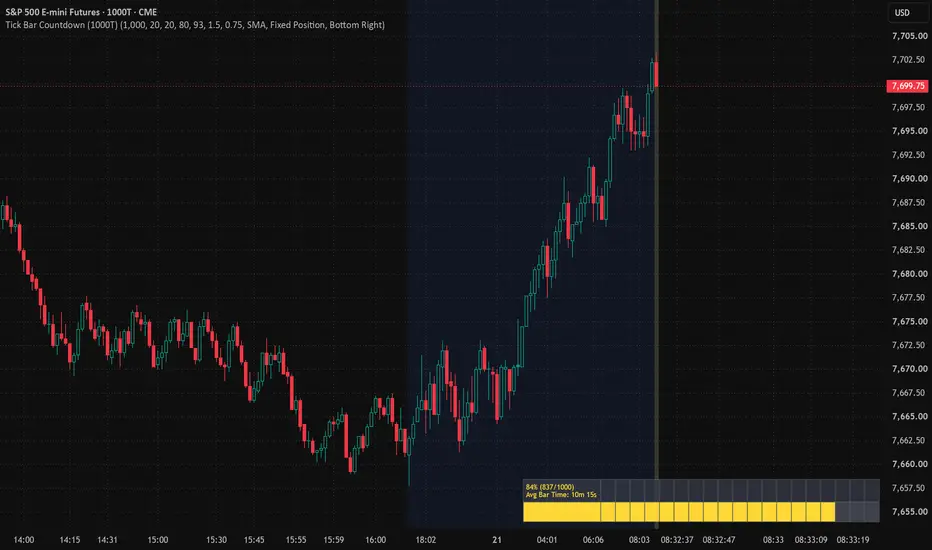
Core problem it solves: Pine has no native tick-count variable, and counting script recalculations undercounts because TradingView throttles execution — multiple trades can batch into a single recalc, especially in fast markets. So instead of counting recalcs, the script infers tick progress from volume, which accumulates the true traded contract count regardless of how many times the script actually fires.
How to read it
While a bar is still forming, you'll see three things stack up together above it:
Grey background wash — tells you at a glance "this bar isn't closed yet," independent of anything else.
% label (e.g. 62% (620/1000)) — your best estimate of how many ticks have printed vs. the 1000 needed to close the bar.
Segmented progress bar directly above the label — same information as a visual gauge, filling left to right as ticks accumulate.
Color coding ties it together:
Grey/aqua — normal, bar still building.
Yellow — crossed your warn threshold (default 80%), bar is getting close.
Lime green — crossed your ready threshold (default 93%), this is your cue to get hands on keys/mouse for the next bar.
Once the bar closes, all of it disappears — grey wash, label, and bar — since barstate.isconfirmed becomes true and those elements only draw on the live/forming bar.
How to read it
While a bar is still forming, you'll see three things stack up together above it:
Grey background wash — tells you at a glance "this bar isn't closed yet," independent of anything else.
% label (e.g. 62% (620/1000)) — your best estimate of how many ticks have printed vs. the 1000 needed to close the bar.
Segmented progress bar directly above the label — same information as a visual gauge, filling left to right as ticks accumulate.
Color coding ties it together:
Grey/aqua — normal, bar still building.
Yellow — crossed your warn threshold (default 80%), bar is getting close.
Lime green — crossed your ready threshold (default 93%), this is your cue to get hands on keys/mouse for the next bar.
Once the bar closes, all of it disappears — grey wash, label, and bar — since barstate.isconfirmed becomes true and those elements only draw on the live/forming bar.
Release Note
I updated this indicator so it will give you the average time for each TICK candle.Release Note
You can now choose how the countdown display shows up on your chart:"Above Price" mode (the default, same as before) — the % label and progress bar float directly above whichever bar is currently forming, moving along with price as new bars print.
"Fixed Position" mode (new) — instead of following price around, the whole readout locks into a corner of your screen — top-left, top-right, bottom-left, or bottom-right, your choice — and just stays there. It won't drift, resize, or get buried in price action no matter how the chart moves or zooms.
You pick which one you want from a dropdown (Display Mode), and if you go with Fixed Position, a second dropdown (Fixed Screen Position) lets you pick which corner.
Everything else — the % complete, avg bar time, color coding (grey/yellow/lime), and the grey "still forming" background — works the same in either mode. Only where the numbers live on your screen changes.

คำจำกัดสิทธิ์ความรับผิดชอบ
ข้อมูลและบทความไม่ได้มีวัตถุประสงค์เพื่อก่อให้เกิดกิจกรรมทางการเงิน, การลงทุน, การซื้อขาย, ข้อเสนอแนะ หรือคำแนะนำประเภทอื่น ๆ ที่ให้หรือรับรองโดย TradingView อ่านเพิ่มเติมใน ข้อกำหนดการใช้งาน
คำจำกัดสิทธิ์ความรับผิดชอบ
ข้อมูลและบทความไม่ได้มีวัตถุประสงค์เพื่อก่อให้เกิดกิจกรรมทางการเงิน, การลงทุน, การซื้อขาย, ข้อเสนอแนะ หรือคำแนะนำประเภทอื่น ๆ ที่ให้หรือรับรองโดย TradingView อ่านเพิ่มเติมใน ข้อกำหนดการใช้งาน